
1. محصول ختم شوview
The TRYX Panorama 360 White is an advanced all-in-one (AIO) liquid cooling system designed for high-performance computing. It features a unique 6.5-inch curved screen on the pump block, offering a 2K display with a 60Hz refresh rate for dynamic content display. This AIO cooler is equipped with an Asetek 8th generation pump for efficient heat dissipation and comes with three pre-installed ROTA PRO 120 fans, known for their high airflow and static pressure, utilizing Liquid Crystal Polymer (LCP) blades for durability and quiet operation. The system is highly customizable via the TRYX KANALI software, allowing for screen content management and comprehensive fan control.

Image 1.1: The TRYX Panorama 360 White AIO liquid cooler with its included ROTA PRO 120 fan.
2. کلیدي ځانګړتیاوې
- 6.5-inch Curved Screen: Features a 6.5-inch curved display with 2K resolution and 60Hz refresh rate, providing an anamorphic view for various content types. The L-shaped screen design ensures full visibility from multiple angles.
- Asetek 8th Gen Pump: Optimized pump design with a strong, stable 3-phase motor, supporting up to 320W TDP. Includes 40% thicker tubing and a 30mm high-density fin radiator for efficient heat transfer.
- TRYX KANALI Software: Enables ultimate customization with features like Instant Screen Content Switching, Split-Screen Display Capability, Quick Recording, and Comprehensive Fan Control. Supports PNG/JPG/GIF/MP4/AVI media (1080P, 500MB maximum).
- ROTA PRO 120 Fans: Three pre-installed 120mm fans with LCP (Liquid Crystal Polymer) material blades, offering 81.32 CFM airflow, 3.66 mmAq static pressure, and low noise levels under 30.97 dB(A) at full load. Features FDB bearing for stability and quiet operation.
- لوړ مطابقت: Includes all-metal mounting hardware for reliable installation on Intel LGA 1851/1700/1200/1151/1150/1155 and AMD AM4/AM5 sockets.

انځور 2.1: اوورview of key features including the 6.5-inch AMOLED display, Asetek 8th Gen cooling, and KANALI software customization.

Image 2.2: Details on the anti-glare tempered glass cover and full adhesion technology for the display.
۱. تنظیم او نصب کول
3.1 د بسته محتويات
ډاډ ترلاسه کړئ چې ټولې برخې په بسته کې شتون لري:
- TRYX Panorama 360 White AIO Liquid Cooler Unit (Pump with integrated screen, Radiator with pre-attached tubing)
- 3 x ROTA PRO 120 White High Performance LCP Case Fans (pre-installed on radiator)
- All-metal Mounting Hardware Kit (for Intel and AMD sockets)
- USB Cable for KANALI Software Connectivity
- Fan and Pump Power Cables
- د کارونکي لارښود (دا لاسوند)
3.2 د سیسټم اړتیاوې
Ensure your system meets the following compatibility requirements:
- د CPU ساکټ مطابقت: Intel LGA 1851, 1700, 1200, 1151, 1150, 1155; AMD AM4, AM5.
- د قضیې مطابقت: Sufficient space for a 360mm radiator (typically top or front mounting).
- د بریښنا رسول: Adequate power connectors for pump and fans.
- عملیاتي سیسټم: Windows 10/11 for KANALI software functionality.
3.3 د نصبولو مرحلې
Follow these general steps for installation. Refer to the detailed diagrams in the physical manual for precise instructions for your specific CPU socket type.
- د مور بورډ چمتو کول: د خپل CPU ساکټ (Intel یا AMD) لپاره مناسب بیک پلیټ او سټینډ آف نصب کړئ.
- د پمپ بلاک نصبول: Apply thermal paste to the CPU (if not pre-applied on the cold plate). Position the pump block onto the CPU and secure it with the provided mounting screws, ensuring even pressure.
- ریډیټر نصب کړئ: Mount the 360mm radiator with the pre-installed fans to an available fan mounting location in your PC case (e.g., top or front panel). Ensure proper airflow direction.
- کیبلونه وصل کړئ:
- Connect the pump power cable to the CPU_FAN or AIO_PUMP header on your motherboard.
- Connect the fan power cables (from the ROTA PRO 120 fans) to available fan headers on your motherboard or a fan controller.
- Connect the USB cable from the pump block to an available internal USB 2.0 header on your motherboard. This is essential for KANALI software functionality.
- د کیبل مدیریت: Route all cables neatly to ensure proper airflow within the case.

Image 3.1: Diagram illustrating the components of the Asetek 8th Gen pump, including the micro-convex copper base and metal fitting.
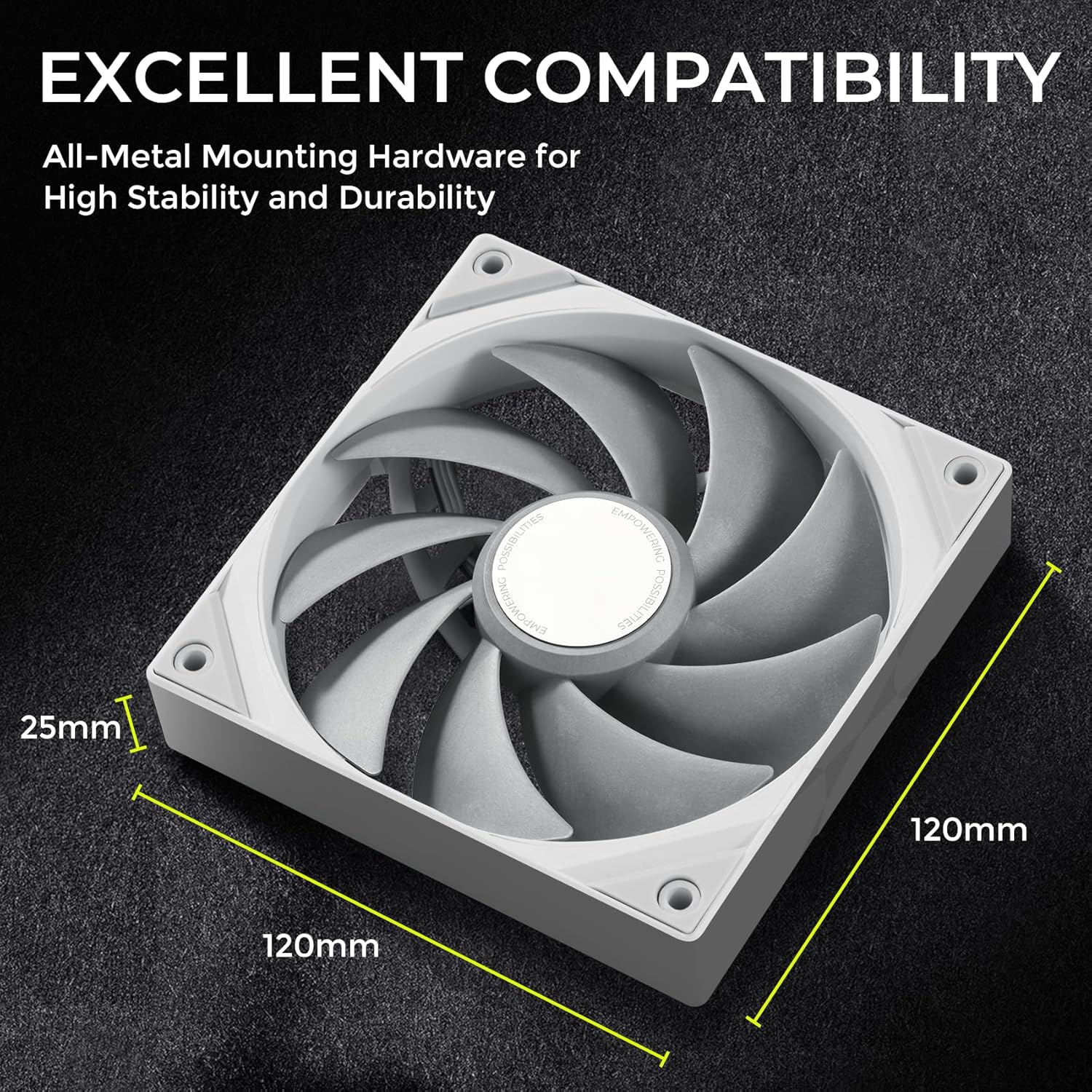
Image 3.2: Dimensions of the ROTA PRO 120 fan, important for case compatibility.
4. عملیاتي لارښوونې
4.1 KANALI Software Installation
To unlock the full potential of your TRYX Panorama 360 AIO, download and install the TRYX KANALI software from the official TRYX webسایټ. د نصبولو لپاره په سکرین کې لارښوونې تعقیب کړئ.
4.2 Screen Customization
The KANALI software provides extensive options for customizing the 6.5-inch curved screen:
- Instant Screen Content Switching: Easily switch between various pre-set displays or your custom content.
- د سپلیټ سکرین ښودنه: Utilize the L-shaped screen to display two different pieces of content simultaneously.
- Media Upload: Upload your own PNG, JPG, GIF images, or MP4, AVI videos (up to 1080P resolution, 500MB file size) to personalize the display.
- چټک ثبتول: Record screen content directly from the software.
- System Information Display: Monitor CPU/GPU temperatures, fan speeds, and other system metrics directly on the screen.
- Interactive Filters: Apply visual effects like 'Rain' or 'Smoky' to the screen content for enhanced interaction.

Image 4.1: KANALI software interface showing options for screen content, including full/splitting screen modes and media compatibility.

Image 4.2: KANALI software demonstrating screen splitting and system information display capabilities.

Image 4.3: KANALI software showcasing interactive screen filters like 'Rain' and 'Smoky'.
4.3 د فین کنټرول
The KANALI software also provides comprehensive control over the ROTA PRO 120 fans and the integrated VRM fan:
- د فین سرعت تنظیمول: Set fan speeds manually or choose from pre-defined profiles (e.g., Low Speed, Mid Speed, High Speed).
- سمارډ موډ: Configure custom fan curves based on CPU temperature for optimal cooling performance and noise levels.
- VRM Fan Control: Manage the integrated 60mm VRM fan with four-speed modes and custom speed curves to efficiently cool the motherboard's Voltagد تنظیم کونکي ماډلونه.

Image 4.4: KANALI software interface for controlling the VRM fan, including smart mode and custom speed curves.
5. ساتنه
Regular maintenance ensures optimal performance and longevity of your TRYX Panorama 360 AIO:
- د دوړو پاکول: د ریډیټر د پنکو او فین تیغونو څخه دوړې په دوره یي ډول د فشار شوي هوا یا نرم برش په کارولو سره پاکې کړئ. د دوړو راټولیدل کولی شي د هوا جریان خنډ کړي او د یخولو موثریت کم کړي.
- د فین معاینه: Check fan blades for any obstructions or signs of wear. Ensure fans spin freely and quietly.
- ټیوبونه او اړیکې: Inspect the tubing for any kinks, leaks, or damage. Ensure all connections (power, USB) are secure.
- د سافټویر تازه معلومات: Keep the KANALI software updated to the latest version to benefit from performance improvements, new features, and bug fixes.
6. ستونزه حل کول
If you encounter issues with your TRYX Panorama 360 AIO, refer to the following common problems and solutions:
- Screen Not Displaying Content:
- ډاډ ترلاسه کړئ چې د پمپ بلاک څخه USB کیبل ستاسو په مور بورډ کې د داخلي USB 2.0 سرلیک سره په خوندي ډول وصل دی.
- Verify that the KANALI software is installed and running.
- Check for any driver conflicts or software updates. Try reinstalling the KANALI software.
- د CPU لوړه تودوخه:
- Confirm the pump power cable is connected to the correct motherboard header (CPU_FAN or AIO_PUMP) and receiving power.
- Ensure the pump block is properly seated on the CPU with adequate thermal paste and even mounting pressure.
- Check that the radiator fans are spinning and oriented correctly for optimal airflow (pushing or pulling air through the radiator).
- د ریډیټر په پنونو کې هر ډول دوړو راټولیدل پاک کړئ.
- پنکه نه ګرځېږي یا غیر معمولي شور نه کوي:
- Verify fan power cables are securely connected to motherboard headers or a fan controller.
- Check fan speed settings in the KANALI software or BIOS to ensure they are not set to 0 RPM.
- Inspect fans for any physical obstructions.
- If a fan is making excessive noise, it may indicate a bearing issue. Contact support if the noise persists.
- KANALI Software Not Detecting Device:
- Ensure the USB cable from the pump block is connected to an active internal USB 2.0 header.
- خپل کمپیوټر بیا پیلولو هڅه وکړئ.
- Reinstall the KANALI software.
- Check your motherboard's BIOS settings for USB port configuration.
7. مشخصات
| فیچر | مشخصات |
|---|---|
| د محصول نوم | TRYX Panorama 360 White Curved Screen 360mm AIO |
| د ماډل شمیره | Panorama 360 White AIO |
| د یخولو طریقه | د مایع یخ کول |
| TDP Max | 320 واټ |
| د پمپ ډول | Asetek 8th Gen, 3-phase motor |
| د ریډیټر اندازه | 360mm (30mm thick with high-density fins) |
| ټیوب کول | 40% thicker compared to previous generation |
| د ښودلو اندازه | 6.5 انچه |
| د ښودلو ریزولوشن | 2K |
| د ریفریش نرخ ښکاره کړئ | 60Hz |
| د ښودلو ډول | منحل سکرین |
| د فین ماډل | ROTA PRO 120 White |
| د فین مقدار | 3 |
| د فین اندازه | 120mm x 120mm x 25mm |
| د فین هوا جریان | 81.32 CFM |
| د فین جامد فشار | ۲.۰۴ ملي متره مربع |
| د فین شور کچه | Under 30.97 dB(A) |
| د فین بیرینګ ډول | FDB (د مایع متحرک بیرینګ) |
| د فین بلیډ مواد | LCP (Liquid Crystal Polymer) |
| د بریښنا نښلونکی ډول | ۳-پن |
| والیtage | 12 ولټه (DC) |
| مطابقت لرونکې وسیلې | ډیسټاپ کمپیوټرونه |
| نیټه لومړی شتون لري | د اکتوبر ۲۹، ۲۰۲۳ |
8. تضمین او ملاتړ
TRYX products are manufactured to high-quality standards and are backed by a manufacturer's warranty. For specific warranty terms and conditions, please refer to the warranty card included with your product or visit the official TRYX website. If you require technical assistance, troubleshooting, or have questions regarding your product, please contact TRYX customer support through their official channels. Ensure you have your product model number and purchase information ready when contacting support.
For more information and support, visit the official TRYX store: TRYX Amazon Store


