
پیژندنه
This manual provides instructions for the assembly, operation, and maintenance of your FLEXISPOT MT137 32-inch Height Adjustable Standing Desk Converter. This product is designed to transform your existing desk into an ergonomic sit-to-stand workstation, promoting a healthier work routine.
د خوندیتوب معلومات
- تل د راټولولو لارښوونې په دقت سره تعقیب کړئ.
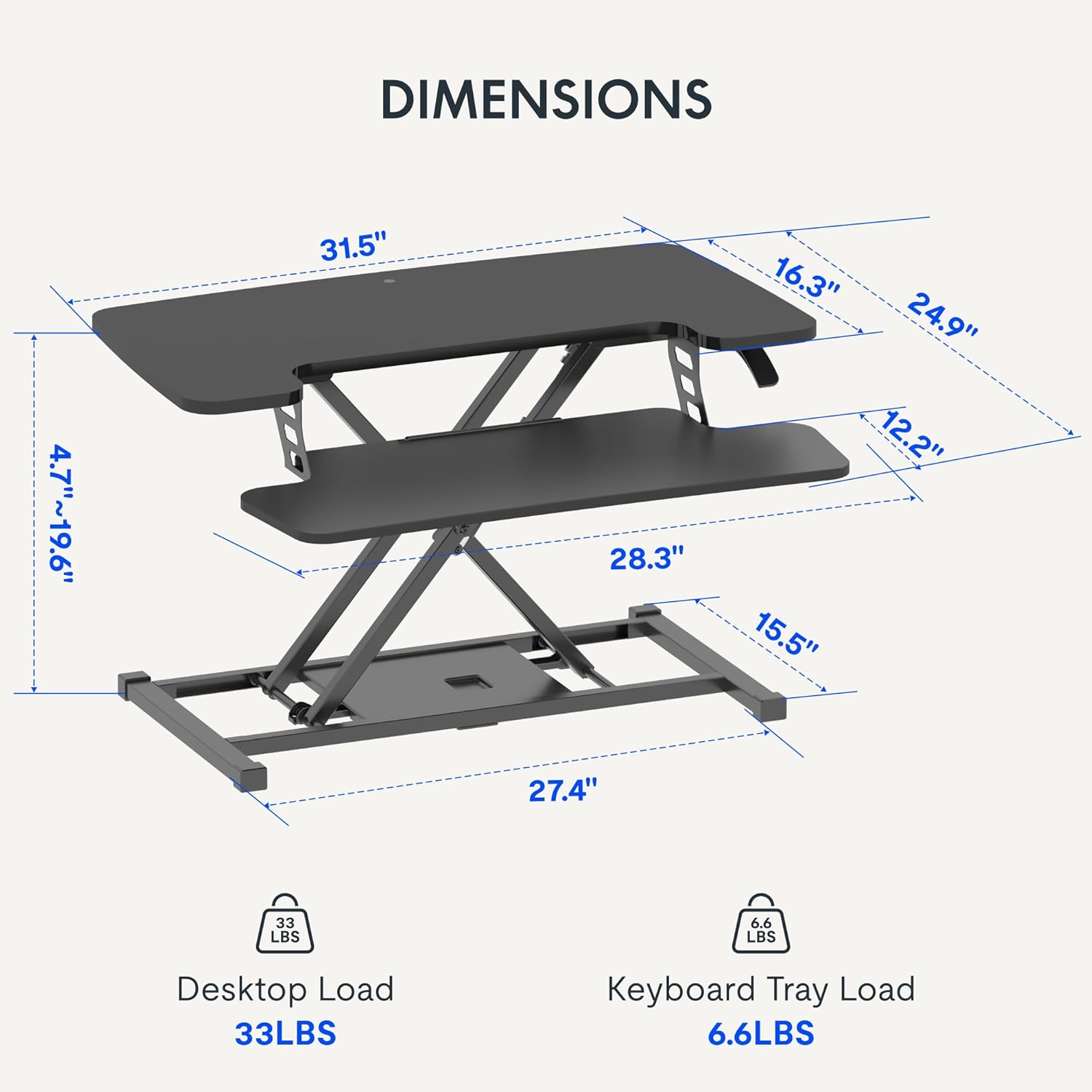
- Do not exceed the weight limit of 33 lbs (15 kg) on the upper desktop.
- Do not exceed the weight limit of 6.6 lbs (3 kg) on the keyboard tray.
- Ensure the desk converter is placed on a stable, flat surface.
- د لوړوالي د تنظیم په وخت کې لاسونه او ګوتې د حرکت کوونکو برخو څخه لرې وساتئ.
د بسته محتويات
- Pre-assembled Desk Converter Unit
- د کیبورډ ټری
- Mounting Screws for Keyboard Tray
- د لارښود لارښود (دا سند)
تنظیم او مجلس
- بسته بندي کول: په احتیاط سره د بسته بندۍ څخه ټولې برخې لرې کړئ.
- Keyboard Tray Attachment: Position the keyboard tray beneath the main desktop. Align the pre-drilled holes on the keyboard tray with the mounting points on the converter's frame. Secure the keyboard tray using the provided screws.
- ځای په ځای کول: Place the assembled desk converter on a stable, flat desk surface.

The desk converter is largely pre-assembled, requiring only the attachment of the keyboard tray for immediate use.
عملیاتي لارښوونې
- د لوړوالی تعدیل: To adjust the height, locate the adjustment lever on the side of the upper desktop.
- د میز پورته کول: Squeeze the lever and gently lift the desktop to your desired standing height. Release the lever to lock it in place. The gas spring mechanism assists in smooth elevation.
- د میز ښکته کول: Squeeze the lever and apply gentle downward pressure to lower the desktop to your desired sitting height. Release the lever to lock it in place.
- د وزن ظرفیت: The upper desktop supports up to 33 pounds (15 kg). The keyboard tray supports up to 6.6 pounds (3 kg). Do not exceed these limits.


ځانګړتیاوې
- ارګونومیک ډیزاین: Seamlessly transition between sitting and standing positions to promote a healthy work posture. The streamlined edges are designed to reduce wrist discomfort.
- Spacious Two-Tier Workstation: The upper desktop provides ample space for monitors or laptops, while the lower keyboard tray accommodates your keyboard and mouse. A U-shaped cutout on the upper deck allows for laptop placement directly on the tray, optimizing space.
- Sturdy X-Frame Construction: Built with a robust X-frame, ensuring stability and smooth, effortless height adjustments.
- Versatile Height Range: Offers a height adjustment range from 4.7 inches (12 cm) to 19.6 inches (50 cm), accommodating various user heights and work preferences.


ساتنه
- پاکول: سطحونه په نرمۍ سره مسح کړئ، دamp ټوکر د کثافاتو پاکونکو څخه ډډه وکړئ.
- معاینه: په دوره یي ډول ټول پیچونه او اړیکې وګورئ ترڅو ډاډ ترلاسه کړئ چې دوی خوندي دي.
د ستونزو حل کول
- د لوړوالي تنظیمولو کې مشکل: Ensure no objects are obstructing the lifting mechanism. Verify that the weight on the desk does not exceed the specified limits.
- وهل: Confirm the desk converter is placed on a flat, stable surface. Check all assembly screws for tightness.
مشخصات
| برانډ | FLEXISPOT |
| د ماډل نوم | MT137 |
| د محصول ابعاد | ۹.۲۵" عرض x ۱۲" عرض x ۲.۹۴" قد (۲۳.۵ سانتي متره طول x ۳۰.۵ سانتي متره طول x ۷.۵ سانتي متره قد) |
| رنګ | تور |
| اساسی مواد | فلزي |
| د پورته موادو ډول | لرګي |
| د توکي وزن | 24 پونډه (10.9 kg) |
| Maximum Upper Desktop Load | 33 پونډه (15 kg) |
| Maximum Keyboard Tray Load | 6.6 پونډه (3 kg) |
| د لوړوالی تنظیم کولو سلسله | له ۲.۶ انچه (۶.۶ سانتي متره) څخه تر ۱۴ انچه (۳۵.۶ سانتي متره) پورې |
| مجلس ته اړتیا ده | هو (لږترلږه) |
| د مجلس لپاره وړاندیز شوي وسایل | سکرو ډرایور |
| UPC | 810072862501 |
تضمین او ملاتړ
د تضمین ډول: This product comes with a Full Warranty.
For further assistance, warranty claims, or technical support, please contact FLEXISPOT customer service. Refer to the official FLEXISPOT webد اوسني اړیکو توضیحاتو لپاره سایټ.