
محصول پای ته ورسیدview
The EarFun Air Pro 4 are advanced wireless earbuds designed for superior audio experience and call clarity. They feature Adaptive Hybrid Noise Canceling, Qualcomm Snapdragon Sound with aptX Lossless, and a long-lasting battery. This manual provides detailed instructions for setup, operation, and maintenance.

Image: The EarFun Air Pro 4 Royal Blue earbuds shown with their charging case, highlighting their sleek design.
1. ترتیب کول
۲.۱ په بکس کې څه دي
- EarFun Air Pro 4 Adaptive Hybrid ANC Earbuds
- د چارج کولو قضیه
- USB-C کیبل
- Eartips (5 pairs: XS, S, M, L, XL)
- د کارونکي لارښود (دا لاسوند)

Image: The EarFun Air Pro 4 earbuds resting in their open charging case, illustrating the compact design and charging indicators.
۴.۱ د ایربډز او کیس چارج کول
Before first use, fully charge the earbuds and charging case. Connect the provided USB-C cable to the charging port on the case and a power source. The indicator lights on the case will show the charging status. A full charge provides up to 11 hours of playtime for the earbuds and extends to 52 hours with the charging case. A 10-minute quick charge can provide up to 2 hours of playtime.
۴.۲ ستاسو د وسیلې سره جوړه کول
- د چارج کولو قضیه پرانیزئ. د غوږ بډونه به په اتوماتيک ډول د جوړې کولو حالت ته ننوځي.
- په خپل وسیله (سمارټ فون، ټابلیټ، لپ ټاپ) کې، بلوتوث فعال کړئ.
- Select "EarFun Air Pro 4" from the list of available Bluetooth devices.
- یوځل چې وصل شو، تاسو به د تایید غږ واورئ.
For Android devices, utilize the integrated Google Fast Pair feature for quick and seamless connection.

Image: A smartphone displaying the Google Fast Pair notification, indicating readiness to connect to the EarFun Air Pro 4 earbuds.
1.4 Installing the EarFun Audio App
For enhanced control and customization, download the EarFun Audio App from the Google Play Store or Apple App Store. The app allows you to customize the EQ settings, update firmware, and access additional features.

Image: Multiple smartphone screens showcasing the EarFun Audio App's interface, including EQ customization and sound profiles.
۶. د ایربډونو چلول
2.1 Adaptive Hybrid Noise Canceling (ANC)
The EarFun Air Pro 4 features Adaptive Hybrid ANC with QuietSmart 3.0 technology, capable of reducing noise by up to 50dB. The earbuds automatically detect your ear canal shape and wearing status to optimize noise cancellation. You can select different ANC modes via the EarFun Audio App (requires firmware version 0.2.0 or above).

Image: A woman wearing an EarFun Air Pro 4 earbud in a simulated airplane environment, demonstrating the effectiveness of the noise cancellation feature.

Image: A visual representation of the various Adaptive Hybrid ANC modes available, including Strong ANC, Balance ANC, and AI-driven adaptive modes for different environments.
2.2 Audio Quality and Codecs
Equipped with the Qualcomm QCC3091 SoC, the EarFun Air Pro 4 supports Qualcomm Snapdragon Sound with aptX Lossless Audio, LDAC, LE Audio, and LC3 codecs. This ensures high-fidelity sound reproduction with robust bass, articulate midrange, and sparkling treble, preserving original audio signals for a superior listening experience.
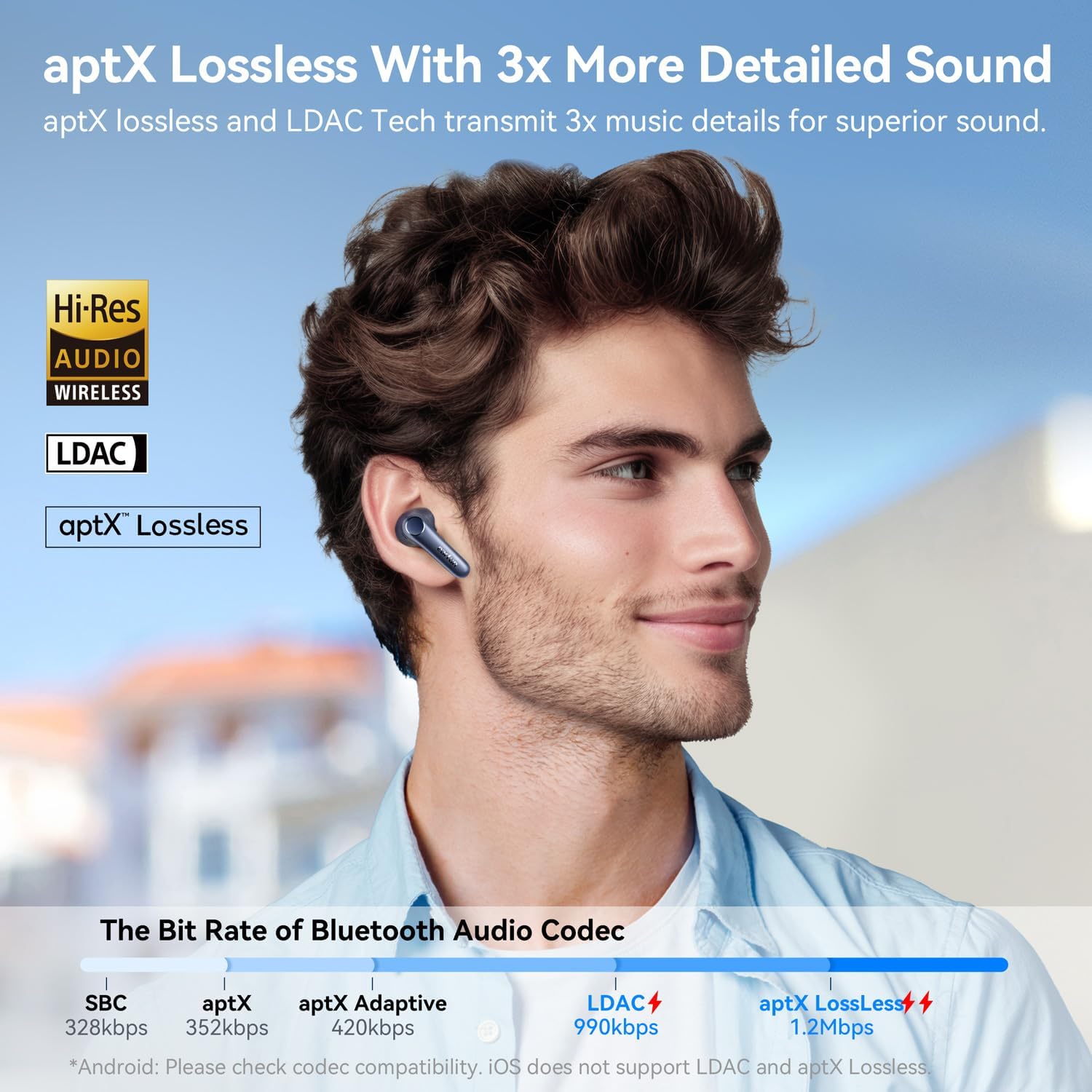
Image: A man enjoying music with the EarFun Air Pro 4 earbuds, emphasizing the support for Hi-Res Audio, LDAC, and aptX Lossless for detailed sound.

Image: A technical diagram illustrating the aptX Lossless Audio Codec and its superior bit rate compared to other Bluetooth codecs, ensuring CD-quality sound.
۳.۳ د زنګ وهلو کیفیت
For crystal-clear calls, the earbuds incorporate 6 built-in microphones, advanced AI algorithms, and Qualcomm cVc 8.0 technology. This combination effectively eliminates background noise, ensuring your voice is heard clearly regardless of your surroundings.

Image: A woman happily engaged in a phone call using the EarFun Air Pro 4 earbuds, with an inset diagram detailing the 6-mic AI algorithm and cVc 8.0 ENC technology for clear calls.
۴.۳ څو نقطې اتصال
The EarFun Air Pro 4 supports Multipoint Connection, allowing you to connect to two Bluetooth devices simultaneously. This enables seamless switching between, for exampاو، ستاسو سمارټ فون او لیپ ټاپ پرته له دې چې بیا جوړه شي.
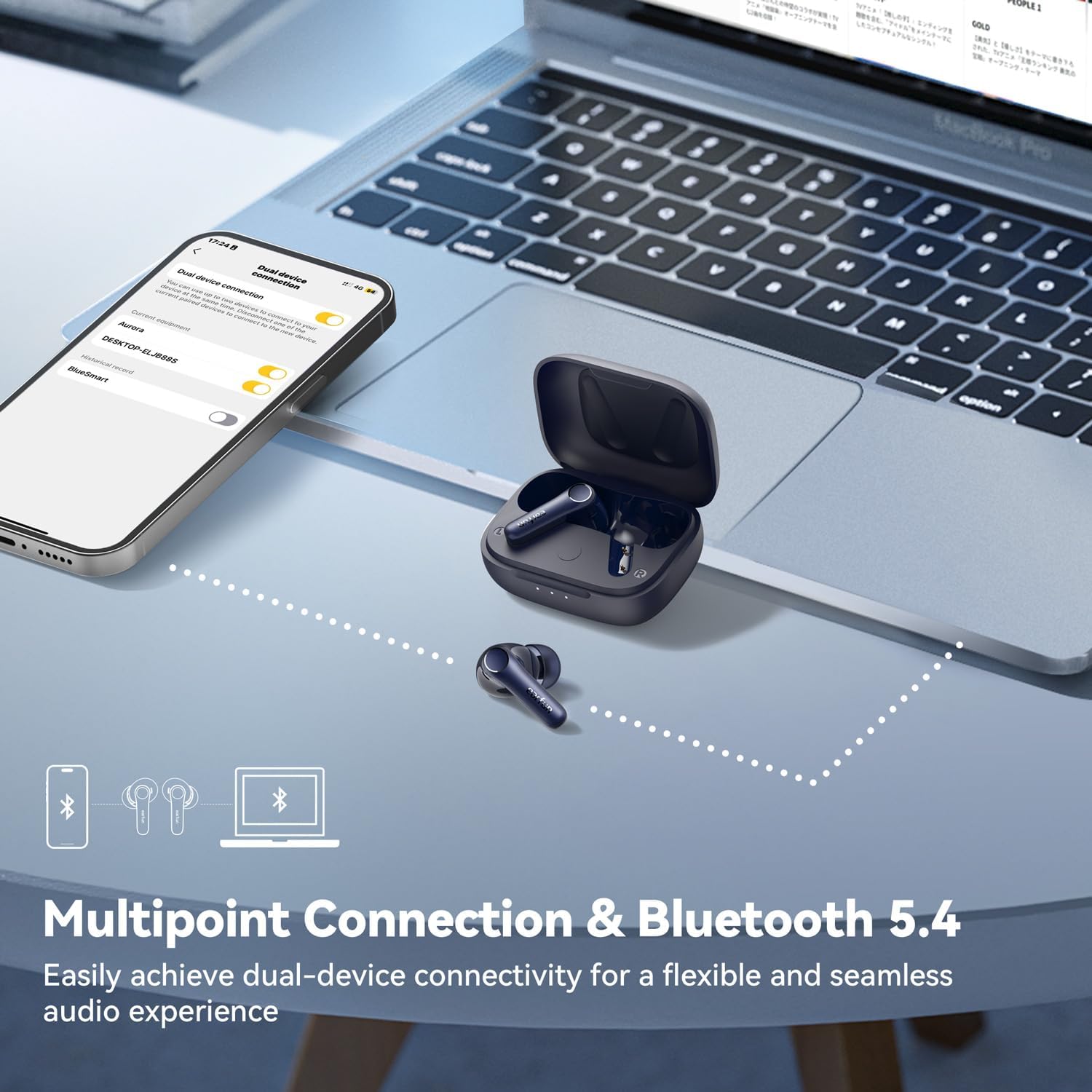
Image: The EarFun Air Pro 4 earbuds shown connected to both a smartphone and a laptop, demonstrating the multipoint connection feature for flexible audio use.
2.5 Auracast Broadcast Audio
With Auracast Broadcast Audio (available via updated firmware), you can share your audio with others or tune into public broadcasts and assistive listening systems. This feature allows for a shared listening experience.

Image: Two individuals, one wearing royal blue and the other white EarFun Air Pro 4 earbuds, positioned back-to-back, illustrating the audio sharing capability via Auracast.
2.6 ټچ کنټرولونه
The EarFun Air Pro 4 earbuds feature intuitive touch controls for managing playback, calls, and noise control modes. Refer to the quick start guide or the EarFun Audio App for a detailed mapping of touch gestures.
۵.۲ د غوږ دننه کشف
The earbuds are equipped with in-ear detection. Music playback will automatically pause when you remove an earbud and resume when you put it back in.

Image: A visual demonstration of the in-ear detection feature, showing music playing when earbuds are worn and pausing when removed.
3. ساتنه
3.1 پاکول
Regular cleaning helps maintain sound quality and hygiene. Use a soft, dry, lint-free cloth to wipe the earbuds and charging case. For earwax buildup on the eartips or speaker mesh, gently use a small, soft brush or cotton swab. Do not use abrasive cleaners or submerge the earbuds in liquid.
3.2 ذخیره کول
When not in use, store the earbuds in their charging case to protect them and keep them charged. Store the case in a cool, dry place, away from extreme temperatures and direct sunlight.
4. ستونزه حل کول
4.1 عام مسایل او حلونه
- غږ نشته: Ensure earbuds are charged, connected to your device, and volume is up. Check if the earbuds are properly seated in your ears.
- د جوړه کولو مسلې:
- ډاډ ترلاسه کړئ چې ستاسو په وسیله کې بلوتوټ فعال شوی او د غوږ بډونه د جوړه کولو حالت کې دي.
- Forget "EarFun Air Pro 4" from your device's Bluetooth list and try pairing again.
- د غوږ بډونه بیرته په کیس کې ځای په ځای کړئ، وتړئ، بیا یې د جوړه کولو حالت بیا تنظیمولو لپاره بیا پرانیزئ.
- یو ایربډ کار نه کوي: Place both earbuds back in the charging case, close the lid for a few seconds, then open them again. This often re-syncs them.
- د زنګ وهلو کیفیت: Ensure microphones are clean. Try disabling ANC temporarily to see if it improves clarity in certain environments.
- د چارج کولو ستونزې: Ensure the USB-C cable is securely connected and the power source is active. Clean the charging contacts on both the earbuds and the case.
۵.۱ د غوږونو بیا تنظیم کول
If you experience persistent issues, a factory reset may resolve them. Refer to the EarFun Audio App or the official EarFun support webستاسو د ماډل لپاره د ځانګړي بیا تنظیم کولو لارښوونو لپاره سایټ.
د نورو مرستو لپاره، مهرباني وکړئ چارواکو ته مراجعه وکړئ د کارن لارښود (PDF) or contact EarFun customer support.
5. مشخصات
| د ماډل نوم | EarFun Air Pro 4 |
| د ماډل شمیره | TW600E |
| د شور کنټرول | Adaptive Noise Cancellation (up to 50dB) |
| د ارتباط ټیکنالوژي | بېسیم (بلوتوث ۵.۳) |
| د آډیو کوډیکونو ملاتړ شوی | aptX Lossless, LDAC, LE Audio, LC3 |
| مایکروفون | 6 Mics with AI Algorithm & cVc 8.0 ENC |
| د لوبې وخت (یو ځل چارج) | تر 11 ساعتونو پورې |
| د لوبې ټول وخت (د چارج کولو کیس سره) | تر 52 ساعتونو پورې |
| د چارج کولو وخت | نږدې ۷ ساعته (د غوږونو بکس + قضیه) |
| د تعدد ځواب | ۲۰ هرټز - ۲۰ کلو هرټز |
| د موټر چلوونکي ډول | متحرک چلوونکی |
| د کنټرول ډول | د ټچ کنټرول، د اپلیکیشن کنټرول |
| وزن | ۴۵ ګرامه (ټول) / ۱.۵۹ اونس |
| ابعاد | 2.36 x 1.97 x 1.22 انچه |
| د اوبو د مقاومت کچه | د اوبو مقاومت نلري |
6. تضمین او ملاتړ
EarFun products typically come with a standard manufacturer's warranty. Please refer to the warranty card included in your product packaging or visit the official EarFun webستاسو د سیمې لپاره ځانګړي د تضمین تفصيلي شرایطو او شرایطو لپاره سایټ.
For technical support, frequently asked questions, or to register your product, please visit the EarFun official webسایټ یا د دوی د ایمیزون برانډ پلورنځي:
- EarFun Official Amazon Brand Store
- د EarFun رسمي Webسایټ (for general support and contact information)