
1. پیژندنه
Thank you for choosing the FLEXISPOT 28-Inch Height Adjustable Standing Desk Converter. This product is designed to transform your existing desk into an active sit-stand workstation, promoting a healthier and more dynamic work environment. Its unique two-tier design provides ample space for your monitor, keyboard, and mouse, allowing for seamless transitions between sitting and standing positions.
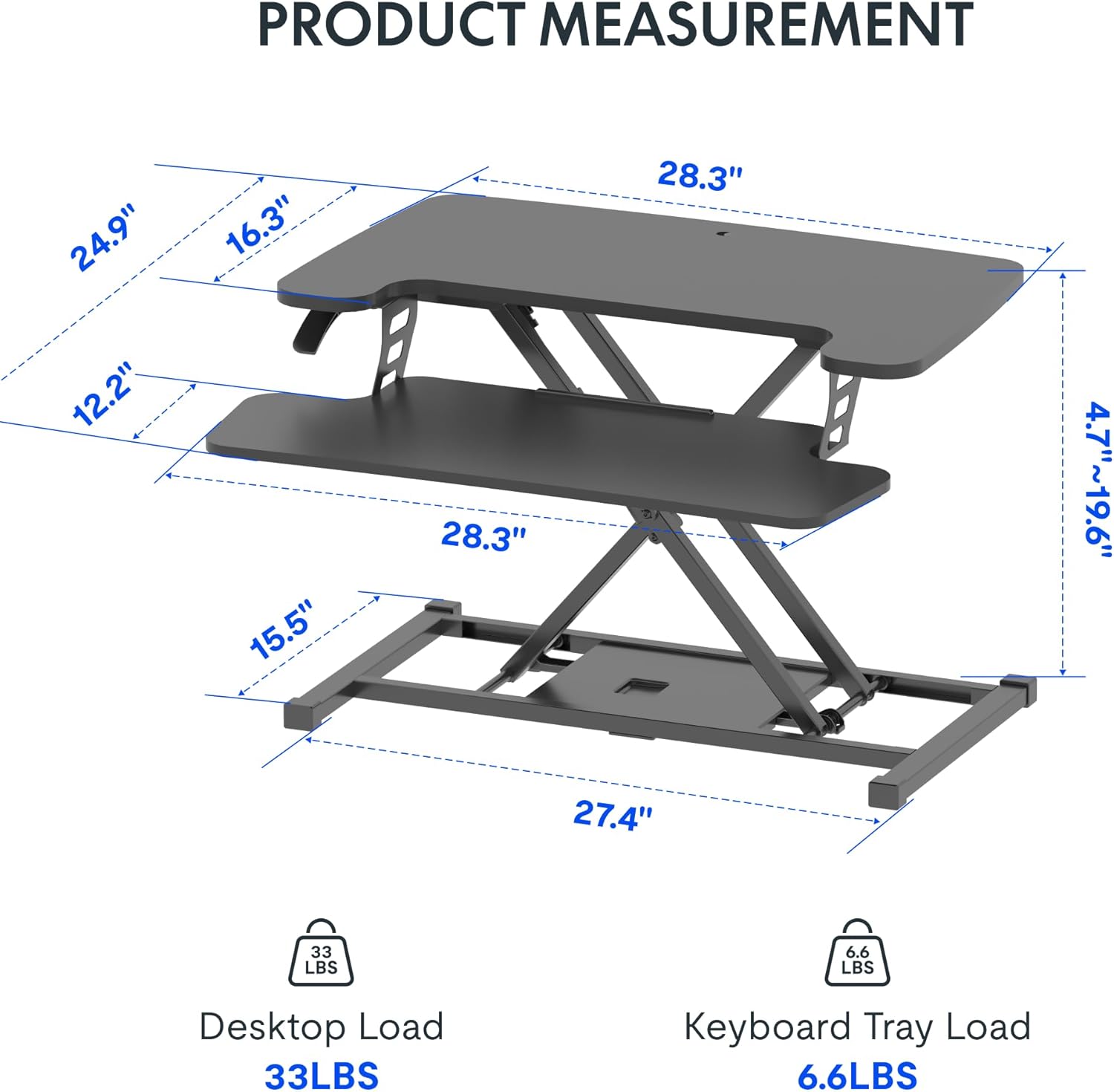
Image: The FLEXISPOT 28-Inch Height Adjustable Standing Desk Converter in a typical office setup, showcasing its two-tier design and compact footprint.
2. د خوندیتوب معلومات
- د راټولولو او کارولو دمخه ټولې لارښوونې په دقت سره ولولئ.
- Ensure all components are securely fastened before placing items on the desk converter.
- Do not exceed the maximum weight capacity: 33 lbs for the desktop and 6.6 lbs for the keyboard tray.
- Keep hands and fingers clear of moving parts during height adjustment to prevent injury.
- د میز کنورټر په یوه مستحکم او هموار سطحه کې ځای په ځای کړئ.
- Avoid placing liquids directly on the surface to prevent spills and potential damage to electronic devices.
3. د بسته محتويات
Upon opening your package, verify that all the following components are present:
- FLEXISPOT 28-Inch Height Adjustable Standing Desk Converter (main unit)
- د کیبورډ ټری
- د اسمبلۍ هارډویر (پیچونه، د ایلن رنچ)
- د لارښود لارښود (دا سند)
4. تنظیم او مجلس
The FLEXISPOT 28-Inch Height Adjustable Standing Desk Converter comes largely pre-assembled. The primary step required is attaching the keyboard tray.
- خلاص کړئ: په احتیاط سره د بسته بندۍ څخه ټولې برخې لرې کړئ.
- اصلي واحد ځای په ځای کړئ: Place the main desk converter unit on your existing desk in the desired location.
- د کیبورډ ټری ضمیمه کړئ: Align the keyboard tray with the pre-drilled holes on the underside of the main unit's lower platform. Secure it using the provided screws and Allen wrench. Ensure it is firmly attached.
- کیبلونه تنظیم کړئ: Route any monitor or peripheral cables to prevent interference with the height adjustment mechanism.
No complex steps are required for assembly. A Phillips screwdriver may be needed for some keyboard tray attachments, though an Allen wrench is typically included for the main connections.
5. عملیاتي لارښوونې
د لوړوالی تعدیل:
The desk converter features a powerful gas spring system for smooth and effortless height adjustment. It allows you to transition between sitting and standing positions with a single lever.
- پورته کول: Gently lift the adjustment lever located on the side of the desk converter. While holding the lever, apply slight upward pressure to the desktop. The gas spring will assist in raising the unit. Release the lever once the desired height (between 4.7" and 19.7") is reached.
- ښکته کول: Gently lift the adjustment lever. While holding the lever, apply downward pressure to the desktop. The unit will smoothly lower. Release the lever once the desired height is reached.
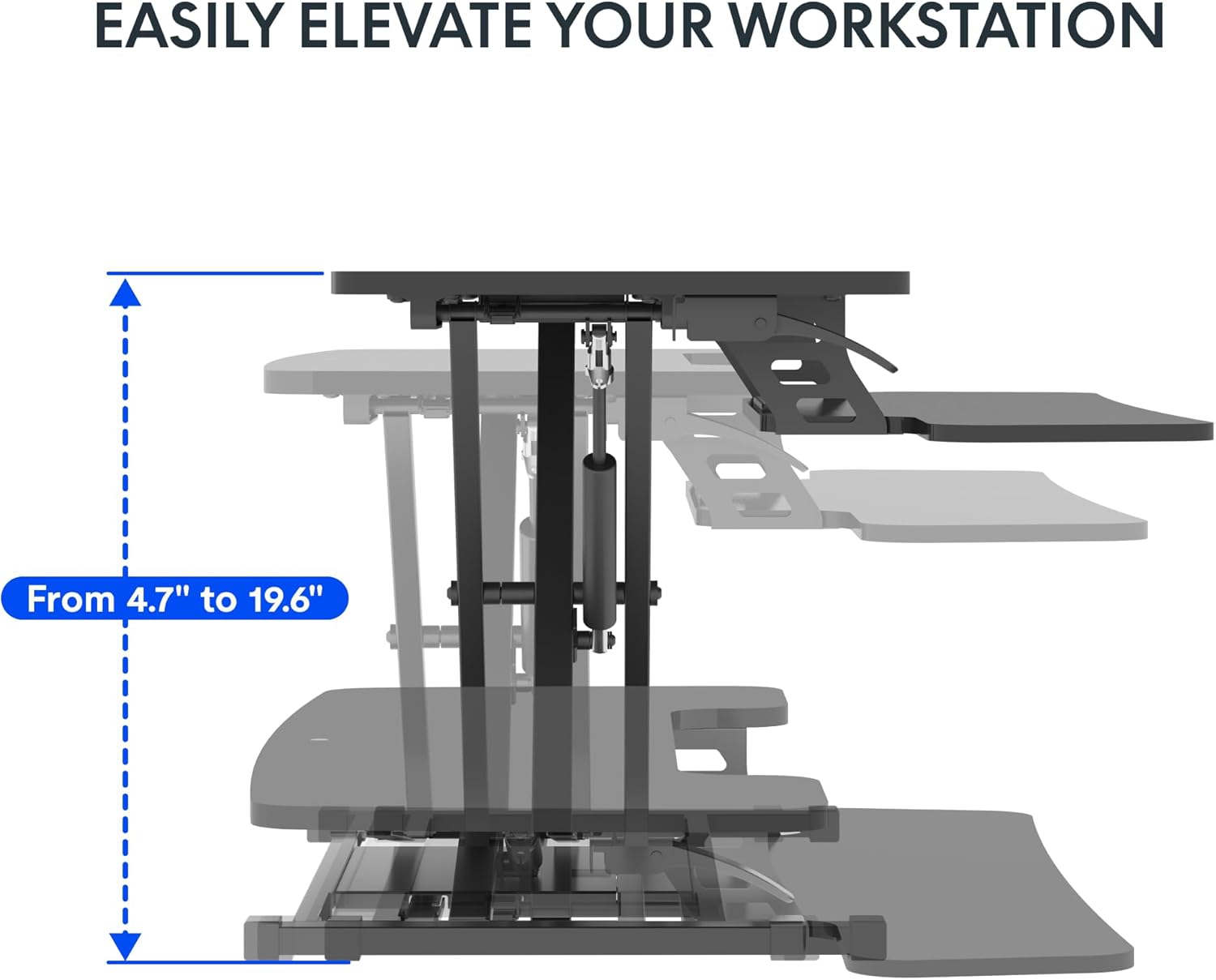
Image: Visual representation of the desk converter's height adjustment range, showing the smooth transition from minimum to maximum height.
Keyboard Tray Angle Adjustment (if applicable):
Some models may offer an adjustable angle for the keyboard tray. Consult your specific model's features for details on how to adjust if this functionality is present.
6. ساتنه
- پاکول: سطحونه په نرمۍ سره مسح کړئ، دamp ټوکر. د خړوبولو پاکوونکو یا سختو کیمیاوي موادو څخه ډډه وکړئ چې کولی شي پای ته زیان ورسوي.
- معاینه: ټول پیچونه او اړیکې په دوره یي ډول وګورئ ترڅو ډاډ ترلاسه شي چې دوی کلک پاتې دي. که اړتیا وي نو بیا یې ټینګ کړئ.
- حرکت کول: When moving the desk converter, ensure it is in its lowest position and lift it carefully to avoid strain or damage.
7. ستونزه حل کول
| ستونزه | احتمالي لامل | د حل لاره |
|---|---|---|
| Desk converter is difficult to raise or lower. | Excessive weight on the desktop; mechanism not fully engaged. | Reduce weight on the desktop. Ensure the adjustment lever is fully engaged when attempting to move the unit. Apply even pressure. |
| Unit feels wobbly. | خلاصې اړیکې؛ نا مساوي سطحه. | Check and tighten all assembly screws. Ensure the desk converter is placed on a flat, stable surface. |
| Keyboard tray is not stable. | Keyboard tray not securely attached. | Verify that the keyboard tray is correctly installed and all screws are tightened. |
8. مشخصات
- ماډل: 28-Inch Height Adjustable Standing Desk Converter
- نښه: FLEXISPOT
- د ډیسټاپ ابعاد: ۶.۹" x ۳.۴"
- Keyboard Tray Dimensions: ۶.۹" x ۳.۴"
- اساسي ابعاد: ۶.۹" x ۳.۴"
- د لوړوالی د سمون حد: ۱۲.۶" - ۳۸.۲"
- د ډیسټاپ وزن ظرفیت: 33 پونډه
- Keyboard Tray Weight Capacity: 6.6 پونډه
- مواد: فلزي، لرګي
- رنګ: کلاسیک تور
- د توکي وزن: 23.2 پونډه
- اړین مجلس: هو (لږترلږه)
- UPC: 840460420143
- ASIN: B0DMSHH497

Image: Detailed product measurements for the FLEXISPOT 28-Inch Height Adjustable Standing Desk Converter, including desktop, keyboard tray, base, and height range.
9. تضمین او ملاتړ
For warranty information, technical support, or to inquire about replacement parts, please contact FLEXISPOT customer service. Refer to the official FLEXISPOT webد اړیکو د خورا وروستي توضیحاتو او تضمین شرایطو لپاره سایټ یا ستاسو د پیرود اسناد.
You can visit the official FLEXISPOT store for more information: د فلیکس سپاټ پلورنځی