
1. محصول ختم شوview
This manual provides instructions for the assembly, operation, and maintenance of your OKD 60-inch L-Shaped Executive Desk with Hutch and Drawers. This desk is designed to maximize your workspace with its L-shaped configuration, integrated hutch, multiple storage drawers, and a convenient charging station. It features a distressed dark rustic oak finish, blending farmhouse aesthetics with modern functionality.

Image 1.1: The OKD 60-inch L-Shaped Executive Desk with Hutch and Drawers.
2. د خوندیتوب معلومات
- Always assemble the desk on a stable, level surface to ensure structural integrity.
- Be cautious when handling heavy components to avoid injury. It is recommended to have at least two people for assembly and moving the desk.
- Ensure the desk is properly anchored to the wall or floor to prevent tipping, especially with the hutch installed.
- Do not overload drawers or the desktop to maintain stability and prevent damage.
- Always follow the assembly instructions carefully to avoid potential safety hazards and ensure correct construction.
3. د بسته محتويات
Your OKD L-Shaped Executive Desk with Hutch will be delivered in multiple packages, typically three separate boxes (Box A, Box B, Box C). These boxes may arrive on different days. Please ensure all packages have arrived before beginning assembly.

Image 3.1: Product dimensions and illustration of the three packages (Box A, B, C) for delivery.
The packages contain all necessary components for the desk and hutch, including:
- Desk panels and supports
- Hutch panels and supports
- د دراز اجزا او سلایډونه
- Charging station unit (2 USB ports, 2 AC outlets)
- د هارډویر کټ (پیچونه، ډویلونه، د کیم قلفونه، او نور)
- د مجلس لارښوونې لارښود
4. تنظیم او مجلس
Assembly of this desk requires time and attention to detail. It is recommended to have two people for the assembly process, which can take several hours (typically 4-12 hours depending on experience).
4.1 وړاندیز شوي وسیلې
- Drill (optional, for speed)
- د فیلیپس سر سکریډرایور
- هامر (د ډویلونو لپاره)
۵.۱ د عمومي غونډې مرحلې
- خلاص او تنظیم کړئ: Carefully unpack all components and verify against the parts list in your included instruction manual. Organize hardware by type.
- Assemble Desk Base: Follow the step-by-step diagrams to construct the main L-shaped desk frame. Pay close attention to the orientation of panels.
- درزونه او المارۍ نصب کړئ: Assemble drawer boxes and install drawer slides. Note that some drawer slider hardware may need to be separated before installation. Install cabinet doors and adjust hinges for proper alignment.
- د چارج کولو سټیشن یوځای کول: Insert the power hub into the designated opening on the desktop.
- Assemble Hutch: Construct the hutch frame, including glass-front cabinets and shelves.
- Attach Hutch to Desk: With assistance, carefully lift and place the hutch onto the assembled desk. Secure it using the provided fasteners. It is advisable to move the desk to its final location before attaching the hutch due to combined weight.
۲.۲ د غونډې ویډیو لارښود
For a detailed visual guide on the assembly process, please refer to the official assembly video below:
Video 4.1: Comprehensive assembly guide for the OKD L-Shaped Executive Desk with Hutch (18:47 duration).
5. عملیاتي لارښوونې
5.1 د چارج کولو سټیشن
The desk includes a built-in power hub for convenient device charging. It features:
- 2 USB پورټونه
- 2 AC آوټ لیټونه
Simply plug the desk's power cord into a wall outlet to activate the charging station. This allows you to power laptops, tablets, phones, and other electronic devices directly from your workspace.

Image 5.1: Close-up of the integrated charging station on the desk surface.
۳.۳ د ذخیره کولو ځانګړتیاوې
The desk and hutch offer extensive storage options:
- د هچ ذخیره: Features two glass-front cabinets, open cubbies, and display shelves for books, decor, or office accessories.
- Desk Drawers: په کې شامل دي file drawer designed for letter-size folders, and three utility drawers for various office supplies.
- پټه کابینه: A cabinet with an adjustable shelf provides flexible storage for larger items or a computer tower.
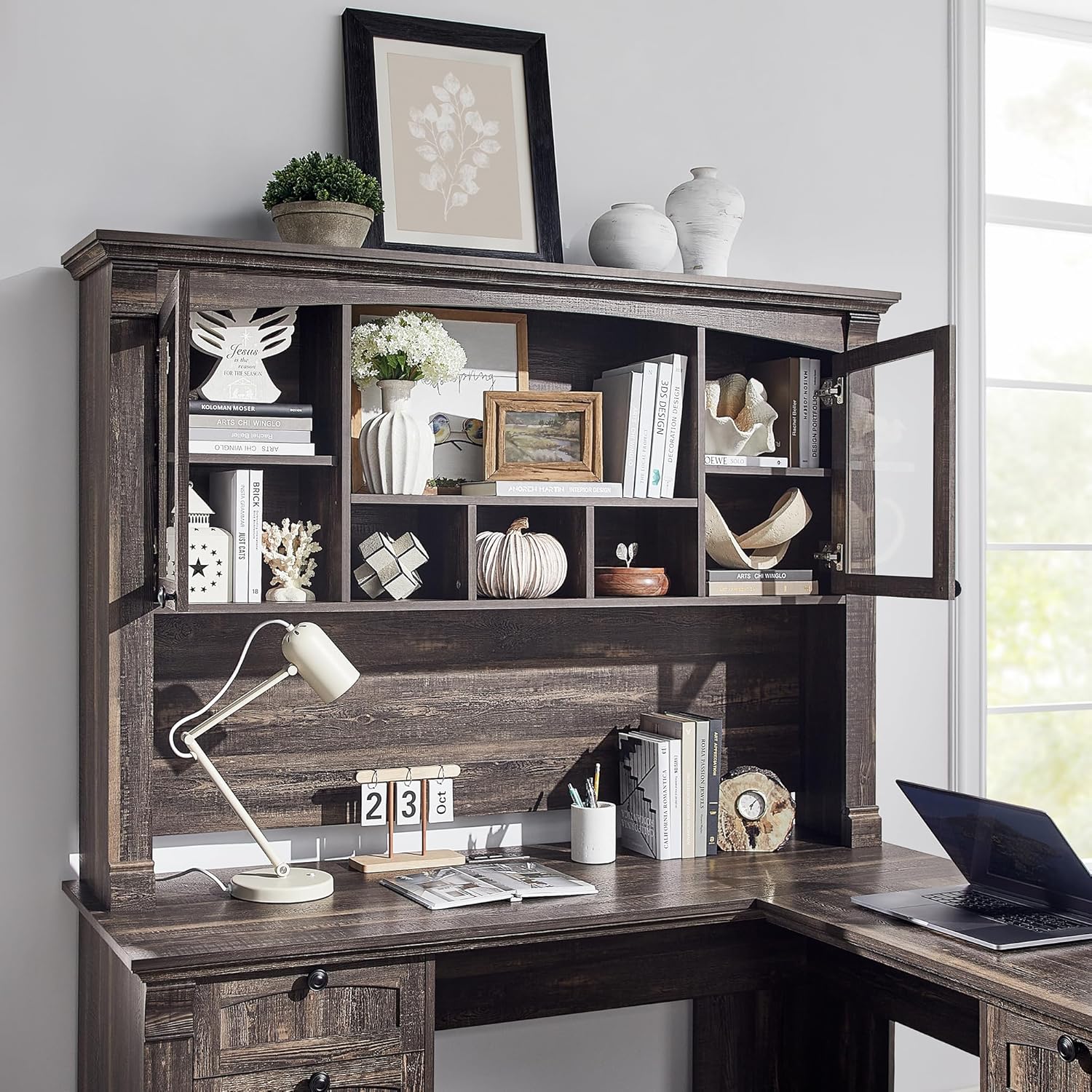
انځور ۲: تفصیلي view of the hutch storage compartments.
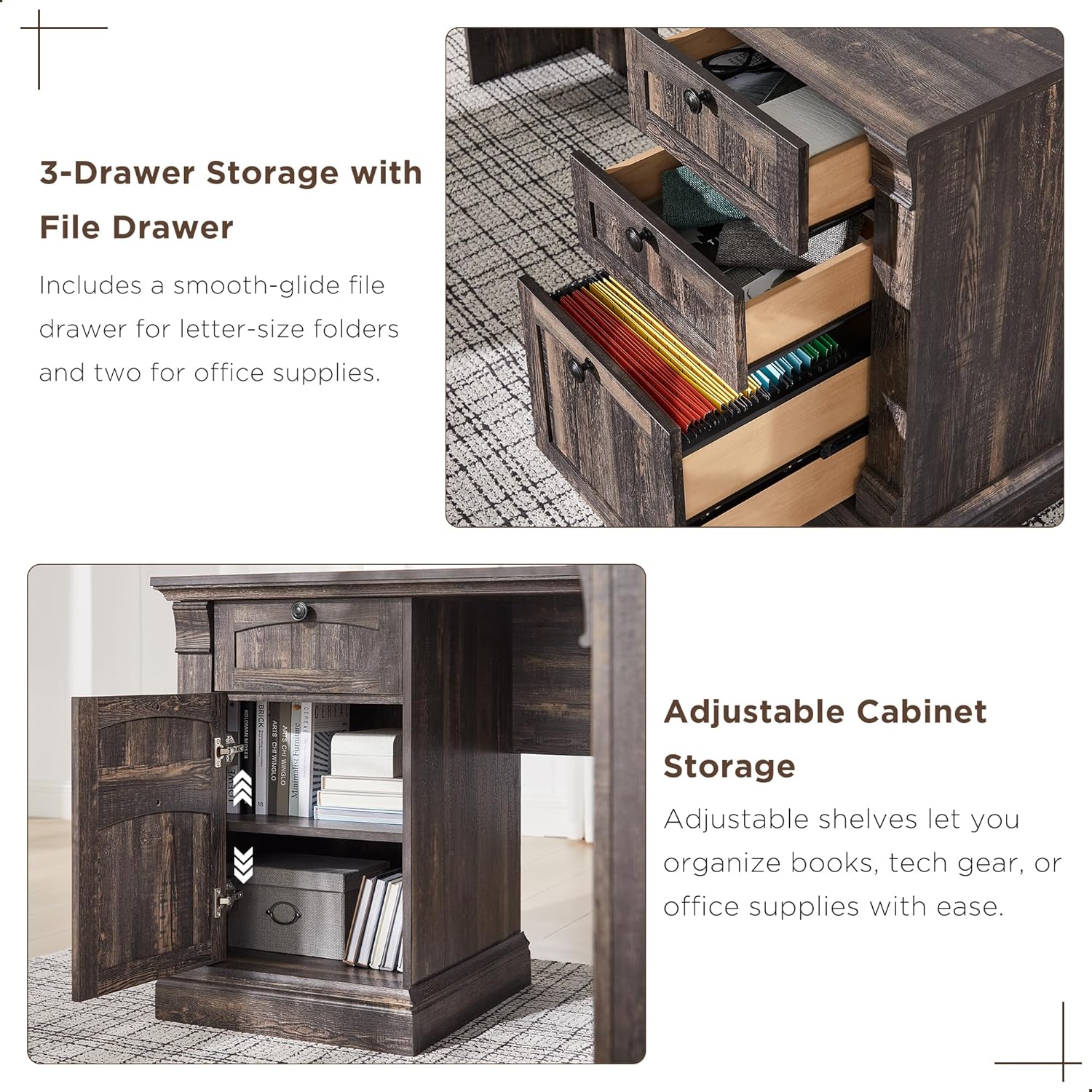
انځور ۲: تفصیلي view of the desk's three-drawer storage and adjustable cabinet.
6. ساتنه
To maintain the appearance and longevity of your OKD Executive Desk, follow these simple care instructions:
- پاکول: Wipe surfaces with a dry, soft cloth. Avoid using harsh chemicals or abrasive cleaners, which can damage the distressed finish.
- څاڅکي: هر ډول توی شوي شیان سمدلاسه د پاک او وچ ټوکر سره پاک کړئ.
- تودوخه او رطوبت: Protect the surface from direct heat and excessive moisture using coasters or protective pads.
- هارډویر: د ثبات ډاډ ترلاسه کولو لپاره په دوره یي ډول ټول هارډویر چیک او ټینګ کړئ.
7. ستونزه حل کول
دلته د هغو عامو ستونزو حلونه دي چې تاسو ورسره مخ کیدی شئ:
- ورکې برخې: If you find any parts missing or damaged upon unboxing, please contact OKD customer support immediately with your purchase details.
- د دستګاه سمون: If drawers do not slide smoothly or appear misaligned, check that the drawer slides are correctly installed and that all screws are tightened. Ensure the drawer slider hardware has been properly separated as per the assembly instructions.
- Cabinet Door Alignment: If cabinet doors rub against the frame, adjust the hinges using a Phillips screwdriver. Small adjustments can significantly improve alignment.
- Computer Tower Fit: The concealed cabinet is designed to accommodate most standard computer towers. If a flash drive or cable prevents the door from closing, you may need to adjust the computer's position or remove the adjustable shelf for more space.
- د میز ټپونه: Ensure the desk is on a level surface. Check all cam locks and screws to confirm they are fully tightened.
8. مشخصات
| فیچر | مشخصات |
|---|---|
| برانډ | سمه ده |
| ماډل | B0DNPTR2YP |
| شکل | L-شکل |
| د محصول ابعاد (د x څلویښتم x څلویښتم) | ۱۶"د x ۲۶"وچ x ۴۷"ح |
| رنګ | تیاره کلیوال بلوط |
| سټایل | د هیواد کلیوال |
| د موادو ډول | انجنیري لرګي |
| د پای ډول | خپه شوی |
| ځانګړی ځانګړنه | Built-In USB Outlet (2 USB, 2 AC) |
| د درازونو شمیر | 4 (1 file, 3 utility) |
| د الماریو شمیر | 10 (including hutch and cabinet shelves) |
| د توکي وزن | 250 پونډه |
| د اعظمي وزن سپارښتنه | 350 پونډه |
| اړین مجلس | هو |
| د غونډې لپاره وړاندیز شوي کسان | 2 |
9. تضمین او ملاتړ
9.1 د تضمین معلومات
This OKD product comes with a محدود تضمین. For specific details regarding coverage and duration, please refer to the warranty documentation included with your purchase or contact OKD customer support.
9.2 د پیرودونکي ملاتړ
Should you have any questions, require assistance with assembly, or need to report missing/damaged parts, our customer support team is available to help. Please have your model number (B0DNPTR2YP) and purchase information ready when contacting support.
د ملاتړ لپاره، مهرباني وکړئ لیدنه وکړئ OKD Store on Amazon یا ستاسو د محصول په بسته بندۍ کې چمتو شوي د اړیکو معلوماتو ته مراجعه وکړئ.