
1. پیژندنه
This manual provides essential information for the safe and effective use of the Generic JBD 8S-24S, 100A Smart Battery Management System (BMS). This BMS is designed for LiFePO4 and LFP prismatic battery packs, supporting configurations from 8S to 24S (24V to 72V) with a continuous discharge current of up to 100 Amperes and a charge current of up to 50 Amperes. It features an active balancer and Bluetooth connectivity for monitoring and control.
The Smart BMS protects your battery pack from overcharge, over-discharge, overcurrent, and over-temperature conditions, ensuring optimal performance and extending battery life.
2. د خوندیتوب معلومات
WARNING: Improper installation or use can lead to serious injury, fire, or damage to the battery pack and BMS. Always follow safety guidelines.
- لوړ والیtage او اوسنی: Battery packs operate at high voltages and currents. Exercise extreme caution to avoid short circuits.
- مسلکي نصب کول: نصب کول باید د وړ پرسونل لخوا ترسره شي چې د بیټرۍ سیسټمونو کې تجربه ولري.
- موصلیت: Ensure all connections are properly insulated to prevent accidental contact.
- وینټیلیشن: Install the BMS in a well-ventilated area.
- اوبه او رطوبت: Keep the BMS dry and away from water or high humidity.
- سمه قطبي والی: Always connect wires with correct polarity. Reversing polarity can cause irreversible damage.
- محافظتي وسایل: مناسب شخصي محافظتي تجهیزات (PPE) واغوندئ، په شمول د موصل شوي دستکشو او د سترګو محافظت.
3. د بسته محتويات
ډاډ ترلاسه کړئ چې ټول توکي په کڅوړه کې شتون لري:
- JBD Smart BMS Unit
- Balance Connector Wires (P- and B- leads)
- NTC Temperature Sensors
- Bluetooth Module (or communication module)
- بهرنۍ سویچ

Figure 3.1: JBD Smart BMS unit with included balance wires, NTC sensors, and switch.
4. ترتیب او نصب کول
Follow these steps carefully for proper installation of the BMS. Refer to the wiring diagrams provided with your specific unit for exact pinouts.
- د بیټرۍ کڅوړه چمتو کړئ: Ensure your LiFePO4/LFP battery cells are balanced and at a safe voltagد BMS سره د نښلولو دمخه د e کچه.
- د بیلانس تارونه وصل کړئ:
- Start by connecting the B- (negative) wire of the balance harness to the negative terminal of the first cell (Cell 1).
- Connect the next wire to the positive terminal of Cell 1 (which is also the negative of Cell 2), and continue this sequence until all cell positive terminals are connected to the corresponding balance wires.
- Ensure the last balance wire connects to the positive terminal of the last cell (Cell N).
- حجم دوه ځله چیک کړئtage of each balance wire against the B- terminal to confirm correct sequencing. The voltage should increase incrementally.
- د بیلانس هارنس د BMS سره وصل کړئ: Once all balance wires are connected to the battery cells and verified, plug the balance harness connector into the designated port on the BMS.
- Connect NTC Temperature Sensors: Attach the NTC sensors to appropriate locations on the battery pack to monitor cell temperatures. Plug the sensor wires into the NTC ports on the BMS.
- د بریښنا اصلي تارونه وصل کړئ:
- اصلي سره وصل کړئ B- (Battery Negative) wire from the battery pack's overall negative terminal to the B- terminal on the BMS.
- اصلي سره وصل کړئ P- (Load/Charge Negative) wire from the BMS to your load/charger negative terminal. The battery pack's overall positive terminal connects directly to the load/charger positive terminal, bypassing the BMS.
- Connect External Switch: If your BMS includes an external switch, connect it to the designated switch port. This switch can be used to activate/deactivate the BMS.
- د بلوتوث ماډل سره وصل کړئ: Plug the Bluetooth module into its dedicated port on the BMS.

Figure 4.1: JBD Smart BMS with balance wires, NTC sensors, and main power connections.
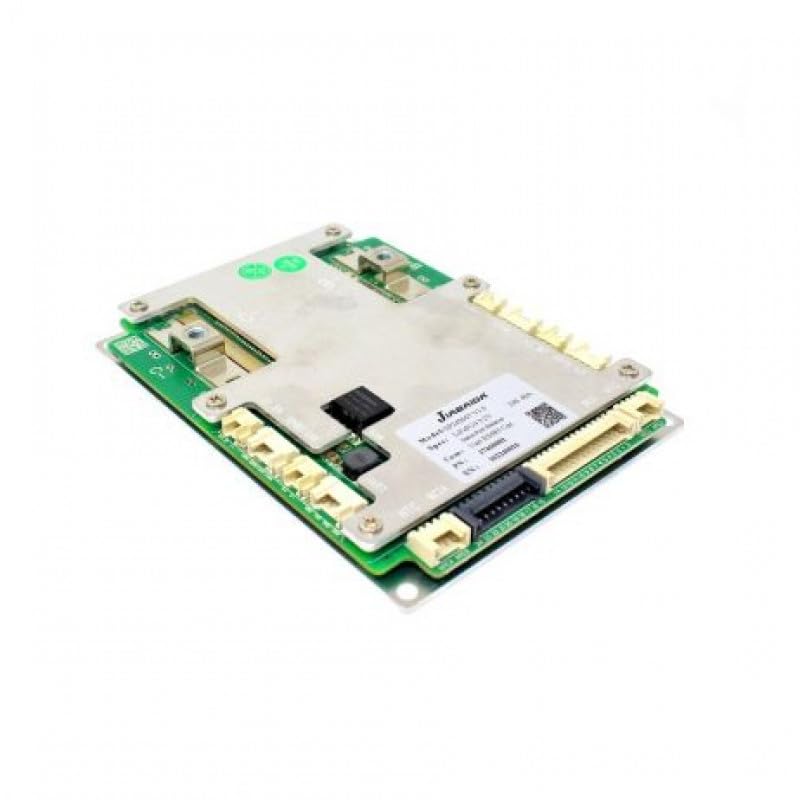
4.2 شکل: تړل view of the JBD Smart BMS board, showing connection points.
5. عملیاتي لارښوونې
The JBD Smart BMS utilizes Bluetooth connectivity for monitoring and configuration via a dedicated mobile application.
- اپلیکیشن ډاونلوډ کړئ: لټون the official JBD BMS application on your smartphone's app store (e.g., "Xiaoxiang BMS" or similar, as specified by the manufacturer).
- د بلوتوث له لارې وصل شئ:
- ډاډ ترلاسه کړئ چې ستاسو په سمارټ فون کې بلوتوټ فعال دی.
- Open the JBD BMS app. The app should automatically scan for nearby BMS devices.
- Select your BMS from the list of available devices. You may need to enter a default password (refer to the app's instructions or manufacturer documentation).
- د بیټرۍ حالت څارنه: Once connected, the app will display real-time data, including:
- د بیټرۍ ټول حجمtage
- د انفرادي حجرو حجمtages
- چارج / خارج کول اوسنی
- Battery temperature (from NTC sensors)
- د لګښت ریاست (SOC)
- BMS status (protection triggers, balancing status)
- فعال توازن: The BMS features an active balancer to equalize cell voltages. This process typically occurs automatically when cell voltage differences exceed a set threshold. You can monitor the balancing status through the app.
- Configuration (Advanced Users): The app may allow configuration of various parameters such as over-voltage ، تر وال لاندېtage, overcurrent thresholds, and temperature limits. Exercise extreme caution when modifying these settings, as incorrect values can damage the battery or BMS.
6. ساتنه
Regular maintenance ensures the longevity and reliable operation of your BMS and battery pack.
- بصری معاینه: په دوره یي ډول د BMS او ټولو تارونو معاینه وکړئ ترڅو د زیان، زنګ وهلو، یا خلاصو اړیکو نښې نښانې ومومئ.
- پاکوالی: د BMS واحد پاک او له دوړو او کثافاتو څخه پاک وساتئ. د پاکولو لپاره وچ، نرم ټوکر وکاروئ.
- د چاپیریال شرایط: Ensure the BMS operates within its specified temperature and humidity ranges. Avoid extreme conditions.
- د فرم ویئر تازه معلومات: جوړونکي وګورئ website or app for any available firmware updates for the BMS. Follow update instructions carefully.
7. ستونزه حل کول
If you encounter issues with your JBD Smart BMS, refer to the following common problems and solutions:
- BMS نه فعالیږي:
- Check all main power connections (B- and P-) for secure contact and correct polarity.
- د بیټرۍ پیک حجم تایید کړئtage is within the BMS operating range.
- Ensure the external switch (if present) is in the 'ON' position.
- د بلوتوث اتصال نشته:
- Confirm the Bluetooth module is correctly plugged into the BMS.
- Ensure Bluetooth is enabled on your smartphone and the app has necessary permissions.
- د اپلیکیشن یا خپل تلیفون بیا پیلولو هڅه وکړئ.
- Move closer to the BMS unit.
- غلط حجمtage لوستل:
- Recheck all balance wire connections to ensure they are in the correct sequence and securely attached to each cell.
- Inspect balance wires for damage or breaks.
- BMS Triggering Protection (e.g., Over-discharge, Overcurrent):
- Identify the specific protection triggered via the app.
- ډیر خارجیدل: د بیټرۍ کڅوړه چارج کړئ.
- زیات روان: Reduce the load or check for short circuits in the system. Ensure your load does not exceed the BMS's continuous current rating.
- ډیر ولtage/Under-volumtage: Check charger settings and cell balance.
- د تودوخې ډیروالی: Ensure adequate ventilation and check NTC sensor placement.
If problems persist after attempting these solutions, contact technical support.
8. مشخصات

Figure 8.1: JBD Smart BMS board showing model and specification details.
| فیچر | مشخصات |
|---|---|
| برانډ | Generic (Manufacturer: JBD -Jaibada) |
| د ماډل نوم | SMART BMS 24-72V -100A |
| د ماډل شمیره | 8S-24S,100A SMART |
| د بیټرۍ حجرو جوړښت | Lithium-Phosphate (LiFePO4, LFP) |
| Cell Count Range | 8S-24S |
| والیtage حد | 24V - 72V (Nominal) |
| اعظمي دوامداره خارجي جریان | 100 Amps |
| د اعظمي چارج اوسني | 50 Amps |
| Balancing Type | فعال بیلانسر |
| ارتباط | بلوتوث |
| ابعاد (L x W x H) | 15 x 6 x 3 سانتي متره |
| د توکي وزن | 500 ګرامه |
| د اصلي هیواد | چین |
9. د تضمین معلومات
This product is sold without an explicit warranty. Please refer to your point of purchase for any return or exchange policies.
10. ملاتړ
For technical assistance or inquiries, please contact:
OLEIO SHOPZ
تلیفون: 8137035522