
1. پیژندنه
Thank you for choosing the QDVOPHZA 10K 20MP Outdoor Wireless WiFi Security Camera. This advanced surveillance system is designed to provide comprehensive security monitoring with its ultra-high definition resolution, 10x optical zoom, automatic tracking, and multi-screen viewing capabilities. This manual will guide you through the installation, operation, and maintenance of your new security camera to ensure optimal performance and longevity.
2. د خوندیتوب معلومات
- د بریښنا رسولو حجم ډاډمن کړئtage matches the camera's requirements (DC 12V). Incorrect voltage کولی شي وسیله زیانمن کړي.
- کیمره د سختې تودوخې، رطوبت، یا زنګ وهونکي چاپیریال سره مه مخ کوئ.
- Avoid direct exposure to sunlight for extended periods, as this may affect image quality and device lifespan.
- Install the camera in a secure location where it cannot be easily tampسره جوړ شوی.
- Keep the camera away from strong electromagnetic fields.
- د هر ډول ساتنې یا پاکولو دمخه بریښنا قطع کړئ.
- یوازې د تولید کونکي لخوا مشخص شوي لوازمات وکاروئ.
3. د بسته محتويات
مهرباني وکړئ د بکس خلاصولو پر مهال د کڅوړې محتويات وګورئ. که کوم توکي ورک یا خراب وي، نو خپل پرچون پلورونکي سره اړیکه ونیسئ.
- QDVOPHZA 10K 20MP Outdoor Wireless WiFi Security Camera
- د بریښنا اډاپټر (DC 12V)
- د غرونو سکرو کټ
- د کارن لارښود
4. محصول ختم شوview
Familiarize yourself with the components of your QDVOPHZA security camera.

شکل 4.1: مخکی view of the QDVOPHZA 10K 20MP Outdoor Wireless WiFi Security Camera, showing the main PTZ camera, two side fixed cameras, and antennas.

شکل 4.2: Diagram illustrating the four-screen camera system, with the main PTZ camera providing a zoomable view and three fixed lenses covering additional areas.
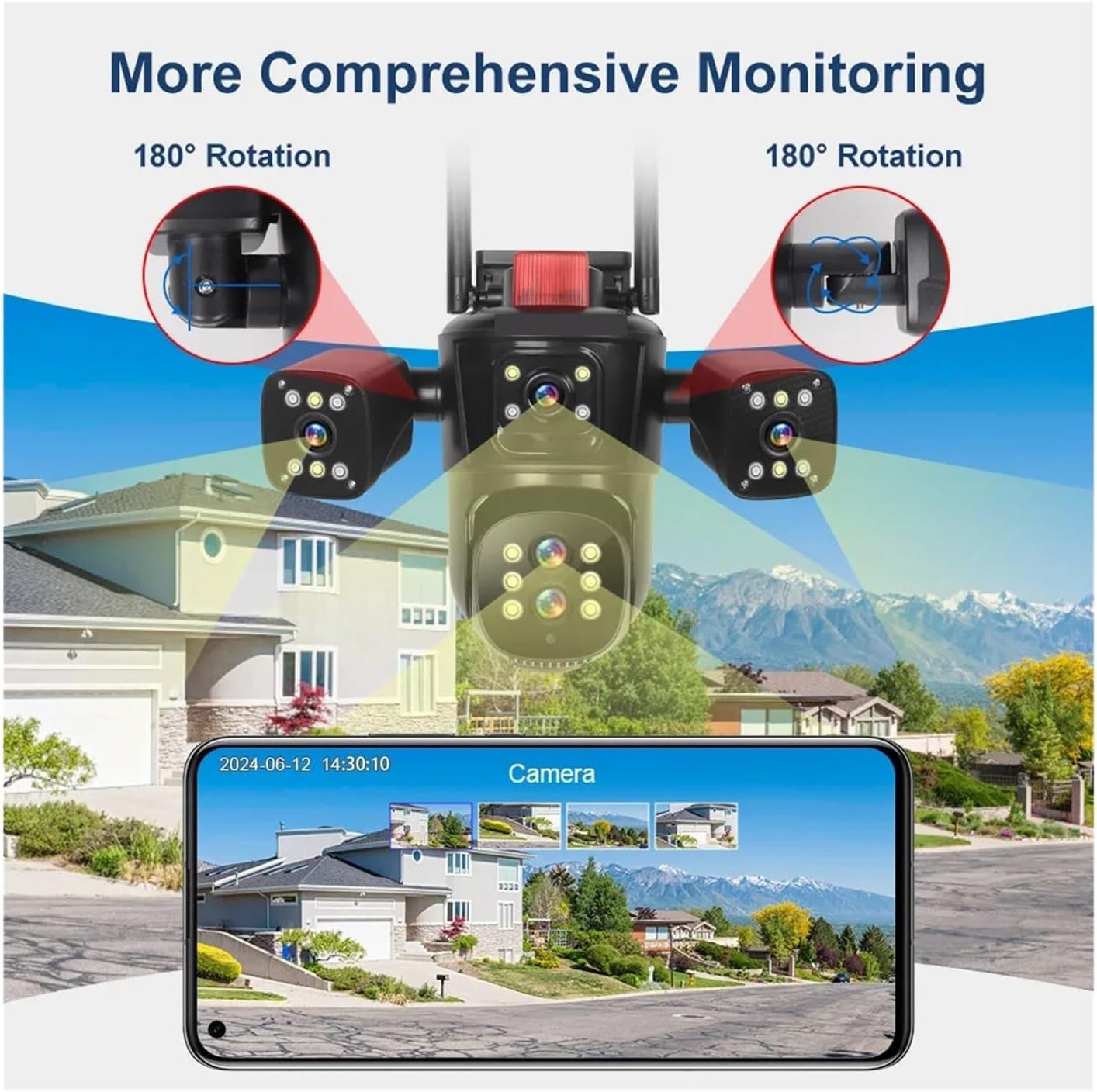
شکل 4.3: Visual representation of the camera's comprehensive monitoring capabilities, including 180-degree rotation for the side cameras and a smartphone interface displaying multiple camera feeds.
5. ترتیب کول
5.1 نصب کول
- یو ځای غوره کړئ: یو بهرنی ځای غوره کړئ چې مطلوب چمتو کوي viewing angle and is within range of your Wi-Fi network or near an Ethernet port. The camera is IP66 waterproof, suitable for various weather conditions.
- پورته کول: Use the provided screw kit to securely mount the camera to a wall or ceiling. Ensure the mounting surface is strong enough to support the camera's weight.
- زاویه تنظیم کړئ: Loosen the adjustment screws (if applicable) to position the camera for optimal coverage. The main PTZ camera offers horizontal 0-360 degrees and vertical 0-90 degrees movement. The side cameras can rotate 180 degrees for broader coverage.
5.2 د بریښنا نښلول
Connect the provided DC 12V power adapter to the camera's power input port and then plug it into a power outlet. The camera will power on and initiate its self-test sequence.
د شبکې اتصال
The camera supports both 2.4G WiFi and RJ45 network port access.
- بېسیم (وای فای): Download the recommended mobile application (refer to the packaging or quick start guide for app name). Follow the in-app instructions to add the camera and connect it to your 2.4GHz Wi-Fi network.
- تار لرونکی (ایترنیټ): Connect an Ethernet cable from your router to the camera's RJ45 port. The camera should automatically connect to the network. Then, use the mobile app to discover and add the camera.
6. عملیاتي لارښوونې
6.1 Mobile Application Usage
After successfully connecting your camera to the network, open the mobile application to access its features.
- ژوندی View: The app will display the live feeds from all four camera lenses simultaneously, providing a comprehensive overview ستاسو د څارنې سیمې.
- د PTZ کنټرول: Use the on-screen controls to pan (rotate horizontally) and tilt (rotate vertically) the main camera.
- نظری زوم: Utilize the 10x optical zoom feature to magnify distant objects without losing image clarity.
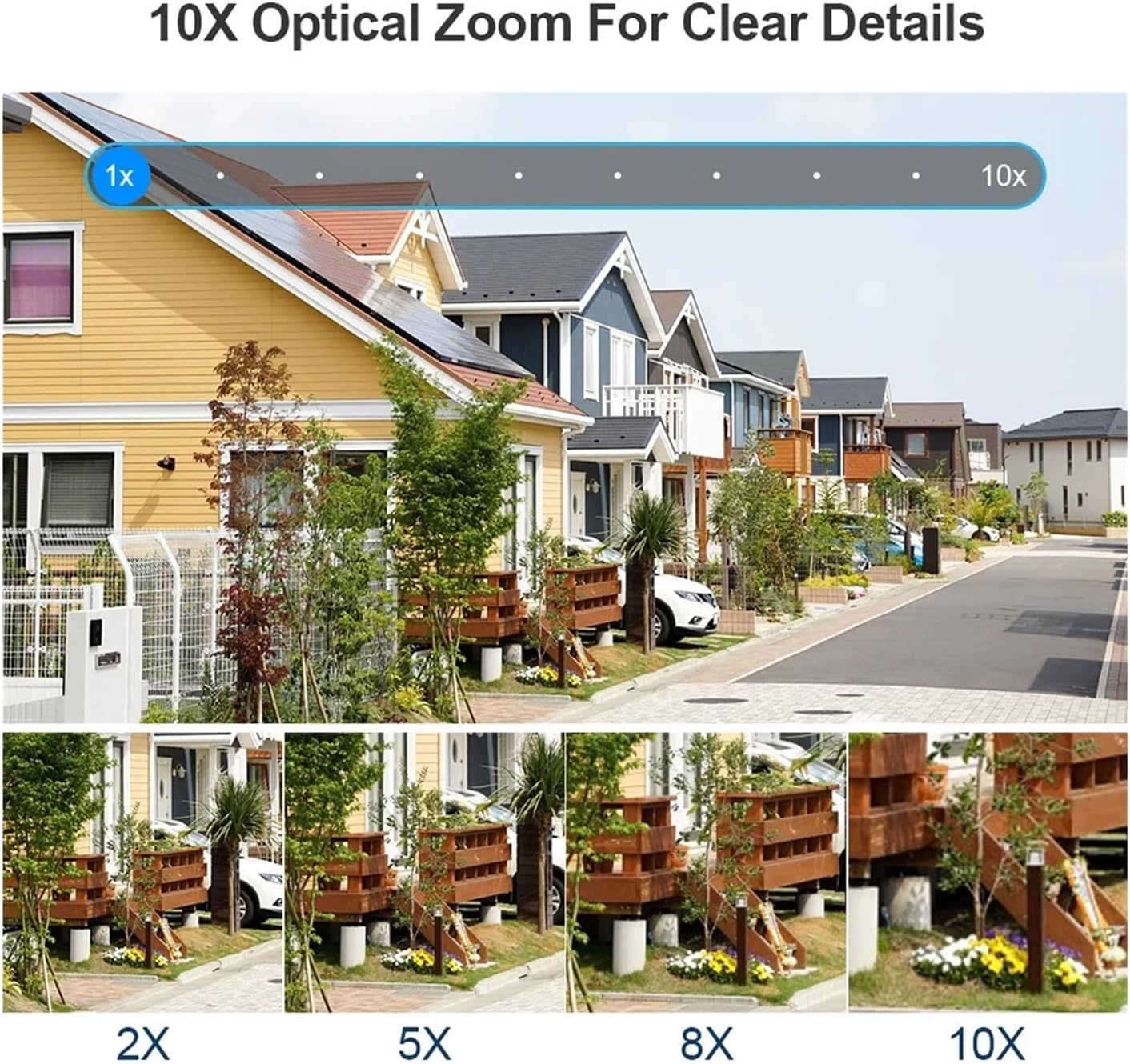
شکل 6.1: Demonstration of the 10x optical zoom capability, showing progressive magnification from 1x to 10x while maintaining image clarity.

شکل 6.2: Visual comparison highlighting the difference in detail captured by the 10x zoom camera versus a fixed focus camera, demonstrating the advantage of optical zoom.
6.2 Motion Detection and Auto Tracking
The camera features intelligent motion detection and automatic tracking.
- د حرکت کشف: The camera can detect movement within its field of view and send instant alerts to your mobile device.
- د ګاډو تعقیب: When a moving target is detected, the camera will automatically adjust its pan/tilt to keep the target centered in the frame, ensuring continuous monitoring of suspicious activity.

شکل 6.3: Illustration of the human detection and automatic tracking feature, showing the camera following a person and a mobile phone displaying an alarm notification.
6.3 ثبتول او ذخیره کول
The camera supports multiple storage options for video recordings.
- د TF کارت ذخیره کول: Insert a TF (microSD) card (up to 128GB, not included) into the designated slot for local storage of recordings. The camera supports video synchronous recording and playback.
- د بادل ذخیره کول: Subscribe to the cloud storage service via the mobile app to securely save your video data online. This ensures your recordings are safe even if the camera is damaged or stolen.
6.4 Two-Way Audio and Night Vision
- دوه طرفه آډیو: The built-in microphone and speaker allow for two-way communication, enabling you to listen in and speak through the camera via the app.
- د شپې لید رنګ: The camera is equipped with advanced night vision technology, providing clear, full-color video even in low-light conditions.
7. ساتنه
- پاکول: د کیمرې لینز په منظم ډول د نرم او وچ ټوکر سره پاک کړئ ترڅو د عکس کیفیت روښانه شي. سخت کیمیاوي مواد یا د کثافاتو مواد مه کاروئ.
- د فرم ویئر تازه معلومات: Check the mobile application periodically for available firmware updates. Keeping your camera's firmware up-to-date ensures optimal performance, security, and access to new features.
- د بریښنا دوره: If the camera experiences issues, try power cycling it by disconnecting and reconnecting the power adapter.
8. ستونزه حل کول
| ستونزه | احتمالي لامل | د حل لاره |
|---|---|---|
| کیمره فعاله نه ده | برېښنا نشته، اډاپټر خراب دی، اړیکه یې خرابه ده | د بریښنا آوټ لیټ وګورئ، ډاډ ترلاسه کړئ چې اډاپټر په خوندي ډول وصل دی، یو بل آوټ لیټ هڅه وکړئ. |
| د وائی فای سره د نښلولو توان نلري | Incorrect Wi-Fi password, camera too far from router, 5GHz network selected | Verify Wi-Fi password, move camera closer to router, ensure you are connecting to a 2.4GHz network. |
| د عکس ضعیف کیفیت | Dirty lens, low network bandwidth, insufficient lighting | Clean the camera lens, ensure stable internet connection, check lighting conditions. |
| Auto tracking not working | Feature disabled in app, obstruction in view, slow movement | Enable auto tracking in the app settings, ensure clear line of sight, ensure movement is detectable. |
| هیڅ غږ نشته یا د غږ کیفیت خراب دی | Microphone/speaker blocked, app volume low, network issues | Ensure microphone/speaker are clear, adjust app volume, check network stability. |
9. مشخصات
| برانډ | QDVOPHZA |
| د ماډل شمیره | w0u5903wei |
| لوړ تعریف | 20 Megapixels (10K resolution, 5 lenses x 4MP each) |
| ارتباط | WIFI (2.4G), RJ45 Ethernet Port |
| ذخیره کول | TF Card (Up to 128GB), Cloud Storage |
| د IP درجه بندي | IP66 (د اوبو ضد / د هوا ضد) |
| د حرکت سلسله (پین) | 0°-360° |
| د حرکت سلسله (ټک) | 0°-90° |
| نظری زوم | 10x |
| د آډیو تولید | دوه طرفه آډیو |
| ځانګړي ځانګړتیاوې | Color Night Vision, Motion Detection, Auto Tracking, Four Screens |
| د بریښنا رسول | DC 12V |
| د توکي وزن | 50 ګرامه |
10. تضمین او ملاتړ
This product comes with a standard manufacturer's warranty. Please refer to the warranty card included in your package or contact your retailer for specific warranty terms and conditions.
For technical support, troubleshooting assistance, or any questions regarding your QDVOPHZA security camera, please contact the customer support team through the contact information provided on the product packaging or the official brand webسایټ