
1. پیژندنه
This manual provides essential instructions for the proper use and maintenance of your SAMCOM BTEAR-02 Wireless Radio Earpiece. Please read this manual thoroughly before operating the device to ensure optimal performance and safety. The BTEAR-02 is designed for seamless wireless communication with compatible two-way radios.
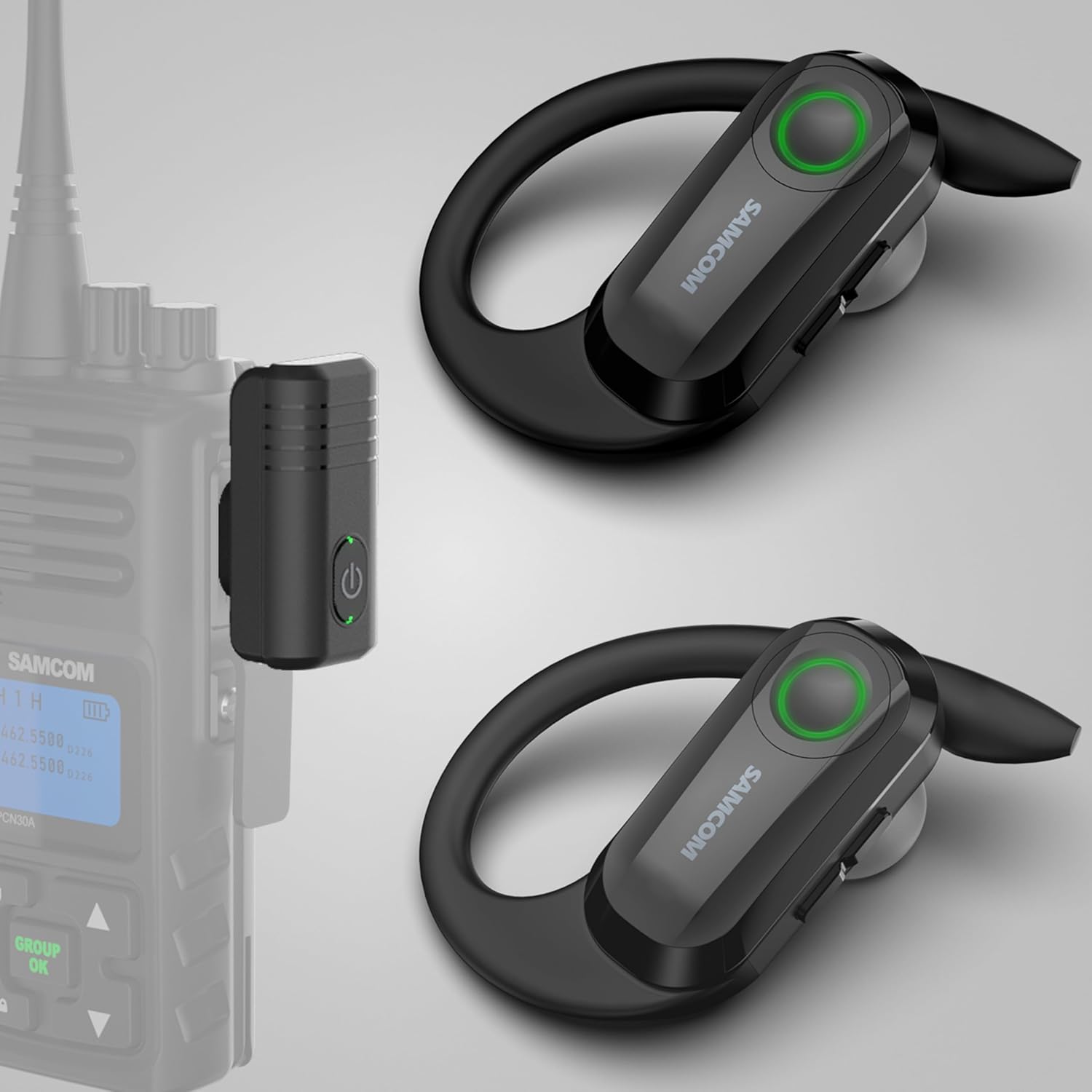
Image 1.1: SAMCOM BTEAR-02 Wireless Radio Earpiece and K-Head Dongle. This image displays the two wireless earpieces and the K-Head dongle, which connects to a walkie-talkie, along with the charging cable and various ear cap sizes.
۲. په بکس کې څه دي؟
ډاډ ترلاسه کړئ چې لاندې ټول توکي ستاسو په بسته کې شامل دي:
- Single Wireless Earpiece (Left)
- Backup Earpiece (Right)
- Replaceable Clear Ear Caps (various sizes)
- New Add In-Ear Caps (various sizes)
- K Head Plug Dongle
- 2-in-1 USB Charger Cable

Image 2.1: Package contents including two earpieces, a K-head dongle, a charging cable, and multiple sets of ear caps.
۴. د تنظیم لارښوونې
3.1 Charging the Earpiece and Dongle
Before initial use, ensure both the wireless earpiece and the K-Head dongle are fully charged. Use the provided 2-in-1 USB charger cable.
- Earpiece Charging: Connect the magnetic end of the charging cable to the charging contacts on the earpiece.
- Dongle Charging: Connect the Type-C end of the charging cable to the Type-C port on the K-Head dongle.
- Charging time for each earpiece is approximately 1.5 hours.
- Charging time for the 2 Pin Dongle is approximately 1.5 hours.

Image 3.1: Illustration of the 2-in-1 USB charging cable connected to both the earpiece via magnetic contacts and the dongle via a Type-C port.
3.2 Attaching Ear Caps and Ear Hooks
Select the appropriate size ear caps for a comfortable and secure fit. The ear hooks are freely removable and replaceable for either left or right ear use.
- Gently attach the chosen ear cap to the earpiece nozzle.
- Adjust the ear hook to fit comfortably over your ear.

انځور ۳.۱: نږدې انځور view of the earpiece showing how to attach the ear caps and highlighting the replaceable ear hooks.
3.3 Connecting the Dongle to Your Walkie-Talkie
The K-Head dongle features a two-pin plug design (2.5mm and 3.5mm diameter, 11mm space between pins) compatible with SAMCOM FPCN10A/FPCN30A/FWCN30A walkie-talkies and most 2-pin K-head walkie-talkies.
- Insert the K-Head dongle's two pins into the corresponding ports on your walkie-talkie.
- خوندي پیوستون ډاډمن کړئ.

Image 3.3: Diagram illustrating the K-Type connector dimensions and showing incompatible M-Type and Y-Type connectors. This helps users verify their walkie-talkie's port type.
Compatibility Notice: This earpiece is not compatible with Midland/Motorola walkie-talkies or other wireless devices like computers, phones, or laptops.
4. عملیاتي لارښوونې
۵.۳ د بریښنا فعالول/بندول او جوړه کول
- پاور آن: Press and hold the PTT/Power button on the earpiece until the indicator light illuminates.
- بندول: Press and hold the PTT/Power button until the indicator light turns off.
- The earpiece and dongle are designed for auto-pairing. Once both are powered on and within range, they should connect automatically.

Image 4.1: A close-up of the earpiece highlighting the PTT/Power button, indicating clear sound and noise cancellation features, and auto-pairing connection.
4.2 Using the Push-to-Talk (PTT) Function
The earpiece features an integrated PTT microphone for hands-free communication.
- To transmit, press and hold the PTT button on the earpiece or the PTT button on your connected walkie-talkie.
- د اوریدلو لپاره د PTT تڼۍ خوشې کړئ.
- If the PTT button is not held down during transmission, others will only hear muffled audio or nothing at all.

Image 4.2: Two individuals in uniform wearing the earpiece, demonstrating hands-free communication with their walkie-talkies.
4.3 Removable Ear Hooks
The ear hooks are designed for user comfort and can be removed and replaced to suit either the left or right ear, ensuring a secure fit for various users.

Image 4.3: Four different individuals wearing the SAMCOM BTEAR-02 earpiece in various professional settings, highlighting its versatility and comfortable fit.
5. ساتنه
5.1 پاکول
Regular cleaning helps maintain the device's performance and hygiene.
- Wipe the earpiece and dongle with a soft, dry cloth.
- For ear caps, remove them and clean with mild soap and water, then dry thoroughly before reattaching.
- سخت کیمیاوي توکي او کثافات پاکونکي مه کاروئ.
5.2 ذخیره کول
When not in use, store the earpiece and dongle in a cool, dry place away from direct sunlight and extreme temperatures.
6. ستونزه حل کول
6.1 No Audio or Muffled Transmission
- Ensure the earpiece and dongle are fully charged.
- Verify that the K-Head dongle is securely connected to the walkie-talkie.
- Confirm that the earpiece and dongle are powered on and successfully paired.
- When transmitting, ensure the PTT button on the earpiece or walkie-talkie is held down firmly. Releasing it too early or not pressing it completely can result in muffled or no transmission.
6.2 Earpiece Not Staying On/Comfort Issues
- Experiment with different sizes of ear caps to find the most secure and comfortable fit.
- Adjust the ear hook position to ensure it sits properly over your ear.
۵.۱ د بیټرۍ لنډ ژوند
- ډاډ ترلاسه کړئ چې وسیله د هرې کارونې دمخه په بشپړ ډول چارج شوې.
- The earpiece has a work time of approximately 4 hours, and the dongle has a work time of approximately 10 hours. If you require extended use, utilize the backup earpiece provided in the upgraded package.
7. مشخصات
| فیچر | مشخصات |
|---|---|
| د ماډل شمیره | BTEAR-02 |
| د توکي وزن | 3.2 اونس |
| د کڅوړې ابعاد | 5.28 x 3.39 x 1.65 انچه |
| بیټرۍ | 2 لیتیم پولیمر بیټرۍ (شامل) |
| Earpiece Battery Life | 4 ساعته |
| Dongle Battery Life | 10 ساعته |
| د غږ قومانده | تڼۍ |
| د نښلونکي ډول | 2 Pin K Head (2.5mm & 3.5mm, 11mm space) |

Image 7.1: Diagram showing the physical dimensions of the SAMCOM BTEAR-02 earpiece and K-head dongle in centimeters.
۸. د محصول رسمي ویډیوګانې
8.1 Wireless Radio Earpiece for Walkie Talkies Upgrade Version
ویډیو ۱: دا ویډیو یو څه وړاندې کويview of the SAMCOM BTEAR-02 wireless radio earpiece, highlighting its upgraded features and compatibility with walkie-talkies.
8.2 SAMCOM Wireless Headsets for Walkie Talkies 2 Pin Plug
Video 8.2: A detailed video demonstrating the SAMCOM wireless headsets, focusing on the 2-pin plug connection and its use with walkie-talkies.
8.3 SAMCOM BTEAR-02B Upgraded Wireless Radios Earpiece with MIC
Video 8.3: This video showcases the upgraded SAMCOM BTEAR-02B wireless earpiece, emphasizing its microphone capabilities and overall design.
8.4 BTEAR-02B Wireless headsets for two way radios
Video 8.4: A concise video demonstrating the BTEAR-02B wireless headsets in action with two-way radios, focusing on practical use.
9. تضمین او ملاتړ
9.1 د تضمین معلومات
The SAMCOM BTEAR-02 Wireless Radio Earpiece comes with a 1-Year Warranty from the date of purchase. This warranty covers manufacturing defects and ensures the product is free from defects in material and workmanship under normal use.
مهرباني وکړئ د تضمین ادعاګانو لپاره د پیرود ثبوت وساتئ.
9.2 د پیرودونکي ملاتړ
For technical assistance, troubleshooting, or warranty inquiries, please contact SAMCOM customer support through the Amazon platform. Provide your product model number (BTEAR-02) and a detailed description of the issue for efficient service.