
1. پیژندنه
Welcome to the user manual for your new XIAOMI Redmi Note 14 Pro+ 5G Smartphone. This guide provides essential information on setting up, operating, and maintaining your device. Please read it carefully to ensure optimal performance and longevity of your smartphone.
2. د بسته محتويات
ډاډ ترلاسه کړئ چې ستاسو کڅوړه لاندې توکي لري:
- XIAOMI Redmi Note 14 Pro+ 5G Smartphone
- USB کیبل
- د چټک پیل لارښود (ممکن د سیمې له مخې توپیر ولري)
- د سیم ایستلو وسیله (ممکن د سیمې له مخې توپیر ولري)
Note: A charger is not included in the package. Please use a compatible 120W HyperCharge adapter for optimal charging.
3. وسیله ختمه شوهview
Familiarize yourself with the physical components of your Redmi Note 14 Pro+ 5G.
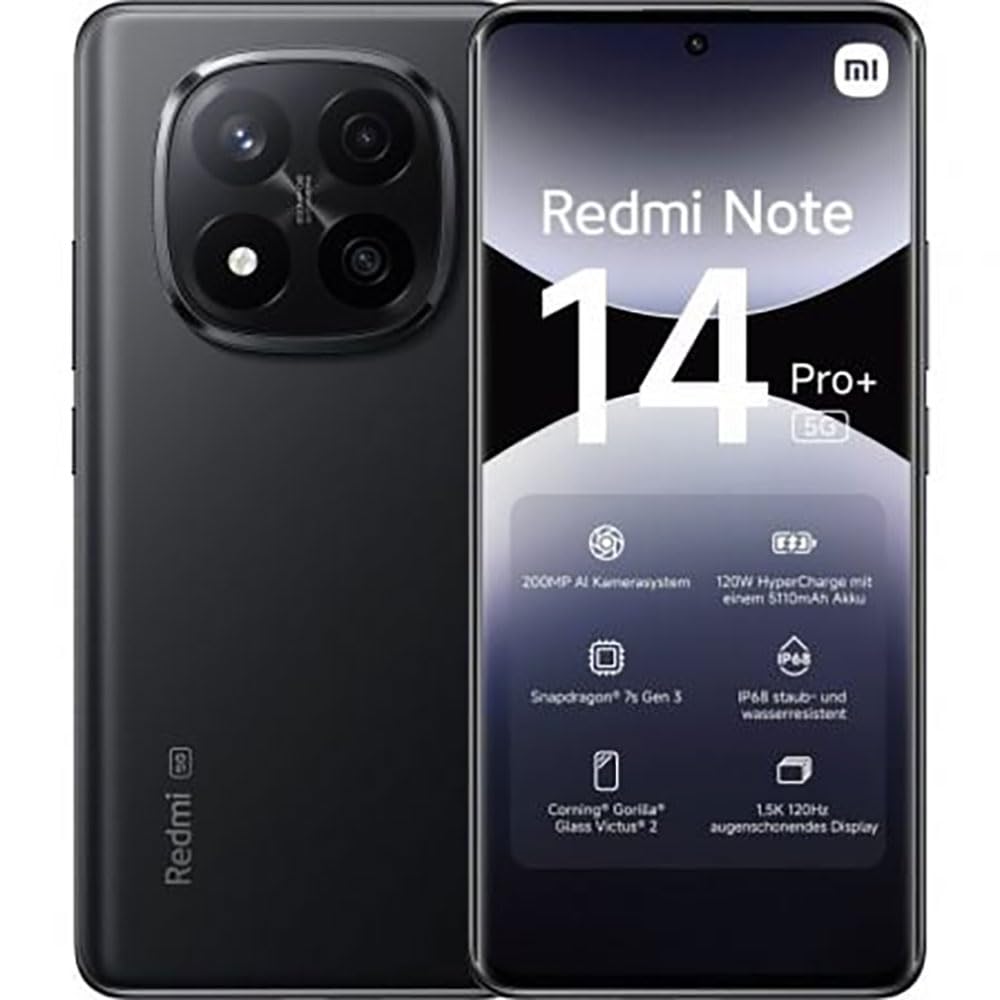
The image displays the front and back of the XIAOMI Redmi Note 14 Pro+ 5G smartphone. The front shows the display with 'Redmi Note 14 Pro+ 5G', '200 Megapixels', and '256 GB' text. The back features a prominent camera module with multiple lenses and the 'Redmi 5G' branding.
مهمې برخې:
- مخکینۍ ښودنه: 6.67-inch 1.5K 120Hz AMOLED display with Corning Gorilla Glass Victus 2.
- د شا کیمرې ماډل: Houses the 200MP Pro-Grade AI Camera system.
- د بریښنا تڼۍ: په اړخ کې موقعیت لري، د وسیلې د فعالولو/بندولو او ویښولو/خوبولو لپاره کارول کیږي.
- د حجم تڼۍ: په اړخ کې موقعیت لري، د رسنیو او زنګ وهلو حجم تنظیمولو لپاره کارول کیږي.
- د USB ډول-C پورټ: د چارج کولو او ډیټا لیږد لپاره.
- د سیم کارت سلاټ: Supports Dual SIM Nano SIM cards.
- ويناوال: د آډیو آوټ پټ لپاره سټیریو سپیکرې.
4. ترتیب کول
4.1. د سیم کارت داخلول
- د خپل وسیلې په اړخ کې د سیم کارت ټری ومومئ.
- د سیم ایستلو وسیله د ټرې تر څنګ په کوچني سوري کې دننه کړئ او په کلکه فشار ورکړئ تر هغه چې ټرې بهر راشي.
- Place your Nano SIM card(s) into the tray with the gold contacts facing down. Ensure proper orientation.
- په نرمۍ سره ټری بیرته په سلاټ کې فشار ورکړئ تر هغه چې دا په خپل ځای کې کلیک وکړي.
۴.۲. ستاسو د وسیلې فعالول
فشار ورکړئ او ونیسئ د بریښنا تڼۍ on the side of the phone until the XIAOMI logo appears on the screen. Follow the on-screen instructions to complete the initial setup, including connecting to Wi-Fi, setting up your Google account, and configuring security features like fingerprint recognition.
۴. لومړنی چارج
It is recommended to fully charge your device before first use. Connect the USB Type-C cable to the phone and a compatible 120W HyperCharge adapter (not included) to a power outlet.
۵. د خپل سمارټ فون چلول
5.1. بنسټیز نیویګیشن
- ټچ سکرین: د انتخاب لپاره ټایپ کړئ، د سکرول کولو لپاره سوائپ کړئ، د زوم کولو لپاره پنچ کړئ.
- کور سکرین: ستاسو د ایپسونو او ویجټونو مرکزي مرکز.
- د خبرتیا پینل: د خبرتیاو او چټکو ترتیباتو ته د لاسرسي لپاره د سکرین له پورتنۍ برخې څخه ښکته سوائپ کړئ.
- د اپلیکیشن دراز: Swipe up from the bottom of the screen (or tap the app drawer icon) to view ټول نصب شوي غوښتنلیکونه.
۱. بریښنا فعاله/بنده کړئ او بیا پیل کړئ
- ته بندول: Press and hold the Power Button until the power menu appears, then select "Power off."
- ته بیا پیل کول: Press and hold the Power Button until the power menu appears, then select "Restart."
5.3. امنیتي ځانګړتیاوې
Your device supports various security options:
- د ګوتو نښان پیژندنه: د چټک او خوندي خلاصولو لپاره د خپلو ګوتو نښې ثبت کړئ.
- د مخ خلاصول: د وسیلې د خلاصولو لپاره خپل مخ وکاروئ.
- پن/نمونه/پټنوم: Standard security methods.
Access these settings via ترتیبات > امنیت او محرمیت.
۲. د کیمرې ځانګړتیاوې
The Redmi Note 14 Pro+ 5G features a powerful 200MP Pro-Grade AI Camera system designed to enhance your photography experience.
- ۵۰ میګاپکسله اصلي کامره: Capture highly detailed images with optical image stabilization (OIS).
- Multiple Camera Modes: Includes automatic, scene, portrait, and manual modes for versatile shooting.
- Dual LED Flash: Provides enhanced lighting in low-light conditions.
- مخکینۍ کیمره: A 20MP front sensor for high-quality selfies and video calls.
- ویډیو ثبتول: Supports up to 8K video capture at 120 fps.
۴. د مصنوعي ذهانت ځانګړتیاوې
Leverage the integrated AI functionalities for a smarter user experience:
- د AI پاکولو پرو: Intelligently remove unwanted objects or people from your photos.
- د مصنوعي ذهانت انځور پراخول: Expand the boundaries of your images using AI.
- د مصنوعي ذهانت یادښتونه: Smart note-taking capabilities.
- د مصنوعي ذهانت فرعي سرلیکونه: Generate subtitles for videos or audio in real-time.
- د مصنوعي ذهانت ریکارډر: Enhanced voice recording with AI features.
- د مصنوعي ذهانت ژباړونکی: په ریښتیني وخت کې د ژبې ژباړه.
- جوزا: Integrated AI assistant.
- د ګوګل لخوا د لټون لپاره حلقه: په خپل سکرین کې د شیانو په شاوخوا کې د معلوماتو لټون په چټکۍ سره وکړئ.
8. چارج کول
Your Redmi Note 14 Pro+ 5G supports 120W HyperCharge technology for rapid charging.
- د بیټرۍ ظرفیت: ۸۳۵۰mAh لیتیم پولیمر بیټرۍ.
- چارج کول: Use the provided USB Type-C cable with a compatible 120W power adapter (sold separately) for optimal charging speeds.
- د بیټرۍ ژوند: Expect up to 20 hours of talk time. Actual battery life may vary based on usage.
Always use certified charging accessories to prevent damage to your device.
9. ساتنه
۴.۵. د اوبو او دوړو مقاومت
دا وسیله ځانګړتیاوې لري چې IP68 درجه بندي for dust and water resistance. This means it is protected against dust ingress and can withstand immersion in water up to 1.5 meters for 30 minutes. However, this resistance is not permanent and may decrease over time with normal wear. Avoid exposing the device to hot water, saltwater, or other liquids.
۱. خپل وسیله پاکول
- د سکرین او بدن پاکولو لپاره نرم، لینټ نه لرونکی ټوکر وکاروئ.
- د کثافاتو پاکوونکو، محلولونو، یا ایروسول سپرې کارولو څخه ډډه وکړئ.
- If the device gets wet, wipe it thoroughly with a clean, dry cloth before charging or using ports.
9.3. د سافټویر تازه معلومات
په منظم ډول د سافټویر تازه معلومات وګورئ او نصب کړئ ترڅو ډاډ ترلاسه کړئ چې ستاسو وسیله وروستي ځانګړتیاوې، امنیتي پیچونه، او د فعالیت ښه والی لري. لاړ شئ ترتیبات > د تلیفون په اړه > د MIUI نسخه د تازه معلوماتو لپاره چک کول.
10. ستونزه حل کول
که تاسو په خپل وسیله کې ستونزې سره مخ شئ، لاندې عام حلونه هڅه وکړئ:
- وسیله نه فعاله کیږي: ډاډ ترلاسه کړئ چې بیټرۍ چارج شوې ده. لږترلږه د 15 دقیقو لپاره چارجر سره وصل شئ، بیا یې چالانولو هڅه وکړئ.
- د اپلیکیشنونو خرابېدل یا کنګل کېدل: ستونزه لرونکی اپلیکیشن بند کړئ او بیا یې پرانیزئ. که ستونزه دوام وکړي، خپل تلیفون بیا پیل کړئ.
- د شبکې ضعیف اړیکه: Check your SIM card is correctly inserted. Try toggling Airplane Mode on and off. If the issue persists, contact your network provider.
- بیټرۍ په چټکۍ سره له مینځه وړل: د سکرین روښانتیا کمه کړئ، نه کارول شوي ایپسونه بند کړئ، او غیر ضروري ځانګړتیاوې لکه GPS یا بلوتوت غیر فعال کړئ کله چې کارول نه وي.
- سکرین بې ځوابه: Force restart your device by holding the Power Button for approximately 10-15 seconds.
د نورو پیچلو مسلو لپاره، د XIAOMI رسمي ملاتړ ته مراجعه وکړئ. webسایټ یا د پیرودونکي خدمت سره اړیکه ونیسئ.
11. مشخصات
| فیچر | مشخصات |
|---|---|
| برانډ | XIAOMI |
| د ماډل نوم | د ریډمي نوټ 14 پرو + 5G |
| عملیاتي سیسټم | Android 14 |
| د CPU ماډل | سنیپډریګون 7 Gen 3 |
| RAM | 8 جي بي |
| د ذخیره کولو ظرفیت | 256 جي بي |
| د سکرین اندازه | ۷۸۷ انچه |
| د ښودلو ریزولوشن | 2712 x 1220 پکسله |
| د تازه کولو نرخ | 120 Hz |
| د شا کیمرې ریزولوشن | 200 Megapixels (with OIS) |
| د مخکینۍ کیمرې ریزولوشن | ۲ میګاپکسله |
| د بیټرۍ ظرفیت | 5110 mAh |
| د چارج کولو ټیکنالوژي | ۱۲۰ واټ هایپر چارج |
| د اوبو مقاومت | IP68 |
| سیلولر ټیکنالوژي | 5G |
| د سیم کارت ډول | Nano SIM (Dual SIM) |
| ارتباط | د USB ډول-C |
12. تضمین او ملاتړ
۹.۱. د جوړونکي تضمین
Your XIAOMI Redmi Note 14 Pro+ 5G Smartphone comes with a د جوړونکي دوه کلن تضمین. دا تضمین د عادي استعمال لاندې موادو او کاریګرۍ نیمګړتیاوې پوښي. مهرباني وکړئ د تضمین ادعاوو لپاره د پیرود ثبوت وساتئ.
The warranty does not cover damage caused by accidents, misuse, unauthorized modifications, or normal wear and tear.
12.2. د پیرودونکي ملاتړ
For technical assistance, warranty claims, or further information, please visit the official XIAOMI support website or contact their customer service department. Contact details can typically be found on the XIAOMI webسایټ یا ستاسو د محصول سره شامل شوي تضمین کارت کې.