
AIKELA YX01,YK01
AIKELA Bluetooth Speaker with Video Scrolling Remote and Phone Stand User Manual
Brand: AIKELA | Model: YX01, YK01
پیژندنه
Thank you for choosing the AIKELA Bluetooth Speaker with Video Scrolling Remote and Phone Stand. This multi-functional device is designed to enhance your media experience by providing amplified sound, a stable viewing platform, and convenient remote control. Whether you're watching videos, listening to podcasts, or making hands-free calls, this product offers a seamless and enjoyable experience.

The AIKELA Bluetooth Speaker with Phone Stand and its accompanying remote control.
د بسته محتويات
مهرباني وکړئ د لاندې توکو لپاره په بسته کې وګورئ:
- Bluetooth Speaker with Phone Stand x 1
- د ریموٹ کنټرول x 1
- ټایپ - سي کیبل x 1
- د کارونکي لارښود x ۱

د محصول په کڅوړه کې شامل ټولو توکو بصري استازیتوب.
د محصول ځانګړتیاوې
- Small But Powerful Sound: The upgraded wireless Bluetooth speaker delivers clear, loud sound for music, movies, videos, and podcasts. It includes a built-in microphone for crisp hands-free calls, which can also assist individuals with hearing loss.
- Video Scrolling Remote: A dedicated Bluetooth remote allows for easy scrolling, pausing, playing videos, and adjusting phone volume. This feature is ideal for platforms like YouTube, TikTok, or Netflix, freeing your hands during various activities.
- د تنظیم وړ تلیفون سټینډ: The stand features a weighted base with non-slip silicone to securely hold your phone. Its adjustable angle ensures optimal viewing, whether on a desk, kitchen counter, or bedside table.
- Portable & Long-Lasting: With a foldable, lightweight design, the speaker is easy to transport. Its rechargeable battery provides up to 10 hours of use on a single 1.5-hour charge, making it suitable for home, office, or travel.

The product combines a Bluetooth speaker, phone stand, built-in microphone, and remote control.

خوند واخلئ amplified sound for media and clear hands-free calls.

The phone stand is adjustable and foldable for convenience.

The speaker offers up to 10 hours of battery life on a 1.5-hour charge.
د تنظیم کولو لارښود
1. د وسیلې چارج کول
Before first use, fully charge the AIKELA Bluetooth Speaker using the provided Type-C cable. Connect the cable to the speaker's charging port and a compatible USB power source.
2. بریښنا کول/بندول
Locate the ON/OFF button on the speaker. Press and hold to power on or off the device.
3. Bluetooth Pairing (Speaker)
- Ensure the speaker is powered on and in pairing mode (indicated by a blinking blue LED light).
- On your smartphone or tablet, go to Bluetooth settings.
- لټون available devices and select "YX01" (or similar name) to connect.
- Once connected, the LED light will become solid blue.
4. Bluetooth Pairing (Remote Control)
- Slide the ON/OFF button on the back of the remote control to the ON position.
- On your smartphone or tablet, go to Bluetooth settings.
- لټون available devices and select "YK01 (Remote Control)" to connect.
- Once connected, the remote is ready for use.
5. iOS Specific Setup for Remote Control
For iOS devices, you must enable AssistiveTouch for the remote control to function correctly with video scrolling and other gestures. Follow these steps:
- ورتګ ترتیبات.
- وټاکئ لاسرسی.
- ټپ لمس.
- چالانول Assistive Touch.
- ډاډ ترلاسه کړئ د لمس اشارې ترسره کړئ چالان دی.
- تنظیم کړئ د تعقیب حساسیت to 20%-30% for optimal performance.

Step-by-step guide for enabling AssistiveTouch on iOS devices to use the remote control.
6. Adjusting the Phone Stand
The phone stand is designed to be adjustable for various viewing angles. Gently adjust the hinges to achieve your desired height and tilt. Ensure your device is securely placed on the stand's non-slip surface. The stand is compatible with most 4"-13" smartphones, tablets, and e-readers.
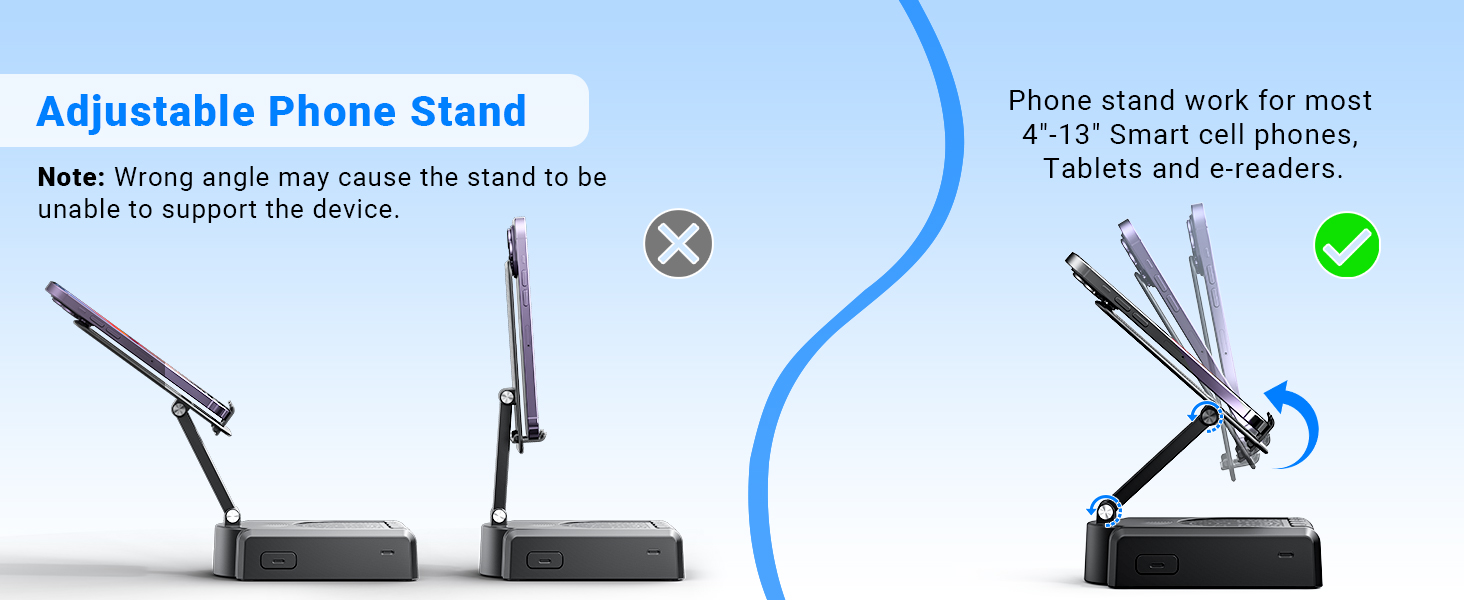
Demonstration of the adjustable angles of the phone stand.
د عملیاتو لارښوونې
د سپیکر کنټرولونه
The speaker features intuitive buttons for basic functions:
- آن/بند: وسیله فعاله یا بنده کړئ.
- وقفه/لوبه/ځواب/ځړول: Control media playback and phone calls.
- مخکینی/حجم-: Skip to the previous track or decrease volume.
- بل/حجم+: Skip to the next track or increase volume.
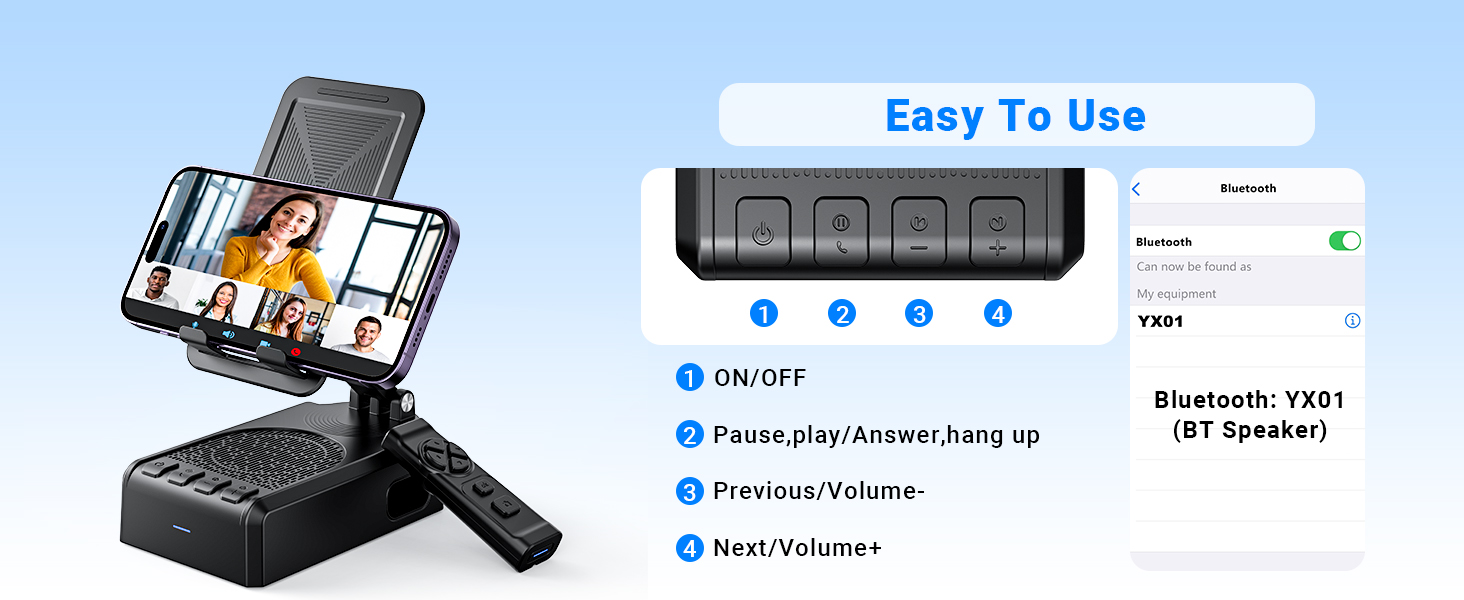
اوورview of the speaker's control buttons and their functions.
د ریموټ کنټرول دندې
The Bluetooth remote control provides convenient hands-free operation for various applications:
- Single click (Up/Down arrows): Scroll up/down in apps like TikTok or YouTube.
- Single click (Left/Right arrows): Swipe left/right (e.g., for next/previous video).
- Long press (Left/Right arrows): Adjust volume (Volume- / Volume+).
- OK button (center): میډیا پلی کړئ / بند کړئ.
- Double click (OK button): Single 'like' in social media apps.
- Long press 3s (OK button): Continuous likes (in TikTok live state).
- د کیمرې تڼۍ: Exit continuous likes (in TikTok live state).
Note: The remote control is not compatible with music software or Kindle devices.
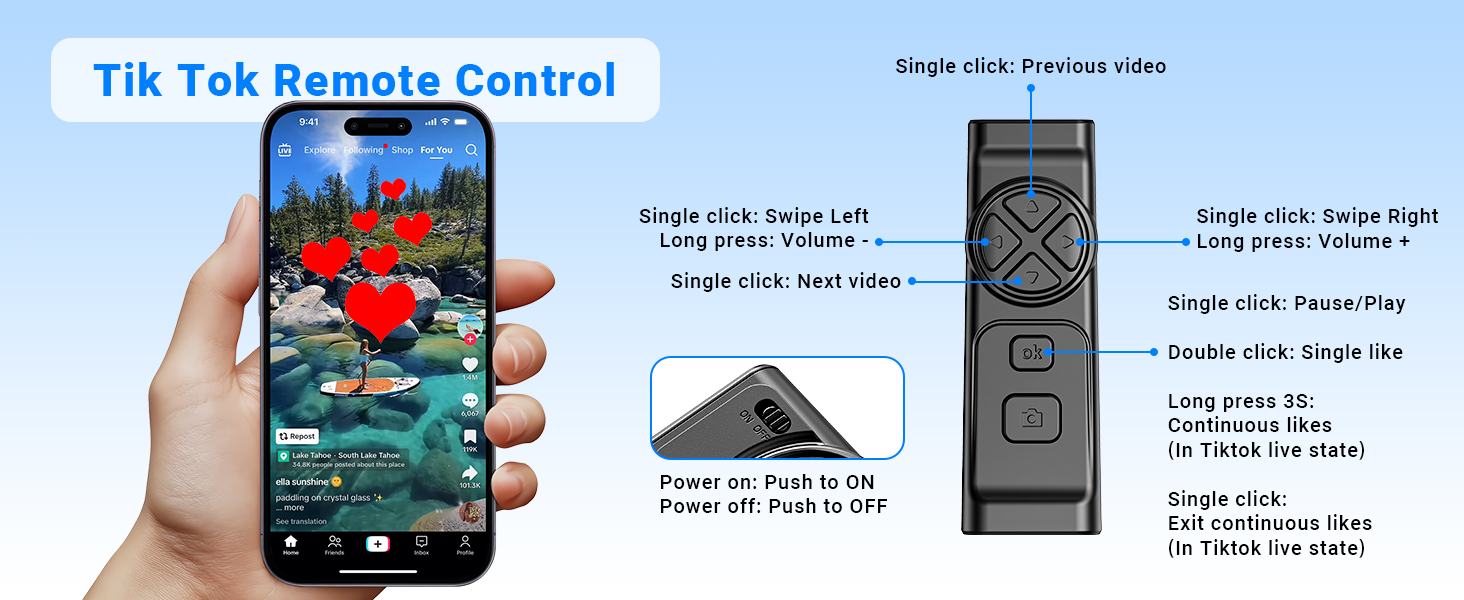
Detailed functions of the remote control for video scrolling and interaction.
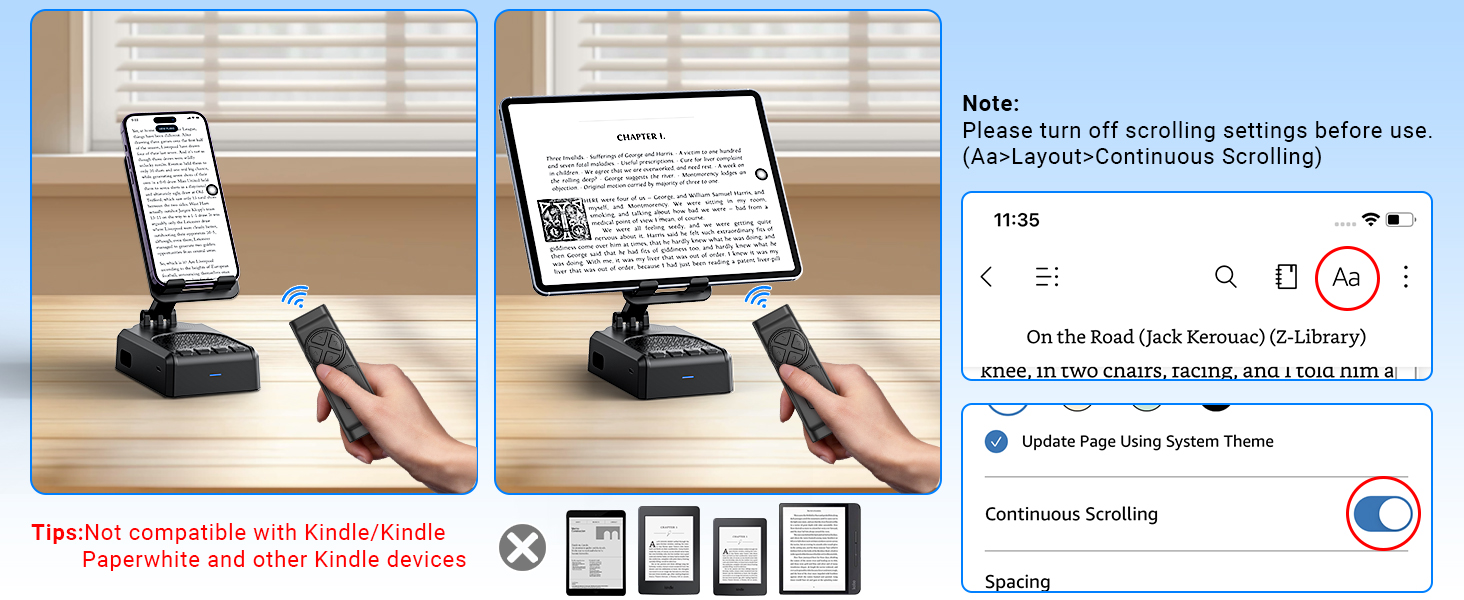
Important note regarding the remote control's compatibility with certain applications and devices.
پاملرنه او ساتنه
- Keep the device dry. Do not expose it to moisture or extreme temperatures.
- وسیله د نرم او وچ ټوکر سره پاکه کړئ. د سختو کیمیاوي موادو یا د کثافاتو پاکوونکو کارولو څخه ډډه وکړئ.
- وسیله په یخ او وچ ځای کې ذخیره کړئ کله چې نه کارول کیږي.
- د قوي تاثیراتو سره د وسیله له مینځه وړلو یا تابع کولو څخه ډډه وکړئ.
د ستونزو حل کول
Remote Control Issues (iOS)
ستونزه: The remote control cannot scroll through videos on an iOS device.
حل لاره: Ensure AssistiveTouch is properly configured. Go to امستنې> لاسرسي> لمس> AssistiveTouch. Turn on AssistiveTouch, then turn on د لمس اشارې ترسره کړئ, and adjust the د تعقیب حساسیت to 20%-30%.
ستونزه: Remote control still not working after enabling AssistiveTouch.
حل لاره:
- Verify the remote control is powered on (slide the button on the back to ON).
- Confirm the remote is paired with your phone via Bluetooth. Check your phone's Bluetooth settings.
- If issues persist, try disabling and re-enabling the AssistiveTouch function.
Visual guide for troubleshooting remote control issues on iOS devices.
Low Volume on Android Devices
ستونزه: The speaker volume is too low on an Android device.
حل لاره: After connecting the speaker via Bluetooth, go to your phone's Bluetooth settings, find the connected speaker (e.g., YX01), tap the gear icon or settings icon next to it, and ensure 'Sync volume with phone' or 'Media volume sync' is enabled.

Instructions for adjusting volume sync settings on Android devices.
تخنیکي مشخصات
| فیچر | مشخصات |
|---|---|
| د ماډل نوم | YX01, YK01 |
| د سپیکر ډول | وړوکی سپیکر |
| ځانګړي ځانګړتیاوې | Bass Boost, Built-In Microphone, Lightweight, Portable, Stereo Pairing |
| مطابقت لرونکې وسیلې | Android phone, Samsung, Tablet, iPad, iPhone |
| د واحد شمیره | 1.0 شمېره |
| شاوخوا د غږ چینل ترتیب کول | 1.0 |
| رنګ | تور |
| د بیټرۍ ژوند | 10 ساعته |
| د محصول ابعاد | ۱۶"د x ۲۶"وچ x ۴۷"ح |
| د توکي وزن | 0.36 کیلوګرامه (12.6 اونس) |
| پنروک دی | دروغ |
| د چارج کولو وخت | 1.5 ساعته |
| د تضمین ډول | محدود |
| اعظمي حد (بلوتوث) | ۱۵ انچه (۰.۳۸ متره) |
| د توکو شمیر | 1 |
| د کنټرول طریقه | ریموټ، ټچ |
| د بې سیمه مخابراتو ټیکنالوژي | بلوتوث |
| د بریښنا سرچینه | د بیټرۍ چلول |
| د بیټرۍ شمیر | 2 بیټرۍ ته اړتیا ده (شامل ده) |
| د آډیو ډرایور ډول | متحرک چلوونکی |
| د مایکروفونونو شمیر | 1 |
| د ارتباط پروتوکول | بلوتوث |
| سټایل | عصري |
| جوړونکی | اکیلا |
| د سپیکر اعظمي تولید ځواک | 1 واټ |
| د آډیو وتلې حالت | سټیریو |
| د نصب کولو ډول | د میز ټاپ غر |
تضمین او ملاتړ
AIKELA provides 12 months of support for your Speaker Stand. If you encounter any problems or have questions, please contact customer service. For quick assistance, use the 'Find Order - Contact Seller' option on your purchase platform.
Ask a question about this manual
Ask about setup, troubleshooting, compatibility, parts, safety, or missing instructions. Manuals+ will review the question and use this page’s manual context to help answer it.