
پیژندنه
The Grandstream GRP2613W is a powerful 6-line carrier-grade IP phone designed for efficient deployment and easy management. It integrates advanced features such as a 2.8-inch color display, built-in Wi-Fi 6, dual Gigabit Ethernet ports with Power-over-Ethernet (PoE), and enterprise-level security. This manual provides essential information for setting up, operating, maintaining, and troubleshooting your GRP2613W IP Phone.
چمتو کول
1. د بسته محتويات
مخکې له دې چې تاسو پیل کړئ، ډاډ ترلاسه کړئ چې ټول توکي ستاسو په کڅوړه کې شتون لري:
- GRP2613W IP Phone Unit
- هینډسیټ او هینډسیټ تار
- د تلیفون سټینډ
- د 5V ځواک اډیپټر
- د شبکې کیبل (ایترنیټ)
- د چټک نصبولو لارښود
۳.۱. فزیکي اړیکه
د خپل IP تلیفون سره د نښلولو لپاره دا ګامونه تعقیب کړئ:
- د تلیفون سټینډ وصل کړئ: Securely attach the phone stand to the back of the GRP2613W unit. The stand allows for adjustable viewزاویې
- هینډسیټ وصل کړئ: د کویل شوي هینډسیټ تار یوه پای په هینډسیټ کې او بله پای د تلیفون واحد کې د هینډسیټ پورټ سره وصل کړئ.
- د شبکې او بریښنا سره وصل شئ:
- د PoE کارول (د ایترنیټ له لارې بریښنا): Connect one end of the Ethernet cable to the LAN port on the GRP2613W and the other end to a PoE-enabled switch or injector. The phone will power on automatically.
- د بریښنا اډاپټر کارول: If PoE is not available, connect the 5V power adapter to the power port on the GRP2613W and then plug the adapter into a power outlet. Connect one end of the Ethernet cable to the LAN port on the GRP2613W and the other end to your network router/switch.

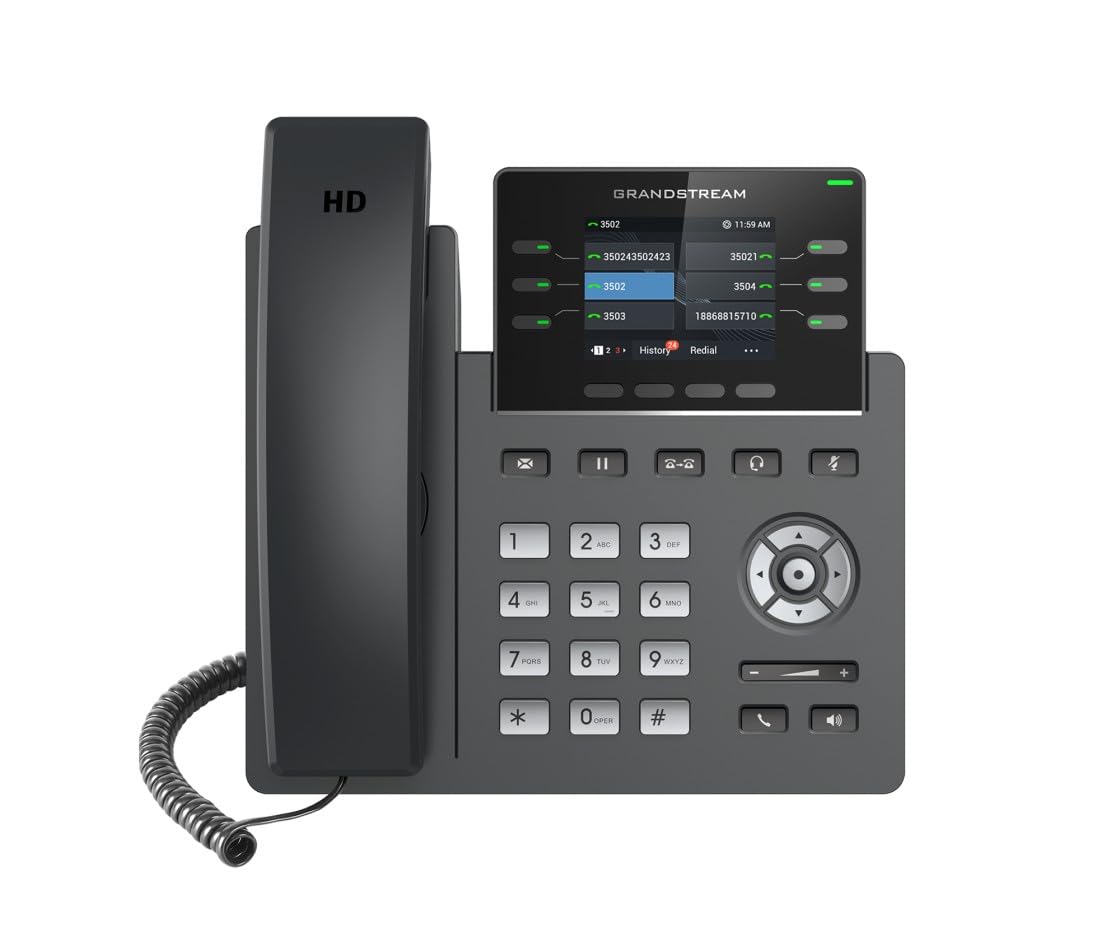
Image: Grandstream GRP2613W IP Phone, showing the main unit with the handset attached and the phone stand.
۳. لومړنی بوټ اپ
Upon successful connection, the phone will boot up. The LCD screen will display Grandstream's logo, followed by network information and the main idle screen. The phone will attempt to obtain an IP address via DHCP by default. If successful, the IP address will be displayed on the screen.
کلیدي ځانګړتیاوې
The GRP2613W IP Phone offers a robust set of features for enhanced communication:
- د SIP حسابونه: Supports up to 6 SIP accounts and 6 versatile line keys.
- د شبکې ارتباط: Dual 10/100/1000 Mbps Gigabit Ethernet ports with auto-sensing and integrated PoE.
- ښکاره کول: 2.8-inch (320x240) color LCD display.
- اصلاح کول: Replaceable faceplate for easy logo customization.
- د آډیو کیفیت: HD audio compatible with major codecs (G.722, Opus broadband) and noise cancellation technology.
- د پروګرام وړ کلیدي: Up to 24 digital BLF (Busy Lamp Field) keys.
- د بیسیم اتصال: Built-in dual-band Wi-Fi (2.4GHz and 5GHz, 802.11a/b/g/n/ac/ax) and Bluetooth.
- امنیت: Enterprise-level protection including secure boot, dual firmware images, and encrypted data storage.
عملیاتي لارښوونې
1. زنګ وهل
You can make a call using the handset, speakerphone, or a connected headset:
- Pick up the handset, press the Speakerphone button
 , or press the Headset button .
 - د کیپډ په کارولو سره مطلوب شمیره ډایل کړئ.
- Press the Send button or a Line key to initiate the call.
2. زنګ ته ځواب ورکول
کله چې تلیفون زنګیږي:
- لاسي صنایع پورته کړئ.
- د سپیکر تلیفون تڼۍ فشار کړئ .
- د Headset تڼۍ فشار کړئ .
- د فلش کولو لاین کیلي فشار ورکړئ.
3. د کال مدیریت
- ساتل: During an active call, press the Hold button . Press it again to resume the call.
- لیږدول: During an active call, press the Transfer button , dial the new number, and press the Transfer button again.
- کنفرانس: During an active call, press the Conference button , dial the third party's number, and then press the Conference button again to join all parties.
- خاموش: د خاموش ت buttonۍ فشار ورکړئ to mute your microphone during a call. Press it again to unmute.
4. د حجم سمون
Use the Volume Up (+) and Volume Down (-) buttons on the phone to adjust the ringtone volume when idle, or the call volume during an active call.
۵.۳. وای فای او بلوتوث
The GRP2613W supports built-in dual-band Wi-Fi and Bluetooth. These features can be configured via the phone's menu or web interface for wireless network connectivity and pairing with Bluetooth headsets.
ساتنه
1. پاکول
To clean your GRP2613W IP Phone, use a soft, dry cloth. Avoid using liquid cleaners or aerosol sprays directly on the device. Ensure the phone is powered off before cleaning.
2. د فرم ویئر تازه معلومات
Firmware updates are crucial for maintaining optimal performance and security. The GRP2613W supports updates over the air (OTA) and can be managed centrally via Grandstream's Device Management System (GDMS). Consult your network administrator or Grandstream's official documentation for the latest firmware and update procedures.
د ستونزو حل کول
If you encounter issues with your GRP2613W, try the following common troubleshooting steps:
- ځواک نشته: Ensure the power adapter is securely connected to both the phone and a working power outlet, or that the Ethernet cable is connected to a PoE-enabled port.
- د ډایل ټون نشته: Check network cable connections. Verify that the phone has obtained a valid IP address (check the LCD screen). Contact your VoIP service provider to confirm SIP account registration.
- ضعیف آډیو کیفیت: Check network connection stability. Ensure the handset cord is securely connected. Adjust the call volume.
- د وای فای اتصال مسلې: Verify Wi-Fi settings in the phone's menu. Ensure the phone is within range of your Wi-Fi network.
- تلیفون نه راجستر کیږي: Confirm SIP account details (username, password, server address) are correctly configured. Check network firewall settings.
For more complex issues, refer to the comprehensive online documentation or contact Grandstream support.
مشخصات
| فیچر | تفصیل |
|---|---|
| د SIP حسابونه | 6 |
| د کرښې کیلي | 6 versatile line keys |
| ښودل | 2.8 inch (320x240) color LCD |
| ایترنیټ بندرونه | Dual 10/100/1000 Mbps Gigabit Ethernet with PoE |
| وای فای | Built-in dual-band Wi-Fi (802.11a/b/g/n/ac/ax) |
| بلوتوث | بلوتوث جوړ شوی |
| آډیو | HD audio, noise cancellation, G.722, Opus codecs |
| BLF Keys | Up to 24 digital BLF keys |
| ابعاد | 1.1 x 9.7 x 6.5 انچه |
| وزن | ۲.۴۵ پونډه |
د تضمین معلومات
Grandstream products typically come with a limited manufacturer's warranty. Please refer to the warranty card included in your product packaging or visit the official Grandstream website for detailed warranty terms and conditions specific to the GRP2613W model.
ملاتړ
For technical assistance, product documentation, or further inquiries, please visit the Grandstream support portal on their official webسایټ. تاسو کولی شئ د پیرودونکو خدماتو لپاره FAQs، د فرم ویئر ډاونلوډونه، او د اړیکو معلومات ومومئ.