
پیژندنه
This manual provides detailed instructions for the assembly, operation, and maintenance of your new FLEXISPOT L-Shaped Electric Height Adjustable Standing Desk. Please read this manual thoroughly before assembly and use to ensure proper function and safety.
- پراخه ډیسکټاپ: د L شکل پراخه کاري سطحه په بې ساري ډول د چاپیریال له پلوه د سرچینې شوي سپلیس بورډ سره جوړه شوې ده، چې اندازه یې 70.9 "x 63.0" ده. دا چمتو کوي ampد روانو پروژو او دفتري توکو لپاره ځای.
- څو اړخیزه لارښوونه: دا د لوړوالي سره تنظیم کیدونکی میز د ډیسټاپ یوه پراخه برخه لري چې په چپ یا ښي اړخ کې موقعیت لري، تاسو ته اجازه درکوي چې ترتیب ستاسو د ځای سره سم تنظیم کړئ.
- کلک ساختمان: د صنعتي درجې فولادي چوکاټ او جامد ډیسکټاپ (1") سره یوځای کیږي ترڅو تر 220 پونډو پورې د اعظمي وزن ظرفیت ملاتړ وکړي، ستاسو د مثالي کاري تنظیم په اسانۍ سره اداره کوي.
- د تنظیم وړ LED کنټرول پینل: د LED کنټرول پیډ تاسو ته اجازه درکوي چې د میز لوړوالی د 4 مختلف حافظې ترتیباتو سره تنظیم کړئ، ستاسو د خوښې ولاړ او ناست موقعیتونو ترمنځ اسانه سویچ کول فعالوي.
د خوندیتوب معلومات
Always ensure the desk is properly assembled and anchored to the floor to prevent tipping. Do not exceed the maximum weight capacity of 220 lbs (100 kg) to maintain stability. Follow the assembly instructions carefully to avoid injury.
The product ships in two separate packages which may arrive separately. Ensure all packages are received before beginning assembly.
تنظیم او مجلس
Assembly requires two people. Tools recommended for assembly include a drill. Please refer to the detailed video instructions for visual guidance.
د اسمبلۍ مرحلې پای ته ورسېدېview:
- Install Middle Column Connecting Joining Plate: Attach the joining plate to the middle column using the provided screws.
- د میز پښې نصب کړئ: Secure the long and short side desk feet to the columns.
- Install Crossbeams: Attach the long and short crossbeams between the desk legs.
- Extend Crossbeam: Loosen the screws on the crossbeam and extend it to the desired length.
- Install Drive Rods: Loosen the drive rod, insert it into the mechanism, spin, and tighten.
- Install Support Plate: Attach the support plate to the frame.
- ډیسکټاپ نصب کړئ: Insert dowels and connect the desktop sections. Secure them with the provided plates and screws.
- چوکاټ ډیسټاپ ته وصل کړئ: Carefully place the assembled frame, adapter holder, and support tube onto the desktop. Adjust the frame to align with pilot holes and attach it securely.
- Secure Crossbeams and Drive Rods: Ensure all crossbeams and drive rods are firmly secured.
- Install Controller and Wiring: Mount the control panel and power adapter. Connect all necessary wiring for the motors and control panel.
- Install Baffle: Attach the baffle to cover the wiring.
- میز واړوئ: With assistance, carefully turn the desk upright.
بصري لارښوونې:
ویډیو: Installation of Right L-Shaped Desk. This video demonstrates the step-by-step assembly process for the right-hand L-shaped configuration of the desk.
ویډیو: Installation of Left L-Shaped Desk. This video guides you through the assembly process for the left-hand L-shaped configuration of the desk.
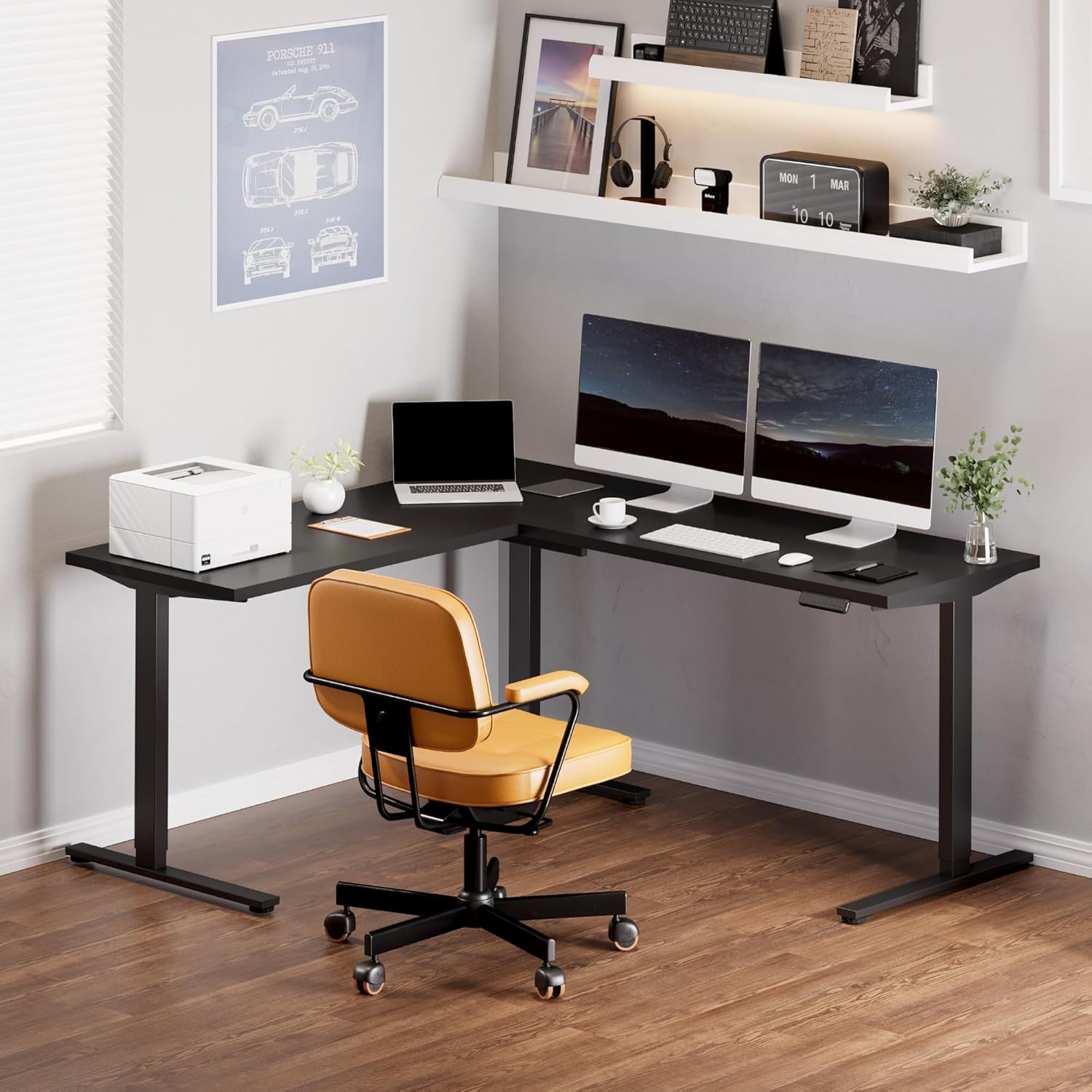
انځور: Fully assembled FLEXISPOT L-Shaped Standing Desk in a modern office environment, showcasinد هغې پراخه ډیزاین او فعالیت.

انځور: Detailed dimensions of the L-shaped desk, highlighting its width, depth, and adjustable height range.
عملیاتي لارښوونې
د کنټرول پینل دندې:

انځور: The smart control panel with buttons for height adjustment and memory presets.
- پورته/ښکته تڼۍ (تیشې): Press and hold the up or down arrow to adjust the desk height. Release the button to stop at the desired height.
- د حافظې پریزیسټونه (۱، ۲، ۳، ۴): To save a height setting, adjust the desk to your preferred height, then press the 'M' button followed by the desired number (1, 2, 3, or 4). The display will show 'S-' and then the number to confirm. To recall a saved height, simply press the corresponding number button.
- د ټکر ضد ځانګړتیا: The desk is equipped with an anti-collision system. If the desktop encounters an obstacle while moving, it will automatically stop and reverse slightly to prevent damage.
ساتنه
- Regularly check all screws and connections to ensure they are tight. Tighten if necessary.
- د ډیسټاپ سطحه د نرم، ډ سره پاکه کړئamp ټوکر. د کثافاتو پاکوونکو یا سختو کیمیاوي موادو څخه ډډه وکړئ.
- د موټرو او بریښنایی برخو برخې د دوړو او رطوبت څخه پاک وساتئ.
- Ensure cables are neatly managed to prevent snagging or damage during height adjustments.
د ستونزو حل کول
| ستونزه | احتمالي لامل | د حل لاره |
|---|---|---|
| میز نه حرکت کوي او نه کنټرولونو ته ځواب ورکوي. | Power cable disconnected; control panel cable loose; motor cable loose. | Check all power and motor connections. Ensure they are securely plugged in. Reset the system by unplugging for 10 seconds and plugging back in. |
| میز په نا مساوي ډول حرکت کوي یا غیر معمولي غږونه کوي. | Loose connections; uneven load; drive rod not properly installed. | Check all frame connections and ensure they are tightened. Distribute weight evenly on the desktop. Verify drive rod installation as per assembly video. |
| د ټکر ضد ځانګړتیا په مکرر ډول پیل کیږي. | Obstruction in desk's path; sensitivity setting too high. | Remove any objects from the desk's path. Consult the full user manual for instructions on adjusting anti-collision sensitivity (if applicable). |
| Desktop sections do not align perfectly. | Assembly error; pilot holes not used correctly. | په احتیاط سره بیاview assembly instructions and videos. Ensure all desktop connecting plates are correctly installed and tightened. Some users have noted that pilot holes are for reference and may require minor adjustments or re-drilling for perfect alignment. |
مشخصات
- نښه: FLEXISPOT
- شکل: Rectangular (L-shaped configuration)
- د میز ډیزاین: سټینګ ډیسک
- د محصول ابعاد: ۱۶"د x ۲۶"وچ x ۴۷"ح
- رنګ: تور چوکاټ + تور سر
- سټایل: عصري
- بنسټیز مواد: د الماس فولاد
- د غوره موادو ډول: لرګي
- د پای ډول: پالش
- ځانګړې ځانګړنه: کوډ شوی
- د ټابلیټ ضخامت: ۷۸۷ انچه
- اعظمي لوړوالی: ۷۸۷ انچه
- لږ تر لږه لوړوالی: ۷۸۷ انچه
- د لوړ وزن کمښت: 220 پونډه
- د لوړو پوستونو شمیر: ۳ (د حافظې پریسیټونه)
- اړین مجلس: هو (د ۲ کسانو سپارښتنه)
- د راټولولو لپاره وړاندیز شوي وسایل: ډرل
تضمین او ملاتړ
د FLEXISPOT پنځه کلن تضمین: Enjoy peace of mind with our 5-year coverage on the desk frame and motor, and 2-year protection on the control panel and electronics.
For further assistance, troubleshooting, or warranty claims, please contact FLEXISPOT customer support through their official webسایټ یا پرچون پلورونکی چیرې چې محصول اخیستل شوی و.