
1. پیژندنه
Thank you for choosing the Satisure Wireless Doorbell Chime Extender. This device is designed to enhance your Blink Video Doorbell experience by providing an extended wireless chime. It features a radio signal transmission set, including a radio converter and a plug-in receiver, offering 58 melodies and 5 adjustable volume levels for personalized alerts.
۲. په بکس کې څه دي؟
- 1x Radio Converter (Transmitter)
- 1x Plug-in Receiver (Chime)
- 1x Wiring Cable for Transmitter Connection
- د کارن لارښود

Image: All components included in the Satisure Wireless Doorbell Chime Extender package.
3. محصول ختم شوview
The Satisure Wireless Doorbell Chime Extender consists of two main units: a transmitter (radio converter) that connects to your Blink Video Doorbell and a plug-in receiver (chime) that can be placed anywhere in your home.
کلیدي ځانګړتیاوې:
- ۳۲ سندرې: Choose from a wide selection of tunes.
- ۱۰ د حجم کچه: Adjust the volume up to 110 dB, suitable for various needs including the hearing impaired.
- 200M Wireless Range: Ensures you hear your doorbell throughout your home.
- Blue LED Night Light: The plug-in receiver features an LED light that can indicate doorbell activity even in silent mode or at night.

Image: The Satisure receiver highlighting its 5 selectable volume levels and 58 melodies.

Image: A diagram showing the 200-meter wireless range of the doorbell extender within a home environment.

Image: The plug-in receiver featuring a blue LED night light, shown in a bedroom setting.
4. ترتیب کول
4.1 Connecting the Transmitter to your Blink Video Doorbell
To connect the transmitter to your Blink Video Doorbell, a cable is required. Use the pre-installed cable provided with the extender.
- Carefully remove the back cover of your Blink Video Doorbell.
- Connect the two wires from the Satisure transmitter to the screw terminals on the back of your Blink Video Doorbell. Ensure a secure connection.
- Reattach the back cover to your Blink Video Doorbell.
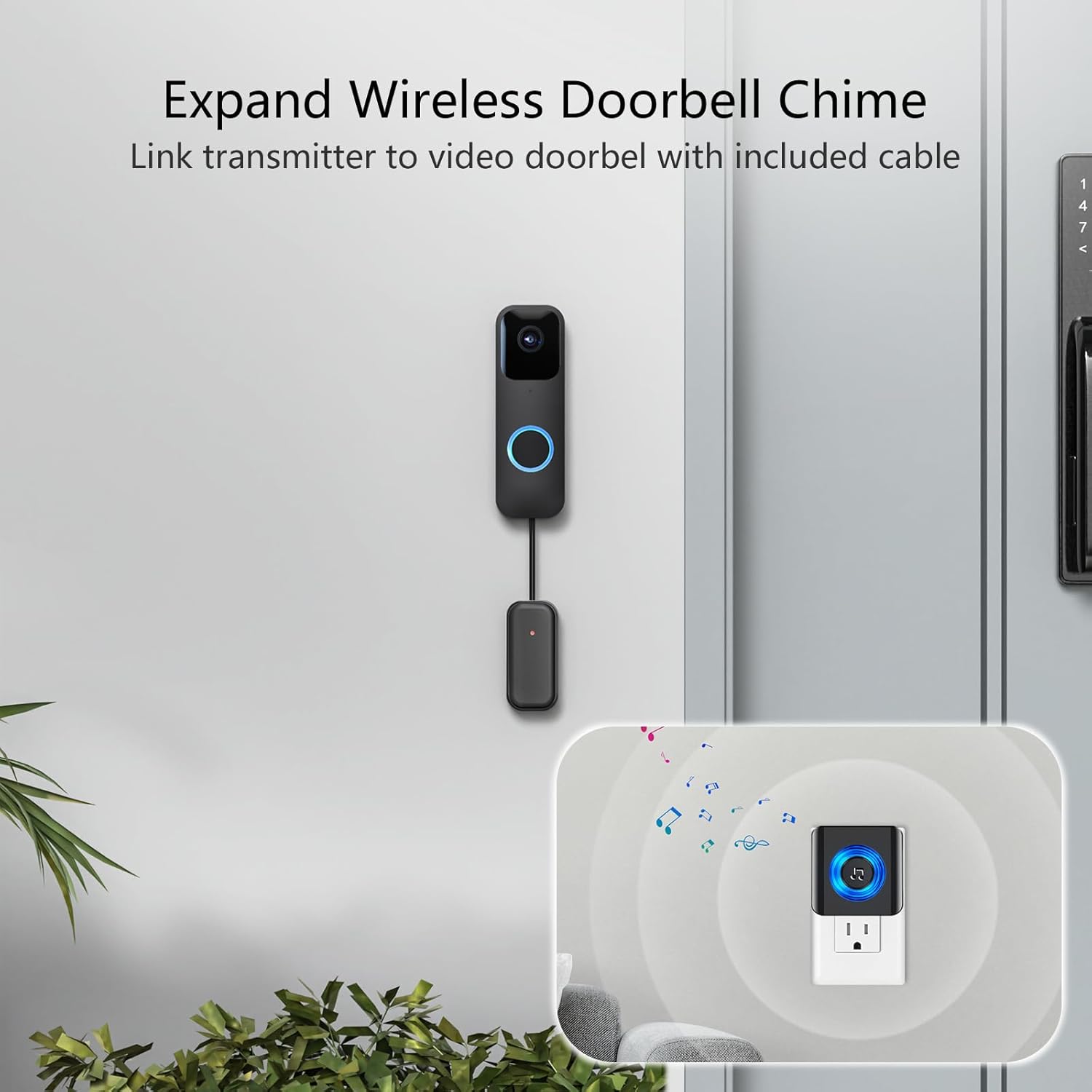
Image: A visual guide demonstrating how to link the Satisure transmitter to the Blink Video Doorbell using the included cable.
Video: A demonstration of the product wiring process for connecting the transmitter.
4.2 Pairing the Transmitter and Receiver
After connecting the transmitter to your Blink Video Doorbell, you need to pair it with the plug-in receiver.
- Plug the receiver into a standard electrical outlet.
- Press and hold the brightness buttons on the Blink Video Doorbell for 3 seconds to enter pairing mode.
- Ring the Blink Video Doorbell. The transmitter will send a signal to the receiver.
- The receiver should now be paired and will sound when the doorbell is pressed.
4.3 App Configuration (Blink Home Monitor App)
Ensure your Blink Video Doorbell system is configured correctly within the Blink Home Monitor app.
- Open the Blink Home Monitor app on your smartphone.
- Navigate to the 'Device Settings' for your Blink Video Doorbell.
- Select 'Doorbell and Chime Settings'.
- Follow the in-app instructions to ensure the chime settings are compatible with your wired setup.
Video: A guide to the installation and operation of the Blink Home Monitor app for doorbell setup.
Video: A demonstration of the app settings for configuring your doorbell system.
Video: An installation guide for the Blink doorbell, relevant for understanding the connection points.
Video: Steps for operating the Blink Home Monitor app.
5. عملیاتي لارښوونې
۶.۲ د حجم تنظیم کول
The receiver offers 5 adjustable volume levels. Use the dedicated volume button on the side of the receiver to cycle through the levels. The maximum volume is 110 dB.
۵.۱ د موسيقۍ بدلول
There are 58 different melodies available. Use the melody selection button on the side of the receiver to choose your preferred chime. Each press will cycle to the next melody.

Image: The doorbell extender shown in multiple household locations, demonstrating its versatile application.
6. ساتنه
To ensure optimal performance and longevity of your Satisure Wireless Doorbell Chime Extender, follow these maintenance guidelines:
- Keep the receiver and transmitter clean and free from dust. Use a soft, dry cloth for cleaning.
- وسایل د سختې تودوخې، مستقیم لمر وړانګو، یا رطوبت سره مخ کیدو څخه ډډه وکړئ.
- The transmitter is designed for outdoor use with the Blink Video Doorbell, offering protection against weather elements.
۵.۴ د بیټرۍ ټیټ خبرتیا
The device features a Low Power Alert function. In case of a low battery on the transmitter side, the receiver will notify you with a simple flash, ensuring you are aware when the battery needs attention.
7. ستونزه حل کول
If you encounter any issues with your Satisure Wireless Doorbell Chime Extender, please refer to the following common problems and solutions:
- د ترلاسه کونکي څخه غږ نشته:
- ډاډ ترلاسه کړئ چې ریسیور په سمه توګه په یوه کاري بریښنایی پلورنځي کې ولګول شوی دی.
- Check if the volume level is set appropriately (not muted or too low).
- Verify that the transmitter is correctly wired to the Blink Video Doorbell and has power.
- Re-attempt the pairing process between the transmitter and receiver.
- لنډ بېسیم رینج:
- Ensure there are no major obstructions (thick walls, large metal objects) between the transmitter and receiver.
- Relocate the receiver closer to the Blink Video Doorbell.
- Avoid placing the receiver near other electronic devices that might cause interference.
- Intermittent Chime:
- Check the battery status of the Blink Video Doorbell and the transmitter (if applicable).
- Ensure all wiring connections are secure and not loose.
- Interference from other wireless devices might be a factor; try changing the receiver's location.
8. مشخصات
| د ماډل شمیره | WET02A |
| برانډ | اطمینان |
| رنګ | تور |
| د توکو شمیر | 1 (Set includes transmitter and receiver) |
| د توکي ابعاد (LxWxH) | 10 x 8 x 10 سانتي متره |
| د توکي وزن | 160 ګرامه |
| د ارتباط ټیکنالوژي | Wired (for transmitter to doorbell), Wireless (for transmitter to receiver) |
| وړاندیز شوی کارول | Multiple receivers |
| د بیټرۍ ډول | Lithium Ion (for Blink Doorbell, not included with extender) |
9. تضمین او ملاتړ
د پیرودونکو خدمت: For any questions or advice during use after receiving the product, please do not hesitate to contact Satisure Direct. We offer 24/7 customer service to assist you with any inquiries or support needs.
Please refer to your purchase documentation for specific warranty details and return policies.