
1. پیژندنه
This manual provides essential information for the safe and efficient use of your AT&T Cingular Flex 2 Smart Flip Phone (Model 6723D). Please read these instructions carefully before operating your device to ensure optimal performance and longevity.
The Cingular Flex 2 is a compact flip phone designed for reliable communication. It features a vibrant display, a built-in camera for capturing moments, and 4GB of internal storage for essential files and applications. The device operates on KaiOS, offering a streamlined user experience.
۲. په بکس کې څه دي؟
ډاډ ترلاسه کړئ چې ټول توکي ستاسو د محصول په کڅوړه کې شتون لري:
- AT&T Cingular Flex 2 Smart Flip Phone
- د بریښنا اډاپټر
- د لیتیم آیون بیټرۍ (مخکې نصب شوې یا جلا)
3. وسیله ختمه شوهview
Familiarize yourself with the physical components of your AT&T Cingular Flex 2 phone.
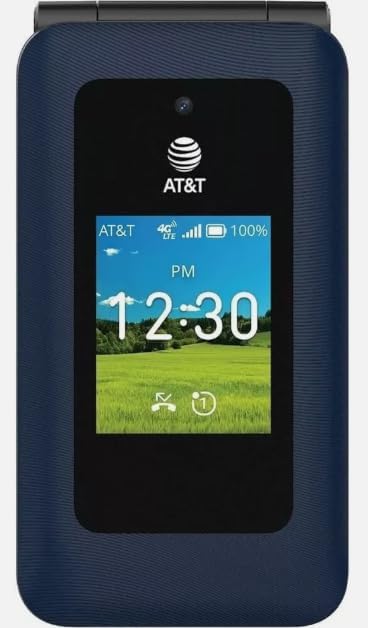
شکل 3.1: مخکی view of the AT&T Cingular Flex 2 Smart Flip Phone, showing the main display with time, network signal, and battery indicator.

شکل 3.2: شاته view of the AT&T Cingular Flex 2 Smart Flip Phone, highlighting the textured back cover and the speaker grille at the top.
مهمې برخې:
- بهرنۍ ښودنه: Shows notifications, time, and caller ID when closed.
- اصلي نندارتون: Internal screen for navigation and content.
- کیپیډ: Numeric and navigation buttons for input.
- کمره: Located on the device for capturing photos and videos.
- د حجم تڼۍ: د غږ کچه تنظیم کړئ.
- Power/End Call Button: Turns the device on/off and ends calls.
- د چارج کولو بندر: د بریښنا اډاپټر د نښلولو لپاره.
4. ترتیب کول
۲. د سیم کارت او بیټرۍ داخلول
- ډاډ ترلاسه کړئ چې تلیفون بند دی.
- د تلیفون شاته پوښ په احتیاط سره لرې کړئ.
- If the battery is installed, remove it by gently lifting it from the notch.
- Locate the SIM card slot, typically beneath the battery compartment. Insert your SIM card with the gold contacts facing down and the notched corner aligned correctly.
- Insert the battery, ensuring the contacts align with those in the phone.
- د شا پوښ بدل کړئ تر هغه چې په خوندي ډول خپل ځای ته راشي.
4.2. د وسیلې چارج کول
- د بریښنا اډاپټر په خپل تلیفون کې د چارج کولو پورټ سره وصل کړئ.
- د بریښنا اډاپټر په معیاري بریښنایی پلورنځي کې ولګوئ.
- Allow the phone to charge completely before initial use. The battery indicator on the screen will show charging status.
4.3. بریښنا کول/بندول
- د فعالولو لپاره: د پاور/پای کال تڼۍ فشار ورکړئ او ونیسئ تر هغه چې سکرین روښانه شي.
- د بریښنا بندولو لپاره: Press and hold the Power/End Call button, then select 'Power Off' from the options on the screen.
۶. ستاسو د تلیفون چلول
5.1. بنسټیز نیویګیشن
The Cingular Flex 2 uses a physical keypad for navigation. Use the directional pad (D-pad) to move between menu items and the center button to select. The left and right soft keys perform actions indicated on the screen above them.
5.2. تلیفونونه کول او ترلاسه کول
- د تلیفون کولو لپاره: Enter the phone number using the keypad and press the Call button (usually the green button).
- زنګ ته ځواب ویل: When the phone rings, press the Call button.
- د تلیفون پای ته رسولو لپاره: Press the Power/End Call button (usually the red button).
۵. د پیغامونو لیږل او ترلاسه کول
Navigate to the 'Messages' application from the main menu.
- To Send a New Message: Select 'New Message', enter the recipient's number or select from contacts, then type your message using the keypad.
- Note on Multimedia Messaging: Sending photos via text message may not be consistently supported. Receiving multimedia messages can also be intermittent.
- Voice to Text: This device does not support voice-to-text input for messaging.
5.4. د کیمرې کارول
The phone includes a built-in camera. You can access it via the main menu or by pressing the dedicated camera shortcut button on the side of the device.
- عکسونه اخیستل: Open the camera app, frame your shot, and press the center button or camera button to capture.
- د ویډیو ثبت کول: Switch to video mode within the camera app and press the record button.
5.5. Internet and Applications
The Cingular Flex 2 runs on KaiOS. Access the KaiOS store for additional applications. Pre-installed apps include YouTube and a feature-reduced version of Google Maps. Be aware that some utility apps downloaded from the store may display advertisements.
6. ساتنه
6.1. د بیټرۍ پاملرنه
- د بیټرۍ ډیر تودوخې ته د افشا کولو څخه ډډه وکړئ.
- Charge the battery using only the provided power adapter.
- Unplug the charger once the battery is fully charged to conserve energy.
۱. خپل وسیله پاکول
Use a soft, dry, lint-free cloth to clean the phone's screen and body. Avoid using harsh chemicals or abrasive materials.
6.3. د سافټویر تازه معلومات
Periodically check for software updates in the phone's settings menu to ensure your device has the latest features and security enhancements.
7. ستونزه حل کول
If you encounter issues with your Cingular Flex 2, refer to the following common problems and solutions:
| ستونزه | احتمالي حل |
|---|---|
| Slow interface or app loading | Close unused applications. Restart the phone. Consider uninstalling less frequently used apps to free up resources. |
| Operating System crashes | Restart the device. Ensure the software is up to date. If persistent, a factory reset may be necessary (back up data first). |
| Wi-Fi or network connectivity issues | Toggle Wi-Fi/Mobile Data off and on. Restart the phone. Check router or network settings. Ensure notifications for network disconnections are managed in settings to avoid excessive alerts. |
| Keyboard input errors (e.g., double key strokes) | Ensure you are pressing keys firmly and deliberately. If the issue persists, contact customer support. |
| Cannot send photos via text message | This is a known limitation for some devices. Try alternative methods for sharing images if available, or reduce image size if an option. |
| د بیټرۍ ضعیف ژوند | Reduce screen brightness. Close background apps. Limit use of power-intensive features like GPS. Ensure the battery is fully charged. |
7.1. د فابریکې ری سیٹ
د فابریکې بیا تنظیم کول به ستاسو د تلیفون ټول معلومات له منځه یوسي او خپل اصلي فابریکې ترتیباتو ته به یې بیرته راولي. دا کولی شي د سافټویر دوامداره ستونزې حل کړي. Back up all important data before performing a factory reset. Consult your phone's settings menu for the 'Reset' or 'Erase all data' option.
8. مشخصات
Detailed technical specifications for the AT&T Cingular Flex 2 Smart Flip Phone (Model 6723D):
| فیچر | مشخصات |
|---|---|
| د ماډل نوم | سينګولر فلیکس ۲ |
| د توکي ماډل شمیره | 6723D |
| برانډ | AT&T |
| عملیاتي سیسټم | KaiOS |
| د حافظې د ذخیره کولو ظرفیت | 4 جي بي |
| د RAM حافظې نصب شوې اندازه | 512 MB |
| د CPU ماډل | میډیاټیک ډیمینسټي ۸۳۰۰ |
| قرارداد | 720 x 1520 |
| د ارتباط ټیکنالوژي | 4G LTE |
| سیلولر ټیکنالوژي | 4G |
| بې سیم کیریر | خلاص شوی |
| GPS | رښتیا |
| د فارم فکتور | فلپ |
| رنګ | کلاسیک سمندري ځواک |
| د بیټرۍ ظرفیت | 1400 ملیونهamp ساعتونه |
| د بیټرۍ د بریښنا درجه بندي | 2800 Amp ساعتونه |
| د توکي وزن | 7.4 اونس (0.21 کیلوګرامه) |
| د کڅوړې ابعاد | 4.69 x 2.91 x 2.13 انچه |
| جوړونکی | AT&T |
| نیټه لومړی شتون لري | د فبروري ۴، ۲۰۲۳ |
9. تضمین او ملاتړ
For warranty information, please refer to the documentation provided with your purchase or visit the official AT&T support website. If you require technical assistance or have questions not covered in this manual, please contact AT&T customer support.
تاسو کولی شئ اضافي ملاتړ سرچینې او د اړیکو معلومات په لاندې لینک کې ومومئ. AT&T Store on Amazon.


