
1. محصول ختم شوview
The zelotes C-12 Professional Wired Gaming Mouse is designed for high-performance gaming and office use. It features an ergonomic design, 12 programmable buttons, adjustable DPI settings, multi-modes RGB backlighting, and a customizable weight system.

Image 1.1: The zelotes C-12 Professional Wired Gaming Mouse, showcasing its ergonomic shape and customizable RGB lighting.
د بسته محتويات:
- 1 x zelotes C-12 Gaming Mouse
- 1 x د لارښوونې لارښود
- 1 x سافټویر CD
- 1 x Foot Pad Set
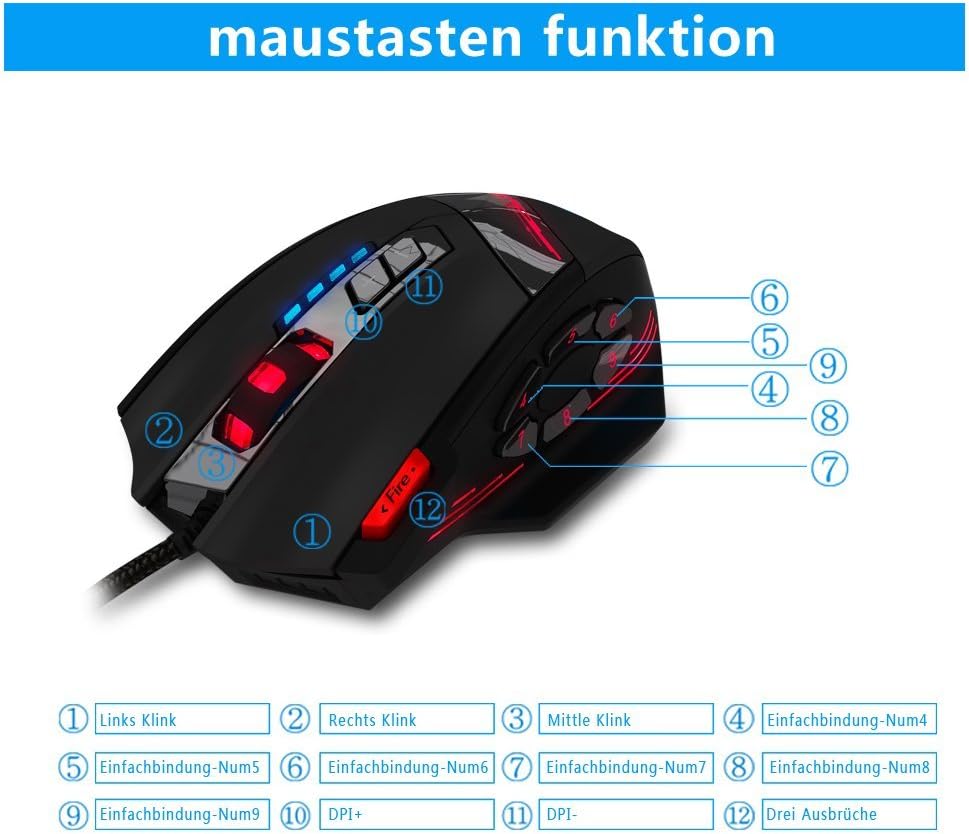
Image 1.2: The complete package contents of the zelotes C-12 Gaming Mouse.
2. ترتیب کول
۳.۲ د موږک سره نښلول
Connect the USB cable of the zelotes C-12 Gaming Mouse to an available USB port on your computer. The mouse is plug-and-play for basic functionality.
۲.۲ د سافټویر نصبول (اختیاري)
For full customization of buttons, DPI, and lighting, install the provided software from the included CD. Insert the CD into your computer's optical drive and follow the on-screen instructions. If your computer does not have an optical drive, please visit the official zelotes website to download the latest software driver.
Note: The programming software is not fully compatible with Mac operating systems.
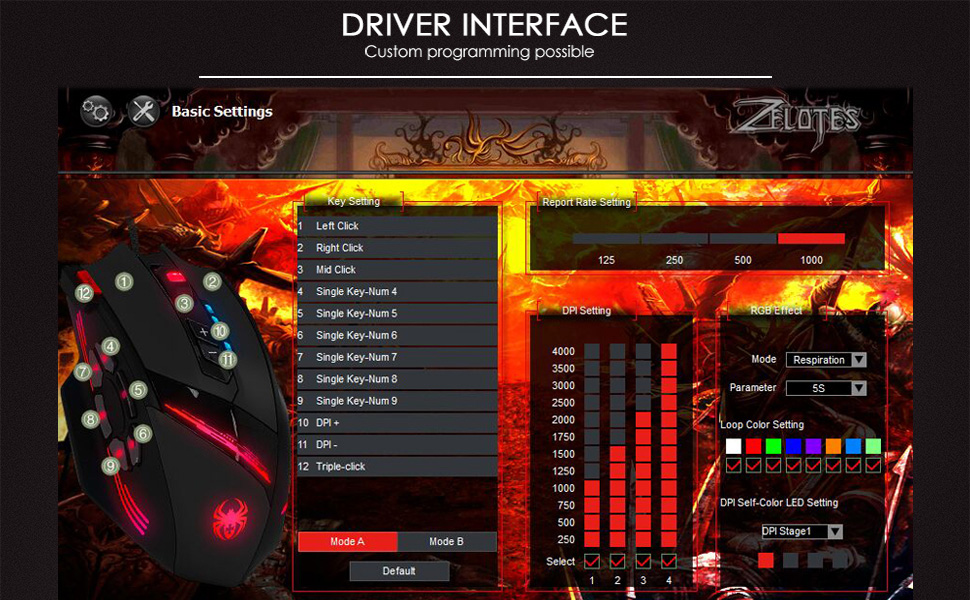
Image 2.1: The software interface for customizing the zelotes C-12 Gaming Mouse.
۵.۴ د وزن تنظیمول
The mouse includes 8 removable weight blocks, each weighing 2.5 grams, located in a compartment on the underside of the mouse. To adjust the mouse's weight:
- Gently twist and remove the circular cover on the bottom of the mouse.
- Add or remove the 2.5g weight blocks as desired to achieve your preferred mouse feel.
- Replace the circular cover by twisting it back into place.
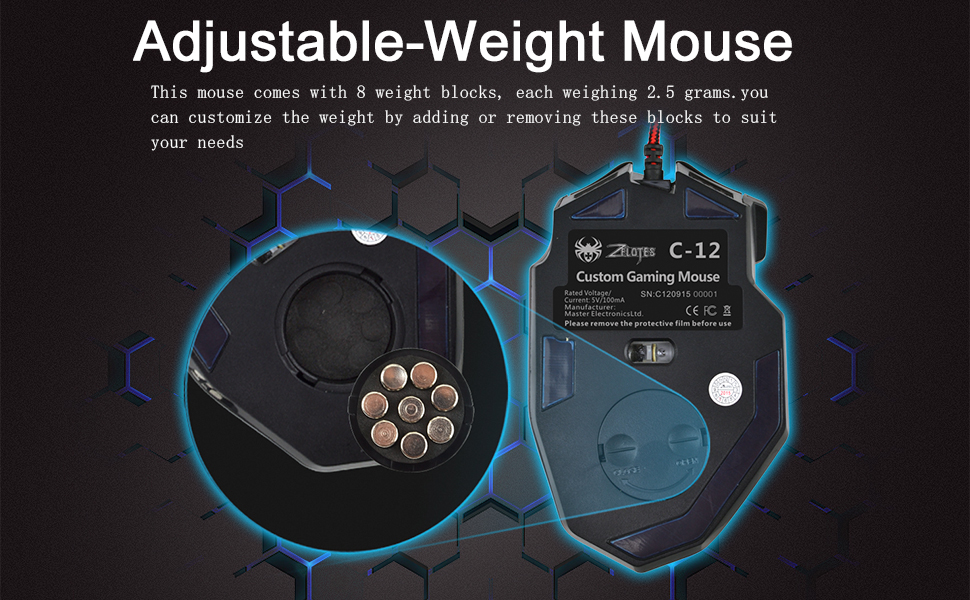
Image 2.2: Adjusting the weight of the zelotes C-12 mouse by adding or removing the 2.5g blocks.
Video 2.1: A demonstration of the weight tuning feature and programmable buttons on the zelotes C-12 Gaming Mouse.
3. عملیاتي لارښوونې
3.1 د تڼۍ دندې
The zelotes C-12 mouse features 12 programmable buttons. The default functions are:
- کیڼ کلیک وکړئ (تڼۍ 1)
- ښي کلیک وکړئ (تڼۍ 2)
- منځنی کلیک / سکرول ویل (تڼۍ 3)
- د غاړې تڼۍ (Buttons 4-9): Default to various functions, customizable via software.
- DPI+ (Button 10): Increases DPI sensitivity.
- DPI- (Button 11): Decreases DPI sensitivity.
- د اور تڼۍ (Button 12): Default to triple-click, customizable via software.

Image 3.1: Labeled diagram of the zelotes C-12 mouse buttons.
3.2 د DPI تعدیل
The mouse offers 4 default DPI levels: 1000/1500/2000/4000 DPI. You can cycle through these levels using the dedicated DPI+ and DPI- buttons. For finer control and to reach up to 8000 DPI, use the included software.
۶.۳ د RGB رڼا
The mouse features multi-modes RGB backlighting, including 7-color cycle breathing and monochromatic constant bright modes. Lighting effects can be customized through the software to match your preferences.
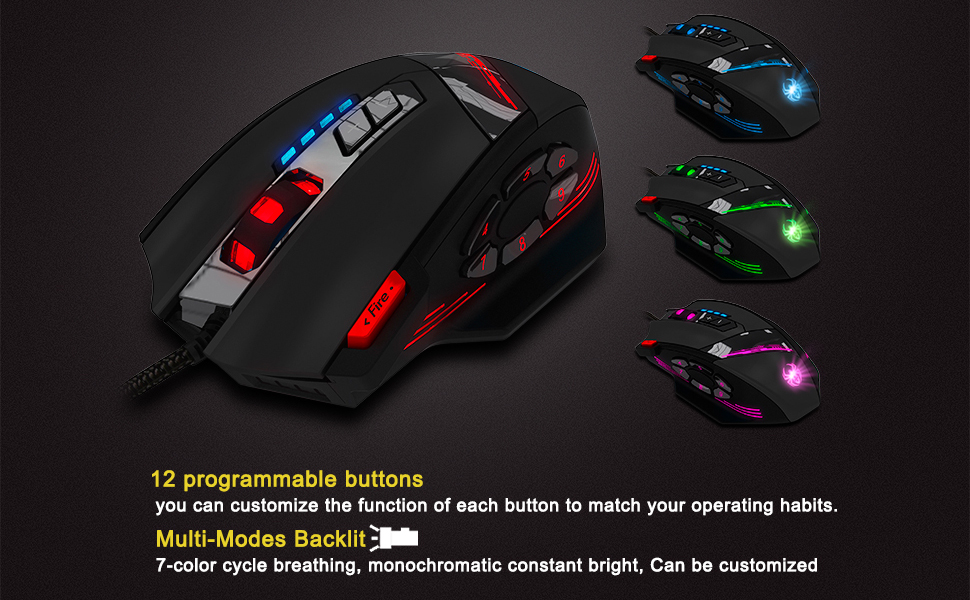
Image 3.2: The zelotes C-12 mouse showcasing its multi-color RGB lighting options.
۳.۳ ارګونومیک ډیزاین
The mouse is designed for comfort during extended use, featuring a sweat-resistant and anti-slip rubber surface. Its ergonomic shape helps prevent wrist fatigue.

Image 3.3: The ergonomic design of the zelotes C-12 mouse provides a comfortable grip.
4. ساتنه
To ensure the longevity and optimal performance of your zelotes C-12 Gaming Mouse, follow these maintenance guidelines:
- پاکول: د موږک سطحه د پاکولو لپاره نرم، وچ ټوکر وکاروئ. د سختې خاورې لپاره، لږ څهampټوکر د اوبو یا نرم پاکولو محلول سره ومینځئ. د سختو کیمیاوي موادو یا خړوبونکو موادو څخه ډډه وکړئ.
- د سینسر پاملرنه: د موږک په ښکته برخه کې نظري سینسر پاک او له دوړو یا کثافاتو څخه پاک وساتئ. که اړتیا وي نو د پنبې سویب یا فشار شوي هوا وکاروئ.
- د کیبل مدیریت: د زیان څخه د مخنیوي لپاره د USB کیبل د تیزو کږو یا ډیر کشولو څخه ډډه وکړئ.
- ذخیره کول: کله چې په کارولو کې نه وي، موږک په پاک او وچ چاپیریال کې د سختې تودوخې څخه لرې وساتئ.
5. ستونزه حل کول
۶.۱ موږک ځواب نه ورکوي
- ډاډ ترلاسه کړئ چې USB کیبل په خوندي ډول ستاسو کمپیوټر سره وصل دی.
- هڅه وکړئ چې موږک د بل USB پورټ سره وصل کړئ.
- موږک په بل کمپیوټر کې ازموینه وکړئ ترڅو د کمپیوټر پورې اړوند کومه ستونزه له منځه یوسي.
- خپل کمپیوټر بیا پیل کړئ.
5.2 DPI or Button Settings Not Changing
- Ensure the zelotes C-12 software is correctly installed and running.
- Check if the settings are saved within the software after making changes.
- For Mac users, note that the programming software has limited compatibility. Basic DPI changes via mouse buttons should still function.
۷.۲ د RGB رڼا کار نه کوي یا غلطه ده
- Verify lighting settings within the zelotes C-12 software.
- ډاډ ترلاسه کړئ چې موږک په سمه توګه وصل دی او بریښنا ترلاسه کوي.
5.4 Mouse Movement Is Erratic
- د موږک په ښکته برخه کې نظري سینسر پاک کړئ.
- ډاډ ترلاسه کړئ چې تاسو موږک په مناسب سطحه کاروئ (د مثال په توګه، د موږک پیډ). د ډیر انعکاس کونکي یا شفاف سطحو څخه ډډه وکړئ.
6. مشخصات
| فیچر | تفصیل |
|---|---|
| برانډ | zelotes |
| د ماډل نوم | C-12 |
| د ارتباط ټیکنالوژي | د USB تار |
| د حرکت کشف ټیکنالوژي | Optical (A3050 Gaming Chip) |
| د DPI تنظیمات | 1000/1500/2000/4000 (Adjustable up to 8000 DPI via software) |
| د تڼۍ مقدار | 12 د پروګرام وړ بټن |
| د وزن تنظیم کول | ۸ x ۲.۴ ګرامه د لرې کولو وړ وزنونه |
| د لاس لارښوونه | ښي لاس |
| د عملیاتي سیسټم مطابقت | Win11, Win10, Win8, Win7, Mac OS (limited software compatibility for Mac) |
| ابعاد (L x W x H) | 130mm x 81.5mm x 39.8mm |
| د رای ورکولو کچه | 125-1000Hz |
| د کیبل اوږدوالی | 1.8m |
| مواد | پلاستیک (میټ فنش) |

Image 6.1: Detailed technical specifications and dimensions of the zelotes C-12 Gaming Mouse.
7. د تضمین معلومات
The zelotes C-12 Professional Wired Gaming Mouse comes with a د جوړونکي دوه کلن تضمین د پیرود نیټې څخه. دا تضمین د عادي استعمال لاندې موادو او کاریګرۍ کې نیمګړتیاوې پوښي. دا د ناوړه ګټې اخیستنې، حادثې، غیر مجاز تعدیل، یا بهرنیو لاملونو له امله رامینځته شوي زیانونه نه پوښي.
مهرباني وکړئ د تضمین ادعاګانو لپاره د پیرود ثبوت وساتئ.
8. ملاتړ
For further assistance, technical support, or warranty inquiries, please refer to the contact information provided with your product packaging or visit the official zelotes webسایټ