
1. پیژندنه
This manual provides detailed instructions for the setup, operation, and maintenance of your WAVLINK 13-in-1 USB-C Triple Display Docking Station. Please read this manual thoroughly before using the product to ensure proper functionality and to prevent damage.
2. محصول ختم شوview
The WAVLINK 13-in-1 USB-C Triple Display Docking Station expands your laptop's connectivity, offering multiple ports for displays, peripherals, network, and power delivery. It is designed to enhance productivity by supporting various display configurations.
د بسته محتويات
- WAVLINK 13-in-1 USB-C Triple Display Docking Station
- USB-C ته C کیبل
- 130W ځواک اډیپټر
- د AC بریښنا کیبل
- د چټک پیل لارښود

Image: Contents of the WAVLINK 13-in-1 USB-C Triple Display Docking Station package, including the docking station, cables, power adapter, and quick start guide.
د بندر ترتیب
The docking station features a comprehensive array of ports to connect various devices:

Image: Diagram showing the front and rear ports of the WAVLINK 13-in-1 USB-C Triple Display Docking Station, with each port clearly labeled.
- د بریښنا پورټ (DC 20V): د شامل شوي 130W بریښنا اډاپټر سره وصل کیږي.
- Upstream USB-C Port: Connects to your host laptop for data, video, and power delivery.
- د HDMI پورټ: د HDMI نندارې سره وصل کیږي.
- ۱ x ډیسپلی پورټ: Connects to DisplayPort displays.
- ګیګابایټ ایترنیټ پورټ (RJ45): یو باثباته تار لرونکی شبکه چمتو کوي.
- ۳ x USB ۳.۰ پورټونه: For connecting USB peripherals, with one supporting BC 1.2 fast charging.
- د SD کارت لوستونکی: For reading standard SD cards.
- د مایکرو ایس ډی کارت ریډر: For reading Micro SD cards.
- 4-Pole Phone Jack (3.5mm Audio): د هیډفونونو یا سپیکرو د نښلولو لپاره.
- د بریښنا تڼۍ: د ډاکینګ سټیشن د فعالولو/بندولو لپاره.
۴. د تنظیم لارښوونې
Follow these steps to set up your WAVLINK docking station:
- بریښنا وصل کړئ: Connect the included 130W power adapter to the DC 20V power port on the docking station, then plug the AC power cable into a wall outlet.
- د کوربه لیپ ټاپ سره وصل شئ: Use the provided USB-C to C cable to connect the upstream USB-C port on the docking station to a compatible USB-C port on your laptop. Ensure your laptop's USB-C port supports DisplayPort Alternate Mode and Power Delivery.
- د نښلولو ښودنې: Connect your external monitors to the HDMI and DisplayPort outputs on the docking station using appropriate cables.
- پرفیریلز وصل کړئ: Connect your USB devices (keyboard, mouse, external drives), Ethernet cable, and audio devices to the corresponding ports on the docking station.
- پاور آن: Press the power button on the docking station. Your laptop should detect the connected devices and displays automatically.
4. عملیاتي لارښوونې
د ښودلو طریقې
د ډاکینګ سټیشن ستاسو د عملیاتي سیسټم پورې اړه لري د مختلفو ښودنې ترتیباتو ملاتړ کوي.
د وینډوز سیسټمونه
Windows systems support both Mirror and Extend modes for multiple displays.

Image: Illustration of Windows multi-display modes, showing a laptop connected to three external monitors in both Extend Mode (each monitor displays unique content) and Mirror Mode (all monitors display the same content).
- د تمدید حالت: Each external monitor can display different content, extending your desktop workspace.
- د عکس حالت: All external monitors will display the same content as your primary display.
macOS Systems
macOS systems support Mirror mode and a non-mirror mode. They do not support Multi-Stream Transport (MST) for extended displays with unique content on each external monitor.
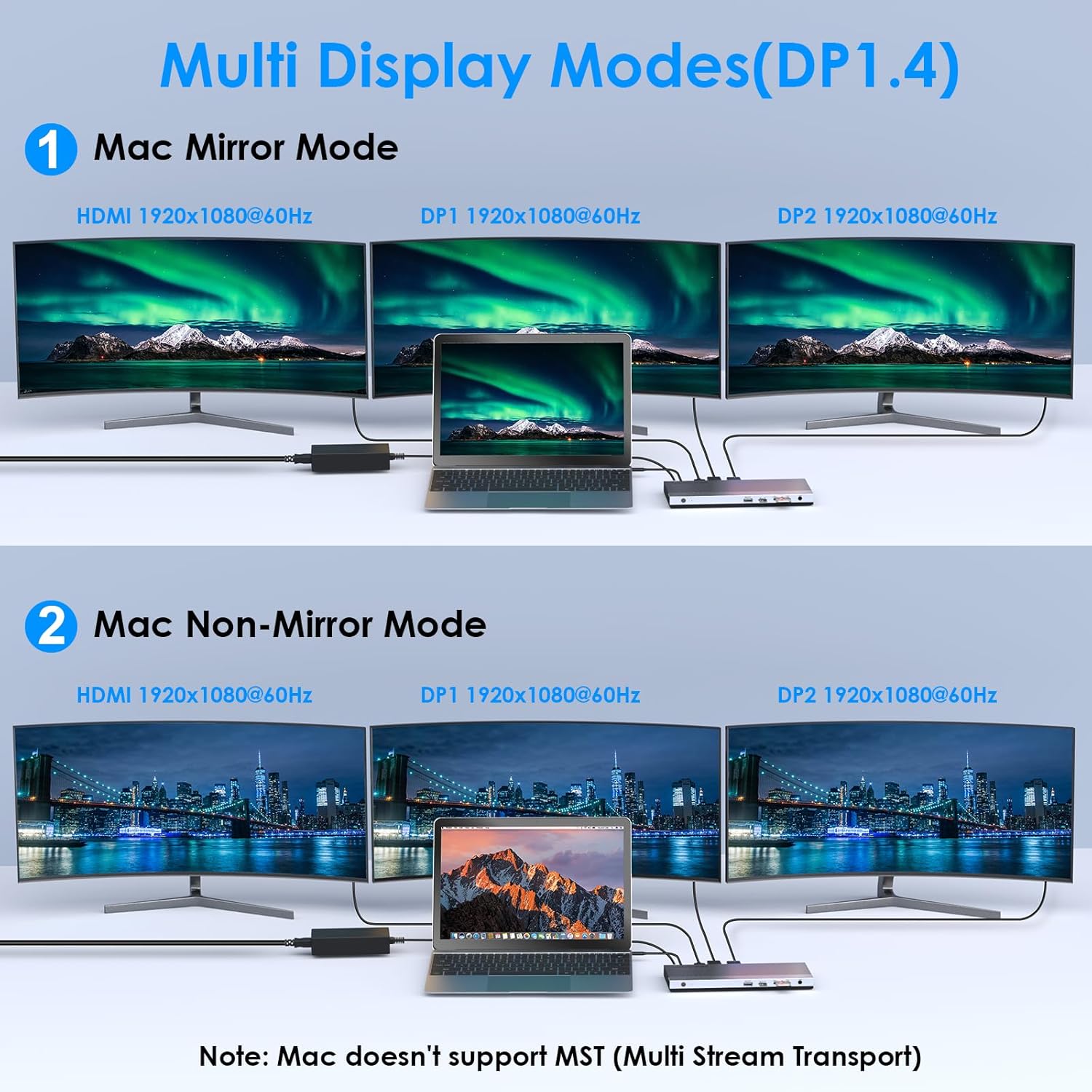
Image: Illustration of Mac multi-display modes, showing a laptop connected to three external monitors in both Mirror Mode (all monitors display the same content) and Non-Mirror Mode (all external monitors display the same content, but different from the laptop screen).
- د عکس حالت: All external monitors will display the same content as your primary display.
- Non-Mirror Mode: The three external monitors (HDMI+DP+DP) will display the same content, which is different from the laptop's built-in screen.
د حل وړتیاوې
- Single HDMI/DP display: Up to 4K@60Hz (with DP1.3/DP1.4 source).
- Dual displays simultaneously: Up to 2K@60Hz.
- Triple displays (HDMI + DP + DP) simultaneously: Up to 1920x1080@60Hz.
د بریښنا رسولو (PD) چارج کول
The upstream USB-C port provides up to 100W Power Delivery 3.0 to charge your connected laptop. Additionally, one USB 3.0 port supports BC 1.2 fast charging, delivering up to 7.5W for mobile devices.

Image: A laptop and a smartphone connected to the docking station, illustrating 100W Power Delivery to the laptop and BC 1.2 fast charging to the smartphone.
د معلوماتو لیږد
The docking station features four USB 3.0 ports, offering data transfer speeds up to 5Gbps. The built-in SD and Micro SD card readers support speeds up to 104MBps and can operate simultaneously.

Image: A laptop connected to the docking station, with USB flash drives and an SD card inserted, highlighting 5Gbps USB 3.0 speeds and 104MB/s SD/TF card reader speeds.
ګیګابایټ ایترنیټ
The RJ45 Ethernet port provides a stable and high-speed wired network connection up to 1000Mbps, ideal for reliable internet access.
5. مطابقت
This docking station is compatible with most Type-C and Thunderbolt 3/4 devices running Windows, macOS, Chrome OS, Linux, and Android.

Image: Visual representation of the docking station's compatibility with various devices like smartphones, tablets, laptops, desktops, and cameras, as well as operating systems including Windows, Chrome OS, Mac OS, Linux, and Android.
Important Compatibility Notes
د پیرودلو دمخهasing or using, ensure your host system's USB-C interface supports:
- DisplayPort Alternate Mode (Alt Mode): Essential for video output.
- USB Power Delivery (PD) Protocol: Required for laptop charging via the docking station.
- د معلوماتو لیږد: For USB peripheral functionality.
If your USB-C port only supports data transfer or charging without DisplayPort Alt Mode, video output will not function.

Image: A visual guide showing various types of USB-C ports (Thunderbolt 3, Data+DisplayPort+Power Delivery, Data Transfer only, Data+Power Delivery only, Data+DisplayPort only, Charging only) and indicating which are compatible with the docking station for full functionality.
6. مشخصات
| فیچر | تفصیل |
|---|---|
| ماډل | B0DXF92DL1 |
| برانډ | ویو لینک |
| هډوتري برسیر | Ethernet, HDMI, USB 3.0, DisplayPort, USB-C, SD/TF Card Reader, 3.5mm Audio Jack |
| د بندرونو شمیر | 13 |
| ټول USB پورټونه | 4 (USB 3.0) |
| د معلوماتو د لیږد کچه | 5 Gbps (USB 3.0), 104 MBps (SD/TF Card Reader) |
| د بریښنا رسول | Up to 100W (Host Charging), 7.5W (BC 1.2 USB 3.0 Port) |
| د ویډیو تولید | ۲x HDMI (۴K@۶۰Hz)، ۱x ډیسپلی پورټ (۴K@۶۰Hz) |
| ایترنیټ | Gigabit (10/100/1000 Mbps) |
| د عملیاتي سیسټم مطابقت | Windows, macOS, Chrome OS, Linux, Android |
| د تړلو موادو | پلاستیک |
ابعاد

Image: Technical drawing showing the dimensions of the WAVLINK 13-in-1 USB-C Triple Display Docking Station: 8.15 inches (207mm) length, 3.27 inches (83mm) width, and 0.71 inches (18mm) height.
7. ستونزه حل کول
که تاسو د خپل ډاکینګ سټیشن سره ستونزې سره مخ شئ، لاندې عامې ستونزې او حل لارې وګورئ:
- د ښودلو محصول نشته:
- ډاډ ترلاسه کړئ چې ستاسو د لیپ ټاپ USB-C پورټ د DisplayPort بدیل حالت ملاتړ کوي.
- Verify all display cables are securely connected to both the docking station and monitors.
- Check monitor input settings to ensure the correct input source (HDMI/DisplayPort) is selected.
- خپل لیپ ټاپ او د ډاکینګ سټیشن بیا پیل کړئ.
- For triple display, ensure your graphics card supports at least 4 displays (including your laptop's screen).
- لیپ ټاپ چارج نه کوي:
- Confirm the 130W power adapter is correctly connected to the docking station and a working power outlet.
- Ensure your laptop's USB-C port supports USB Power Delivery (PD) protocol.
- Verify the USB-C cable connecting the laptop to the docking station is capable of PD.
- د USB وسایل نه پیژندل شوي:
- ډاډ ترلاسه کړئ چې د ډاکینګ سټیشن فعال دی او ستاسو لپ ټاپ سره وصل دی.
- Try connecting the USB device to a different USB 3.0 port on the docking station.
- Connect the USB device directly to your laptop to confirm it is functional.
- د ایترنیټ اتصال نشته:
- وګورئ چې د ایترنیټ کیبل په خوندي ډول د ډاکینګ سټیشن او ستاسو روټر/موډیم دواړو سره وصل دی.
- په خپل لپ ټاپ کې د شبکې ترتیبات تایید کړئ.
- ډاډ ترلاسه کړئ چې ستاسو روټر/موډیم په سمه توګه کار کوي.
- متقابل ارتباط:
- Ensure all cables are firmly connected.
- د ډاکینګ سټیشن د قوي بریښنایی مقناطیسي مداخلې سرچینو ته نږدې د ځای پرځای کولو څخه ډډه وکړئ.
- Update your laptop's USB-C port drivers if available.
8. ساتنه
د خپل WAVLINK ډاکینګ سټیشن د اوږد عمر او غوره فعالیت ډاډمن کولو لپاره، د ساتنې دا لارښوونې تعقیب کړئ:
- پاکول: د ډاکینګ سټیشن بهرنۍ برخه پاکولو لپاره نرم، وچ ټوکر وکاروئ. د مایع پاکوونکو یا ایروسولونو څخه کار مه اخلئ.
- ذخیره کول: د ډاکینګ سټیشن په یخ او وچ ځای کې د مستقیم لمر وړانګو او سختې تودوخې څخه لرې وساتئ.
- سمبالول: د قوي تاثیراتو سره د وسیله له مینځه وړلو یا تابع کولو څخه ډډه وکړئ.
- وینټیلیشن: ډاډ ترلاسه کړئ چې د ډاکینګ سټیشن کافي هوا ورکول لري ترڅو د ډیر تودوخې مخه ونیسي، په ځانګړي توګه د ډیری وصل شوي وسیلو سره د اوږدې مودې کارونې پرمهال.
9. تضمین او ملاتړ
د تضمین معلومات
This WAVLINK product comes with an 18-month warranty from the date of purchase. An additional 6 months of warranty may be available for registered members. Please retain your proof of purchase for warranty claims.
د پیرودونکي ملاتړ
For technical assistance or support, please contact WAVLINK customer service:
- تلیفون: +1 8889730883 (UTC -5) Monday - Friday, 9 AM - 6 PM
- بریښنالیک: اړیکه@wavlink.com


