
1. پیژندنه
Thank you for choosing the Sunffice Wireless Bluetooth 5.3 Earbuds. This manual provides essential information for setting up, operating, and maintaining your new earbuds and charging case. Please read it carefully to ensure optimal performance and longevity of your device.
2. د بسته محتويات
مهرباني وکړئ تصدیق کړئ چې لاندې ټول لیست شوي توکي ستاسو په کڅوړه کې شتون لري:
- Sunffice Wireless Bluetooth Earbuds (Left and Right)
- LED Touch Screen Charging Case
- د USB چارج کولو کیبل (ډول-سي)
- د کارن لارښود

Image: Contents of the Sunffice Earbuds package, including the earbuds, charging case, USB cable, and user manual.
3. محصول ختم شوview
Familiarize yourself with the components of your Sunffice Wireless Earbuds and Charging Case.

Image: The Sunffice Wireless Earbuds placed in their charging case, showcasing the LED touch screen.
Image: Detailed diagram illustrating the various components of the earbuds and charging case, including the flashlight, USB interface, Type-C port, earplug, charging port, left/right charging compartments, magnetic edge, charging compartment cover, screen off button, multi-functional screen, time display, and battery levels for both earbuds and the charging case.
- ایربودز: In-ear design with touch control.
- د چارج کولو قضیه: Features a full-color LED touch screen, USB-A output for phone charging, and a Type-C input for charging the case.
- د LED ټچ سکرین: Displays date, time, battery levels, Bluetooth connection status, and provides access to various functions like music control, equalizer, illumination, camera trigger, alarm, volume adjustment, and games.
4. ترتیب کول
4.1 Charging the Charging Case and Earbuds
د لومړي ځل کارولو دمخه، د چارج کولو قضیه او ایربډونه په بشپړه توګه چارج کړئ.
- Connect the provided Type-C USB cable to the charging port on the case and a power source.
- د LED سکرین به د چارج کولو حالت په ګوته کړي.
- Place the earbuds into their respective slots in the charging case. They will automatically begin charging.
The 5000mAh charging case can charge the earbuds approximately 4-5 times, providing extended listening time. The case can also be used as a power bank to charge your phone.

Image: The Sunffice charging case connected to a laptop, illustrating the charging process for the case itself.
4.2 د بلوتوټ جوړه کول
The earbuds utilize Bluetooth 5.3 for a fast and stable connection.
- د چارج کولو قضیه پرانیزئ. د غوږ بډونه به په اتوماتيک ډول د جوړې کولو حالت ته ننوځي.
- په خپل وسیله (سمارټ فون، ټابلیټ، لیپ ټاپ) کې، بلوتوث فعال کړئ او د شته وسایلو لټون وکړئ.
- Select "Bluetooth Earbuds" (or similar name) from the list to connect.
- یوځل چې جوړه شي، نو په راتلونکي کې به د غوږ بډونه له قضیې څخه لرې کولو وروسته په اتوماتيک ډول ستاسو وسیله سره وصل شي.

Image: A smartphone displaying its Bluetooth settings, showing a successful connection to the earbuds, labeled as 'A98 TWS'.
5. عملیاتي لارښوونې
5.1 LED Touch Screen Functions
The charging case features an intelligent LED touch screen for various controls and information.

Image: The LED touch screen of the charging case displaying various functions, including music control, system settings, calculator, stopwatch, equalizer, and lock screen wallpaper options.
- وخت او نېټه: Check current date and time.
- د بیټرۍ کچه: View battery status of both earbuds and the charging case.
- د موسیقۍ کنټرول: Play, pause, skip tracks, and adjust volume directly from the screen.
- برابرونکی: مختلف آډیو پرو غوره کړئfiles (e.g., Pop, Rock, Class, Jazz, Rural, Normal).
- روښانتیا: Control lighting features (if applicable).
- د کیمرې محرک: Use as a remote shutter for your phone's camera.
- الارم: الارمونه تنظیم کړئ.
- لوبې: Access built-in games.
- رڼا: جوړ شوی فلش لائټ فعال کړئ.
۵.۱ د ایربډ ټچ کنټرولونه
The earbuds feature touch-sensitive areas for controlling playback and calls. Specific functions can often be customized via a mobile application (if available).
- یو نل موسیقي غږ کړئ/بند کړئ، زنګ ووهئ/پای ته ورسوئ.
- دوه ځله ټپ: بل ټریک (ښي غوږۍ)، مخکینی ټریک (کیڼ غوږۍ).
- درې ګونی نل: د غږ معاون فعال کړئ.
- اوږد پریس: Reject call, Switch between Noise Cancellation/Transparency modes (if applicable).
5.3 Charging Your Phone with the Case
The charging case can act as a portable power bank for your mobile phone.
- Connect your phone's charging cable to the USB-A output port on the charging case.
- The charging case will begin to charge your phone.
Video: This video demonstrates the various features of the Sunffice Wireless Earbuds and Charging Case, including unboxing, navigating the touch screen for games and calculators, and using the charging case to charge a smartphone. It also shows the flashlight function.
6. ساتنه
د خپلو غوږونو د اوږد عمر او غوره فعالیت ډاډمن کولو لپاره، د ساتنې دا لارښوونې تعقیب کړئ:
- پاکول: د غوږ بډونه او د چارج کولو کیس په منظم ډول د نرم، وچ، لینټ نه پاک ټوکر سره پاک کړئ. د سختو کیمیاوي موادو یا کثافاتو موادو کارولو څخه ډډه وکړئ.
- د اوبو مقاومت: The earbuds feature IPX waterproof coating technology, protecting them from sweat and rain. However, they are not designed for submersion in water. Do not use them while swimming or showering.
- ذخیره کول: کله چې په کارولو کې نه وي، د غوږ غوږوالۍ د چارج کولو په قضیه کې وساتئ ترڅو دوی خوندي کړي او چارج یې وساتي. په یخ او وچ ځای کې د سخت تودوخې څخه لرې وساتئ.
- چارج کول: یوازې چمتو شوی چارج کیبل یا تصدیق شوی معادل وکاروئ. د ډیر چارج کولو څخه ډډه وکړئ.

Image: Sunffice earbuds with water droplets, illustrating their water-resistant design suitable for sports activities.
7. ستونزه حل کول
که تاسو د خپلو غوږونو سره ستونزې سره مخ شئ، لاندې عام حلونو ته مراجعه وکړئ:
- غږ نشته: Ensure earbuds are charged, properly paired, and volume is turned up on both the earbuds and your connected device.
- جوړه نشي کیدی: Make sure Bluetooth is enabled on your device and the earbuds are in pairing mode. Try turning Bluetooth off and on again on your device, or resetting the earbuds (refer to manufacturer's webکه اړتیا وي، د بیا تنظیم کولو ځانګړي لارښوونو لپاره سایټ وګورئ).
- موقتي اړیکه: Ensure you are within the Bluetooth range (up to 10 meters) and there are no significant obstructions between the earbuds and your device.
- د چارج کولو مسلې: Check that the charging cable is securely connected and the power source is active. Clean the charging contacts on both the earbuds and the case.
- د ټچ سکرین غیر ځواب ویونکی: Ensure the screen is clean and dry. Try restarting the charging case by holding the screen off button (if available) or allowing the battery to drain and recharge.
8. مشخصات
| فیچر | مشخصات |
|---|---|
| د ماډل نوم | Wireless Bluetooth Earbuds with charging case |
| بلوتوث نسخه | 5.3 |
| د بلوتوټ رینج | 10 متره |
| د ایربډ بیټرۍ ژوند | نږدې 5 ساعته |
| د چارج کولو قضیه ظرفیت | 5000mAh (approx. 4-5 earbud charges) |
| د اوبو د مقاومت کچه | Water Resistant (IPX) |
| د کنټرول ډول | ټچ کنټرول |
| مطابقت لرونکې وسیلې | Cellphones, Laptops, Music Production Equipment, Smart Speaker, Tablets |
| د توکي وزن | 100 ګرامه (3.53 اونس) |
| مواد | پلاستیک |
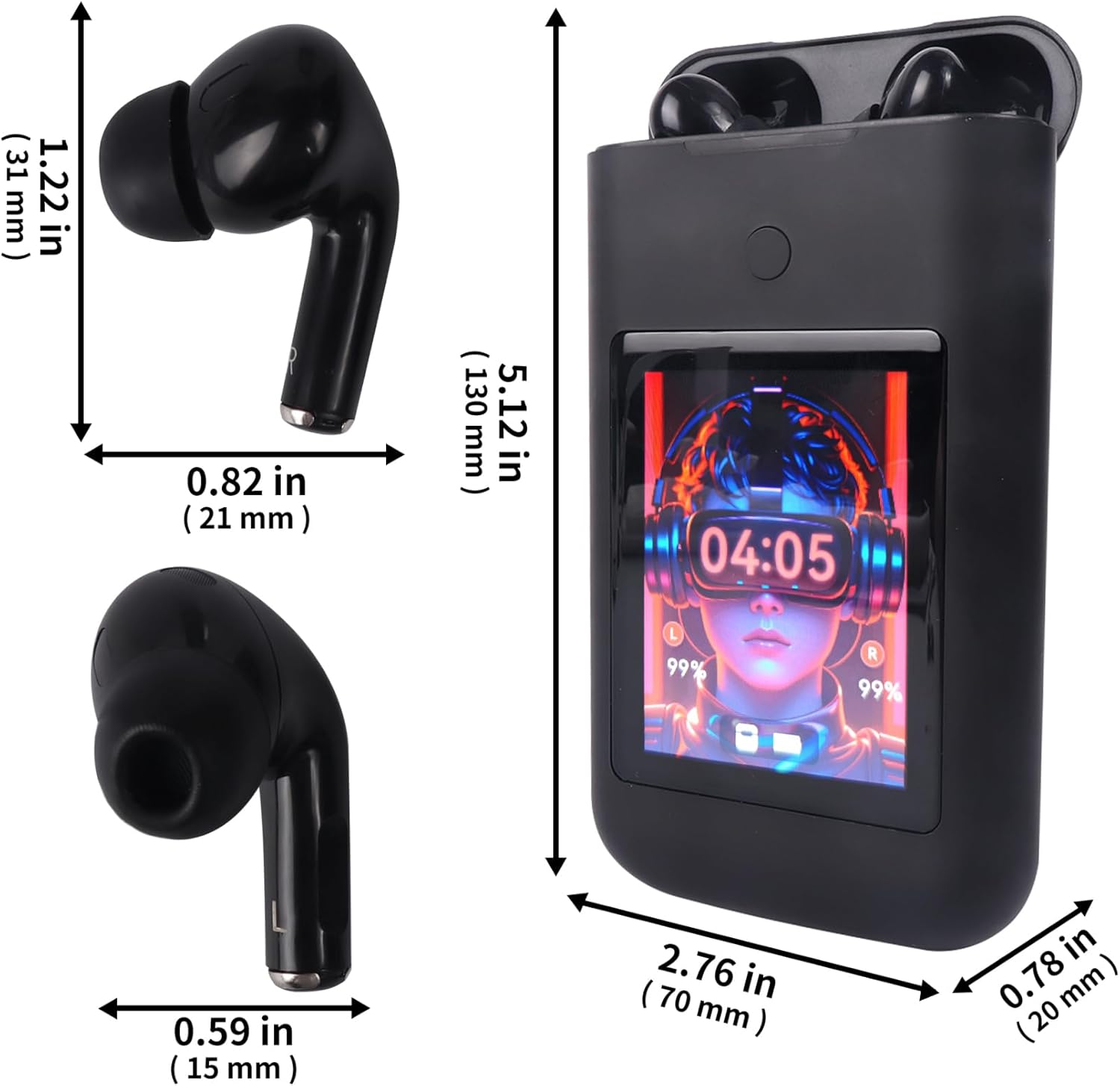
Image: Diagram showing the dimensions of the Sunffice Wireless Earbuds and their charging case in inches and millimeters.
9. د خوندیتوب معلومات
- د محصول جلا کول، ترمیم یا ترمیم مه کوئ.
- محصول د سختې تودوخې، مستقیم لمر وړانګو او خلاص اور څخه لرې وساتئ.
- Avoid exposing the product to excessive moisture or liquids beyond its water resistance rating.
- د اورېدو د زیان د مخنیوي لپاره د اوږدې مودې لپاره د غوږ بډونه په لوړ غږ مه کاروئ.
- د ماشومانو او څارویو د لاسرسي څخه لرې وساتئ.
10. تضمین او ملاتړ
د تضمین معلوماتو او د پیرودونکو ملاتړ لپاره، مهرباني وکړئ د خپل پیرود سره چمتو شوي اسنادو ته مراجعه وکړئ یا مستقیم له پلورونکي سره اړیکه ونیسئ. د هر ډول تضمین ادعا لپاره د پیرود ثبوت وساتئ.