
1. پیژندنه
Thank you for choosing the JUNJIEUNVO Q16 Wireless Translation Earbuds. These open-ear design earbuds offer a comfortable listening experience, advanced Bluetooth 5.4 connectivity, IPX5 waterproof rating, and support for real-time language translation across over 100 countries. This manual provides detailed instructions on how to set up, operate, and maintain your earbuds to ensure optimal performance.
2. د بسته محتويات
مهرباني وکړئ د لاندې توکو لپاره په بسته کې وګورئ:
- JUNJIEUNVO Q16 Wireless Translation Earbuds (Left and Right)
- د چارج کولو قضیه
- د کارن لارښود
- Charging Cable (USB-C, not always included, please check packaging)
3. محصول ختم شوview
The Q16 earbuds feature an open-ear design for comfort and situational awareness, housed in a compact charging case. The case includes a digital display for battery status.

شکل 3.1: Q16 Earbuds in their charging case, showing the left (L) and right (R) indicators along with the digital battery display.

شکل 3.2: The open-ear design of the Q16 earbuds, emphasizing comfort and awareness of surroundings.

شکل 3.3: Diagram illustrating the directional sound transmission technology, designed to protect privacy and reduce sound leakage.
4. ترتیب کول
۴.۱ د ایربډز او کیس چارج کول
Before first use, fully charge the earbuds and the charging case. The charging case has a 500mAh battery, and each earbud has a 40mAh battery. A full charge takes approximately 1.5 hours.
- Connect the charging cable (typically USB-C) to the charging port on the case and to a USB power source.
- The digital display on the charging case will show the charging progress.
- Place the earbuds into the charging case. Ensure they are correctly seated; the case will indicate if they are charging.
4.2 د بلوتوټ جوړه کول
The Q16 earbuds use Bluetooth 5.4 for a stable and efficient connection. The pairing process is automatic upon opening the case.
- Ensure your smartphone or device's Bluetooth is turned on.
- د چارج کولو کیس پوښ خلاص کړئ. د غوږ بډونه به په اتوماتيک ډول د جوړې کولو حالت ته ننوځي.
- په خپل وسیله کې، د بلوتوث وسیلو لټون وکړئ او له لیست څخه "Q16" غوره کړئ.
- یوځل چې وصل شو، تاسو به د تایید غږ واورئ، او د غوږ بډونه به د کارولو لپاره چمتو وي.
- For subsequent connections, simply open the charging case, and the earbuds will automatically reconnect to the last paired device.
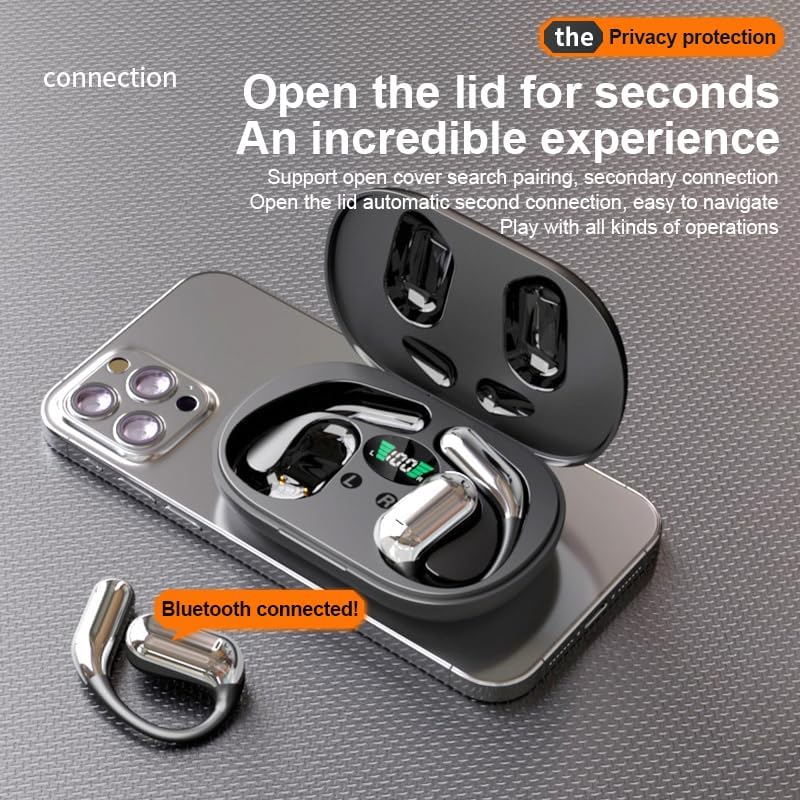
شکل 4.1: The Q16 earbuds connected to a smartphone, indicating successful Bluetooth pairing.
5. عملیاتي لارښوونې
۸ پاور آن/بند
- پاور آن: د چارج کولو کیس پوښ خلاص کړئ، او د غوږ بډونه به په اوتومات ډول فعال شي.
- بندول: د غوږ بډونه بیرته د چارج کولو په بکس کې کېږدئ او پوښ یې وتړئ. دوی به په اتوماتيک ډول بریښنا بنده کړي او چارج کول به پیل کړي.
5.2 د میوزیک غږ
(Specific touch controls are not detailed in the provided product data. The following are common gestures; refer to the manufacturer's official app or website for precise controls.)
- پلی کول / ودرول: یو ځل د غوږ بډ ټپ کړئ.
- بله لار: ښي غوږ بډ دوه ځله ټایپ کړئ.
- مخکینی لار کیڼ غوږ بډ دوه ځله ټایپ کړئ.
- د حجم کنټرول: (Typically a long press or triple tap, specific action not provided. Adjust via your connected device if not available on earbuds.)

شکل 5.1: Illustration of the panoramic stereo surround sound feature, enhancing the audio experience.
۶.۳ د زنګ وهلو مدیریت
- ځواب / پای کال: یو ځل د غوږ بډ ټپ کړئ.
- زنګ رد کړئ: د 2 ثانیو لپاره د غوږ بډ فشار ورکړئ.
5.4 Language Translation Function
The Q16 earbuds support real-time translation for over 100 languages. This feature typically requires a dedicated translation application on your paired smartphone.
- Download and install the recommended translation app (refer to product packaging or manufacturer's website for app details) on your smartphone.
- Ensure the earbuds are connected to your smartphone via Bluetooth.
- Open the translation app and follow its instructions to initiate real-time translation. The earbuds will act as your audio input/output device for the translation.
۴.۴ IPX5 د اوبو ضد درجه بندي
The earbuds are rated IPX5 waterproof, meaning they are resistant to splashing water from any direction. This makes them suitable for sports and outdoor activities. Note: The charging case is not waterproof. Avoid exposing the charging case to water.
6. ساتنه او پالنه
- پاکول: د غوږ بډونه او د چارج کولو کیس په نرمۍ سره د نرم، وچ، لینټ پاک ټوکر سره پاک کړئ. سخت کیمیاوي مواد یا د کثافاتو مواد مه کاروئ.
- ذخیره کول: کله چې په کارولو کې نه وي، د غوږ غوږوالۍ د چارج کولو په قضیه کې وساتئ ترڅو دوی خوندي کړي او چارج یې وساتي. په یخ او وچ ځای کې د سخت تودوخې څخه لرې وساتئ.
- د اوبو څخه ډډه کول: While the earbuds are IPX5 waterproof, avoid submerging them in water. The charging case is not waterproof.
- د بیټرۍ پاملرنه: د بیټرۍ د ژوند اوږدولو لپاره، د غوږونو او چارج کولو کیس په مکرر ډول په بشپړ ډول چارج کولو څخه ډډه وکړئ. په منظم ډول یې چارج کړئ، حتی که په دوامداره توګه نه وي.
7. ستونزه حل کول
| ستونزه | د حل لاره |
|---|---|
| ایربډونه د وسیلې سره نه جوړیږي. |
|
| د غوږونو څخه غږ نشته. |
|
| د غوږۍ غوږۍ نه چارج کېږي. |
|
| د ژباړې فعالیت کار نه کوي. |
|
8. مشخصات
| فیچر | تفصیل |
|---|---|
| د ماډل نوم | YYK-Q16 |
| بلوتوث نسخه | V5.4+EDR |
| چپ | Blue Flood |
| ملاتړ شوي پروتوکولونه | AVRCP V1.6, A2DP V1.3, HFP V1.7 (Simultaneous LE and BR / EDR) |
| Usage/Playback Time | نږدې ۴ ساعته (په ۷۰٪ حجم کې) |
| ولاړ وخت | ۸ ساعته |
| د چارج کولو وخت | تقریبا 1.5 ساعته |
| بې سیم واټن | 10 متره |
| د ایربود بیټرۍ ظرفیت | 40mAh (هر یو) |
| د چارج کولو قضیه بیټرۍ ظرفیت | 500mAh |
| د پنروک درجه | IPX5 (یوازې غوږوالۍ) |
| Translation Support | Over 100 languages |
| د غوږ ځای پرځای کول | On Ear (Open-ear design) |
| خنډ | 32 اوهم |
| خالص وزن | ۴۳ ګرامه (ټول) |
9. تضمین او ملاتړ
For warranty information and customer support, please refer to the documentation included with your purchase or visit the official JUNJIEUNVO webسایټ. که تاسو له کومې ستونزې سره مخ شئ چې پدې لارښود کې نه دي پوښل شوي، مهرباني وکړئ د مرستې لپاره زموږ د پیرودونکو خدماتو ټیم سره اړیکه ونیسئ.
جوړونکی: د ملګرو ملتونو سازمان (UNVO)
نښه: JUNJIEUNVO