
پیژندنه
This manual provides detailed instructions for the installation, operation, and maintenance of your SIXTOP 4+64G Single DIN 7-inch Retractable Touchscreen Car Stereo. Please read this manual thoroughly before using the product to ensure proper function and safety.
د محصول ځانګړتیاوې
- سیسټم: Android 13 with RK3326S 4-core processor.
- ښکاره کول: 7-inch IPS HD retractable touchscreen (1024x600 resolution).
- حافظه: ۴ جي بي رام + ۶۴ جي بي روم.
- ارتباط: Wireless CarPlay & Android Auto, Mirror Link (wireless only), Bluetooth 5.0, WiFi.
- نیویگیشن: Built-in GPS module with support for online and offline maps.
- آډیو: FM/RDS radio, EQ audio function, 4 x 45W output power, YD7388 power ampد ژوندي کولو چپ.
- معلومات: Dual USB ports, AUX-IN, AHD/CVBS reverse input, external microphone support.
- کنټرول: Steering wheel control support, split screen function, illuminated buttons.
- ملټي میډیا: Supports various audio (APE/FLAC/WAV/MP3/WMA), video (MKV/RMVB/AVI/MP4/MDV), and image (PNG/JPEG/JPG/GIF/WBMP/BNP) formats.
تنظیم او نصب کول
The car stereo features a universal 1DIN design, compatible with most Single DIN vehicle slots. Careful wiring is essential for proper functionality.
د بسته محتويات
ډاډ ترلاسه کړئ چې ټول توکي ستاسو په بسته کې شامل دي:

Image: Included accessories such as USB cable, GPS antenna, rear camera input cable, power cable, radio antenna, RCA cable, user manual, microphone, rear camera, and mounting bracket.
د تار لګولو لارښوونې
The connection wires are provided bare, and an ISO plug is not included. You will need to either purchase a suitable ISO adapter for your vehicle or carefully cut and connect the car's existing wiring using appropriate connectors such as terminal blocks or Wago connectors. Ensure all connections are secure and correctly matched to avoid damage to the unit or vehicle electrical system.
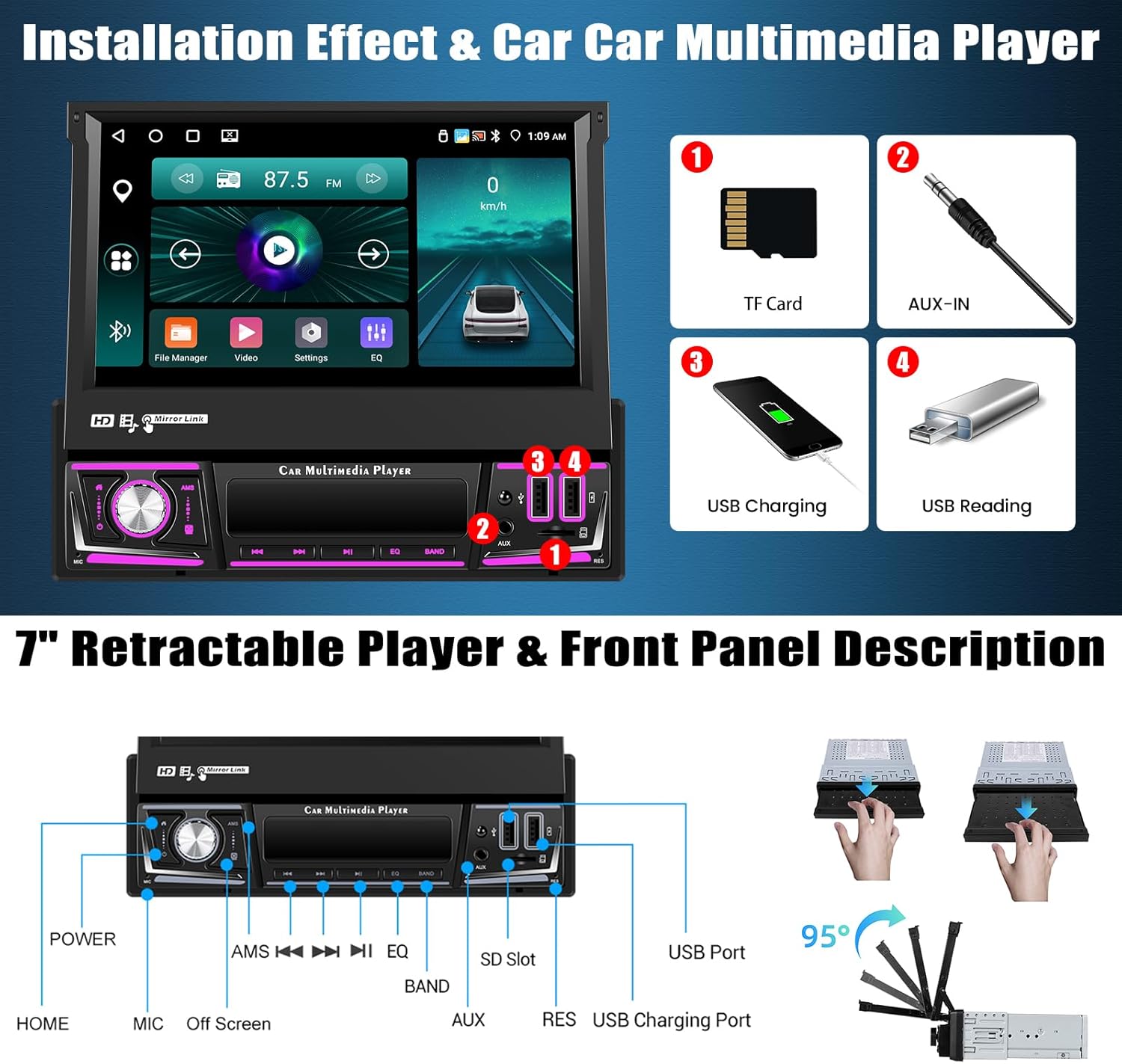
Image: Front panel description highlighting the retractable screen mechanism and various ports including TF card slot, AUX-IN, USB charging, and USB reading ports.
عملیاتي لارښوونې
CarPlay & Android Auto / Mirror Link
Connect your smartphone wirelessly to access phone contacts, emails, notifications, maps, music, and videos directly on the car stereo screen. Voice commands are supported. Mirror Link functionality allows projecting your phone's screen onto the car stereo display (wireless connection only).

Image: Demonstrates the interface for Wireless CarPlay, Android Auto, and Mirrorlink, showing how phone applications and media are displayed on the car stereo.
Bluetooth & FM/RDS Radio
Utilize Bluetooth 5.0 for hands-free calling, contact synchronization, and wireless music streaming. The FM/RDS radio supports automatic, semi-automatic, and precise tuning to listen to your favorite stations, news, and traffic information.
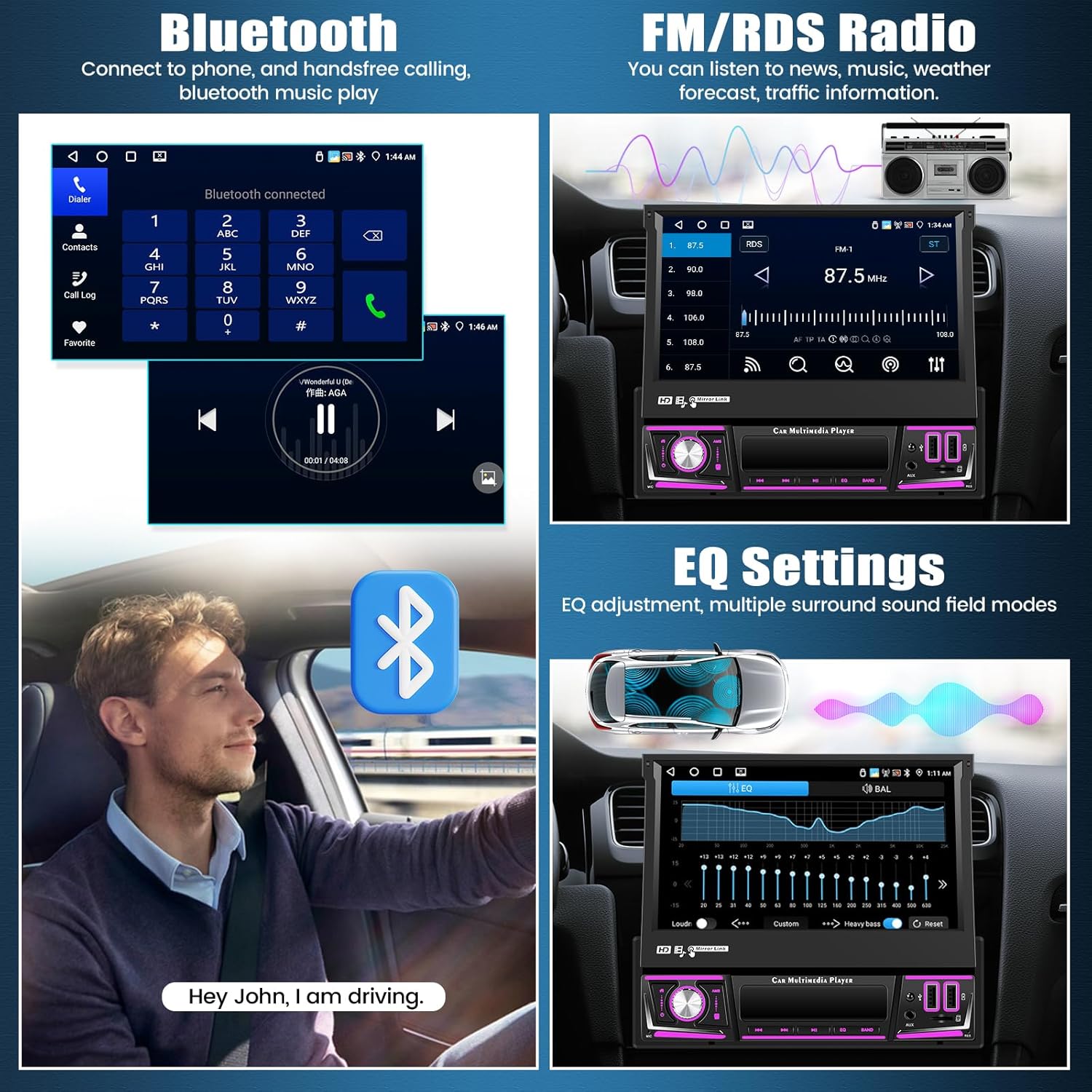
Image: Illustrates the Bluetooth interface for phone calls and music, alongside the FM/RDS radio display for tuning into stations.
GPS Navigation & WiFi Function
The integrated GPS module supports both online and offline maps for accurate and easy navigation. Voice navigation and real-time traffic information are available. Connect to WiFi to access online videos, download applications, and browse the internet.

Image: Displays the GPS navigation interface with map details and a visual representation of the WiFi function with common application icons.
Steering Wheel Controls & Split Screen
The unit supports existing steering wheel controls, allowing you to manage audio functions like changing songs, channels, and volume without taking your hands off the wheel. The split screen feature enables simultaneous use of two applications, with adjustable size and position, and easy switching via a swipe gesture.
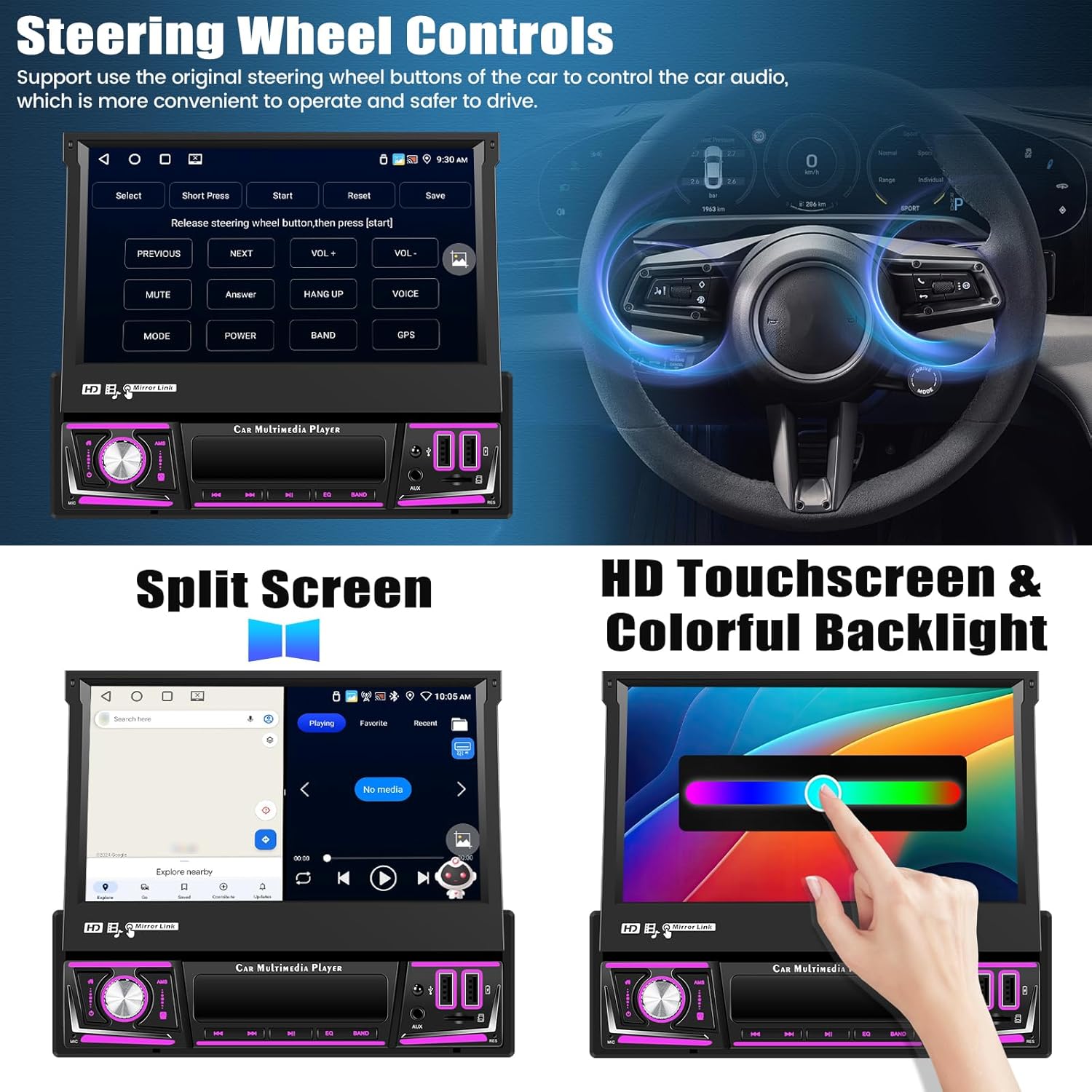
Image: Demonstrates how to configure steering wheel controls and the functionality of the split screen mode, showing two apps running side-by-side.
د بیرته راګرځیدو ښودنه
The car stereo supports a rearview camera (included), automatically switching to the reverse image when backing up. It supports AHD/CVBS formats, providing a clear view, even at night. Parking assist lines can be adjusted for convenience.
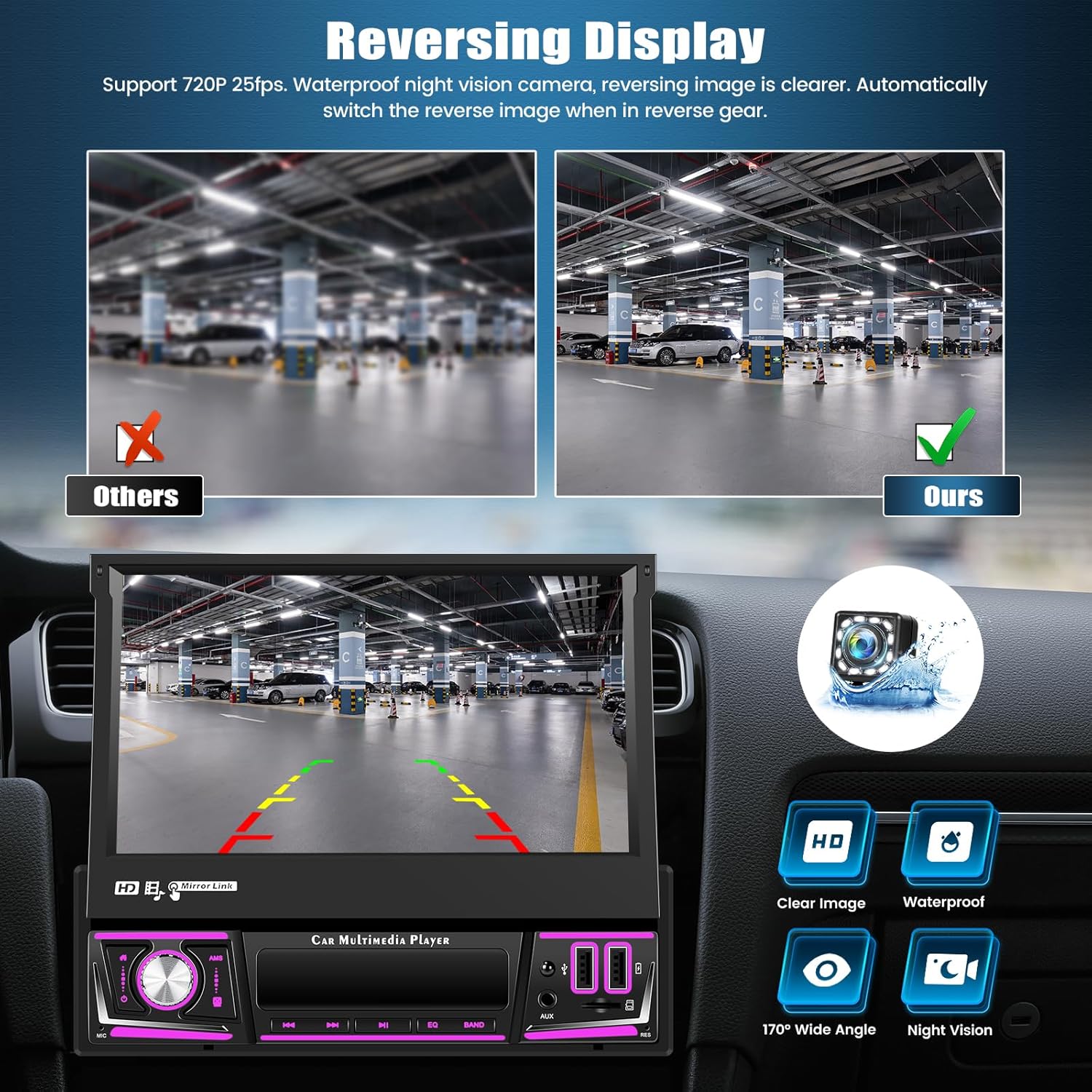
Image: Illustrates the clear reversing display provided by the included camera, highlighting features like HD resolution, waterproof design, wide-angle view, and night vision capabilities.
د EQ آډیو تنظیمات
Adjust the equalizer parameters of the audio output to customize sound quality. This feature allows for personalized audio tuning for an enhanced listening experience.
اختیاري دندې
The unit supports several optional functions to further enhance your driving experience:
- AI DSP: Eight mainstream sound effects specifically designed for automotive scenarios.
- هوښیار غږ مرستیال: Control the device and access various functions using natural language voice commands (activation may be required).
- DVR (Digital Video Recorder): Connect an optional car recorder to record your journeys.
- DAB (Digital Audio Broadcasting): Support for digital radio broadcasting (requires optional DAB module).

Image: Displays the user interfaces for AI DSP sound effects, the intelligent voice assistant, an example of DVR integration, and the DAB radio connection screen.
مشخصات
| فیچر | مشخصات |
|---|---|
| سیسټم | Android 13 |
| پروسیسر | RK3326S (4-core) |
| د سکرین اندازه | 7 انچه |
| د سکرین مواد | IPS |
| حافظه (RAM + ROM) | 4GB + 64GB |
| د سکرین ریزولوشن | 1024 x 600 |
| د راډیو چپ | UMW2652 |
| د تولید بریښنا | 4 x 45W (180 Watts total) |
| بلوتوث نسخه | 5.0 |
| د عملیاتي حرارت درجه | -20 °C څخه تر 75 °C |
| ځواک Ampلایفیر چپ | YD7388 |
| راډیو بانډ | FM/RDS |
| د راګرځولو انډول | د AHD/CVBS |
| CarPlay/Android Auto | یوازې بېسیم اتصال |
| د عکس لینک | یوازې بېسیم اتصال |
| USB بندرونه | دوه ګونی USB |
| د آډیو بڼه | APE/FLAC/WAV/MP3/WMA, etc. |
| د ویډیو بڼه | MKV/RMVB/AVI/MP4/MDV, etc. |
| د انځور بڼه | PNG/JPEG/JPG/GIF/WBMP/BNP, etc. |
| Default Keyword | 8317 |
| د توکي وزن | 1.9 کیلوګرامه |
ساتنه
د خپل موټر سټیریو د اوږد عمر او غوره فعالیت ډاډمن کولو لپاره، د ساتنې دا لارښوونې تعقیب کړئ:
- پاکول: د سکرین او واحد پاکولو لپاره نرم، وچ ټوکر وکاروئ. د کثافاتو پاکوونکو یا محلولونو څخه ډډه وکړئ.
- دحرارت درجه: Operate the unit within the specified temperature range (-20 °C to 75 °C) to prevent damage.
- Retractable Screen: When not in use, retract the screen to protect it from dust and physical damage.
- د سافټویر تازه معلومات: جوړونکي وګورئ website for any available software updates to improve performance and add new features.
د ستونزو حل کول
که تاسو د خپل موټر سټیریو سره ستونزې سره مخ شئ، لاندې عامې ستونزې او حل لارې وګورئ:
بریښنا نشته / واحد نه چالانیږي
- د بریښنا ټول اتصالونه وګورئ ترڅو ډاډ ترلاسه کړئ چې دوی خوندي او په سمه توګه تار شوي دي.
- Verify that the vehicle's fuse for the stereo is intact.
نه غږ
- ډاډ ترلاسه کړئ چې د سپیکر تارونه په سمه توګه وصل دي او لنډ سرکټ شوي ندي.
- Check volume levels and EQ settings.
د سټیرینګ ویل کنټرولونه کار نه کوي
- Confirm that the steering wheel control wires are properly connected to the unit.
- Refer to the unit's settings for steering wheel control configuration.
شاتهview کیمره نه ښودل کیږي
- Check the camera's power and video input connections.
- Ensure the reverse gear signal wire is correctly connected to trigger the display.
Connectivity Issues (Bluetooth, WiFi, CarPlay/Android Auto)
- Ensure Bluetooth and WiFi are enabled on both the stereo and your device.
- For CarPlay/Android Auto, verify the connection type (wireless or wired) and ensure your phone is compatible.
- د موټر سټیریو او خپل موبایل وسیله دواړه بیا پیل کړئ.
تضمین او ملاتړ
SIXTOP is committed to providing quality products and customer satisfaction. Your product comes with the following support:
- تضمین: 2 Years repair or replacement.
- راستنیدنه: 30 Day Replacement policy.
- تخنیکي ملاتړ: د ژوند تخنیکي ملاتړ.
- د ځواب وخت: 18 Hours Online Response for inquiries.
For any questions regarding product fitment or technical assistance, please contact our support team. You can typically find our contact information by navigating to the seller's page on the platform where you purchased the product and looking for an 'Ask a question' option.

Image: A customer service representative ready to assist, symbolizing available support.
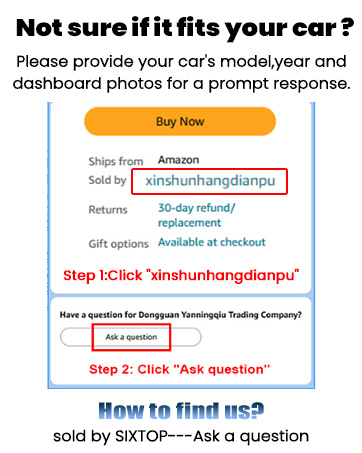
Image: Instructions on how to contact the seller for support through the online marketplace interface.