
JUNJIEUNVO YYK-Q16 PRO
JUNJIEUNVO Q30 Bluetooth Earphones User Manual
Model: YYK-Q16 PRO
1. پیژندنه
Thank you for choosing the JUNJIEUNVO Q30 Bluetooth Earphones. These earphones are designed to provide a superior audio experience with advanced features such as an intelligent color touch screen, Active Noise Cancellation (ANC), and Environmental Noise Cancellation (ENC). This manual will guide you through the setup, operation, and maintenance of your new earphones.
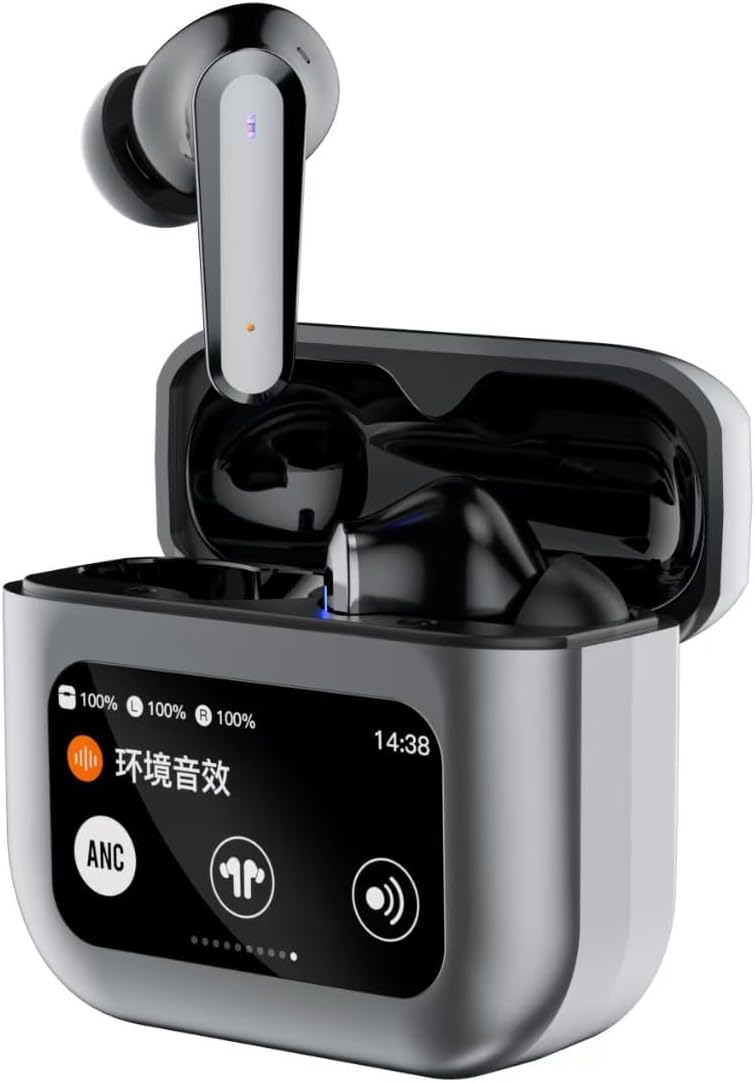
Image 1.1: JUNJIEUNVO Q30 Bluetooth Earphones in their charging case, showcasing the intelligent color touch screen.
2. د بسته محتويات
مهرباني وکړئ د لاندې توکو لپاره په بسته کې وګورئ:
- JUNJIEUNVO Q30 Bluetooth Earphones (Left and Right)
- Charging Case with Intelligent Color Touch Screen
- د USB چارج کیبل
- د کارن لارښود
- د غوږونو څو اندازې (S، M، L)
۱.۱. د خوندیتوب مهم معلومات
- Do not disassemble or modify the earphones or charging case.
- Keep the device away from extreme temperatures, humidity, and liquids.
- د اوریدلو زیان څخه مخنیوي لپاره د لوړې حجم کچې سره د اوږدې مودې تماس څخه مخنیوی وکړئ.
- یوازې چمتو شوی چارجینګ کیبل یا تصدیق شوی معادل وکاروئ.
- وسیله او د هغې بیټرۍ د ځایی مقرراتو سره سم په مسؤلیت سره تصفیه کړئ.
4. ترتیب کول
۲. د غوږونو او کیس چارج کول
د لومړي ځل کارولو دمخه، اییرفونونه او د چارج کولو کیس په بشپړه توګه چارج کړئ.
- د USB چارج کولو کیبل د قضیې د چارج کولو پورټ او د بریښنا سرچینې سره وصل کړئ.
- په کیس کې ټچ سکرین به د چارج کولو حالت ښکاره کړي.
- اییرفونونه د چارج کولو په قضیه کې واچوئ. دوی به په اتوماتيک ډول چارج پیل کړي.
- بشپړ چارج معمولا شاوخوا ۱.۵ ساعته وخت نیسي.
4.2. د بلوتوث جوړه کول
د خپل اییرفونونو د وسیلې سره د نښلولو لپاره:
- ډاډ ترلاسه کړئ چې اییرفونونه چارج شوي او د چارج کولو کیس دننه دي.
- د چارج کولو کیس پوښ خلاص کړئ. اییرفونونه به په اتوماتيک ډول د جوړې کولو حالت ته ننوځي.
- په خپل وسیله (سمارټ فون، ټابلیټ، او نور) کې، بلوتوث فعال کړئ.
- لټون available Bluetooth devices and select "Q30" from the list.
- Once connected, the earphones will indicate successful pairing, and the touch screen on the case may show connection status.
۴. د غوږونو اغوستل
For optimal sound quality and comfort, choose the ear tips that best fit your ears. Insert the earphones gently into your ear canal and rotate them slightly until they feel secure and comfortable.

Image 4.1: Illustration of proper earphone fit for comfort and sound.
5. عملیاتي لارښوونې
5.1. بریښنا فعال/بند
- پاور آن: د چارج کولو کیس پوښ خلاص کړئ، یا اییرفونونه له کیس څخه وباسئ. دوی به په اتوماتيک ډول چالان شي.
- بندول: اییرفونونه بیرته د چارج کولو په قضیه کې کیږدئ او پوښ یې وتړئ. دوی به په اتوماتيک ډول بریښنا بنده کړي.
5.2. Touch Controls (Earbuds)
The earphones feature touch-sensitive areas for various functions:
- پلی کول / ودرول: په دواړو غوږونو کې یو ځل کلیک وکړئ.
- بله لار: په ښي غوږۍ کې دوه ځله ټایپ کړئ.
- مخکینی لار په چپ غوږۍ کې دوه ځله ټایپ کړئ.
- ځواب / پای کال: په دواړو غوږونو کې یو ځل کلیک وکړئ.
- زنګ رد کړئ: د 2 ثانیو لپاره هر یو ایربډ فشار ورکړئ او ونیسئ.
- د غږ همکار فعاله کړئ: په دواړو غوږونو درې ځله ټایپ کړئ.
- Switch ANC/ENC Modes: Press and hold the left earbud for 2 seconds to cycle through ANC On, Transparency Mode, and ANC Off.
5.3. Intelligent Color Touch Screen Functions (Charging Case)
The charging case features a full-color touch screen for advanced control and settings. Swipe left or right to navigate through the menus.

انځور 5.1: اوورview of the intelligent color touch screen functions on the charging case.
- د موسیقۍ کنټرول: Play, pause, skip tracks directly from the screen.
- د حجم سمون: د پلې بیک حجم کنټرول کړئ.
- برابرونکی: Select from preset equalizer modes or customize your sound profile.
- Pattern Selection (Mode Select): Choose different audio modes, such as gaming or movie mode.
- Lock Wallpaper: د سکرین شالید تنظیم کړئ.
- د وخت ترتیب: Adjust the device's time.
- د سکرین روښانتیا: د ښودنې روښانتیا تنظیم کړئ.
- د فلش لائټ فعالیت: Activate a small flashlight feature.
- ژبه: د ښودلو ژبه بدله کړئ.
- Find Earphone: Locate misplaced earbuds by emitting a sound.
- د کیمرې دنده: د خپل تلیفون د کیمرې شټر په لرې ډول فعال کړئ.
- غږ زنګ: Initiate or manage voice calls.
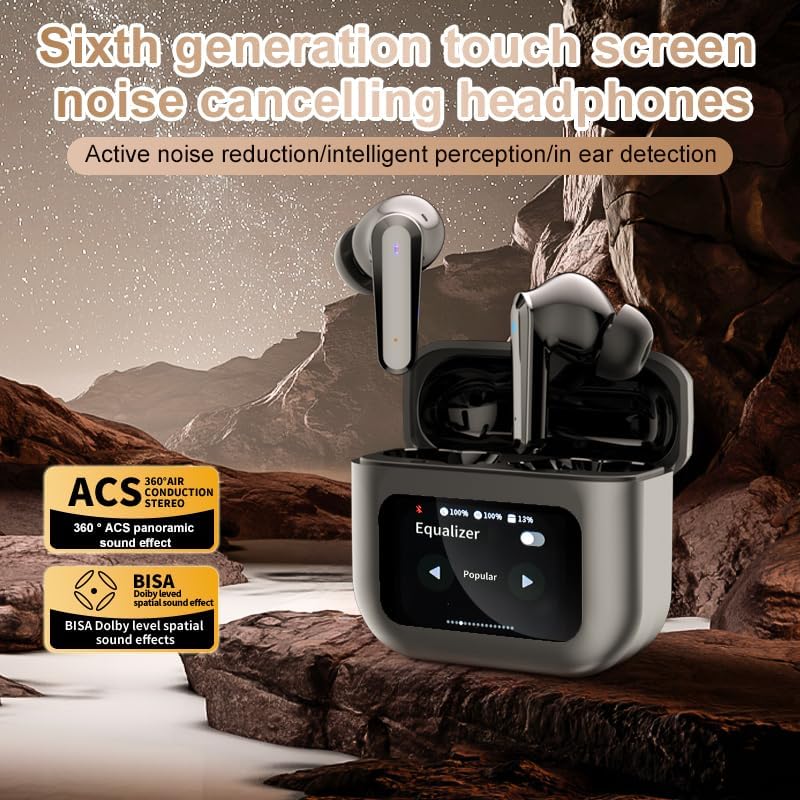
Image 5.2: The touch screen displaying equalizer settings for audio customization.
۵.۲. د فعال شور لغوه کول (ANC) او د چاپیریال شور لغوه کول (ENC)
The Q30 earphones feature both ANC for reducing ambient noise and ENC for clear call quality.
- ANC: Reduces external low-frequency noise, ideal for travel or noisy environments. Activate via earbud touch control or the charging case screen.
- د روڼتیا حالت: Allows you to hear your surroundings without removing the earphones. Cycle through modes using the earbud touch control.
- ENC: Enhances voice clarity during calls by filtering out background noise from your microphone. This feature is automatically active during calls.

Image 5.3: The touch screen interface for selecting various modes, including noise cancellation options.
6. ساتنه
6.1. پاکول
- په نرمۍ سره د غوږونو او چارج کولو کیس د نرم، وچ، لینټ پاک ټوکر سره پاک کړئ.
- د کثافاتو پاکوونکي، الکول، یا کیمیاوي محلولونه مه کاروئ.
- د غوږ لارښوونې په منظمه توګه د اعلان سره پاک کړئamp ټوکر واچوئ او پریږدئ چې په بشپړه توګه وچ شي مخکې لدې چې بیا وصل کړئ.
- Ensure charging contacts on both earphones and case are clean and free of debris.
6.2. ذخیره کول
- کله چې په کارولو کې نه وي، نو اییرفونونه د چارج کولو په قضیه کې وساتئ ترڅو یې ساتنه وشي او چارج یې وساتل شي.
- په یخ، وچ ځای کې ذخیره کړئ، د مستقیم لمر وړانګو او خورا تودوخې څخه لرې.
7. ستونزه حل کول
| ستونزه | احتمالي لامل | د حل لاره |
|---|---|---|
| اییرفونونه نه جوړیږي | اییرفونونه د جوړې کولو په حالت کې ندي؛ په وسیله کې بلوتوټ بند دی؛ له حد څخه بهر دی. | Ensure earphones are in pairing mode (open case lid). Turn Bluetooth on your device. Move device closer to earphones. |
| د غوږونو څخه هیڅ غږ نشته | Volume too low; earphones not connected; media paused. | Increase volume on device and earphones. Reconnect earphones. Check if media is playing. |
| One earphone has no sound | د بیټرۍ ټیټه کچه؛ د اتصال ستونزه. | Place both earphones back in the case, close, then reopen to reset connection. Ensure both are charged. |
| د چارج قضیه نه چارج کول | Faulty cable; power source issue. | یو بل USB کیبل او د بریښنا اډاپټر هڅه وکړئ. ډاډ ترلاسه کړئ چې اړیکې خوندي دي. |
| د ټچ سکرین غیر ځواب ورکوونکی | د سافټویر لنډمهاله ستونزه. | Restart the case by closing and reopening it, or allow the battery to drain and recharge. |
8. مشخصات
| فیچر | تفصیل |
|---|---|
| د ماډل نوم | YYK-Q16 PRO (Q30) |
| بلوتوث نسخه | V5.4+EDR |
| چپ | Blue Flood |
| ملاتړ شوي پروتوکولونه | AVRCP V1.6, A2DP V1.3, HFP V1.7, Simultaneous LE and BR / EDR |
| د شور کنټرول | د فعال شور لغوه کول (ANC)، د چاپیریال شور لغوه کول (ENC) |
| د پلې بیک وخت | نږدې ۴ ساعته (په ۷۰٪ حجم کې) |
| ولاړ وخت | ۸ ساعته |
| د چارج کولو وخت | تقریبا 1.5 ساعته |
| بې سیم واټن | 10 متره |
| د هیډفون بیټرۍ وړتیا | 40mAh |
| د چارج کولو قضیه بیټرۍ ظرفیت | 500mAh |
| د پنروک درجه | IPX5 (اییرفونونه) |
| خنډ | 32 اوم |
| UPC | 884613749491 |
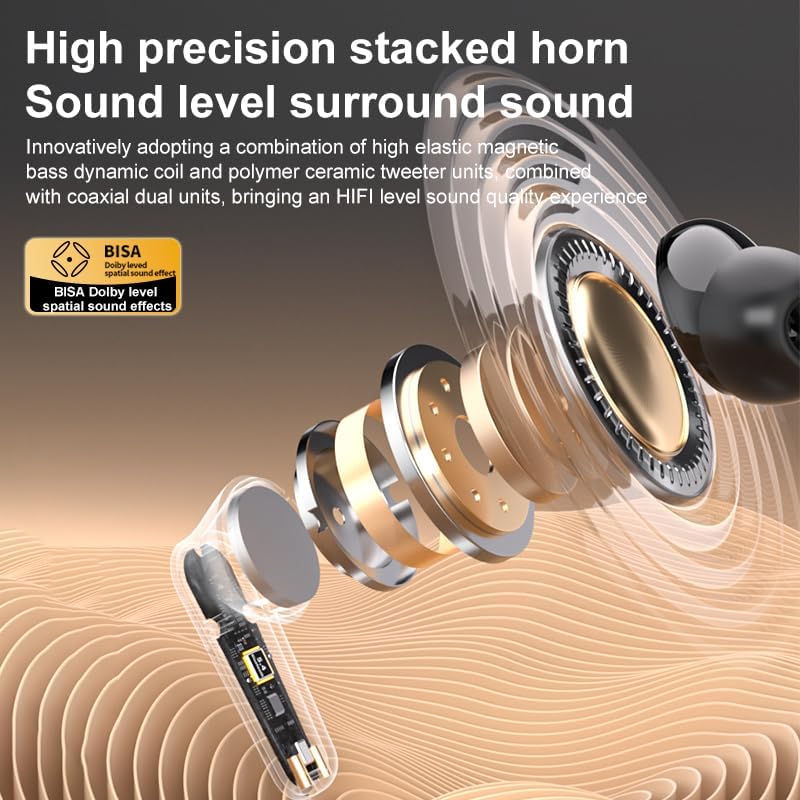
انځور ۲: تفصیلي view of the high-precision stacked horn and internal components for sound delivery.
9. تضمین او ملاتړ
For warranty information or technical support, please refer to the warranty card included with your product or contact the manufacturer directly. Please have your model number (YYK-Q16 PRO) and purchase details ready when contacting support.
Manufacturer: UNVO
Ask a question about this manual
Ask about setup, troubleshooting, compatibility, parts, safety, or missing instructions. Manuals+ will review the question and use this page’s manual context to help answer it.