
1. پیژندنه
This manual provides detailed instructions for the proper use and maintenance of your Oakcastle HIFI500 Remote Control. This remote is designed as a replacement or spare for the Oakcastle HIFI500 audio system, ensuring seamless control over its functions. Please read this manual thoroughly before use to ensure optimal performance and longevity of your remote control.
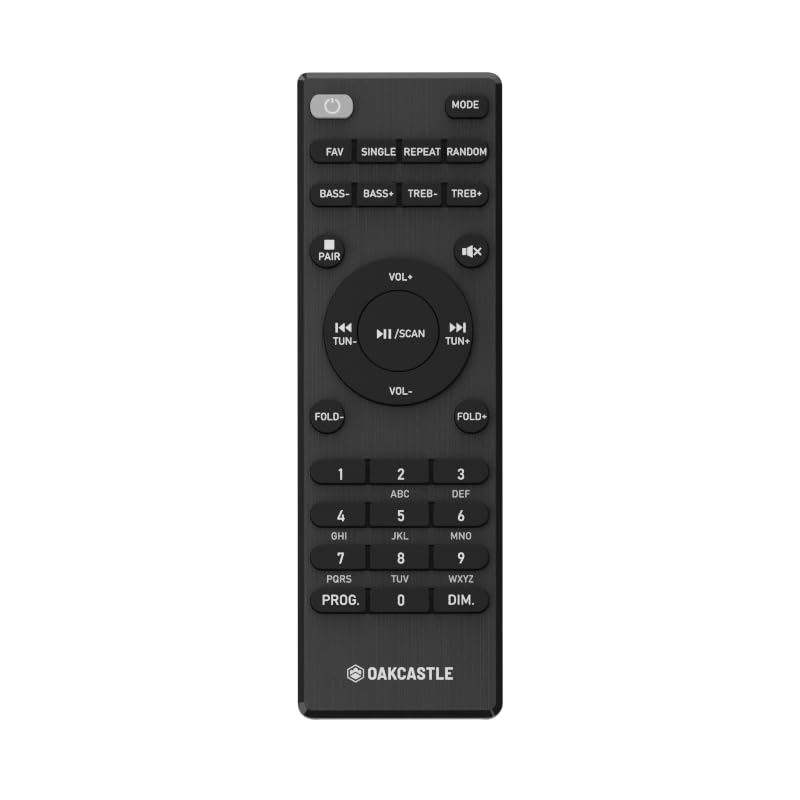
شکل 1.1: مخکی view of the Oakcastle HIFI500 Remote Control. This image displays the compact design and button layout, including power, volume, source selection, and playback controls, typical for operating the HIFI500 audio system.
2. ترتیب کول
2.1. د بیټرۍ نصب کول
The Oakcastle HIFI500 Remote Control requires two AAA batteries (not included) for operation. Follow these steps to install the batteries:
- د ریموټ کنټرول شاته د بیټرۍ کڅوړه ومومئ.
- په ټب کې فشار ورکړئ او د بیټرۍ پوښ ښکته خوا ته وغورځوئ ترڅو یې خلاص کړئ.
- دوه AAA بیټرۍ دننه کړئ، ډاډ ترلاسه کړئ چې مثبت (+) او منفي (-) ټرمینلونه د خونې دننه د نښانونو سره په سمه توګه سمون لري.
- د بیټرۍ پوښ بیرته ځای پر ځای کړئ تر هغه چې په خوندي توګه کلیک وکړئ.
یادونه: Always use new batteries and dispose of old batteries responsibly. Do not mix old and new batteries, or different types of batteries.
2.2. ابتدايي استعمال
Once batteries are installed, the remote control is ready for use with your Oakcastle HIFI500 audio system. Point the remote directly at the infrared (IR) receiver on your HIFI500 system. No additional pairing is typically required for this replacement remote.
3. د ریموټ کنټرول چلول
The Oakcastle HIFI500 Remote Control provides full functionality for your HIFI500 audio system. Below is a general guide to common button functions:
- د چالانېدو تڼۍ (🏻): Turns the HIFI500 system on or off.
- حجم پورته/ ښکته (Vol+ / Vol-): د آډیو تولید کچه تنظیموي.
- خاموش (🔇): په لنډمهاله توګه د آډیو محصول خاموشوي.
- Source/Input (سرچینه): Cycles through available audio inputs (e.g., CD, FM, Bluetooth, AUX).
- د پلې بیک کنټرولونه (▶ / ⏸ / ⏹ / ⏪ / ⏩): Controls media playback (Play, Pause, Stop, Rewind, Fast Forward) for compatible sources like CD or USB.
- د نیویګیشن تonsۍ (▲ / ▼ / ◀ / ▶): Used to navigate menus and selections on the HIFI500 system display.
- د OK/Enter تڼۍ: انتخابونه تاییدوي.
- عددي کیپډ (0-9): For direct input of radio frequencies, track numbers, or other numerical data.
Refer to your Oakcastle HIFI500 audio system's main user manual for specific functions and advanced operations.
4. ساتنه
4.1. پاکول
To clean your remote control, gently wipe the surface with a soft, dry cloth. For stubborn dirt, slightly dampټوکر د اوبو یا یو نرم، غیر خړوبونکي کلینر سره ومینځئ. د سختو کیمیاوي موادو، محلولونو، یا خړوبونکي موادو کارولو څخه ډډه وکړئ، ځکه چې دا کولی شي د ریموټ پای یا داخلي برخو ته زیان ورسوي.
4.2. د بیټرۍ بدلول
Replace batteries when the remote's response becomes sluggish or stops working. Follow the battery installation steps outlined in Section 2.1. Always replace both batteries simultaneously with new ones.
4.3. ذخیره کول
When not in use for extended periods, it is recommended to remove the batteries from the remote control to prevent leakage, which can cause damage. Store the remote in a cool, dry place away from direct sunlight and extreme temperatures.
5. ستونزه حل کول
If you encounter issues with your Oakcastle HIFI500 Remote Control, please refer to the following common problems and solutions:
- ریموټ ځواب نه ورکوي:
- وګورئ چې ایا بیټرۍ په سمه توګه نصب شوي او سم قطبي دي.
- بیټرۍ د نویو سره بدل کړئ.
- Ensure there are no obstructions between the remote control and the HIFI500 system's IR receiver.
- Make sure you are within the effective range and pointing the remote directly at the HIFI500 system.
- Intermittent function:
- دا ډیری وخت د بیټرۍ ټیټ ځواک په ګوته کوي. بیټرۍ بدل کړئ.
- Ensure the remote's IR emitter is clean and free from dirt or smudges.
If the problem persists after trying these solutions, please contact Oakcastle customer support.
6. مشخصات
| فیچر | مشخصات |
|---|---|
| ماډل | HIFI500 Remote Control |
| برانډ | اوکاسټل |
| د ارتباط ټیکنالوژي | انفراریډ (IR) |
| د بریښنا سرچینه | 2 x AAA بیټرۍ (شامل ندي) |
| د ملاتړ شوي وسایلو اعظمي شمیر | 1 (Oakcastle HIFI500 Audio System) |
| ځانګړی ځانګړنه | د رڼا وزن |
| د توکي وزن | 2.82 اونس (نږدې 80 ګرامه) |
| د کڅوړې ابعاد | ۲.۶۴ x ۲.۳۲ x ۲.۷۶ انچه (تقریبا ۶.۷ x ۵.۹ x ۷ سانتي متره) |
| جوړونکی | اکثریت |
7. تضمین او ملاتړ
7.1. د تضمین معلومات
This Oakcastle HIFI500 Remote Control is covered by a manufacturer's warranty. Please refer to the warranty card included with your original Oakcastle HIFI500 audio system or visit the official Oakcastle webد تضمین د مفصلو شرایطو او شرایطو لپاره سایټ. د تضمین ادعاوو لپاره د پیرود ثبوت وساتئ.
7.2. د پیرودونکي ملاتړ
For technical assistance, troubleshooting beyond this manual, or warranty inquiries, please contact Oakcastle customer support. You can typically find contact information, including phone numbers, email addresses, and support portals, on the official Oakcastle webسایټ
Please have your product model (HIFI500 Remote Control) and purchase details ready when contacting support.