
1. پیژندنه
Thank you for choosing the JUNJIEUNVO Q16 PRO Wireless Translation Earbuds. These earbuds are designed to provide a versatile audio experience, featuring real-time language translation, high-definition sound, and an open-ear design for comfort. This manual provides essential information for setting up, operating, and maintaining your device.
2. د بسته محتويات
- JUNJIEUNVO Q16 PRO Wireless Translation Earbuds (Left and Right)
- Charging Case with Smart Touch Screen
- د کارن لارښود
- د چارج کولو کیبل (USB-C)
3. محصول ختم شوview

شکل 3.1: JUNJIEUNVO Q16 PRO Wireless Translation Earbuds and Charging Case. This image displays the white and silver earbuds with their unique ear-hook design, alongside the charging case which features a digital display showing time and battery levels.
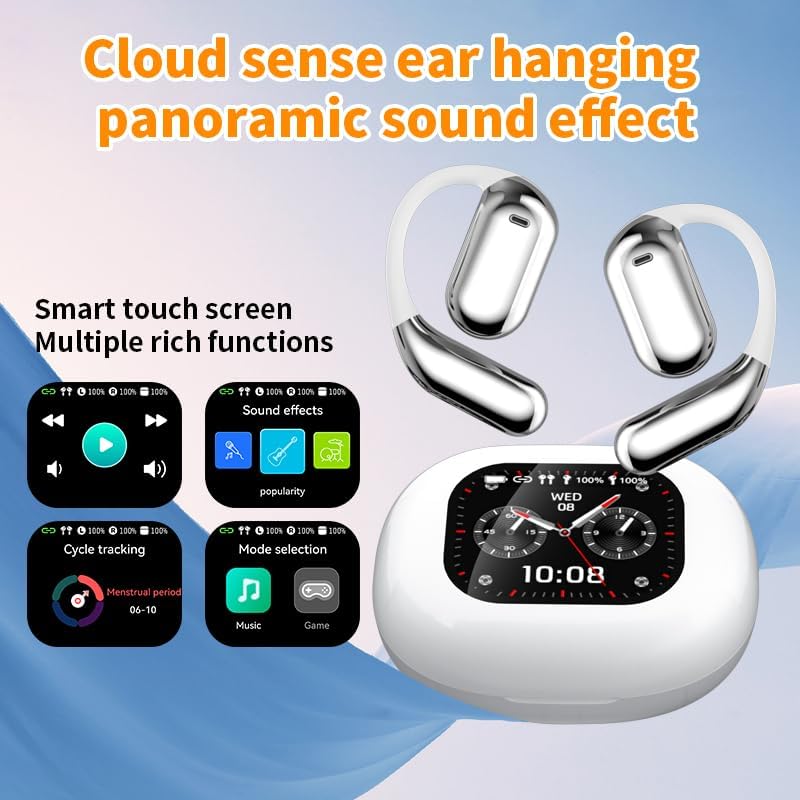
شکل 3.2: Smart Touch Screen Functions. This image highlights the charging case's smart touch screen, illustrating various functions such as media playback controls, sound effects, cycle tracking, and mode selection (music/game).

شکل 3.3: Environmental Noise Cancellation (ENC). This image depicts a person wearing the earbuds, with an overlay illustrating how the ENC technology reduces ambient noise by up to 99.44%, providing a clearer audio experience.

شکل 3.4: Open-Ear Design for Comfort. This image shows a person wearing the earbuds, emphasizing the open-ear design that offers comfort and allows for awareness of external sounds, protecting ear canal health.

شکل 3.5: Multiple Sound Adjustment Modes. This image displays the charging case's screen showing "Sound effects" with options for various music genres, indicating the ability to customize audio preferences.

شکل 3.6: Extended Battery Life and Rich Functions. This image showcases the earbuds and charging case, highlighting a 40-hour endurance with a 500mAh charging case capacity, along with a mention of multiple functions.

شکل 3.7: Earbuds and Charging Case (Open View). A detailed view of both earbuds and the open charging case, showing the internal design and charging contacts.

شکل 3.8: Earbuds in Charging Case. This image shows the earbuds securely placed within their charging case, ready for charging or storage.

شکل 3.9: Earbuds and Charging Case (Angled View). Another perspective of the earbuds and charging case, emphasizing their sleek design and compact form factor.
4. ترتیب کول
۴.۱ د ایربډز او کیس چارج کول
د لومړي ځل کارولو دمخه، د غوږ بډونه او د چارج کولو قضیه په بشپړه توګه چارج کړئ.
- د چارج کولو په بکس کې د غوږ بډونه ځای په ځای کړئ. ډاډ ترلاسه کړئ چې دوی په خپلو اړوندو سلاټونو کې په سمه توګه ځای پر ځای شوي دي (L د کیڼ لپاره، R د ښي لپاره).
- Connect the charging cable to the USB-C port on the charging case and to a power source.
- د چارج کولو په قضیه کې ډیجیټل ښودنه به د چارج کولو حالت په ګوته کړي.
A full charge for the earbuds takes approximately 1.5 hours. The charging case has a 500mAh battery, providing extended use.
4.2 د وسیلې سره جوړه کول
The earbuds use Bluetooth 5.4 for a stable connection up to 10 meters.
- د چارج کولو قضیه پرانیزئ. د غوږ بډونه به په اتوماتيک ډول د جوړې کولو حالت ته ننوځي.
- په خپل وسیله (سمارټ فون، ټابلیټ، او نور) کې، بلوتوث فعال کړئ.
- لټون available Bluetooth devices and select "Q16 PRO" from the list.
- یوځل چې وصل شي، د غوږ بډونه به بریالي جوړه په ګوته کړي، او وسیله به یې د وصل شوي په توګه وښيي.
که چیرې په وسیله کې بلوتوټ فعال وي، نو د غوږ بډونه به په اتوماتيک ډول د وروستي جوړه شوي وسیلې سره وصل شي کله چې له قضیې څخه لرې شي.
5. عملیاتي لارښوونې
5.1 Smart Touch Screen Functions
The charging case features a smart touch screen for easy control of various functions. Navigate through options by swiping or tapping on the screen.
- میډیا پلے بیک: Control music (play, pause, skip tracks) directly from the screen.
- غږیز اغیزې: Select from various sound modes.
- د موډل انتخاب: Switch between music and game modes.
- د سایکل تعقیب: Access additional features if supported by the connected application.
5.2 Touch Controls (Earbuds)
The earbuds themselves also feature touch-sensitive areas for basic controls:
- یو نل موسیقي غږ کړئ/بند کړئ، زنګ ووهئ/پای ته ورسوئ.
- Double Tap (Left): پخوانۍ لار.
- Double Tap (Right): بله لار.
- اوږد پریس: د غږ معاون فعال کړئ، زنګ رد کړئ.
5.3 Translation Function
The Q16 PRO earbuds support real-time translation for up to 144 languages. This feature typically requires a dedicated application on your connected smartphone.
- Download and install the companion translation application (refer to the app store or product packaging for details).
- Open the application and follow the on-screen instructions to connect your earbuds.
- Select the desired source and target languages within the application.
- Use the earbuds as instructed by the application for real-time translation during conversations or audio playback.
5.4 Sound Adjustment Modes
Customize your audio experience through the charging case's smart touch screen. Available sound modes include:
- نورمال
- پاپ
- ډبره
- جاز
- کلاسیک
- لوک
- Custom (user-defined equalizer settings)
۴.۴ IPX5 د اوبو ضد درجه بندي
The earbuds are rated IPX5 waterproof, meaning they are resistant to splashes and sweat. They are suitable for sports and outdoor activities but should not be submerged in water.
6. ساتنه
- پاکول: Use a soft, dry cloth to clean the earbuds and charging case. Avoid using abrasive materials or harsh chemicals.
- ذخیره کول: اییربډونه د چارج کولو په قضیه کې ذخیره کړئ کله چې کارول نه وي ترڅو د دوی ساتنه وکړي او چارج یې وساتي.
- د سختې تودوخې څخه ډډه وکړئ: Do not expose the device to extreme heat or cold, as this can damage the battery and internal components.
- د اوبو ښکاره کول: While IPX5 rated, avoid prolonged exposure to water or high humidity. Ensure the charging port is dry before charging.
7. ستونزه حل کول
| ستونزه | احتمالي حل |
|---|---|
| Earbuds نه جوړیږي | Ensure earbuds are charged. Turn off and on Bluetooth on your device. Forget "Q16 PRO" from your device's Bluetooth list and re-pair. |
| د یو غوږ بډ څخه هیڅ غږ نشته | Check battery level of both earbuds. Place both earbuds back in the case, close it, then reopen to reset. Re-pair with your device. |
| د چارج قضیه نه چارج کول | Ensure the charging cable is securely connected. Try a different USB-C cable and power adapter. |
| د ژباړې فعالیت کار نه کوي | Ensure the companion app is installed and updated. Check app permissions (microphone, internet). Verify a stable internet connection. |
| ضعیف غږ کیفیت | Ensure earbuds are clean. Check the distance to your device (within 10m). Avoid obstacles between earbuds and device. |
8. مشخصات
| فیچر | تفصیل |
|---|---|
| د ماډل نوم | YYK-Q16 PRO |
| بلوتوث نسخه | V5.4+EDR |
| چپ | Blue Flood |
| ملاتړ شوي پروتوکولونه | AVRCP V1.6, A2DP V1.3, HFP V1.7, Simultaneous LE and BR / EDR |
| Usage/Playback Time | نږدې ۴ ساعته (په ۷۰٪ حجم کې) |
| ولاړ وخت | ۸ ساعته |
| د چارج کولو وخت | تقریبا 1.5 ساعته |
| بې سیم واټن | 10 متره |
| د ایربود بیټرۍ ظرفیت | 40mAh (هر غوږ بډ) |
| د چارج کولو قضیه بیټرۍ ظرفیت | 500mAh |
| د پنروک درجه | IPX5 |
| د توکي وزن | ۶.۷ اونس (ټول) |
| UPC | 884613749637 |
| جوړونکی | د ملګرو ملتونو سازمان (UNVO) |
| رنګ | White+Silver |
| د غوږ ځای پرځای کول | On Ear (Open-wear design) |
| د فارم فکتور | ریښتیني بې سیم |
9. تضمین او ملاتړ
د تضمین معلوماتو او د پیرودونکو ملاتړ لپاره، مهرباني وکړئ هغه اسناد وګورئ چې ستاسو د پیرود سره شامل دي یا مستقیم پرچون پلورونکي / جوړونکي سره اړیکه ونیسئ. د هر ډول تضمین ادعا لپاره د پیرود ثبوت وساتئ.