
پیژندنه
This manual provides detailed instructions for the installation, operation, and maintenance of your SIXTOP 7-inch Double Din Car Stereo. Please read this manual thoroughly before using the product to ensure proper function and to prevent damage. Keep this manual for future reference.
د بسته محتويات
ډاډ ترلاسه کړئ چې لاندې ټول توکي ستاسو په بسته کې شامل دي:
- 1 x Double Din Radio
- 1 x د بریښنا کیبل
- ۱ ایکس هارن کیبل
- ۲ x د بې لارې کولو وسایل
- 1 x د کارونکي لارښود

Figure 1: Package contents and unit dimensions. The image displays the 7-inch head unit, its rear connections, and the included cables, disassembly tools, and user manual.
تنظیم او نصب کول
Professional installation is recommended for this car stereo. Ensure the vehicle's power is disconnected before beginning installation.
ابعاد او فټ
The unit is a standard 7-inch double din size. Installation dimensions are approximately 180mm (L) x 103mm (H) / 7.0 inches (L) x 4.0 inches (H). Please verify your vehicle's dashboard opening before installation.
د تارونو نښلول
Connect the power cable, horn cable, and other necessary audio/video cables (RCA, 3.5mm Jack, ISO) to the corresponding ports on the back of the unit and your vehicle's wiring harness. Refer to the wiring diagram provided in the separate wiring guide (if applicable) or consult a professional installer.
پورته کول
Use the provided disassembly tools and mounting brackets to secure the unit into your vehicle's double din slot.
عملیاتي لارښوونې
بنسټیز عملیات
- پاور آن/بند: Press the power button (usually a rotary knob or dedicated button) to turn the unit on or off.
- د حجم کنټرول: Rotate the volume knob or use the volume buttons to adjust the audio level.
- مینو نیویگیشن: Use the touchscreen or physical buttons to navigate through menus and select functions.
Bluetooth Hands-Free Calls and Music Streaming
Pair your smartphone with the car stereo via Bluetooth for hands-free calling and wireless music streaming.
- په خپل سمارټ فون کې بلوتوټ فعال کړئ.
- On the car stereo, navigate to the Bluetooth menu.
- لټون available devices on your phone and select "SIXTOP Car Stereo" (or similar name).
- په دواړو وسیلو کې جوړه تایید کړئ.
- Once paired, you can make/receive calls and stream audio from your phone.
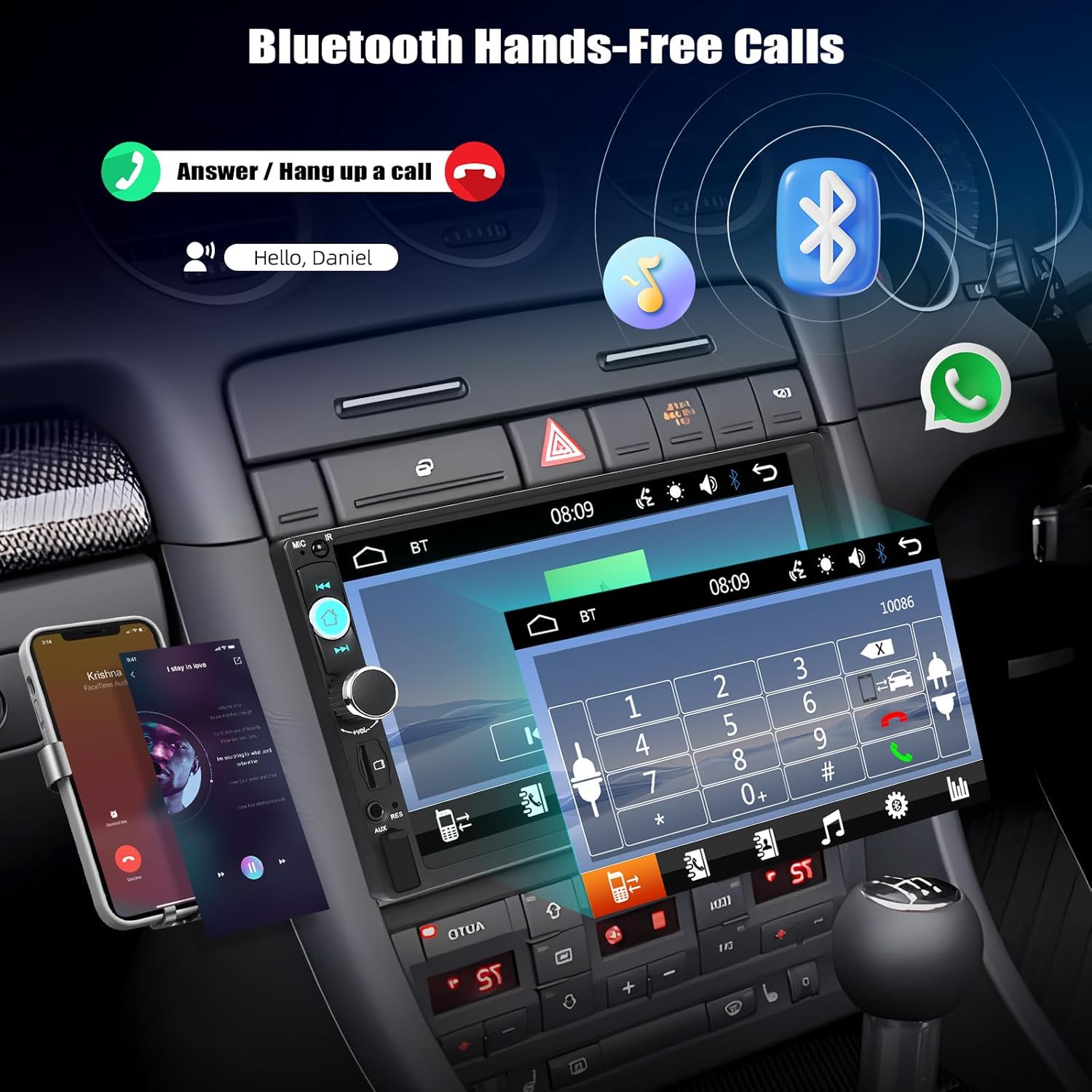
Figure 2: Bluetooth hands-free calling interface. The image illustrates how to answer or hang up calls and stream music via Bluetooth.
د عکس لینک فعالیت
The Mirror Link feature allows you to display your smartphone's screen on the car stereo's display. This unit supports wired Mirror Link for both iOS and Android devices.
- Connect your smartphone to the car stereo using an original USB data cable.
- Follow the on-screen prompts on both your phone and the car stereo to establish the connection.
- Once connected, your phone's screen content will be mirrored on the stereo display.

Figure 3: Mirror Link for iOS and Android. This image demonstrates how a smartphone's display is replicated on the car stereo screen via USB connection.
د ایف ایم راډیو عملیات
د ایف ایم راډیو سټیشنونو ته لاسرسی ومومئ او غږ یې کړئ.
- Navigate to the FM Radio mode.
- Use the scan function for automatic station search or manually tune to desired frequencies (87.5-108MHz).
- د چټک لاسرسي لپاره خپل غوره سټیشنونه په مخکینۍ بټنونو کې خوندي کړئ.

Figure 4: FM Radio interface. The image shows the radio frequency display and preset station buttons.
Multimedia Playback (USB/TF Card/AUX)
آډیو او ویډیو غږول fileد مختلفو سرچینو څخه.
- USB: Insert a USB drive into the USB port. The unit will automatically detect and play compatible media files.
- TF کارت: Insert a TF (MicroSD) card into the TF card slot. The unit will detect and play compatible media files.
- AUX-in: Connect an external audio device using a 3.5mm AUX cable to the AUX input. Select AUX mode on the stereo.
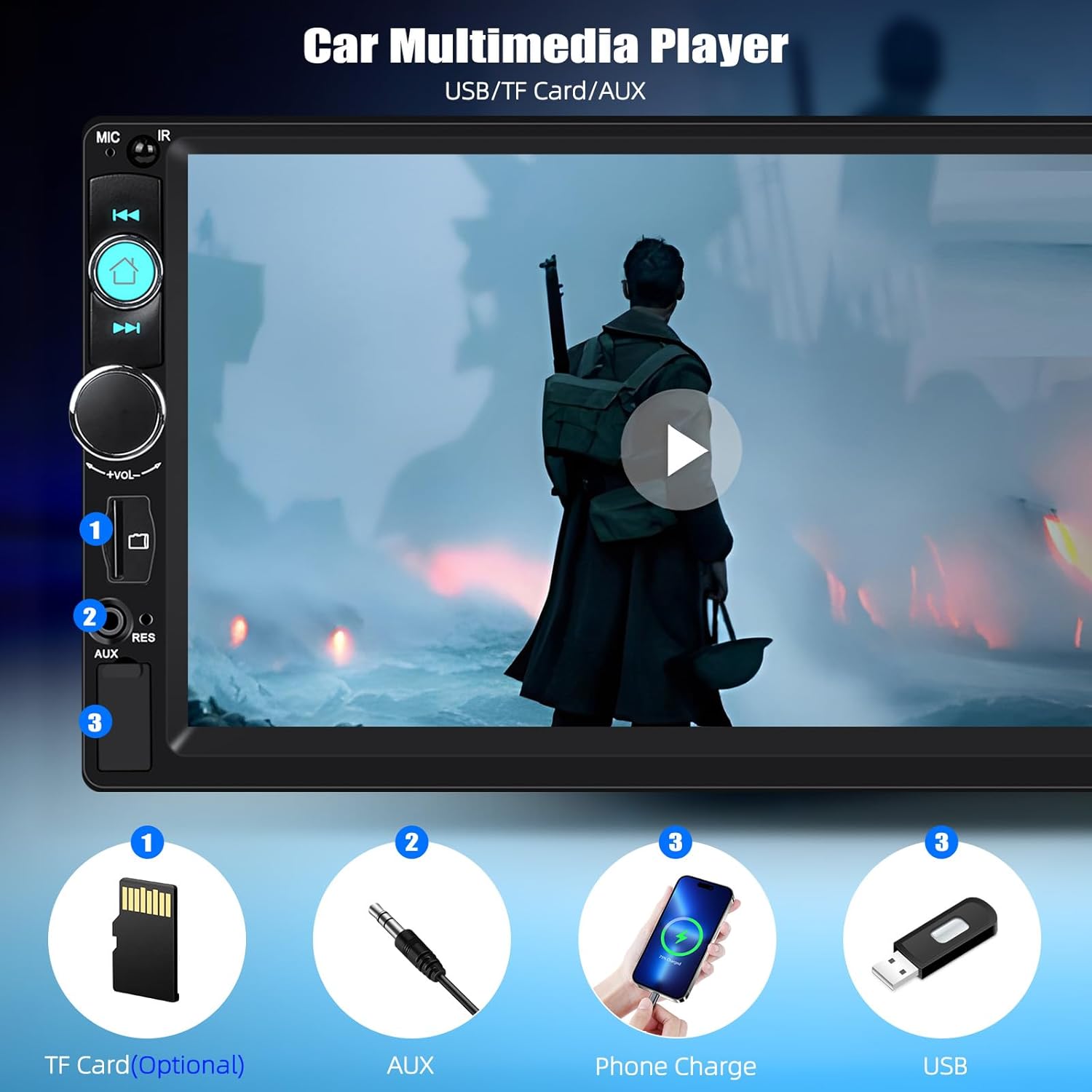
Figure 5: Multimedia input options. This image highlights the TF Card slot, AUX input, and USB port for media playback and phone charging.
د سټیرینګ ویل کنټرول (SWC)
The unit supports original steering wheel button control. Connect the SWC wires from your vehicle to the stereo's SWC input. Configuration may be required in the stereo's settings menu.
د برابرونکي (EQ) ترتیبات
Customize your audio experience with the multi-band EQ settings. Access the EQ menu to select preset sound modes or adjust individual frequency bands.
Key Backlight Color Adjustment
Personalize the appearance of your stereo by changing the key backlight color. The unit offers a cycle of 7 colors: red, green, blue, yellow, cyan, purple, and white.

Figure 6: Customizable key backlight colors. The image displays the stereo with different button illumination options.
د وال پیپر ډیری اختیارونه
Change the background wallpaper of the stereo display to suit your preference. Access the settings menu to select from various pre-installed wallpapers or potentially upload your own (if supported).

Figure 7: Multiple wallpaper options. This image illustrates various background designs available for the stereo display.
ساتنه
د خپل موټر سټیریو د اوږد عمر او غوره فعالیت ډاډمن کولو لپاره، د ساتنې دا لارښوونې تعقیب کړئ:
- پاکول: د سکرین او بهرنۍ برخې پاکولو لپاره نرم، وچ ټوکر وکاروئ. د سختو نښو لپاره، یو څه نرم کړئampټوکر د اوبو سره ومینځئ. د سختو کیمیاوي موادو یا د کثافاتو پاکوونکو څخه ډډه وکړئ.
- دحرارت درجه: د واحد د سختې تودوخې، د اوږدې مودې لپاره د مستقیم لمر وړانګو، یا لوړ رطوبت سره د مخ کیدو څخه ډډه وکړئ.
- اړیکې: په دوره یي ډول د ټولو تارونو اړیکې وګورئ ترڅو ډاډ ترلاسه کړئ چې دوی خوندي دي.
د ستونزو حل کول
که تاسو د خپل موټر سټیریو سره ستونزې سره مخ شئ، لاندې عامې ستونزې او حل لارې وګورئ:
- ځواک نشته:
Check power cable connections. Ensure the vehicle's ignition is on. Check vehicle fuses. - غږ نشته:
Verify speaker connections. Check volume level and mute settings. Ensure the correct audio source is selected. - بلوتوث نه نښلي:
Ensure Bluetooth is enabled on both devices. Delete previous pairings and try pairing again. Restart both the stereo and your phone. - د عکس لینک کار نه کوي:
Ensure you are using an original USB data cable. Check for any required app installations on your phone. Verify phone settings allow USB debugging or file لیږدول. - د راډیو کمزوری استقبال:
Check antenna connection. Ensure the antenna is fully extended (if applicable). Try scanning for stations again.
که چیرې د دې حل لارو هڅه کولو وروسته هم ستونزه دوام ومومي، مهرباني وکړئ د پیرودونکو ملاتړ سره اړیکه ونیسئ.
مشخصات
| برانډ | شپږیزه |
| د ماډل شمیره | 92dead35-1a95-4b1f-b1dd-135857655b8b |
| سیسټم | 8600 |
| والیtage | 12 وی |
| د سکرین ریزولوشن | 800 x 480 |
| د سکرین ډول | مقاومت لرونکی ټچ سکرین |
| د بریښنا اعظمي محصول | 4*45W (180 Watts total) |
| د عکس لینک | Supports wired only (iOS/Android) |
| راډیو بانډ | FM |
| د راډیو فریکونسي | 87.5-108MHz |
| د آډیو بڼه | MP3/AAC/OGG/FLAC/APE |
| د ویډیو بڼه | AVI/3GP/MP4/MOV/MPG/MKV/VOB/RMVB/RM |
| د ارتباط ټیکنالوژي | Bluetooth, USB, TF Card, AUX-in, RCA, ISO |
| د کنټرولر ډول | Touch Screen, Original Steering Wheel Control |
| د محصول ابعاد | ۳۰.۶D x ۴۵.۱W x ۳۰.۶H سانتي متره |
| ملاتړ شوي ژبې | English, Chinese, Japanese, Portuguese, Russian, German, Spanish, Turkish, Italian, French, Polish, Hebrew, Slovenia |
تضمین او ملاتړ
For warranty information or technical support, please refer to the documentation included with your purchase or contact SIXTOP customer service directly. Keep your purchase receipt as proof of purchase.