
1. پیژندنه
Welcome to the user manual for your new FLEXISPOT 63x28 Inch Dual Motor Electric Standing Desk. This manual provides essential information for the safe assembly, operation, maintenance, and troubleshooting of your desk. Please read it thoroughly before use and retain it for future reference.
2. د خوندیتوب لارښوونې
- ډاډ ترلاسه کړئ چې ټولې برخې شتون لري او د راټولولو دمخه زیانمن شوي ندي. که چیرې کومې برخې ورکې یا زیانمنې وي نو مه کاروئ.
- د ټپي کیدو مخنیوي لپاره د عملیاتو په جریان کې ماشومان او څاروي له میز څخه لرې وساتئ.
- Do not place hands or other body parts near moving parts of the desk during height adjustment.
- ډاډ ترلاسه کړئ چې میز په یوه هواره سطحه کې کیښودل شي ترڅو د ټیپ کولو مخه ونیول شي.
- میز ډیر مه باروئ. د اعظمي وزن ظرفیت لپاره مشخصاتو ته مراجعه وکړئ.
- Keep all electrical cords organized and away from moving parts to prevent damage or entanglement.
- د پاکولو یا هر ډول ساتنې ترسره کولو دمخه میز د بریښنا له سایټ څخه خلاص کړئ.
- یوازې د کارځای په توګه د میز څخه د هغې د ټاکل شوي هدف لپاره کار واخلئ.
3. د بسته محتويات
ډاډ ترلاسه کړئ چې لاندې ټول توکي ستاسو په بسته کې شامل دي:
- Desktop Surface (Black)
- Desk Frame (Black, including dual motors and lifting columns)
- Control Panel with Memory Controller
- د بریښنا اډاپټر او کیبل
- د اسمبلۍ هارډویر (پیچونه، وسایل، او نور)
- د لارښوونې لارښود

انځور: اوورview of the FLEXISPOT 63x28 Inch Dual Motor Electric Standing Desk, showing the desktop, frame, and control panel.
۴. د تنظیم لارښوونې
4.1 پیک کول
Carefully remove all components from the packaging. Place them on a soft, clean surface to prevent scratches or damage during assembly. Keep all packaging materials until assembly is complete and you are satisfied with the product.
۴.۲ د چوکاټ راټولول
Follow the detailed diagrams provided in the separate assembly guide to connect the lifting columns to the crossbar and attach the footings. Ensure all screws are tightened securely.
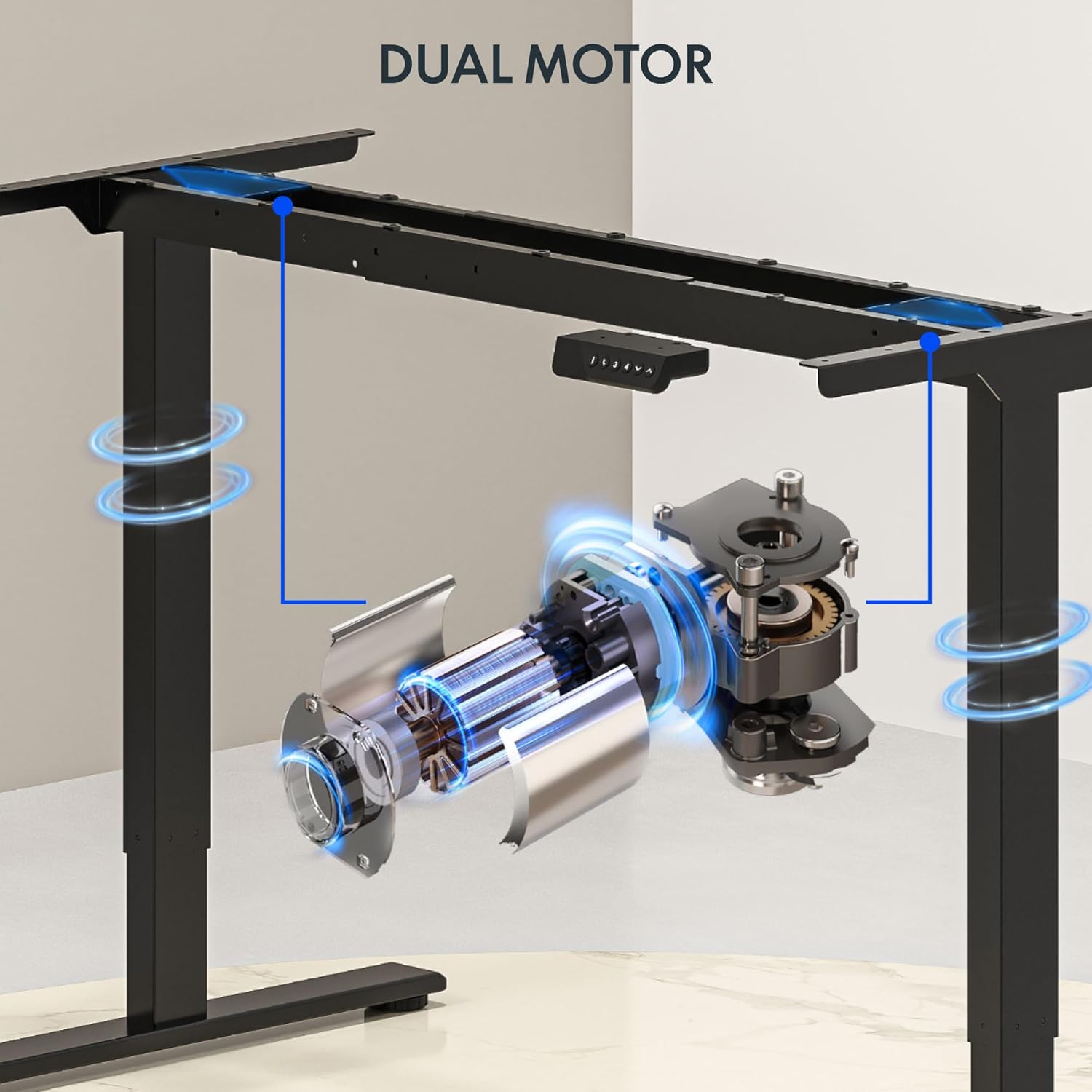
انځور: تفصیلي view of the dual motor desk frame, illustrating the motor placement and structural components.
۴.۳ د ډیسکټاپ نښلول
Carefully place the desktop upside down on a soft surface. Align the assembled frame with the pre-drilled holes on the desktop. Secure the desktop to the frame using the provided screws. Once secured, carefully flip the desk upright with assistance.
4.4 Connecting the Control Panel and Power
Connect the control panel cable to the control box, and then connect the power adapter to the control box. Plug the power cable into a standard electrical outlet. The desk is now ready for initial operation.

Image: Close-up of the desk's control panel, showing the LED display and buttons for height adjustment and memory presets.
Video: Demonstrates the dual-motor strength and smooth operation of the FLEXISPOT standing desk, highlighting its robust design and functionality.
5. عملیاتي لارښوونې
۵.۲ د لوړوالي تنظیم کول
- فشار ورکړئ پورته (∧) د میز د پورته کولو تڼۍ.
- فشار ورکړئ ښکته (∨) د میز د ښکته کولو تڼۍ.
- Release the button at your desired height. The LED display will show the current height.
۵.۲ د حافظې پریسیټونو کارول
The control panel features four memory presets (1, 2, 3, 4) to save and recall your preferred sitting and standing heights.
- د پورته/ښکته تڼیو په کارولو سره میز د خپلې خوښې لوړوالي سره سم تنظیم کړئ.
- فشار ورکړئ "م" button (or similar memory set button, indicated by 'i' on some models) once. The display will flash.
- Immediately press one of the number buttons (1, 2, 3, or 4) to save the current height to that preset.
- د خوندي شوي لوړوالي د یادولو لپاره، په ساده ډول د اړونده شمېرې تڼۍ فشار ورکړئ (۱، ۲، ۳، یا ۴). میز به په اتوماتيک ډول خوندي شوي موقعیت ته لاړ شي.

Image: Close-up of the memory controller, highlighting the numbered preset buttons and the up/down controls for precise height adjustments.
۳.۲ د ټکر ضد سیسټم
The desk is equipped with an anti-collision system. If the desk encounters an obstacle during height adjustment, it will automatically stop and reverse slightly to prevent damage. This feature enhances safety during operation.
6. ساتنه
- پاکول: د میز سطحه او چوکاټ د نرم، d سره پاک کړئamp ټوکر. د خړوبولو پاکوونکو یا سختو کیمیاوي موادو څخه ډډه وکړئ چې کولی شي پای ته زیان ورسوي.
- معاینه: Regularly check all screws and connections to ensure they are tight. Re-tighten if necessary.
- د کیبل مدیریت: Ensure all cables are neatly organized and not pinched or tangled, especially during height adjustments.
- د بریښنا تار: د بریښنا تار د زیان نښې نښانې لپاره معاینه کړئ. که زیانمن شوی وي، کارول یې بند کړئ او د پیرودونکو ملاتړ سره اړیکه ونیسئ.
7. ستونزه حل کول
| ستونزه | احتمالي لامل | د حل لاره |
|---|---|---|
| مېز نه حرکت کوي. | Power cable disconnected; motor cable loose; overload. | Check power connection; ensure all cables are securely plugged in; reduce weight on desk. |
| میز په نا مساوي ډول حرکت کوي یا غیر معمولي غږ کوي. | نا مساوي بار؛ خلاصې اړیکې؛ خنډ. | Distribute weight evenly; check and tighten all screws; remove any obstructions. |
| د لوړوالي مخکیني سیټونه کار نه کوي. | Presets not properly set. | Re-program the memory presets following section 5.2. |
| د ټکر ضد سیسټم ډیری وختونه پیل کیږي. | Obstacles in the path of movement; sensitivity setting too high. | Clear the area around the desk; consult the full manual for adjusting anti-collision sensitivity if available. |
If you encounter issues not listed here or if the solutions do not resolve the problem, please contact FLEXISPOT customer support.
8. مشخصات
| فیچر | تفصیل |
|---|---|
| برانډ | FLEXISPOT |
| ماډل | 63x28 Inch Dual Motor Electric Standing Desk |
| د ډیسټاپ ابعاد | ۲۰"واټه x ۲۰.۹"د |
| د لوړوالی سلسله | له ۱۳" څخه تر ۴۹" پورې |
| د اعظمي وزن ظرفیت | 198 پونډه |
| د موټرو ډول | دوه ګونی موټور |
| د تضمین اداره | د حافظې کنټرولر د 4 پریسیټونو سره |
| د ډیسټاپ مواد | Engineered Wood (Black Top) |
| د چوکاټ مواد | Alloy Steel (Black Frame) |
| ځانګړي ځانګړتیاوې | Dual Motor, 198 lbs Heavy-Duty Capacity, Memory Controller, 63"x28" Large Desktop |

Image: Diagram illustrating the dimensions of the FLEXISPOT 63x28 Inch Electric Standing Desk, including height range, width, and depth.
9. تضمین او ملاتړ
9.1 محدود تضمین
This FLEXISPOT product comes with a limited warranty against defects in materials and workmanship. The specific terms and duration of the warranty may vary. Please refer to the warranty card included in your package or visit the official FLEXISPOT webد تفصيلي تضمین معلوماتو لپاره سایټ.
The warranty typically covers the desk frame, motors, and control panel under normal use conditions. Damage resulting from misuse, accidents, unauthorized modifications, or improper assembly is not covered.
9.2 د پیرودونکي ملاتړ
For technical assistance, warranty claims, or any questions regarding your FLEXISPOT standing desk, please contact our customer support team:
- Webسایټ: www.flexispot.com
- بریښنالیک: support@flexispot.com
- تلیفون: (Refer to your product packaging or webد سیمه ایزو اړیکو شمیرو لپاره سایټ)
Please have your model number (B0F29ZD4DN) and purchase date ready when contacting support.


