1. پیژندنه
This manual provides detailed instructions for the installation, operation, and maintenance of the QUASAR X99 H5 Motherboard. The X99 H5 is a robust solution designed for workstations and servers, supporting LGA 2011-3 socket processors, including Intel Xeon V3/V4 series. It features DDR4 REG ECC memory support in a Dual Channel configuration, ensuring reliable stability and high performance for demanding applications such as rendering, virtualization, and intensive data processing.
Key features include PCIe 16X slots for expansion, an M.2 NVMe slot for high-speed storage, and multiple SATA 3.0 ports for additional drives. High-speed USB 3.0 ports are also integrated for rapid data transfer and peripheral connectivity. Its well-planned layout simplifies system assembly and maintenance, while quality components contribute to operational longevity and stability.
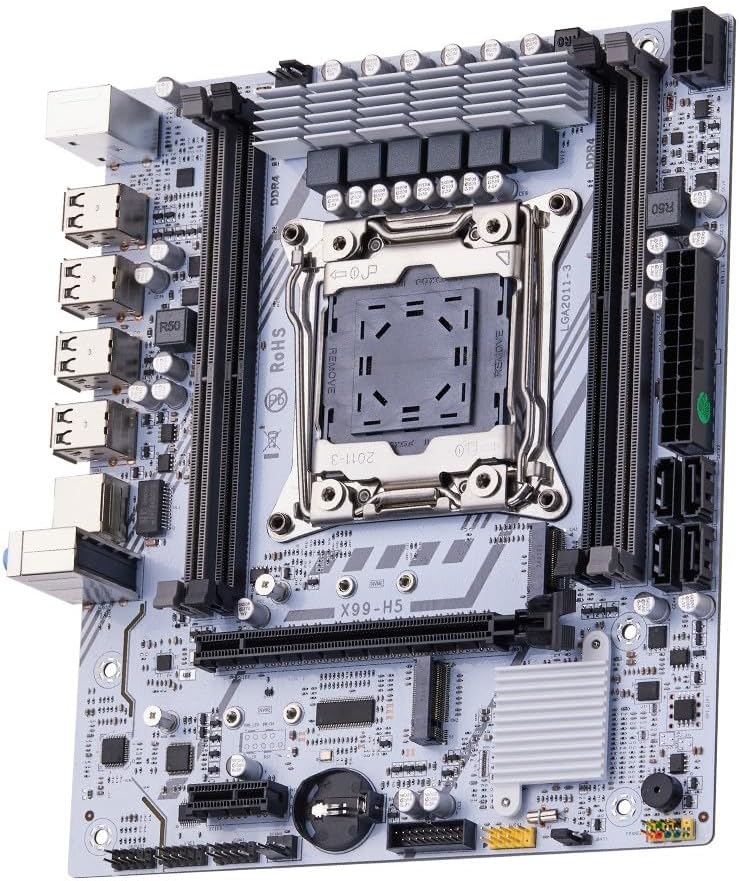
شکل 1.1: پایview of the QUASAR X99 H5 Motherboard. This image displays the full motherboard, highlighting its compact and efficient design, including the CPU socket, memory slots, and various expansion ports.
2. د خوندیتوب معلومات
Please read all safety instructions carefully before installing or operating the motherboard. Failure to follow these guidelines may result in personal injury, damage to the product, or damage to other components.
- تل د هر ډول اجزاو نصبولو یا لرې کولو دمخه د دیوال له سایټ څخه د بریښنا رسولو قطع کړئ.
- د مدر بورډ یا نورو برخو سره د لاس وهلو دمخه د جامد بریښنا خارجولو لپاره د انټي سټیټیک لاس پټه واغوندئ یا په مکرر ډول د ځمکې لاندې فلزي شی ته لمس وکړئ.
- د مور بورډ د څنډو له لارې لاس ورکړئ ترڅو حساسو برخو ته لاس ورنه کړئ.
- Ensure proper ventilation within the computer case to prevent overheating.
- مور بورډ د رطوبت یا ډیرې تودوخې سره مه مخ کوئ.
- د ماشومانو د لاسرسي څخه لرې وساتئ.
3. ترتیب او نصب کول
3.1. د اجزاو پیژندنه
Familiarize yourself with the various components and connectors on the motherboard before beginning installation.

Figure 3.1: Labeled diagram of the QUASAR X99 H5 Motherboard. This image indicates the location of key components such as the CPU socket, DDR4 memory slots, PCIe slots, M.2 NVMe slot, SATA ports, USB ports, and power connectors.
- LGA 2011-3 CPU Socket: For Intel Xeon V3/V4 processors.
- DDR4 Memory Slots (4x): Supports DDR4 REG ECC memory up to 128GB.
- PCIe 16X Slots: For graphics cards and other expansion cards.
- M.2 NVMe Slot: For high-speed solid-state drives.
- SATA 3.0 Ports: For connecting traditional hard drives and SSDs.
- د ۲۴ پن ATX بریښنا نښلونکی: د بریښنا اصلي ان پټ.
- 8-pin CPU Power Connector: د CPU لپاره اضافي ځواک.
- USB 3.0/2.0 Ports: د پردې د نښلولو لپاره.
- ګیګابایټ ایترنیټ پورټ: د شبکې اتصال لپاره.
- آډیو جیکونه: د آډیو ان پټ/آؤټ پټ لپاره.
- PS/2 پورټونه: For legacy keyboard and mouse.
3.2. د نصب کولو دمخه چک لیست
- Compatible CPU (Intel Xeon V3/V4 series, LGA 2011-3 socket).
- Compatible DDR4 REG ECC memory modules.
- ATX power supply unit.
- Computer case with ATX form factor support.
- Storage devices (M.2 NVMe SSD, SATA SSD/HDD).
- Graphics card (if CPU does not have integrated graphics or for dedicated performance).
- Screwdriver set, anti-static wrist strap.
3.3. د نصبولو پړاوونه
- قضیه چمتو کړئ: د خپل کمپیوټر کیس په شا پرانیسته کې د I/O شیلډ نصب کړئ.
- CPU نصب کړئ:
- Open the CPU socket retention mechanism.
- په احتیاط سره CPU د ساکټ سره تنظیم کړئ، ډاډ ترلاسه کړئ چې په CPU کې مثلثي نښه د ساکټ نښه سره سمون لري.
- په نرمۍ سره CPU په ساکټ کې ځای په ځای کړئ پرته له دې چې فشار یې ورکړئ.
- Close the retention mechanism to secure the CPU.
- د CPU کولر نصب کړئ: د تودوخې پیسټ تطبیق کړئ (که مخکې نه وي کارول شوی) او د CPU کولر د جوړونکي لارښوونو سره سم نصب کړئ. د CPU فین کیبل د مور بورډ په CPU_FAN سرلیک سره وصل کړئ.
- د حافظې ماډلونه نصب کړئ:
- Open the clips on the DDR4 memory slots.
- د حافظې ماډل کې نوچ د سلاټ کې کیلي سره سم کړئ.
- Press down firmly on both ends of the module until the clips snap into place. For Dual Channel configuration, refer to the motherboard's silkscreen for recommended slot pairing (e.g., A1 and B1).
- د مور بورډ نصبول: Carefully place the motherboard into the computer case, aligning it with the standoffs. Secure the motherboard with screws.
- د ذخیره کولو وسایل نصب کړئ:
- For M.2 NVMe SSDs: Insert the M.2 SSD into the M.2 slot and secure it with the provided screw.
- For SATA drives: Connect SATA data cables from the motherboard's SATA ports to your drives. Connect power cables from the PSU to your drives.
- د پراختیا کارتونه نصب کړئ: ګرافیک کارتونه یا نور PCIe توسیع کارتونه په مناسب PCIe سلاټونو کې دننه کړئ او د قضیې د ساتلو میکانیزم سره یې خوندي کړئ.
- د بریښنا رسولو سره نښلول:
- Connect the 24-pin ATX power cable from the PSU to the motherboard.
- Connect the 8-pin CPU power cable from the PSU to the motherboard.
- د مخکینۍ پینل کیبلونه وصل کړئ: Connect the power button, reset button, HDD LED, power LED, and front panel USB/audio cables to their respective headers on the motherboard. Refer to the motherboard's silkscreen or a detailed diagram for correct pin assignments.
- پرفیریلز وصل کړئ: خپل مانیټر، کیبورډ، موږک، او نور وسایل د شا I/O پورټونو سره وصل کړئ.

3.2 شکل: تړل view of the rear I/O panel of the QUASAR X99 H5 Motherboard. This image shows the PS/2 ports for keyboard and mouse, multiple USB ports, the Ethernet port, and the audio jacks.
4. عملیاتي لارښوونې
۴.۱. لومړی بوټ او د BIOS تنظیم
- After connecting all components and power, press the power button on your computer case.
- د بوټ کولو پروسې په جریان کې، په مکرر ډول فشار ورکړئ DEL or F2 key (common BIOS entry keys) to enter the BIOS/UEFI setup utility. The exact key may vary; check your screen for prompts.
- In the BIOS, verify that all installed components (CPU, RAM, storage drives) are detected correctly.
- د خپل عملیاتي سیسټم نصبولو میډیا (USB ډرایو یا DVD) ته لومړیتوب ورکولو لپاره د بوټ ترتیب تنظیم کړئ.
- بدلونونه خوندي کړئ او له BIOS څخه ووځئ. سیسټم به بیا پیل شي.
4.2. د عملیاتي سیسټم نصب کول
Follow the instructions provided with your operating system (e.g., Windows, Linux) to complete the installation process. Ensure you install all necessary drivers for the motherboard's chipsets, network adapter, audio, and any other integrated components. Drivers are typically available on the manufacturer's website or included on a driver disc.
4.3. د ډرایور نصب کول
For optimal performance and stability, install the latest drivers for your motherboard. These typically include:
- د چپسیټ چلوونکي
- د LAN (ایترنیټ) چلوونکي
- آډیو چلوونکي
- USB Drivers (if specific ones are required)
- SATA/NVMe Storage Drivers
Visit the manufacturer's support website for the X99 H5 motherboard to download the most current drivers.
5. ساتنه
منظم ساتنه ستاسو د مور بورډ او سیسټم د اوږد عمر او غوره فعالیت ډاډمن کولو کې مرسته کوي.
- د دوړو لرې کول: Periodically clean dust from inside your computer case, especially from fans, heatsinks, and the motherboard surface. Use compressed air or a soft brush. Ensure the system is powered off and unplugged before cleaning.
- د BIOS/UEFI تازه معلومات: جوړونکي وګورئ website for BIOS/UEFI updates. Updates can improve compatibility, stability, and performance. Follow the update instructions carefully to avoid damaging the motherboard.
- د موټر چلوونکي تازه معلومات: Keep your system drivers updated to the latest versions.
- د کیبل مدیریت: ډاډ ترلاسه کړئ چې داخلي کیبلونه په سمه توګه تنظیم شوي ترڅو د هوا جریان ښه کړي او د مداخلې مخه ونیسي.
- د چاپیریال کنټرول: Operate the system in a clean, dry, and well-ventilated environment. Avoid extreme temperatures and humidity.
6. ستونزه حل کول
دا برخه د هغو عامو ستونزو حلونه وړاندې کوي چې تاسو ورسره مخ کیدی شئ.
| ستونزه | احتمالي لامل | د حل لاره |
|---|---|---|
| سیسټم فعال نه دی. | No power, loose connections, faulty PSU. | Check power cable, 24-pin and 8-pin power connectors. Ensure PSU switch is ON. Test PSU if possible. |
| په مانیټر کې هیڅ ښودنه نشته. | Loose graphics card, faulty RAM, incorrect monitor input. | Reseat graphics card and RAM modules. Check monitor cable and input source. Test with one RAM stick. |
| سیسټم په ناڅاپي ډول ریبوټ کیږي. | ډیر تودوخه، بې ثباته بریښنا، غلط اجزا. | Check CPU cooler installation. Ensure adequate case ventilation. Verify PSU stability. Run memory diagnostic. |
| عملیاتي سیسټم ونه موندل شو. | Incorrect boot order, unformatted drive, faulty drive. | Check BIOS boot order. Ensure storage drive is properly connected and formatted with an OS. |
| د USB وسایل نه پیژندل شوي. | Missing drivers, faulty port, device issue. | Install/update USB drivers. Try different USB ports. Test device on another system. |
If issues persist, consult the manufacturer's support resources or a qualified technician.
7. مشخصات
| فیچر | تفصیل |
|---|---|
| برانډ | Generic (Manufactured by Machinist) |
| ماډل لړۍ | X99 H5 |
| د CPU ساکټ | LGA 2011-3 |
| مطابقت لرونکي پروسیسرونه | Intel Xeon V3/V4 series |
| د حافظې ټیکنالوژي | DDR4 REG ECC |
| د یادونې سلاټونه | 4 x DDR4 DIMM slots (Dual Channel) |
| اعظمي حافظه ملاتړ شوې | 128 جي بي |
| د حافظې ساعت سرعت | Up to 3200 MHz (actual speed depends on CPU and memory modules) |
| د ذخیره کولو انٹرفیسونه | 1 x M.2 NVMe slot, Multiple SATA 3.0 ports |
| د توسعې سلاټونه | PCIe 16X slots (number not specified, but typically at least one) |
| شبکه کول | ۱ x ګیګابایټ ایترنیټ پورټ |
| USB بندرونه | USB 3.0 and USB 2.0 ports (number not specified, but typically multiple) |
| آډیو | Integrated Audio Jacks |
| د فارم فکتور | ATX (Dimensions: 30.5 x 24.4 cm) |
| د محصول وزن | 1 کیلوګرامه |
8. تضمین او ملاتړ
د تضمین معلوماتو او تخنیکي ملاتړ لپاره، مهرباني وکړئ د خپل پیرود سره چمتو شوي اسنادو ته مراجعه وکړئ یا د تولید کونکي چارواکي ته مراجعه وکړئ. webسایټ. د تضمین ادعاوو لپاره د پیرود ثبوت وساتئ.
Typical support resources include:
- Online FAQs and Knowledge Base
- Driver and BIOS Download Section
- Customer Service Contact Information (Email/Phone)
When contacting support, please have your motherboard model (X99 H5) and any relevant error messages or system configurations ready.


