
1. پیژندنه
د پیرودلو لپاره مننهasing the MONODEAL T23 3-Speed Turntable. This manual provides essential information for the safe and correct operation of your device. Please read it thoroughly before use and retain it for future reference.
2. د خوندیتوب معلومات
- د اور یا بریښنا شاک څخه د مخنیوي لپاره واحد باران یا رطوبت ته مه ښکاره کوئ.
- کابینه مه خلاصوئ. یوازې وړ پرسونل ته خدمت ته مراجعه وکړئ.
- Ensure the power adapter matches your local power supply.
- Place the unit on a stable, level surface away from direct sunlight, heat sources, and excessive dust or vibration.
- د ماشومانو د لاسرسي څخه لرې وساتئ.
3. د بسته محتويات
ډاډ ترلاسه کړئ چې ټول توکي په کڅوړه کې شتون لري:
- 1 x MONODEAL T23 Record Player
- 1 x 5V 1.5A Power Cord
- ۱ x د کارونکي لارښود (دا سند)
4. محصول ختم شوview
Familiarize yourself with the various parts and controls of your MONODEAL T23 Turntable.

شکل 4.1: پورته او شاته View of the MONODEAL T23 Turntable with labeled components including Power Switch, Headphone Jack, Mode button, LED Light, USB Port, Power Adapter Input, RCA Output Jacks, 45 RPM Fixator, Tone Arm Raise Lever, Auto Stop Switch, LP Speed Switch, and Stylus.
- Power Switch/Volume Knob: واحد چالان/بندوي او حجم تنظیموي.
- د سر غوږ جیک: د هیډفونونو سره د شخصي اوریدلو لپاره.
- د حالت تڼۍ: Switches between different input modes (e.g., Phono, Bluetooth, USB).
- LED څراغ: Indicates power and mode status.
- USB پورټ: د USB پلې بیک لپاره.
- د بریښنا اډاپټر داخلول: Connects to the provided 5V 1.5A power cord.
- د RCA آوټ پټ جیکونه (L/R): له بهرني سره وصل کیږي ampلایفیر یا ځواک لرونکي سپیکرې.
- 45 RPM Fixator: Adapter for 7-inch records with large center holes.
- د ټون آرم رایز لیور: Lifts and lowers the tone arm gently.
- د اتوماتیک بندولو سویچ: د اتوماتیک بندولو فعالیت فعال یا غیر فعالوي.
- د LP سرعت سویچ: د پلې بیک سرعت غوره کوي (۳۳، ۴۵، یا ۷۸ RPM).
- ستولیس: هغه ستنه چې د ریکارډ سوري لولي.
5. ترتیب کول
- بسته بندي کول: د ټرنټیبل په احتیاط سره د هغې له بسته بندۍ څخه لرې کړئ. د راتلونکي لیږد یا ذخیره کولو لپاره بسته بندي وساتئ.
- ځای په ځای کول: Place the turntable on a stable, level surface. Ensure there is adequate ventilation around the unit.
- د بریښنا پیوستون: Connect the provided 5V 1.5A power cord to the DC IN port on the back of the turntable and then plug it into a wall outlet.
- د دوړو پوښ: The transparent dust cover can be opened or closed to protect the platter and stylus when not in use.
6. عملیاتي لارښوونې
۶.۱ د وینیل ریکارډونو غږول
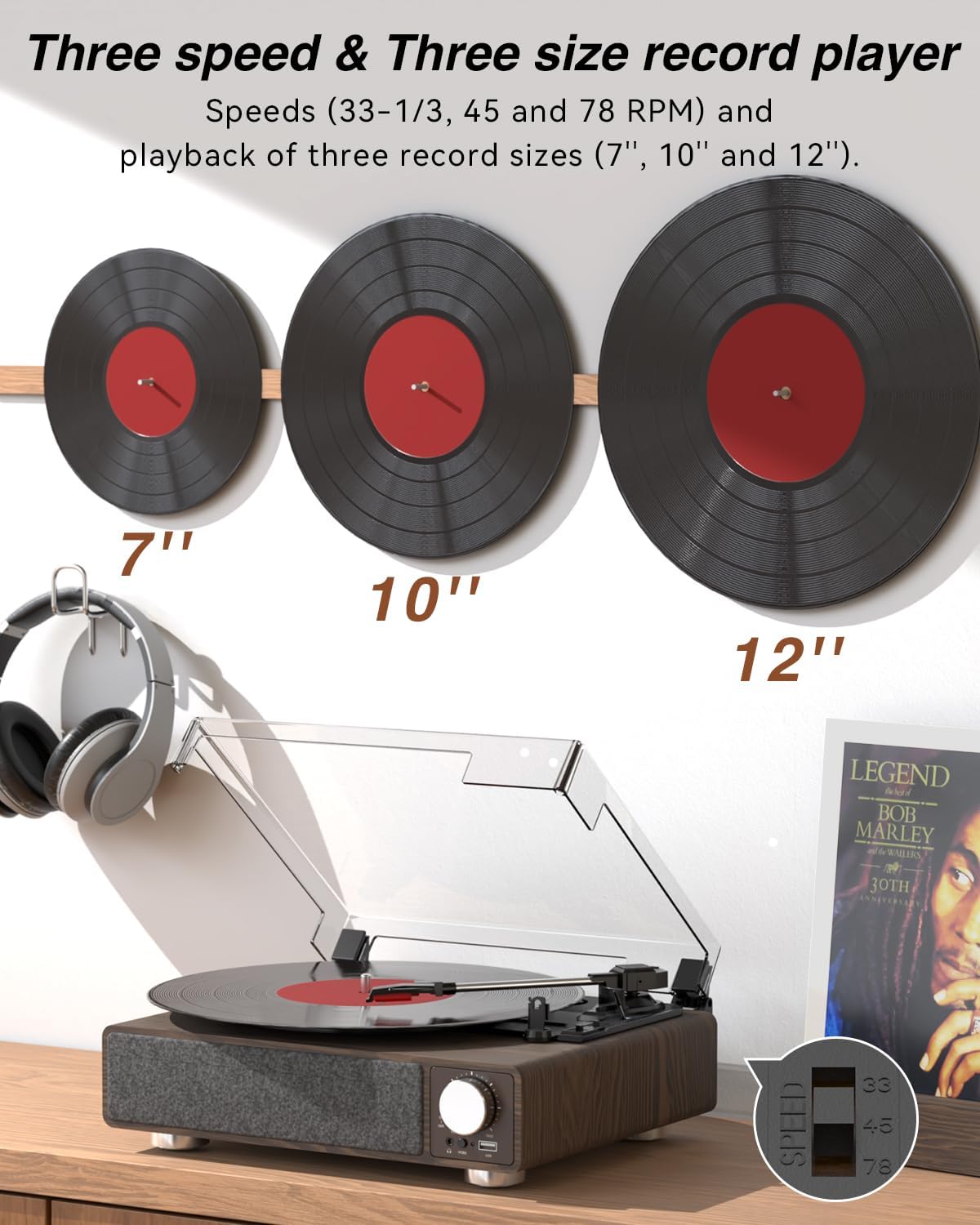
شکل 6.1: The MONODEAL T23 Turntable supports 3 speeds and 3 record sizes.
- Turn the Power Switch/Volume Knob clockwise to turn on the unit.
- د دوړو پوښ پورته کړئ.
- Place a vinyl record on the turntable platter. If playing a 7-inch record with a large center hole, place the 45 RPM fixator on the spindle first.
- Select the appropriate speed (33, 45, or 78 RPM) using the LP Speed Switch, matching the record you are playing.
- Push the Tone Arm Raise Lever up to lift the tone arm.
- Manually move the tone arm over the desired starting track of the record.
- Push the Tone Arm Raise Lever down to gently lower the tone arm onto the record. Playback will begin.
- Adjust the volume using the Power Switch/Volume Knob.
- د اتوماتیک بندولو فعالیت: If the Auto Stop Switch is set to ON, the turntable will automatically stop rotating when the record finishes playing. If set to OFF, it will continue to rotate.
- To stop playback, lift the tone arm using the lever and return it to the tone arm rest. Turn the Power Switch/Volume Knob counter-clockwise to turn off the unit.
6.2 Bluetooth Transmission (BT OUT)
This feature allows you to stream audio from the turntable to external Bluetooth speakers or headphones.

شکل 6.2: Bluetooth transmission from the turntable to external devices.
- Ensure the turntable is powered on and in Phono mode (playing a record).
- Press and hold the Mode button until the LED indicator flashes blue, indicating Bluetooth transmission pairing mode.
- Place your Bluetooth speaker or headphones in pairing mode.
- The turntable will automatically search for and connect to the nearest Bluetooth device. Once connected, the LED indicator will turn solid blue.
- Audio from the record will now play through your connected Bluetooth device.
6.3 Bluetooth Reception (BT IN)
This feature allows you to stream audio from your mobile device (phone, tablet) to the turntable's built-in speakers.
شکل 6.3: Bluetooth reception by the turntable from a smartphone.
- د ټرنټ میز چالان کړئ.
- Press the Mode button repeatedly until the LED indicator flashes blue, indicating Bluetooth reception pairing mode.
- On your mobile device, enable Bluetooth and search for available devices. Select "MONODEAL T23" from the list.
- یوځل چې وصل شي ، د LED شاخص به قوي نیلي شي.
- Play audio on your mobile device, and it will sound through the turntable's speakers. Adjust volume using the turntable's volume knob or your mobile device.
۱۴ USB پلے بیک
The turntable supports playing audio fileد USB فلش ډرایو څخه.
- Insert a USB flash drive into the USB port on the front of the turntable.
- Press the Mode button to switch to USB mode. The LED indicator will change to reflect USB mode.
- The turntable will automatically begin playing audio files from the USB drive. Use the control buttons (if available, or refer to the specific model's USB control instructions) to navigate tracks.
6.5 د RCA محصول
د ټرنټیبل بهرنۍ سره وصل کړئ ampد لوړ غږ لپاره لایفیر یا ځواکمن سپیکرې.

شکل 6.4: RCA output for external speakers and headphone jack for private listening.
- Ensure the turntable and your external audio system are turned off.
- Connect an RCA cable (not included) to the RCA Output Jacks (L/R) on the back of the turntable.
- Connect the other end of the RCA cable to the corresponding audio input on your ampلایفیر یا ځواک لرونکي سپیکرې.
- Turn on both the turntable and your external audio system.
- Play a record as described in Section 6.1. Audio will be routed through your external system. Adjust volume on both devices as needed.
6.6 هیډفون جیک
For private listening, connect headphones to the 3.5mm headphone jack on the front of the unit.
- Plug your 3.5mm headphones into the Headphone Jack.
- Adjust the volume using the Power Switch/Volume Knob.
7. ساتنه
۵.۳ د ټرنټیبل پاکول
- د واحد بهرنۍ برخه د نرم او وچ ټوکر سره پاک کړئ. د کثافاتو پاکوونکي یا محلولونه مه کاروئ.
- د دوړو د راټولیدو مخنیوي لپاره د کارولو پرمهال د دوړو پوښ وتړئ.
۶.۲ د سټایلس پاملرنه
- Handle the stylus with extreme care. Avoid touching the stylus tip with your fingers.
- سټایلس په دوره یي ډول د نرم برش په کارولو سره پاک کړئ، په نرمۍ سره له شا څخه مخې ته برش کړئ.
- A worn stylus can damage records and degrade sound quality. Replace the stylus when signs of wear appear (e.g., distorted sound, skipping).
۵.۳ د ریکارډ پاملرنه
- Always hold records by their edges or center label.
- ریکارډونه په عمودي ډول د هغوی په آستینونو کې په یخ او وچ ځای کې وساتئ.
- ریکارډونه په منظم ډول د ځانګړي شوي ریکارډ پاکولو برش یا محلول سره پاک کړئ ترڅو دوړې او جامد مواد لرې کړئ.
8. ستونزه حل کول
| ستونزه | احتمالي لامل | د حل لاره |
|---|---|---|
| هیڅ ځواک نشته | Power cord not connected; Power outlet not working; Unit not turned on. | Ensure power cord is securely connected; Try a different outlet; Turn the Power Switch/Volume Knob clockwise. |
| د جوړ شوي سپیکرو څخه هیڅ غږ نشته | Volume too low; RCA output connected; Bluetooth transmission active. | Increase volume; Disconnect RCA cables if not using external speakers; Ensure Bluetooth transmission is off if you want sound from built-in speakers. |
| د غږ تحریف یا پریښودل | Record dirty or damaged; Stylus dirty or worn; Turntable not level; Excessive vibration. | Clean record; Clean or replace stylus; Place turntable on a stable, level surface; Ensure turntable is away from sources of vibration. |
| بلوتوث جوړه ناکامه ده | Device too far; Device not in pairing mode; Interference. | Move devices closer; Ensure both devices are in pairing mode; Turn off other Bluetooth devices nearby. |
| Auto stop not working | Auto Stop Switch is OFF. | Set the Auto Stop Switch to ON. Note: Some records may stop prematurely or not at all due to variations in groove patterns. |
9. مشخصات
| فیچر | مشخصات |
|---|---|
| د ماډل نوم | T23 |
| برانډ | مونوډیال |
| د محصول ابعاد | 11.81 x 9.84 x 4.31 انچه (30 x 25 x 11 سانتي متره) |
| د توکي وزن | ۶ پونډه (۳ کیلو ګرامه) |
| مواد | لرګي |
| د پلی بیک سرعت | ۳۳-۱/۳، ۴۵، ۷۸ آر پي ایم |
| Record Sizes Supported | ۷"، ۹"، ۱۰" |
| ارتباط | Bluetooth (Reception & Transmission), USB, RCA Output, Headphone Jack |
| د بریښنا سرچینه | د بریښنا تار لرونکی (5V 1.5A) |
| ځانګړي ځانګړتیاوې | Built-in Stereo Speakers, Auto Stop, Belt-Drive System |
10. تضمین او ملاتړ
MONODEAL products are designed and manufactured to the highest quality standards. For warranty information and technical support, please refer to the warranty card included with your purchase or visit the official MONODEAL website. Please have your model number (T23) and purchase date available when contacting support.