
1. پیژندنه
This manual provides essential information for setting up, operating, maintaining, and troubleshooting your GIGABYTE AORUS Elite 16 BWH gaming laptop. The AORUS Elite 16 BWH is designed for high-performance gaming and demanding applications, featuring an Intel Core Ultra 9 processor, NVIDIA GeForce RTX 5070 laptop GPU, a 16-inch WQXGA 165Hz display, and Windows 11 Pro.
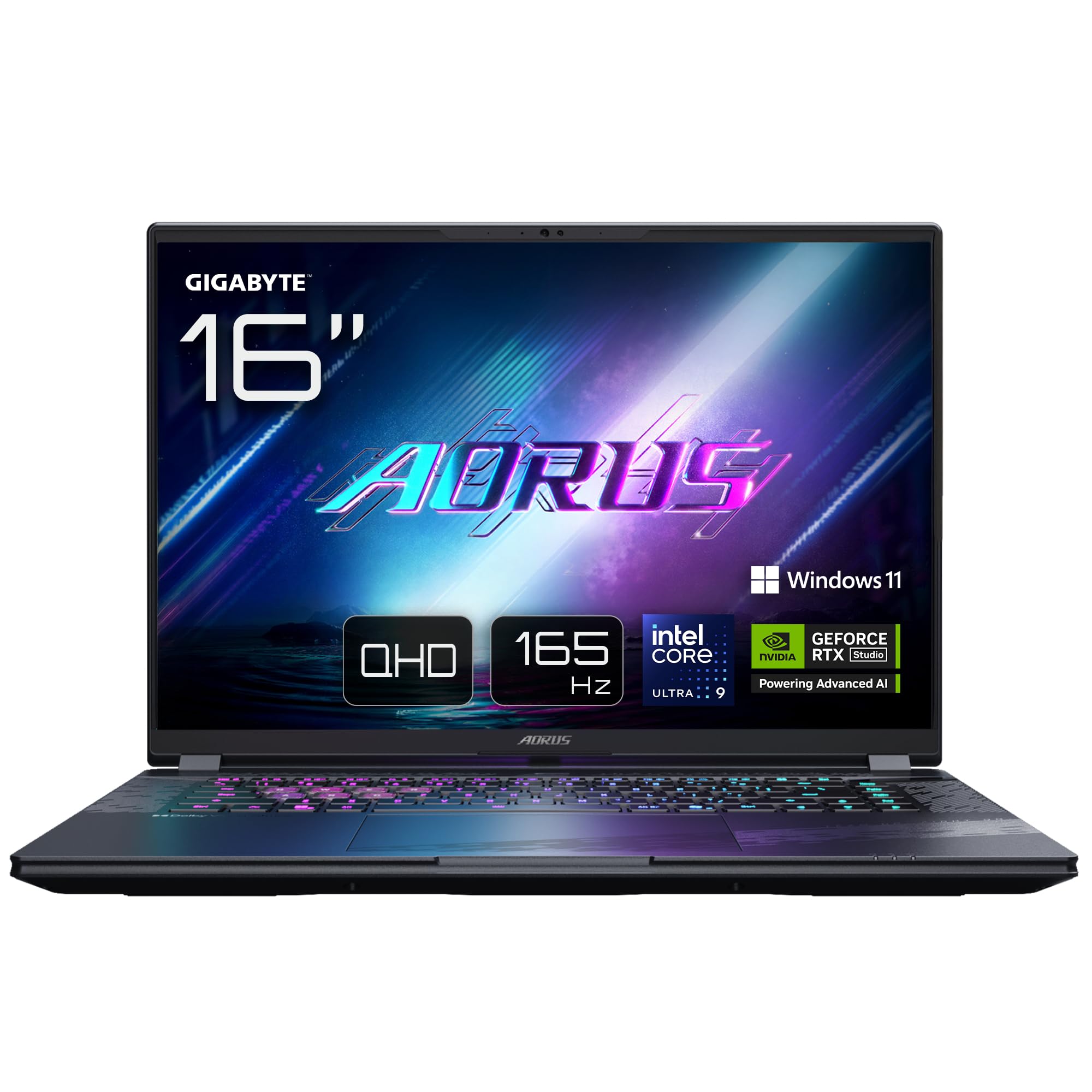
Image: The GIGABYTE AORUS Elite 16 BWH gaming laptop, showcasing its open display and keyboard.
2. ترتیب کول
۲.۱ د بکس خلاصول او لومړنۍ تفتیش
په احتیاط سره لپ ټاپ او ټول لوازمات له بسته بندۍ څخه لرې کړئ. ډاډ ترلاسه کړئ چې د "په بکس کې څه دي" برخې کې لیست شوي ټولې برخې شتون لري او زیانمن شوي ندي.
- GIGABYTE AORUS ELITE 16 BWHC3FRC65SP Laptop
- د بریښنا اډاپټر او کیبل
- اسناد (دا لارښود، د تضمین کارت)
2.2 د نښلولو بریښنا
Connect the power adapter to the laptop's power input port and then plug the power cable into an electrical outlet. It is recommended to fully charge the battery before initial use.
2.3 لومړی پاور آن
د لپ ټاپ د چالانولو لپاره د پاور تڼۍ کېکاږئ. د وینډوز 11 پرو د تنظیم کولو پروسې بشپړولو لپاره په سکرین کې لارښوونې تعقیب کړئ، پشمول د ژبې انتخاب، د شبکې اتصال، او د کارونکي حساب جوړول.
2.4 Connecting Peripherals and Network
The laptop features various ports for connecting external devices and networks.
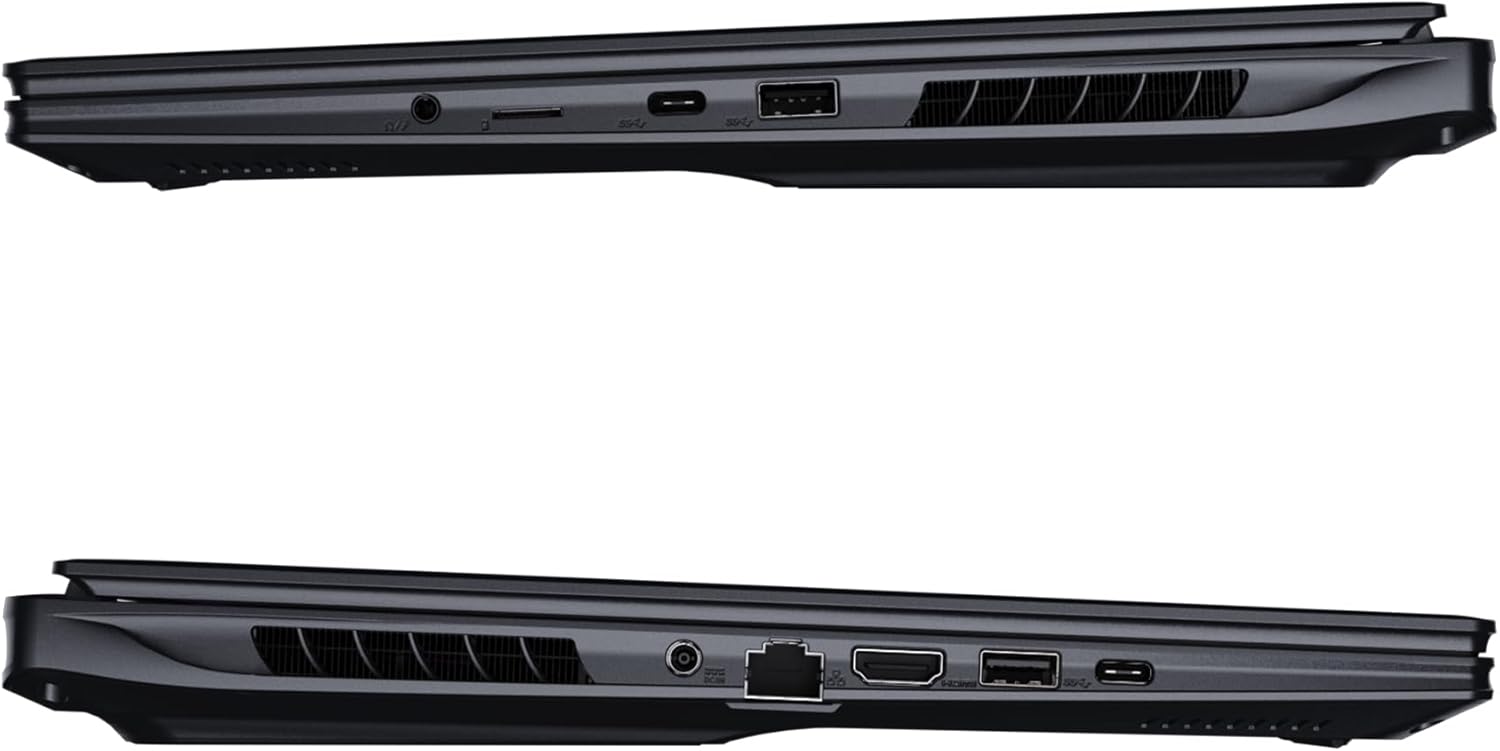
انځور: اړخ view د لپ ټاپ انځور چې د اتصال لپاره شته پورټونه ښیي.
- USB پورټونه: Connect USB devices such as mice, keyboards, or external storage.
- د HDMI پورټ: Connect to an external display or TV.
- تندربولټ 4 پورټ: د لوړ سرعت ډیټا لیږد او نندارې محصول لپاره.
- ایترنیټ پورټ: د تار لرونکي شبکې اتصال لپاره.
- د سر غوږ جیک: د هیډفونونو یا بهرني سپیکرو ته د آډیو آوټ پټ لپاره.
- Wi-Fi 7: Connect to wireless networks via the integrated Wi-Fi 7 module.
- بلوتوث 5.4: د بلوتوث فعالو وسیلو سره جوړه کړئ.
۳. ستاسو د لپ ټاپ چلول
3.1 ځانګړتیاوې ښکاره کول
Your AORUS Elite 16 BWH features a 16-inch WQXGA (2560x1600) IPS display with a 165Hz refresh rate and 16:10 aspect ratio, offering a wide viewing experience. It supports Dolby Vision for enhanced visual quality and is Pantone validated for color accuracy.

Image: The laptop's 16:10 aspect ratio display, highlighting its IPS panel and Pantone validation.
۳.۳ کیبورډ او ټچ پیډ
The laptop is equipped with a backlit keyboard for comfortable typing in various lighting conditions and a responsive touchpad for navigation.
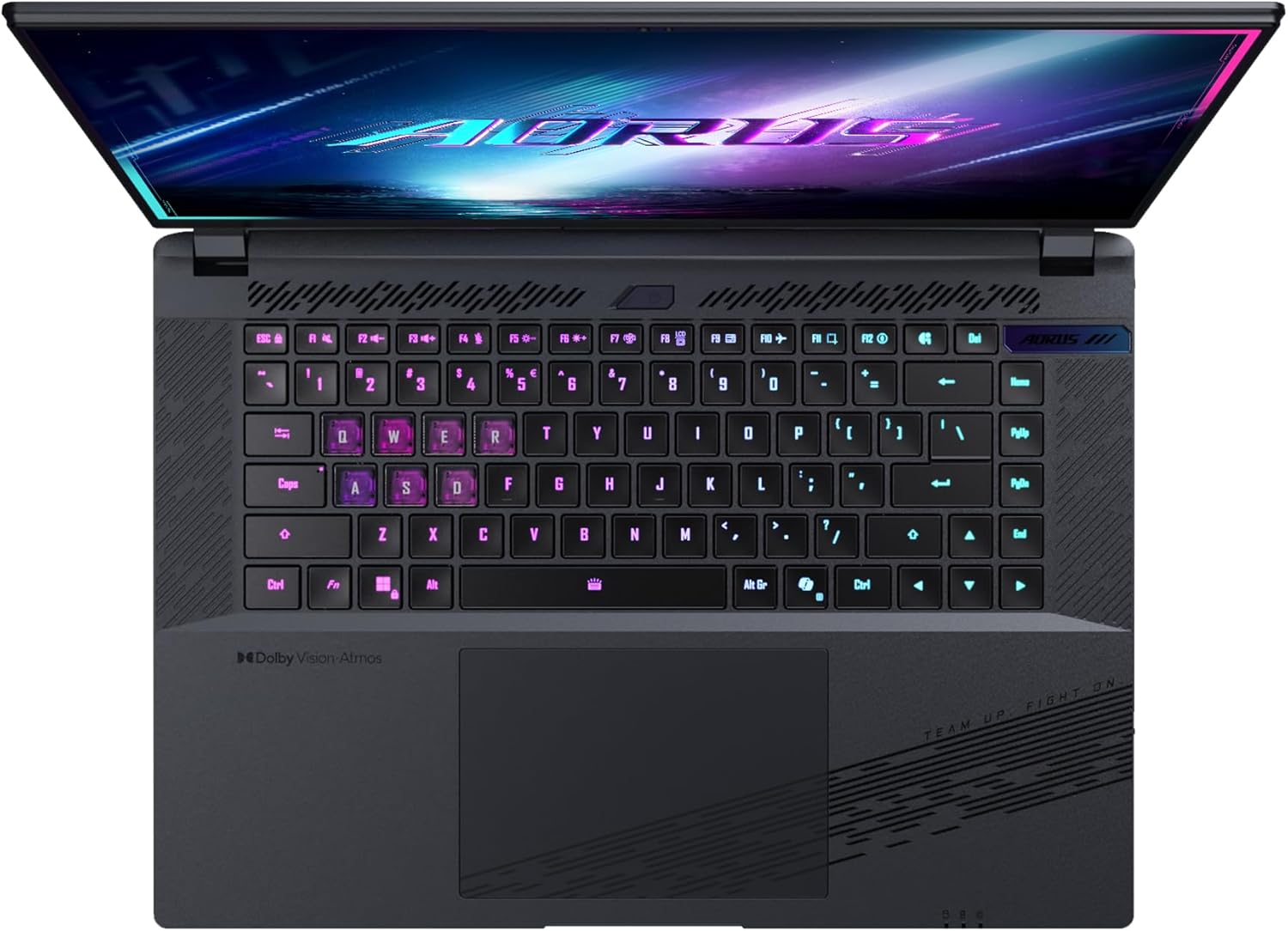
انځور: پورته-ښکته view د لپ ټاپ د کیبورډ، شوکasing its backlit keys.
The keyboard also features a dedicated Copilot Key for quick access to AI functionalities in Windows 11.

Image: Close-up of the keyboard, highlighting the Copilot Key for AI features.
3.3 د آډیو سیسټم
Experience immersive audio with Dolby Atmos support and integrated 2W speakers. The laptop also includes a built-in microphone for communication.

Image: Visual representation of Dolby Atmos and Dolby Vision audio and visual enhancements.
3.4 د فعالیت ځانګړتیاوې
The AORUS Elite 16 BWH is powered by an Intel Core Ultra 9 processor with an integrated NPU for AI acceleration and an NVIDIA GeForce RTX 5070 laptop GPU, ensuring high performance for gaming and demanding tasks. It also features Advanced Optimus with DDS Technology for optimized graphics performance.

انځور: یو مفصل view of the Intel Core Ultra 9 processor chip.
انځور: یو مفصل view of the NVIDIA GeForce RTX 50 Series laptop GPU chip.
3.5 GiMATE AI Agent
Utilize GiMATE, your personal AI agent, to optimize performance, manage smart cooling, enhance privacy, control power settings, and improve audio and voice functionalities.

Image: GiMATE AI Agent interface showing various optimization features.
4. ساتنه
4.1 د یخولو سیسټم
The laptop features the WINDFORCE Infinity cooling system to maintain optimal temperatures during intensive use. Ensure the vents are clear of obstructions to allow proper airflow.

Image: Representation of the WINDFORCE Infinity cooling system.
4.2 پاکول
د سکرین او بهرنۍ سطحې پاکولو لپاره د نرم، لینټ نه پاک ټوکر څخه کار واخلئ. د سختو نښو لپاره، dampټوکر په اوبو یا د سکرین پاکولو محلول سره لږ څه ومینځئ. د سختو کیمیاوي موادو څخه ډډه وکړئ.
4.3 د بیټرۍ پاملرنه
د بیټرۍ د ژوند اوږدولو لپاره، د لوړې تودوخې څخه ډډه وکړئ او لیپ ټاپ د اوږدې مودې لپاره په بشپړه توګه چارج یا په بشپړه توګه خارج مه پریږدئ.
4.4 د سافټویر تازه معلومات
Regularly update your Windows operating system, drivers, and GIGABYTE software to ensure optimal performance and security.
5. ستونزه حل کول
۵.۱ د برېښنا ستونزې
- لیپ ټاپ نه چالانیږي: Ensure the power adapter is securely connected and the outlet is functional. Check the battery charge level.
- بیټرۍ چارج نه کوي: ډاډ ترلاسه کړئ چې د بریښنا اډاپټر او کیبل خراب شوي نه دي. یو بل سایټ هڅه وکړئ.
5.2 د ښودلو مسلې
- نه ښودنه: Connect an external monitor to check if the issue is with the laptop's screen. Ensure the laptop is powered on.
- ځلیدونکی یا تحریف شوی ښودنه: د ګرافیک ډرایورونه تازه کړئ. که تاسو بهرني مانیټر کاروئ نو د ښودنې کیبل اتصالونه وګورئ.
۵.۳ د اتصال مسلې
- وای فای نه وصل کیږي: وګورئ چې ایا وای فای د وینډوز ترتیباتو کې فعال شوی دی. خپل روټر او لیپ ټاپ بیا پیل کړئ.
- د بلوتوث وسیله نه جوړه کیږي: Ensure the device is in pairing mode and within range. Update Bluetooth drivers.
۵.۴ د عمومي فعالیت مسلې
- ورو فعالیت: Close unnecessary applications. Check for malware. Ensure sufficient free disk space.
- ډیر ګرمول: Ensure cooling vents are clear. Use the laptop on a hard, flat surface.
د ډیرو پیچلو مسلو لپاره، د ګیګابایټ ملاتړ ته مراجعه وکړئ webسایټ یا د پیرودونکي خدمت سره اړیکه ونیسئ.
6. مشخصات
| فیچر | تفصیل |
|---|---|
| برانډ | ګیګابایټ |
| د ماډل نوم | AORUS ELITE 16 BWHC3FRC65SP |
| د سکرین اندازه | ۷۸۷ انچه |
| رنګ | خړ |
| د هارډ ډیسک اندازه | 2000 GB (2x 1TB SSD Gen4) |
| د CPU ماډل | Intel Core Ultra 9 275HX |
| د نصب شوي RAM اندازه | 32 GB DDR5 |
| عملیاتي سیسټم | وینډوز 11 پرو |
| ځانګړی ځانګړنه | Backlit Keyboard, Memory Card Slot |
| د ګرافیک کارت توضیحات | وقف شوی |
| د ګرافیک کاپروسیسر | NVIDIA GeForce RTX 5070 |
| Hard Disk Technology | SSD |
| د توکي وزن | 2300 ګرامه |
| Webcam Capability | Yes (Frontal) |
| د ګرافیک کارت د RAM اندازه | 8 GB GDDR6 |
| اعظمي رام ملاتړ شوی | 64 جي بي |
| د بیټرۍ د انرژۍ محتوا | 99 Watt-hours (Lithium-polymer, 4 cells) |
| ارتباط | Bluetooth 5.4, Ethernet (10/1000 Mbit/s), HDMI (1 port), Thunderbolt 4 (1 port), USB 3.2 Gen 2 (2 ports), Wi-Fi 7 (802.11.be) |
| د پروسیسر سرعت | 2.7 GHz (Max 5.4 GHz) |
| د پروسیجرونو شمیر | 24 |
| د سکرین ریزولوشن | ۲۵۶۰ x ۱۶۰۰ پېکسل (WQXGA) |
| د ښودلو ډول | IPS LCD |
| د آډیو ځانګړتیاوې | Dolby Atmos, 2x 2W Integrated Speakers, Integrated Microphone |
7. د تضمین معلومات
Your GIGABYTE AORUS Elite 16 BWH laptop comes with a د 2 کلن محدود تضمین. This warranty covers manufacturing defects and hardware malfunctions under normal use. Please retain your proof of purchase for warranty claims. For detailed terms and conditions, refer to the warranty card included with your product or visit the official GIGABYTE webسایټ
8. ملاتړ
For technical assistance, driver downloads, and further product information, please visit the official GIGABYTE support webسایټ. تاسو کولی شئ هلته د FAQs او ټولنیزو فورمونو سره هم اړیکه ونیسئ.
- د ګیګابایټ رسمي Webسایټ: www.gigabyte.com
- د پیرودونکو خدمت: Refer to your regional GIGABYTE webد ځایی اړیکو معلوماتو لپاره سایټ.