
1. محصول ختم شوview
The SAIJI Foldable TV Tray Model F4 is a versatile and sturdy table designed for various uses such as dining, working, crafting, and gaming. It features an easy-folding mechanism, adjustable height and tilt, and requires no assembly. This manual provides instructions for its setup, operation, and maintenance.
کلیدي ځانګړتیاوې:
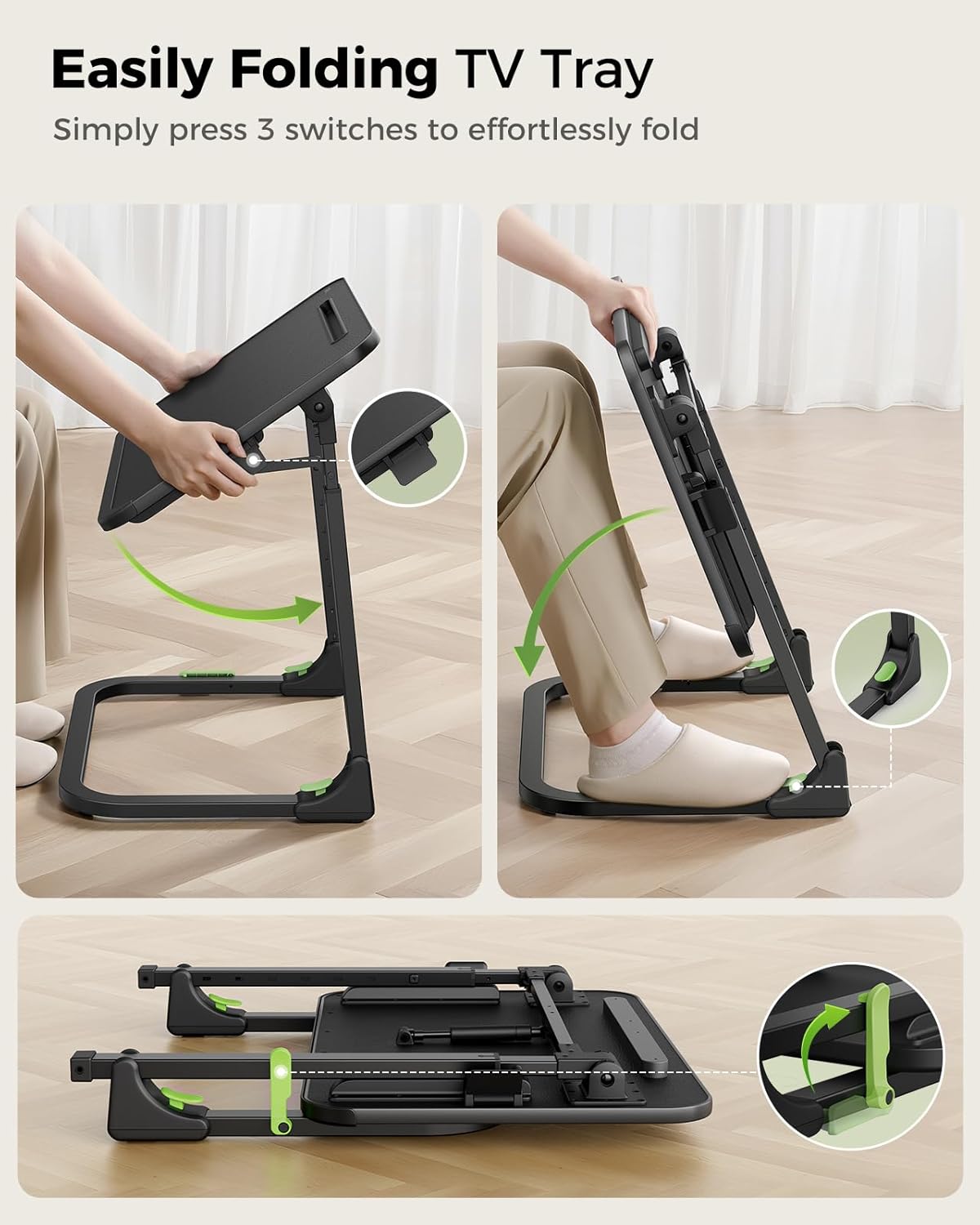
- Easy Folding: Effortlessly folds and unfolds in under 30 seconds by pressing 3 switches.
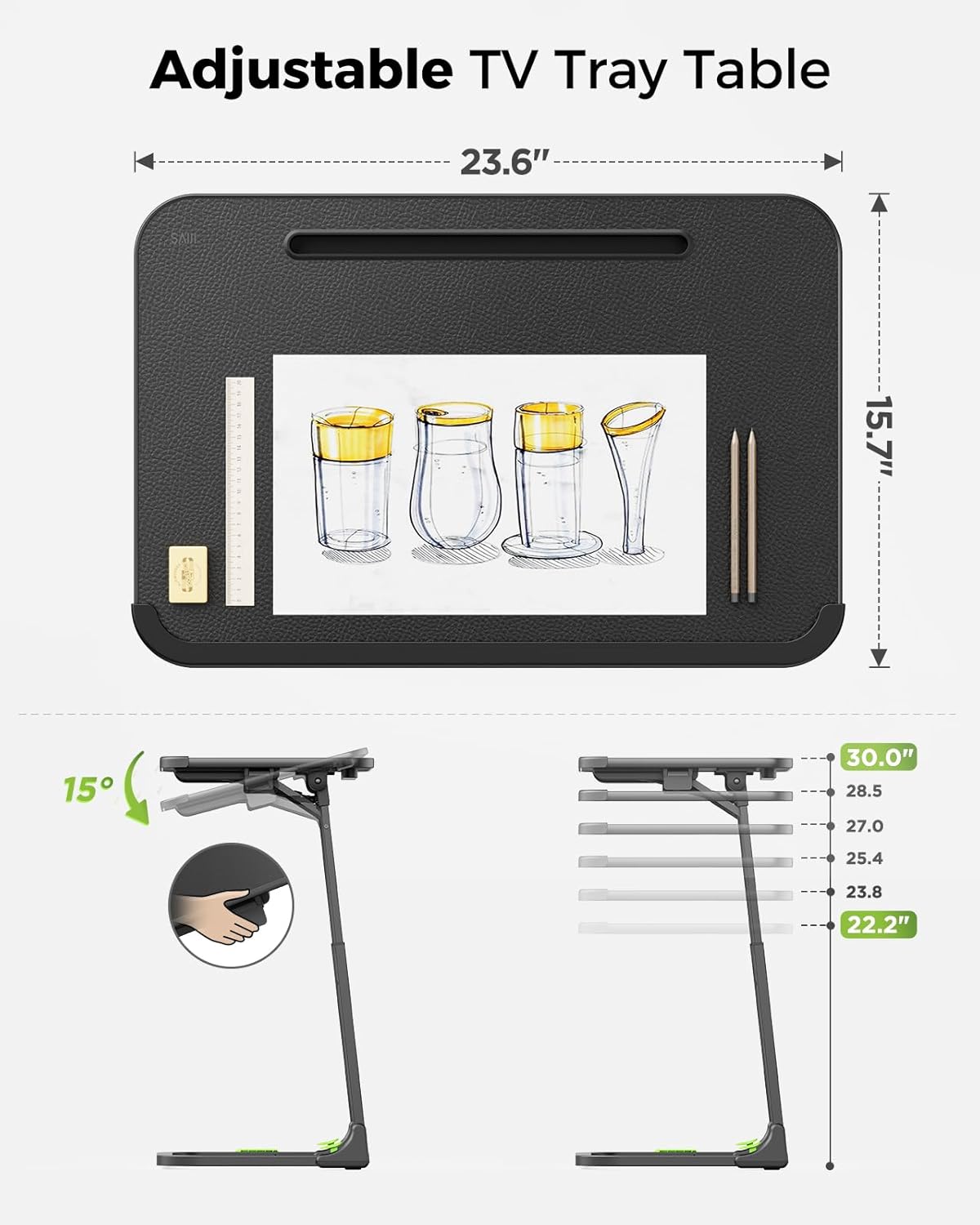
- Height & Angle Adjustment: Smoothly adjust height from 22.2" to 30" and tilt angle from 0-90° without standing.
- هیڅ مجلس ته اړتیا نشته: د بکس څخه بهر د کارولو لپاره چمتو.
- Sturdy & Stable: Features a comfortable leather-wrapped surface, gas spring support, and 3x thickened carbon steel legs.
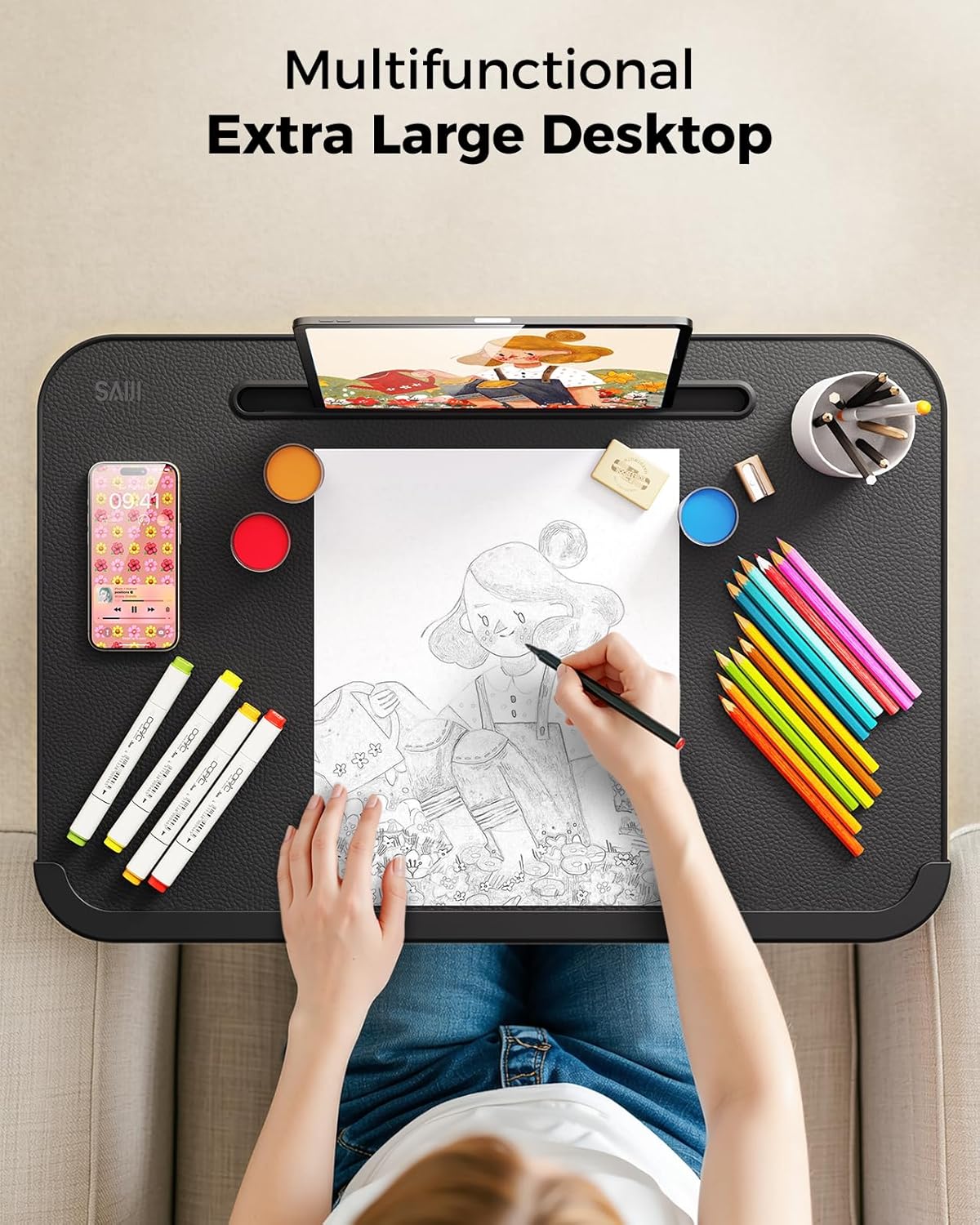
- څو اړخیز ډیزاین: Suitable for dining, working, drawing, studying, or gaming.
2. د خوندیتوب معلومات
Please read and understand all safety instructions before using the SAIJI Foldable TV Tray.
- Always keep the tray in the locked position when in use to prevent accidental folding.
- Do not overload the tray. The maximum weight recommendation is 120 pounds.
- Be cautious of moving parts and edges, especially when folding and unfolding the tray.
- Keep the tray out of reach of children when not in use or supervise them during use.
- Ensure the tray is placed on a stable, level surface before use.
3. Setup: Unfolding the TV Tray
The SAIJI Foldable TV Tray comes pre-assembled. To unfold it for use:
- ټری په احتیاط سره د هغې له بسته بندۍ څخه لرې کړئ.
- Locate the three folding switches on the frame. These are typically green or highlighted for easy identification.
- Press the switches to release the locking mechanisms.
- Gently extend the legs and unfold the tabletop until it clicks into place, indicating it is securely locked.
- Ensure all locking mechanisms are engaged before placing items on the tray.
4. Operation: Adjusting Height and Tilt
4.1. د لوړوالی سمون
The tray's height can be adjusted smoothly even with items on the desktop.
- To raise the height: Step firmly on the base of the tray with your foot and gently lift the desktop upwards. The gas spring mechanism will assist in smooth elevation.
- To lower the height: Step firmly on the base and apply downward pressure on the desktop. The height can be adjusted between 22.2 inches and 30 inches.

4.2. ضعیف تنظیم کول
The desktop angle can be adjusted for optimal comfort.
- Locate the tilt adjustment lever, typically found on the underside of the desktop near the hinge.
- Pull the lever to release the tilt lock.
- Adjust the desktop to your desired angle (0-90°).
- Release the lever to lock the desktop in place.
5. Storage: Folding the TV Tray
The SAIJI TV Tray offers two convenient storage options:
- عمودی ذخیره: Fold just the tabletop to stand the unit vertically beside furniture. This is ideal for quick, accessible storage.
- کمپیکٹ ذخیره: Completely collapse the small couch desk to store neatly under beds or sofas. This minimizes the footprint for long-term storage.
6. ساتنه او پالنه
To ensure the longevity and appearance of your SAIJI Foldable TV Tray:
- د ډیسټاپ پاکول: The leather-wrapped surface is waterproof and easy to clean. Use a soft, damp cloth with mild soap and water to wipe down the surface. Avoid abrasive cleaners or harsh chemicals that may damage the material.
- د چوکاټ ساتنه: The carbon steel legs can be wiped clean with a damp ټوکر. د زنګ وهلو مخنیوي لپاره سمدلاسه وچ کړئ.
- Moving the Tray: When moving the tray, lift it rather than dragging it to prevent wear on the leg pads and floor surfaces.
- ذخیره کول: Store the tray in a dry environment away from extreme temperatures and direct sunlight.
7. ستونزه حل کول
If you encounter any issues with your SAIJI Foldable TV Tray, please refer to the following common solutions:
- Tray is wobbly: Ensure all locking mechanisms for folding and height adjustment are fully engaged. Check that the tray is placed on a flat, stable surface. Adjust the leg pads if the ground is uneven.
- د لوړوالي/کښت تنظیمولو کې ستونزه: Verify that the adjustment levers/switches are fully disengaged before attempting to move the desktop. Do not force adjustments. If resistance is met, check for obstructions.
- ناخوښه بوی: Some new products may have a slight manufacturing odor. This typically dissipates over time with ventilation. Place the tray in a well-ventilated area for a few days.
- د پوښلو میکانیزم سخت دی: Ensure the switches are fully pressed. A small amount of silicone-based lubricant can be applied to hinges if necessary, but avoid getting it on the desktop surface.
If the problem persists, please contact SAIJI customer support for further assistance.
8. مشخصات
| فیچر | مشخصات |
|---|---|
| برانډ | ساجي |
| د ماډل نوم | F4 |
| د محصول ابعاد (د x څلویښتم x څلویښتم) | ۸۳.۸" x ۵۵.۷" x ۴۴.۱" |
| د توکي وزن | 15 پونډه |
| د اعظمي وزن سپارښتنه | 120 پونډه |
| د چوکاټ مواد | د الماس فولاد |
| د پورته موادو ډول | چرم |
| رنګ | Standard (Brown) |
| شکل | سي-شکل |
| اړین مجلس | نه |
| د کور دننه / بهر کارول | دننه |
9. تضمین او ملاتړ
For warranty information or technical support, please refer to the documentation included with your purchase or contact SAIJI customer service directly. Details for contacting support can typically be found on the manufacturer's webپه سایټ یا د محصول په بسته بندۍ کې.