
1. محصول ختم شوview
The Attoe AK680 is a wired mechanical gaming keyboard designed for performance and customization. It features a compact 60% layout, RGB backlighting, hot-swappable switches, and durable double-shot PBT keycaps. This manual provides essential information for setting up, operating, and maintaining your keyboard.

Figure 1: Attoe AK680 Mechanical Gaming Keyboard.
2. د بسته محتويات
ډاډ ترلاسه کړئ چې ټول توکي په کڅوړه کې شتون لري:
- Attoe AK680 Mechanical Gaming Keyboard
- USB-C کیبل
- کیکیپ پلر
- Switch Puller (often integrated with keycap puller or separate)
- د کارونکي لارښود (دا لاسوند)
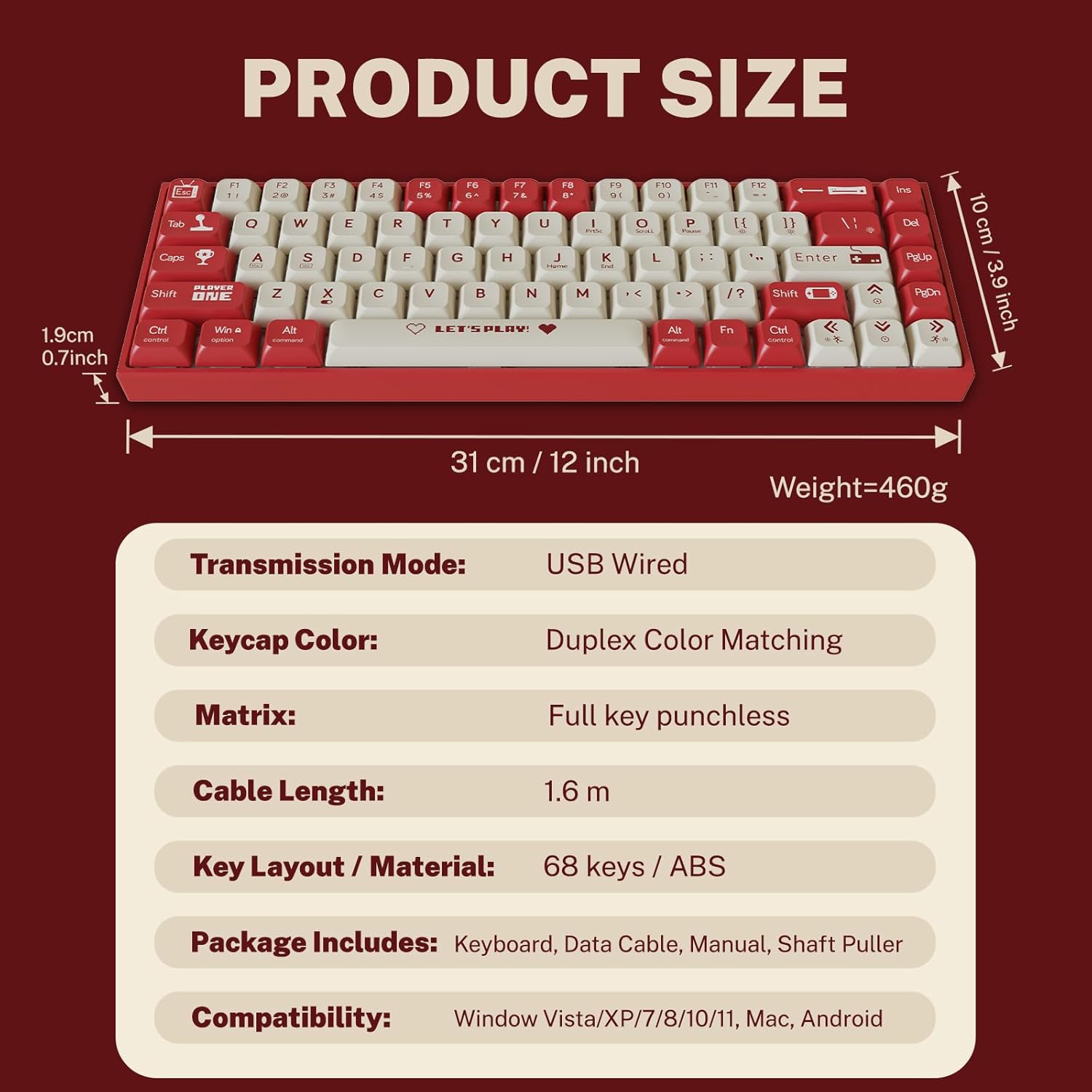
شکل ۲: د بسته بندۍ محتوا او د محصول ابعاد.
۴. د تنظیم لارښوونې
۴.۲ د کیبورډ نښلول
- Locate the USB-C port on the back or side of the keyboard.
- د ورکړل شوي USB-C کیبل یوه پای د کیبورډ USB-C پورټ سره وصل کړئ.
- Connect the other end of the USB-A connector to an available USB port on your computer.
- کیبورډ به په اتوماتيک ډول ستاسو د عملیاتي سیسټم لخوا وپیژندل شي. د اساسي فعالیت لپاره معمولا اضافي ډرایورانو ته اړتیا نشته.
۳.۳ د سیسټم مطابقت
The Attoe AK680 keyboard is compatible with the following operating systems:
- Windows Vista / XP / 7 / 8 / 10 / 11
- macOS
- Android

Figure 3: Multi-system compatibility of the keyboard.
4. عملیاتي لارښوونې
۳.۱ د کیبورډ اساسي دندې
The AK680 features a 68-key layout, providing essential keys while maintaining a compact form factor. All keys support anti-ghosting, ensuring accurate input even during rapid key presses.

Figure 4: The 68-key layout for efficient use.
4.2 د RGB بیکلاینټینګ
The keyboard features 16.8 million color RGB backlighting with various effects. Specific key combinations (often involving the Fn key) are used to cycle through lighting modes, adjust brightness, and change colors. Refer to the quick start guide or product page for detailed key combinations for lighting control.

Figure 5: RGB Backlighting in operation.
۵.۳ ګرم بدلیدونکي سویچونه
The AK680 supports hot-swappable 3-pin and 5-pin mechanical switches. This allows you to easily change switches without soldering, customizing the typing feel to your preference. Use the included switch puller for safe removal and installation.
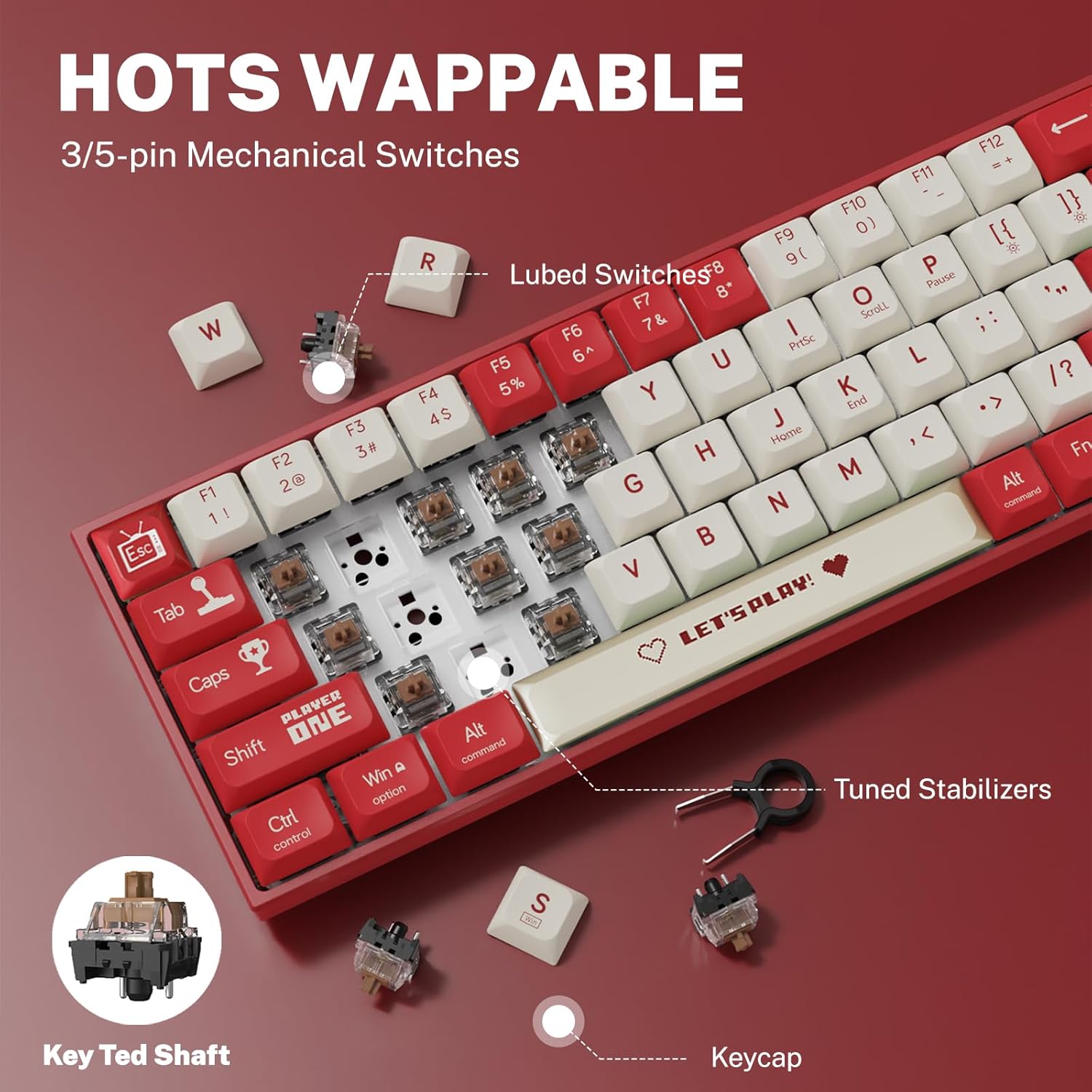
شکل ۲: د ګرمو بدلولو وړ سویچ میکانیزم.
5. ساتنه
۷.۲ د کیبورډ پاکول
- عمومي پاکول: د کیبورډ سطحې د پاکولو لپاره نرم، وچ ټوکر وکاروئ. د سختې خاورې لپاره، یو څه dampپه ټوکر کې د اوبو سره یا یو نرم، غیر خړوبونکی کلینر.
- د کی کیپسونو ترمنځ: د کیلي کیپسونو ترمنځ د دوړو او کثافاتو لرې کولو لپاره د فشار شوي هوا څخه کار واخلئ.
- د کیلي کیپ پاکول: For thorough cleaning, remove keycaps using the provided keycap puller. Wash keycaps with mild soap and water, rinse thoroughly, and ensure they are completely dry before reattaching.
۷.۲ د کی کیپس او سویچونو بدلول
The AK680's hot-swappable design allows for easy replacement of keycaps and switches.
- د کیلي کیپس لرې کول: Use the keycap puller to gently grip and lift keycaps straight up.
- د سویچونو لرې کول: After removing the keycap, use the switch puller to carefully grip the top and bottom clips of the switch and pull it straight out.
- د سویچونو نصب کول: د نوي سویچ پنونه د PCB سوریو سره سم کړئ. په کلکه فشار ورکړئ تر هغه چې سویچ په خپل ځای کې کلیک وکړي. ډاډ ترلاسه کړئ چې پنونه کږ شوي نه دي.
- د کی کیپس نصب کول: Align the keycap with the switch stem and press down gently until it is seated securely.

Figure 7: Components of a mechanical switch and tools for maintenance.
6. ستونزه حل کول
- کیبورډ ځواب نه ورکوي:
- ډاډ ترلاسه کړئ چې د USB-C کیبل په خوندي ډول د کیبورډ او کمپیوټر دواړو سره وصل دی.
- هڅه وکړئ چې کیبورډ په خپل کمپیوټر کې بل USB پورټ سره وصل کړئ.
- د سیسټم پورې اړوند ستونزو د له منځه وړلو لپاره په بل کمپیوټر کې کیبورډ ازموینه وکړئ.
- هغه کیلي چې راجستر نه کیږي:
- Remove the keycap and switch for the affected key. Reinstall the switch, ensuring it is properly seated and its pins are not bent.
- هر هغه کثافات چې ممکن د سویچ میکانیزم خنډ کړي پاک کړئ.
- RGB Backlighting Not Working:
- Check if the backlighting is turned off or set to minimum brightness using the keyboard's function keys.
- ډاډ ترلاسه کړئ چې کیبورډ د USB پورټ څخه کافي بریښنا ترلاسه کوي.
7. مشخصات
| فیچر | تفصیل |
|---|---|
| د ماډل شمیره | AK680 |
| برانډ | Attoe |
| د پیوستون ډول | تار لرونکی (USB-C) |
| د کلیدونو شمیر | 68 کیلي |
| کلیدي ټیکنالوژي | Mechanical Shaft (Red/Teal Shaft), Hot-Swappable (3-pin/5-pin) |
| د کیکیپ مواد | دوه ګونی شاټ PBT |
| شاته رڼا کول | RGB (۱۶ میلیونه رنګونه) |
| د غشی ضد | Full Keys Anti-Ghosting |
| د کیبل اوږدوالی | 1.6 متره |
| د محصول ابعاد | 12 x 3.9 x 0.7 انچه (31 x 10 x 1.9 سانتي متره) |
| د توکي وزن | 1.01 پونډه (460 ګرامه) |
| مطابقت | Windows Vista/XP/7/8/10/11, macOS, Android |
| د اوبو ضد فعالیت | IPX4 rated protection (splash resistant) |
8. تضمین او ملاتړ
Attoe provides a د 12 میاشتو تضمین for the AK680 Mechanical Gaming Keyboard from the date of purchase.
If you encounter any problems or have questions regarding your product, please contact Attoe customer service. We are committed to providing the best service and will respond within 24 hours to assist you.
For support, please refer to the contact information provided with your purchase or visit the official Attoe webسایټ