
پیژندنه
د پیرودلو لپاره مننهasing the UPXNBOR Wireless LED Table Lamp. This manual provides important information for the safe and efficient use of your new lamp. Please read it thoroughly before first use and keep it for future reference.
دا څو اړخیز lamp features a durable all-metal casing, touch control, three warm light levels, and IP54 waterproofing, making it suitable for various indoor and outdoor settings.
د خوندیتوب لارښوونې
- ټولې لارښوونې ولولئ: د عملیاتو دمخه د lamp, read and understand all safety and operating instructions.
- چارج کول: Use only the provided USB-C cable for charging. Do not use fast chargers, as this may reduce battery lifespan. Ensure the lamp is fully charged before its first use.
- د اوبو مقاومت: دamp is IP54 waterproof, meaning it is protected against dust ingress and splashing water from any direction. It is not designed for submersion in water.
- دحرارت درجه: د افشا کولو څخه ډډه وکړئamp to extreme temperatures. For optimal battery performance, use and charge the lamp within recommended temperature ranges.
- پاکول: lamp from the power source before cleaning. Use a soft, dry cloth. Do not use abrasive cleaners or solvents.
- بې لارې کول: د جلا کولو یا ترمیم کولو هڅه مه کوئampدا به تضمین باطل کړي او ممکن زیان یا ټپي کیدو لامل شي.
- ماشومان: l وساتئamp د ماشومانو د لاسرسي څخه بهر.
د بسته محتويات
مهرباني وکړئ د لاندې توکو لپاره په بسته کې وګورئ:
- UPXNBOR Wireless LED Table Lamp (Model UP-WSA)
- USB-C Power Cable (80cm)
- د کارن لارښود
محصول پای ته ورسیدview
The UPXNBOR Wireless LED Table Lamp is designed for convenience and durability. It features a robust all-metal construction and a sleek, minimalist design.
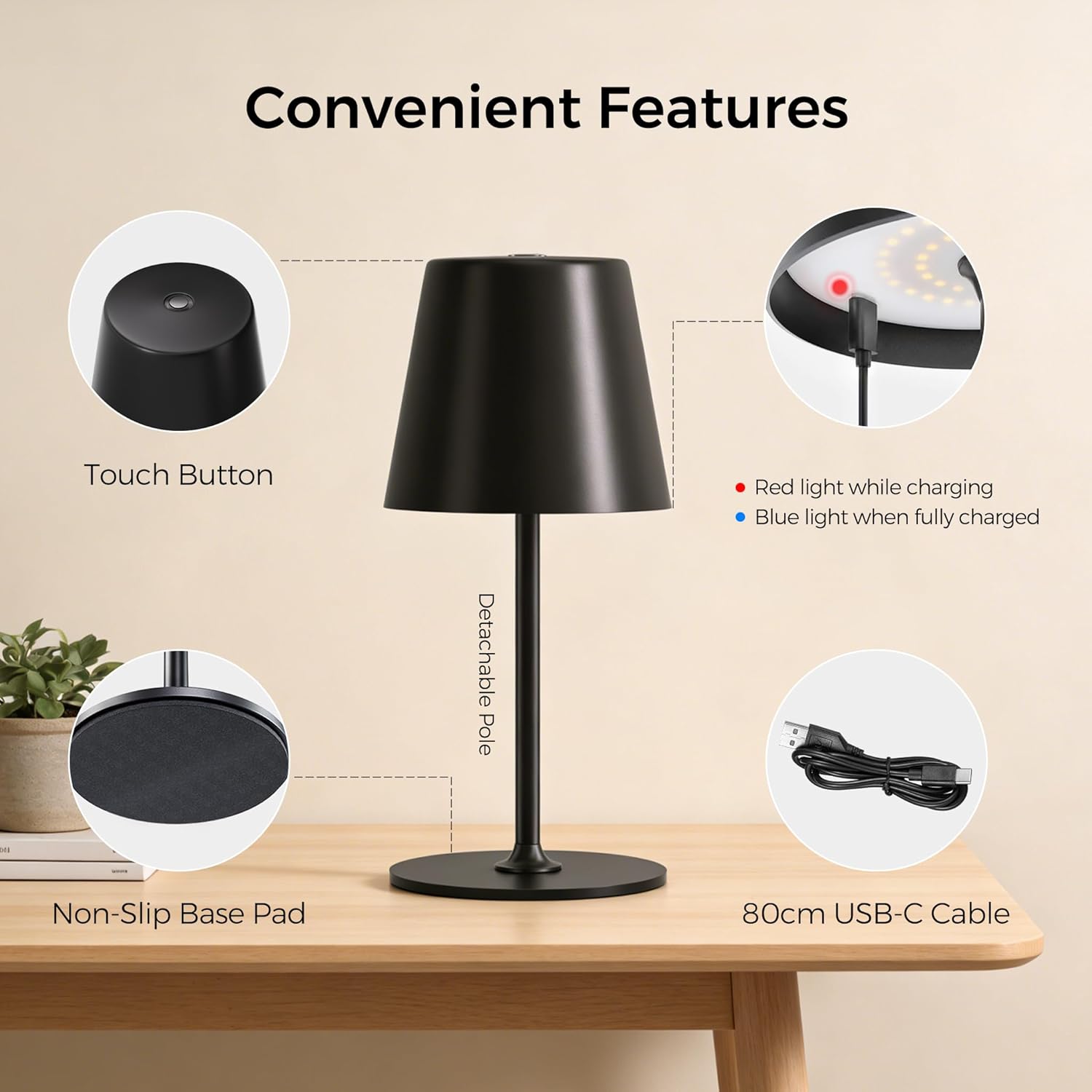
Image: Convenient Features. This image highlights the key components of the lamp, including the touch button on top, the charging indicator light (red for charging, blue for fully charged), the detachable pole for easy assembly, the non-slip base pad for stability, and the included 80cm USB-C charging cable.
کلیدي ځانګړتیاوې:
- All-Metal Casing: High-quality metal construction for durability and stability.
- 48 LEDs: Provides uniform illumination with 20 internal and 28 external LEDs.
- 3 د روښانتیا کچه: Easily adjust light intensity to suit different environments and needs.
- Dual Battery Design: د اوږدې مودې کارونې لپاره د بیټرۍ ژوند اوږد شوی.
- د ټچ کنټرول: Simple and intuitive operation via a touch-sensitive button on the top.
- IP54 واټر پروف: Suitable for both indoor and outdoor use, resistant to splashing water.
- د غیر سلیپ اساس: په مختلفو سطحو کې ثبات ډاډمن کوي.
- Detachable Pole: Allows for compact storage and easy assembly.

Image: All-New Upgrade. This graphic illustrates the product's enhancements, including an upgrade from single-ring to dual-ring LEDs for improved brightness, a transition from a single-battery to a dual-battery design for extended runtime (6-16 hours), and an upgrade from a plastic top to an all-metal top for enhanced material quality.
چمتو کول
Your UPXNBOR lamp is designed for easy assembly.
- خلاص کړئ: په احتیاط سره د بسته بندۍ څخه ټولې برخې لرې کړئ.
- قطب راټول کړئ: دamp pole may come in two parts. Gently screw the upper part of the pole into the lower part, then screw the assembled pole into the lamp base. Ensure it is securely fastened.
- لومړنی لګښت: د لومړي استعمال څخه دمخه، l په بشپړه توګه چارج کړئamp د ورکړل شوي USB-C کیبل په کارولو سره. د جزیاتو لپاره د 'چارج کولو' برخې ته مراجعه وکړئ.
عملیاتي لارښوونې
دamp features simple touch control for power and brightness adjustment.
- پاور آن/بند: Lightly touch the center of the top surface of the lamp to turn it on. Touch it again to turn it off.
- روښانتیا تنظیم کړئ: پداسې حال کې چې د ایلamp is on, tap the touch button repeatedly to cycle through the three brightness levels (Low, Medium, High).

Image: 3 Brightness Levels and Battery Life. This image illustrates the three available brightness settings and their approximate battery runtimes: Level 1 provides 14-16 hours, Level 2 provides 8-9 hours, and Level 3 provides 6-7 hours. Note that in cold conditions (0-5°C), battery capacity may drop to around 70-80%.
چارج کول
To charge your UPXNBOR Wireless LED Table Lamp:
- Locate the USB-C charging port, typically on the side or base of the lamp.
- ورکړل شوی USB-C کیبل د l سره وصل کړئampد چارج کولو بندر.
- د USB-C کیبل بل پای د معیاري USB بریښنا اډاپټر (شامل نه دی) یا بریښنا شوي USB پورټ سره وصل کړئ.
- The charging indicator light (refer to Product Overview image) will illuminate سور د چارج کولو پرمهال.
- کله چې په بشپړ ډول چارج شي، د شاخص څراغ به وګرځي آبي.
- کله چې چارج بشپړ شي، د چارج کولو کیبل جلا کړئ.
مهم: مهرباني وکړئ په بشپړ ډول l چارج کړئamp before its first use. Do not use a fast charger to ensure the long-term health and lifespan of the battery.
ساتنه
Proper maintenance ensures the longevity of your lamp.
- پاکول: l مسح کړئamp with a soft, dry cloth. For stubborn marks, a slightly damp cloth can be used, but ensure the lamp is completely dry before use or charging. Do not use harsh chemicals or abrasive materials.
- ذخیره کول: که چیرې د l ذخیره کولamp for an extended period, ensure it is fully charged and store it in a cool, dry place. Recharge it every 3-6 months to maintain battery health.
- د بیټرۍ پاملرنه: To maximize battery life, avoid completely draining the battery frequently. Charge the lamp کله چې د رڼا تولید د پام وړ کم شي.
د ستونزو حل کول
که تاسو د خپل l سره ستونزې سره مخ شئamp، مهرباني وکړئ لاندې عامې ستونزې او حل لارې ته مراجعه وکړئ:
| ستونزه | احتمالي لامل | د حل لاره |
|---|---|---|
| Lamp نه چلیږي. | بیټرۍ ختمه شوې. | l چارج کړئamp په بشپړه توګه |
| Lamp چارج نه کوي. | د چارج کولو کیبل یا اډاپټر خراب دی. د چارج کولو پورټ چټل دی. | یو بل USB-C کیبل او د بریښنا اډاپټر هڅه وکړئ. Gently clean the charging port with a dry, soft brush. |
| د رڼا تولید کم دی. | بیټرۍ ټیټه ده. Incorrect brightness level selected. | l چارج کړئamp. Tap the touch button to cycle to a brighter setting. |
| د ټچ کنټرول غیر ځواب ویونکی دی. | Surface is wet or dirty. د سافټویر لنډمهاله ستونزه. | ډاډ ترلاسه کړئ چې د لمس کولو سطحه پاکه او وچه ده. هڅه وکړئ چې l واړوئamp off and on again (if possible) or let the battery drain and recharge. |
مشخصات
| د ماډل شمیره | UP-WSA |
| برانډ | UPXNBOR |
| ابعاد (L x W x H) | 10.5 x 37.8 x 10.5 سانتي متره |
| د توکي وزن | 650 ګرامه |
| مواد | فلزي |
| سیوري مواد | فلزي |
| رنګ | تور |
| د رڼا سرچینې ډول | LED |
| د LEDs شمیر | 48 |
| واټtage | 10 واټ |
| د بریښنا سرچینه | Battery Powered (2 Non-standard batteries included) |
| د سویچ ډول | لمس |
| ځانګړتیاوې | کم کېدونکی، بې تاره |
| د پنروک درجه | IP54 |
| د کارونې چاپیریال | دننه، بهر |
| د اصلي هیواد | چین |

Image: Two Height Options. This image displays the lamp in two different configurations, illustrating its adjustable height. One configuration shows a height of 23.5 cm (9.3 inches), and the other shows a height of 37.8 cm (14.9 inches).
د ضایع کولو معلومات
This product contains a built-in rechargeable battery. Do not dispose of this product with general household waste. Please follow local regulations for the disposal of electronic products and batteries. Proper disposal helps prevent potential negative consequences for the environment and human health.
تضمین او ملاتړ
د تضمین معلوماتو یا تخنیکي ملاتړ لپاره، مهرباني وکړئ د پیرودلو په وخت کې چمتو شوي اسنادو ته مراجعه وکړئ یا خپل پرچون پلورونکي سره اړیکه ونیسئ. د تضمین ادعاوو لپاره د پیرود ثبوت وساتئ.