پیژندنه
This manual provides comprehensive instructions for the operation, setup, maintenance, and troubleshooting of the Mini Pearl 1024A DMX512 Computer Light Controller. This device is designed for professional stage lighting control, offering extensive capabilities for managing complex lighting scenes.
The Mini Pearl 1024A supports up to 1024 DMX512 channels and can control up to 96 computer lamps, each with up to 40 main and 40 fine-tuning channels. It features advanced scene management, a graph generator, and various control options including faders and a turntable for precise adjustments.
محصول پای ته ورسیدview
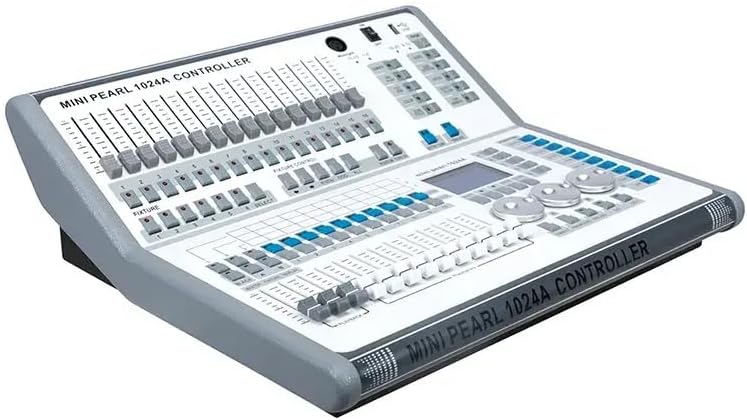
شکل 1: مخکینۍ برخه view of the Mini Pearl 1024A DMX512 Computer Light Controller, showcasing the faders, buttons, and display screen.

شکل 2: پورته- ښکته view of the controller, highlighting the layout of the control surface including fixture faders, playback faders, and rotary encoders.

شکل 3: اړخ view of the Mini Pearl 1024A, showing its ergonomic design and profile.

شکل 4: Rear panel of the controller, displaying power input, DMX outputs, and MIDI ports.

شکل 5: The Mini Pearl 1024A controller securely packed within its dedicated flight case, indicating robust protection for transport.
چمتو کول
1. خلاصول او معاینه کول
Carefully remove the Mini Pearl 1024A from its packaging. Inspect the unit for any signs of damage that may have occurred during transit. The controller comes in a single package flight case for protection.
2. د بریښنا پیوستون
Connect the provided power cable to the power input on the rear panel of the controller (refer to Figure 4). Ensure the power switch is in the OFF position before connecting to a power source. The unit operates on standard AC power.
3. DMX Connections
Connect your DMX-compatible lighting fixtures to the DMX output ports on the rear panel using standard 3-pin or 5-pin DMX cables. The Mini Pearl 1024A supports 1024 DMX512 channels across multiple universes.
- Ensure proper DMX termination for stable signal transmission, especially in long DMX chains.
- Assign unique DMX addresses to each lighting fixture according to their respective manuals.
4. USB and MIDI Connections (Optional)
For U disk reading (FAT32 format) or MIDI music synchronization, connect your USB drive or MIDI device to the respective ports on the controller.
عملیاتي لارښوونې
1. Powering On and Initializing
Flip the power switch to the ON position. The controller will perform a self-test and initialize. The display screen will show the current status.
2. Fixture Patching and Addressing
The Mini Pearl 1024A allows for saving up to 60 scenes and running up to 10 scenes simultaneously. Multi-step scenes can have up to 600 steps.
- Select Fixtures: Use the fixture selection buttons to choose the lights you wish to control.
- پیرامیټونه تنظیم کړئ: Use the faders, encoders, and turntable to adjust parameters such as dimmer, pan/tilt (P/T), RGB, CMY, color, gobo, iris, and focus.
- صحنه خوندي کړئ: Once the desired lighting state is achieved, save it as a scene. The controller supports scene time control (fade in, fade out, LTP slide) and can store up to 5 graphics per scene.
- پلې بیک: Use the playback faders to trigger and control saved scenes. The faders also support dimming control.
3. Graph Generator
The built-in graph generator can create dynamic effects for various parameters. Up to 5 figures can operate simultaneously.
- Access the "Graph" menu to select and customize pre-programmed effects or create new ones.
- Apply graphs to specific fixture parameters for automated movement, color changes, or dimming patterns.
4. پرمختللي ځانګړتیاوې
- ماسټر فادر: Control global, reply, and lamp master dimming.
- تور لګول: Instantly black out all lights.
- Interlock Scene: Manage scene dependencies.
- Point Control Scene: Fine-tune specific scene elements.
- Program Backup and Recovery: Utilize the U disk (FAT32) for saving and restoring your console programs.
ساتنه
1. پاکول
Regularly clean the exterior of the controller with a soft, dry cloth. For stubborn dirt, a slightly damp cloth can be used, followed by drying. Avoid using abrasive cleaners or solvents, as they may damage the finish or internal components.
2. د چاپیریال په اړه نظرونه
The Mini Pearl 1024A has an IP20 protection level, meaning it is protected against solid objects larger than 12.5mm but has no special protection against water. Operate the unit in a dry environment, away from excessive dust, moisture, and extreme temperatures.
3. د فرم ویئر تازه معلومات
جوړونکي وګورئ website periodically for firmware updates. Updates can provide new features, performance improvements, or bug fixes. Follow the instructions provided with the firmware update package carefully.
د ستونزو حل کول
| ستونزه | احتمالي لامل | د حل لاره |
|---|---|---|
| کنټرولر بریښنا نه کوي. | No power supply; power cable loose; power switch off. | Ensure power cable is securely connected and plugged into a live outlet. Check power switch position. |
| Lights not responding to DMX signals. | Incorrect DMX addressing; faulty DMX cable; DMX termination missing; fixture not patched correctly. | Verify DMX addresses on fixtures match console settings. Test DMX cables. Ensure DMX chain is properly terminated. Re-patch fixtures if necessary. |
| Faders or buttons unresponsive. | Dust or debris; internal malfunction. | Clean the control surface. If problem persists, contact technical support. |
| USB drive not recognized. | Incorrect format; drive malfunction. | Ensure USB drive is formatted to FAT32. Try a different USB drive. |
مشخصات
- DMX512 چینلونه: 1024
- Computer Lampملاتړ شوی: 96
- Control Channels per Lamp: 40 main + 40 fine tuning
- Saved Scenes: 60
- Simultaneous Running Scenes: 10
- Multi-step Scene Steps: 600 ټول
- Scene Time Control: Fade in, Fade out, LTP slide
- Graphics per Scene: 5
- Graph Generator: Dimmer, P/T, RGB, CMY, Color, Gobo, Iris, Focus graphs
- Simultaneous Operation Figures: 5
- ماسټر فادر: Global, Reply, Lamps
- د USB ملاتړ: FAT32 format for U disk reading, program backup/recovery
- MIDI: MIDI music synchronization support
- د کنټرول انٹرفیس: Electric faders, encoders, programmable shortcut keys, controllable angle touch screen
- ساختمان: Metal shell, industrial-grade technology
- د ساتنې کچه: IP20
- بسته بندي: Single package flight case
- د بسته ابعاد: 59cm x 53cm x 29cm (approx. 23.2in x 20.9in x 11.4in)
- د بسته وزن: ۰.۱ کیلوګرامه (تقریبا ۰.۲۲ پونډه)
تضمین او ملاتړ
The Mini Pearl 1024A DMX512 Computer Light Controller comes with a 2 کلن تضمین provided by the manufacturer, Borui. For technical support, warranty claims, or service inquiries, please contact your authorized dealer or the manufacturer directly.
Please retain your proof of purchase for warranty validation. The warranty covers defects in materials and workmanship under normal use. It does not cover damage caused by misuse, accidents, unauthorized modifications, or improper installation.


