
پیژندنه
This manual provides detailed instructions for the assembly, operation, and maintenance of your FLEXISPOT One-Piece Standing Desk with Rattan Drawers. Please read this manual thoroughly before installation and use to ensure proper function and safety. Keep this manual for future reference.

Image: The FLEXISPOT One-Piece Standing Desk in black with rattan drawers, featuring a monitor shelf and an integrated control panel.
د خوندیتوب مهم معلومات
د محصول د ټپي کیدو یا زیان مخنیوي لپاره، لاندې خوندیتوب لارښوونې تعقیب کړئ:
- تل د مجلس لارښوونې په دقت سره تعقیب کړئ.
- ماشومان او څاروي د مجلس له ساحې څخه لرې وساتئ.
- Use appropriate tools and safety gear during assembly.
- د میز چلولو دمخه ډاډ ترلاسه کړئ چې ټولې اړیکې خوندي دي.
- میز ډیر مه باروئ. د وزن اعظمي ظرفیت یې ۱۸۰ پونډه دی.
- د لوړوالي د تنظیم په وخت کې لاسونه او شیان د حرکت کونکو برخو څخه لرې وساتئ.
د بسته محتويات
Verify that all components are present before beginning assembly. The desk ships in two separate packages.
- Desktop with integrated monitor shelf and rattan drawers
- Desk frame and legs
- د تضمین اداره
- د بریښنا اډاپټر او کیبلونه
- د اسمبلۍ هارډویر (پیچونه، بولټونه، وسایل)
- د کارن لارښود

Image: A diagram illustrating the dimensions of the desk components and indicating that the product ships in two separate packages.
د مجلس لارښوونې
Assembly typically takes approximately one hour. Refer to the separate detailed assembly guide included in your package for step-by-step instructions and diagrams. Ensure all fasteners are correctly identified and used in their designated locations.
- ټولې برخې خلاصې کړئ او د بسته بندۍ د منځپانګې لیست سره سم یې تایید کړئ.
- Attach the desk legs to the desktop frame using the provided hardware.
- Connect the control panel and motor cables as instructed.
- Secure any cable management components.
- Place the desk in its desired location.
چمتو کول
After assembly, connect the desk to a power source.
- Plug the power adapter into the desk's control box.
- د بریښنا تار په معیاري بریښنایی پلورنځی کې ولګوه.
- The desk is now ready for initial use.
عملیاتي لارښوونې
د لوړوالی سمون
The desk features an electric motor system for smooth height transitions.
- فشار ورکړئ پورته تیر د میز د پورته کولو تڼۍ.
- فشار ورکړئ ښکته تیر د میز د ښکته کولو تڼۍ.
- The desk can adjust between 28.9 inches (minimum) and 46.5 inches (maximum).
- The motor operates quietly, typically below 50dB.

Image: The desk shown at its minimum (28.9") and maximum (46.5") adjustable heights.
د حافظې پریزیټ
Program up to three preferred height settings for quick adjustments.
- میز د خپلې خوښې لوړوالي سره سم تنظیم کړئ.
- فشار ورکړئ M button, then press one of the numbered preset buttons (1, 2، یا 3) within 3 seconds to save the current height.
- د خوندي شوي لوړوالي د یادولو لپاره، په ساده ډول د اړونده شمیرې سره سم تڼۍ فشار ورکړئ.

انځور: نږدې انځور view of the desk's control panel, highlighting the up/down arrows and memory preset buttons.
د څارنې شیلف
The integrated monitor shelf is designed to elevate screens to an ergonomic eye level.
- Place your monitor(s) on the shelf to reduce neck and back strain.
- This helps maintain proper posture during extended work sessions.

Image: Visual comparison of poor posture versus ergonomic sitting and standing postures facilitated by the adjustable desk.
Rattan Drawers
The desk includes both sliding-door desktop compartments and an under-desk drawer for organized storage.
- Use the desktop compartments (47.2"x8.7"x5.5") for easy access to frequently used items.
- The under-desk drawer (23.6"x11.8"x3.9") provides discreet storage for documents or books.
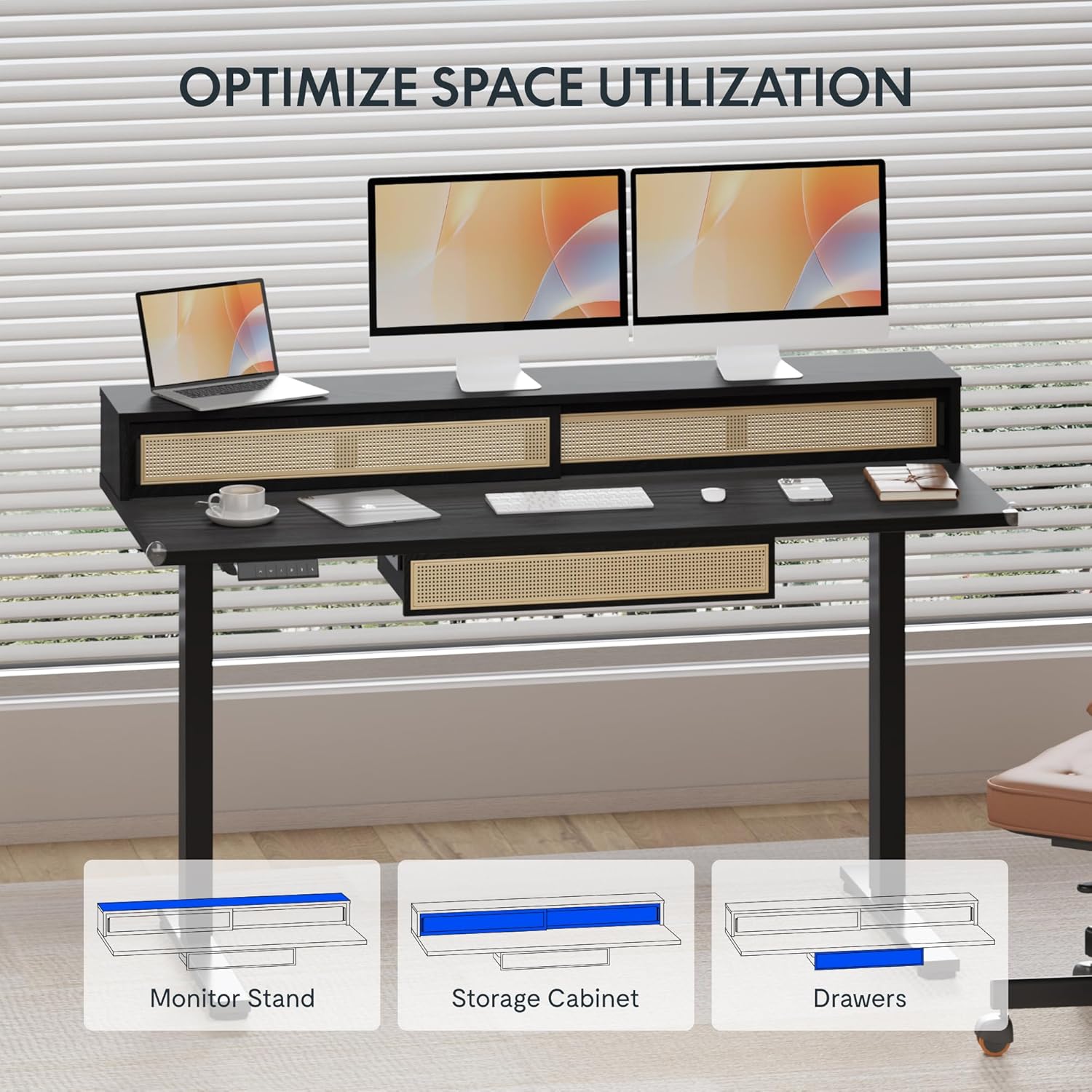
Image: An illustration demonstrating the various storage options, including the monitor stand, storage cabinet, and drawers, for optimal space utilization.
ساتنه
Regular maintenance ensures the longevity and optimal performance of your desk.
- پاکول: د میز سطحې د نرم، ډ سره پاک کړئamp ټوکر د کثافاتو پاکونکو یا سخت کیمیاوي موادو څخه ډډه وکړئ چې ممکن پای ته زیان ورسوي.
- معاینه: ټول پیچونه او بولټونه په دوره یي ډول وګورئ ترڅو ډاډ ترلاسه شي چې دوی کلک دي. که اړتیا وي نو بیا یې ټینګ کړئ.
- د کیبل مدیریت: ډاډ ترلاسه کړئ چې کیبلونه په ښه توګه تنظیم شوي او د میز په حرکت کې مداخله نه کوي.
د ستونزو حل کول
که تاسو په خپل میز کې ستونزې سره مخ شئ، لاندې عام حلونو ته مراجعه وکړئ:
| ستونزه | احتمالي لامل | د حل لاره |
|---|---|---|
| میز نه حرکت کوي او نه کنټرولونو ته ځواب ورکوي. | Power connection issue, cable disconnected, motor error. | Check power cord connection to outlet and desk. Ensure all motor cables are securely connected. Unplug and replug the power for 10 seconds to reset. |
| میز په نا مساوي ډول حرکت کوي یا غیر معمولي غږ کوي. | نا مساوي بار، خلاصې اړیکې، خنډ. | Ensure weight is evenly distributed. Check for any obstructions under the desk. Verify all assembly screws are tight. |
| د حافظې مخکینۍ سیټونه کار نه کوي. | پریسیټونه په سمه توګه خوندي شوي ندي. | Re-save the desired height settings by pressing 'M' then the preset number within 3 seconds. |
مشخصات
| فیچر | تفصیل |
|---|---|
| برانډ | FLEXISPOT |
| د محصول ابعاد (د x څلویښتم x څلویښتم) | 23.6"D x 47.2"W x 29"H (at lowest point) |
| رنګ | تور |
| اساسی مواد | د الماس فولاد |
| د پورته موادو ډول | لرګي |
| لږ تر لږه لوړوالی | ۷۸۷ انچه |
| اعظمي لوړوالی | ۷۸۷ انچه |
| د درازونو شمیر | 1 (under-desk) |
| Enclosed Shelves | 2 (sliding-door desktop compartments) |
| ځانګړی ځانګړنه | Corded electric height adjustment, Memory Presets |
| اړین مجلس | هو |
تضمین او ملاتړ
FLEXISPOT provides comprehensive warranty coverage for your standing desk:
- Frame and Motor: دوه کلن پوښښ.
- الکترونیکی: دوه کلن پوښښ.
This warranty ensures lasting security for your workspace investment. For customer support, technical assistance, or warranty claims, please refer to the contact information provided in your product packaging or visit the official FLEXISPOT webسایټ