
پیژندنه
The Chilkey Foxy65 is a compact 65% mechanical keyboard designed for versatility and performance. It features a gasket-mounted aluminum case, hot-swappable switches, tri-mode connectivity (Bluetooth 5.0, 2.4GHz wireless, and USB-C wired), and customizable RGB backlighting. This manual provides detailed instructions for setting up, operating, and maintaining your Foxy65 keyboard.
د بسته محتويات
مهرباني وکړئ د لاندې توکو لپاره بکس وګورئ:
- Chilkey Foxy65 Mechanical Keyboard
- USB-C کیبل
- ۲.۴GHz بېسیم رسیور (USB ډونګل)
- کیکیپ پلر
- سویچ پلر
- Replaceable Diffuser (Cat Ear Design)
- د کارن لارښود
- Small tool kit (screws, hex key)
ویډیو: Foxy65 Mechanical Keyboard Unboxing. This video demonstrates the unboxing experience and shows the included accessories.
محصول پای ته ورسیدview
The Foxy65 keyboard combines a compact layout with advanced features for an enhanced typing experience.
- ۶۰٪ کمپیکټ ترتیب: Space-saving design while retaining essential keys.
- Tri-Mode Wireless Connectivity: د بلوتوث ۵.۰، ۲.۴GHz بېسیم، او USB-C تار لرونکي اتصالاتو ملاتړ کوي.
- د ګازکیټ جوړښت: Features an FR4 plate, 1.2mm Flex Cut PCB, and four layers of Poron dampening for a softer, more elastic feel and thicker sound.
- ګرم بدلیدونکی: Compatible with 3-pin and 5-pin mechanical switches, allowing for easy customization without soldering.
- Programmable Knob: A dedicated knob for volume adjustment, which can also be programmed for other functions.
- د PBT کیلي کیپس: Durable doubleshot PBT keycaps with Cherry profile د آرامۍ ټایپ کولو لپاره.
- د RGB بیک لایټ: Features 18 lighting effects and supports music rhythm lighting, with two interchangeable diffuser types.

انځور: اوورview of the Foxy65 Mechanical Keyboard highlighting its key features.
ویډیو: Foxy65 Aluminum Mechanical Keyboard. This video provides a general overview د کیبورډ ډیزاین او ځانګړتیاوې.
چمتو کول
Follow these steps to set up your Foxy65 keyboard:
- کیبورډ چارج کړئ: Connect the provided USB-C cable to the keyboard and a power source (e.g., computer USB port, wall adapter). The keyboard has a 4500mAh battery.
- د اتصال حالت غوره کړئ: The wireless switch is located under the spacebar. Gently remove the spacebar keycap to access the switch. Choose between 2.4GHz, Bluetooth, or Wired mode.
- د بریښنا حالت: د USB-C کیبل مستقیم خپل کمپیوټر سره وصل کړئ. کیبورډ به په اتوماتيک ډول وپیژندل شي.
- 2.4GHz بې سیم حالت: Insert the 2.4GHz USB receiver into an available USB port on your computer. Switch the keyboard to 2.4GHz mode. Press FN + R to activate 2.4GHz pairing. The keyboard should connect automatically.
- بلوتوث موډ: Switch the keyboard to Bluetooth mode. Press FN + Q, FN + W، یا FN + E to select one of three Bluetooth channels. The indicator light will flash, indicating pairing mode. On your device, search for "Foxy65" in Bluetooth settings and connect.

انځور: Three Modes Connection. This image illustrates the different connectivity options and the location of the wireless mode switch.
عملیاتي لارښوونې
د RGB بیک لایټ کنټرول
The Foxy65 keyboard features 18 kinds of lighting effects. Use the following key combinations to control the RGB backlighting:
- ایف این + |: د رڼا د مختلفو حالتونو ترمنځ بدل کړئ.
- FN + DEL: Toggle between different lighting colors.
The keyboard also supports cool music rhythm lighting effects with the appropriate driver software.

انځور: Ultra Bright RGB Backlight. This image demonstrates the RGB lighting and control key combinations.
Programmable Knob
The dedicated metal knob on the Foxy65 keyboard provides quick access to volume control:
- کيڼ خوا ته تاو شه: حجم کم کړئ.
- ښي لاس ته وګرځه: حجم زیات کړئ.
- کلیک وکړئ: غږ خاموش/غیر خاموش کړئ.
The knob can also be programmed for other keys or functions using the keyboard's software.

انځور: Adjust volume as you like. This image details the functionality of the programmable knob.
ګرم بدلیدونکي سویچونه
The Foxy65 features a hot-swappable PCB, allowing you to easily change mechanical switches without soldering. It is compatible with both 3-pin and 5-pin switches.
د سویچ بدلولو لپاره:
- Use the keycap puller to remove the desired keycap.
- Use the switch puller to gently remove the switch from the PCB.
- Align the pins of the new switch with the hot-swap socket on the PCB. Ensure the pins are straight to avoid bending.
- نوی سویچ په ټینګه سره په خپل ځای کې فشار ورکړئ تر هغه چې کلیک وکړي.
- د کیلي کیپ بدل کړئ.

انځور: Hot Swappable PCB. This image shows the components involved in the hot-swappable feature.

انځور: Chilkey Lotus Pink Switch. This image provides details on the linear switch type.
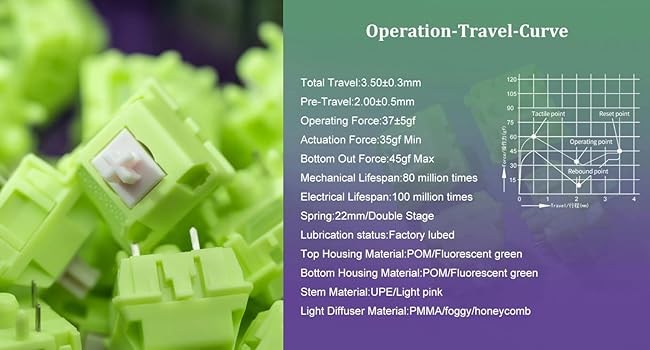
انځور: Chilkey Sprout Green Switch. This image provides details on the tactile switch type.
ساتنه
To ensure the longevity and optimal performance of your Foxy65 keyboard, follow these maintenance guidelines:
- پاکول: Regularly clean the keycaps and case with a soft, dry cloth. For deeper cleaning, remove keycaps using the provided keycap puller and clean with a mild cleaning solution if necessary. Ensure the keyboard is disconnected from power before cleaning.
- د سویچ پاملرنه: If you replace switches, ensure they are inserted correctly to avoid bending pins. Avoid excessive force.
- ذخیره کول: When not in use, store the keyboard in a clean, dry environment, away from direct sunlight and extreme temperatures. The included dust bag can be used for protection.
د ستونزو حل کول
If you encounter issues with your Foxy65 keyboard, refer to the following common solutions:
- کیبورډ ځواب نه ورکوي:
- ډاډ ترلاسه کړئ چې کیبورډ چارج شوی دی.
- Check the connection mode switch under the spacebar. Make sure it is set to the correct mode (Wired, 2.4GHz, or BT).
- For wired connection, try a different USB-C port or cable.
- For 2.4GHz, ensure the USB receiver is securely plugged in and re-pair by pressing FN + R.
- For Bluetooth, ensure Bluetooth is enabled on your device and re-pair using فرعي + پوښتنه/وچ/وروسته.
- Intermittent Disconnections (Wired Mode):
- This could indicate a faulty USB-C cable or port. Try a different cable or port.
- Ensure the cable is fully inserted and not loose.
- د RGB بیک لایټ کار نه کوي:
- ډاډ ترلاسه کړئ چې کیبورډ فعال دی.
- Try cycling through lighting modes with ایف این + |.
- Adjust brightness settings (refer to advanced functions in the full manual if available).
- هغه کیلي چې راجستر نه کیږي:
- Remove the keycap and switch for the affected key. Re-insert the switch firmly, ensuring pins are not bent.
- If the issue persists, try swapping the switch with a known working switch to determine if the switch or the socket is faulty.
مشخصات
Detailed technical specifications for the Chilkey Foxy65 Mechanical Keyboard:
| فیچر | تفصیل |
|---|---|
| برانډ | OOCTPK (Chilkey) |
| ماډل | Foxy65 |
| ترتیب | ۷۵٪ کمپیکټ (۸۱ کیلي) |
| د ارتباط ټیکنالوژي | ۲.۴GHz بېسیم، بلوتوث ۵.۰، USB-C وایرډ |
| د سویچ ډول | Mechanical (Hot-Swappable 3/5-pin) |
| د کیکیپ مواد | Doubleshot PBT, Cherry Profile |
| د قضیې مواد | المونیم |
| د نصب کولو سټایل | د ګازکیټ غر |
| PCB | 1.2mm Flex Cut PCB, South-facing LEDs |
| Dampدننه کېدل | 4 layers of Poron dampener kit |
| شاته رڼا کول | RGB (18 effects, music rhythm support) |
| د بیټرۍ ظرفیت | 4500mAh |
| د محصول ابعاد | ۷۱"لیتر x ۲۳.۶"واټه x ۲۴.۴"هوا |
| د توکي وزن | 4.3 پونډه |
| مطابقت لرونکې وسیلې | لپ ټاپ، کمپیوټر، ټابلیټ |

انځور: Mechanical Keyboard Internal Structure. This image illustrates the various layers and components of the keyboard's gasket mount design.
ویډیو: Sound Test of Foxy65 Mechanical Keyboard. This video demonstrates the typing sound profile of the keyboard with Lotus Pink Linear Switches.
تضمین او ملاتړ
The Chilkey Foxy65 Mechanical Keyboard comes with a ۱-کلن تضمین د پیرود نیټې څخه. دا تضمین د عادي استعمال لاندې د تولید نیمګړتیاوې او نیمګړتیاوې پوښي. دا د ناوړه ګټې اخیستنې، پیښو، غیر مجاز تعدیلاتو، یا عادي اغوستلو او اوښکو له امله رامینځته شوي زیانونه نه پوښي.
For warranty claims, technical support, or further inquiries, please contact OOCTPK customer service through the retailer where the product was purchased or visit the official Chilkey webد ملاتړ اړیکو معلوماتو لپاره سایټ.