
1. د خوندیتوب لارښوونې
Please read all instructions carefully before assembly and use to ensure safe operation and prevent injury or damage. Keep this manual for future reference.
- ډاډ ترلاسه کړئ چې ټولې برخې شتون لري او د راټولولو دمخه زیانمن شوي ندي. که کومې برخې ورکې یا نیمګړتیاوې ولري نو مه کاروئ.
- د عملیاتو په جریان کې ماشومان او څاروي له میز څخه لرې وساتئ ترڅو د پیښو مخه ونیول شي.
- Ensure there are no obstructions (walls, furniture, cables, etc.) in the desk's path during height adjustment.
- Do not place heavy or unstable objects on the desk that exceed its maximum load capacity of 100 kg.
- Avoid placing the desk near heat sources, open flames, or in excessively humid environments.
- Unplug the desk from the power outlet before cleaning, maintenance, or if it will be unused for an extended period.
- یوازې چمتو شوي بریښنا اډاپټر او کیبلونه وکاروئ.
- Do not attempt to modify or disassemble the desk's electrical components. Contact qualified service personnel for repairs.
2. محصول ختم شوview
The FLEXISPOT EC5 Lite is an electric height-adjustable desk frame designed for ergonomic workspaces. It features a robust dual-motor system and a stable 3-column leg design.
کلیدي ځانګړتیاوې:
- Dual-Motor Lifting System: Provides smooth, quiet (<50 dB) and stable height adjustments.
- Wide Height Range: Adjustable from 60 cm to 125 cm to accommodate various user preferences and activities.
- د لوړ بار وړتیا: Supports up to 100 kg, suitable for multiple monitors and office equipment.
- د سمارټ حافظې پینل: Allows saving and recalling up to 4 preferred height settings.
- د ټکر ضد ټیکنالوژي: Automatically stops and retracts the desk if an obstacle is detected during movement, ensuring safety.
- قوي ساختمان: Made with reinforced steel for durability and stability.

Figure 2.1: Ultra-High Load Capacity (100 kg)

Figure 2.2: Large Height Adjustment Range (60-125 cm)

Figure 2.3: Powerful Dual Motors
3. تنظیم او مجلس
The FLEXISPOT EC5 Lite desk frame is designed for straightforward assembly, typically completed in under 25 minutes. A detailed instruction manual is included with the product for step-by-step guidance.
د مجلس لارښوونې:
- د راټولولو لپاره پراخه ساحه پاکه کړئ.
- Lay out all parts and hardware according to the included manual.
- ډاډ ترلاسه کړئ چې ټول پیچونه په خوندي ډول ټینګ شوي دي، مګر ډیر مه کلکوئ.
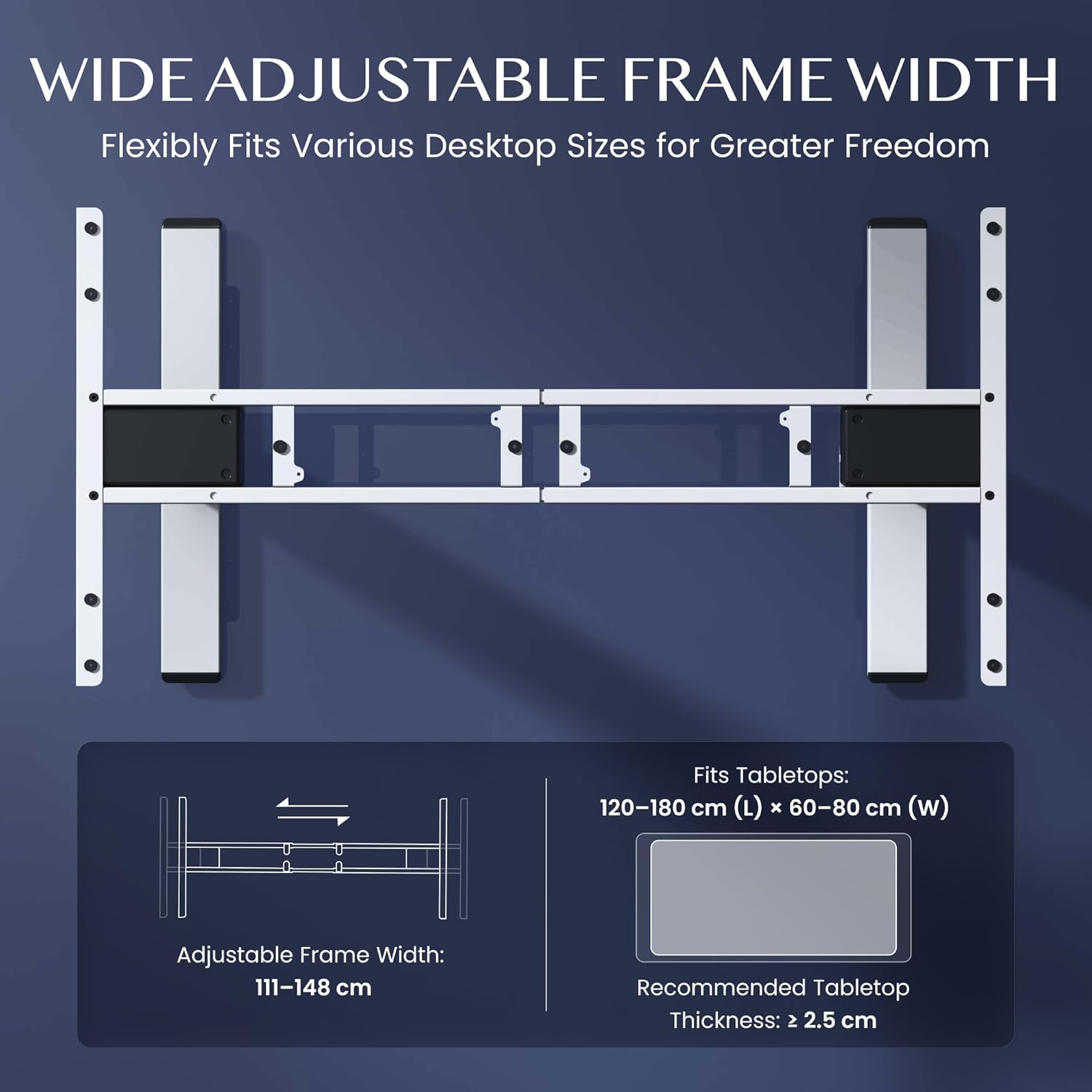
- The frame's width is adjustable to fit various tabletop sizes.

Figure 3.1: Wide Adjustable Frame Width
شکل ۵: د نصبولو اسانه اجزا
4. عملیاتي لارښوونې
The FLEXISPOT EC5 Lite desk is operated via a digital control panel, offering intuitive height adjustment and memory functions.
د ډیجیټل کنټرول پینل:

شکل ۳: د ډیجیټل کنټرول پینل
د لوړوالی سمون:
- د کارولو پورته (^) او ښکته (v) د میز لوړوالی په لاسي ډول تنظیم کولو لپاره په کنټرول پینل کې د تیر تڼۍ.
- اوسنی لوړوالی به د LED سکرین کې ښکاره شي.
د حافظې پریزیټ:
The desk allows you to save up to 4 preferred height settings for quick adjustments.
- د پورته/ښکته تڼیو په کارولو سره میز د خپلې خوښې لوړوالي سره سم تنظیم کړئ.
- فشار ورکړئ 'م' تڼۍ. ښودنه به 'S-' ښکاره کړي.
- سمدلاسه د شمېرې تڼۍ څخه یو فشار ورکړئ (۳، ۴، ۵، یا ۶) ترڅو اوسنی لوړوالی په هغه مخکینۍ برخه کې خوندي شي. ښودنه به 'S-1'، 'S-2'، او نور وښيي، ترڅو تایید شي.
- د خوندي شوي لوړوالي د یادولو لپاره، په ساده ډول د اړونده شمېرې تڼۍ فشار ورکړئ (۳، ۴، ۵، یا ۶). میز به په اتوماتيک ډول خوندي شوي موقعیت ته لاړ شي.
د ټکر ضد سیستم:
The desk is equipped with an anti-collision sensor. If the desk encounters an obstacle during upward or downward movement, it will automatically stop and retract slightly to prevent damage or injury.
5. ساتنه
Regular maintenance ensures the longevity and optimal performance of your FLEXISPOT EC5 Lite desk.
- پاکول: د میز چوکاټ او کنټرول پینل د نرم، d سره پاک کړئamp ټوکر. د سختو کیمیاوي موادو، د کثافاتو پاکوونکو، یا ډیر رطوبت کارولو څخه ډډه وکړئ.
- معاینات: ټول پیچونه او بولټونه په دوره یي ډول وګورئ ترڅو ډاډ ترلاسه شي چې دوی کلک دي. که اړتیا وي نو بیا یې ټینګ کړئ.
- د کیبل مدیریت: Ensure all cables are neatly organized and not pinched or tangled, especially during height adjustments.
- د بریښنا تار: د بریښنا تار د زیان نښې نښانې لپاره معاینه کړئ. که زیانمن شوی وي، کارول یې بند کړئ او د پیرودونکو ملاتړ سره اړیکه ونیسئ.
6. ستونزه حل کول
If you encounter issues with your FLEXISPOT EC5 Lite desk, refer to the following common troubleshooting steps:
- میز نه حرکت کوي:
- وګورئ چې آیا د بریښنا تار په خوندي ډول د میز او کاري بریښنا سایټ دواړو سره نښلول شوی دی.
- Ensure no objects are obstructing the desk's movement, triggering the anti-collision system.
- Uneven Movement or Error Codes:
- Perform a reset: Lower the desk to its lowest position and hold the 'Down' button for approximately 5-10 seconds until the desk slightly lowers further or an 'RST' message appears, then releases. The desk should then reset to its lowest point.
- If an error code persists, consult the full product manual or contact customer support.
- د عملیاتو پرمهال شور:
- A slight motor hum is normal. If the noise is excessive or unusual, check for loose components or contact support.
Video 6.1: Crash Test Demonstration. This video illustrates the desk's stability and durability under impact, showing minimal disturbance to items on the FlexiSpot desk compared to others.
7. مشخصات
Detailed technical specifications for the FLEXISPOT EC5 Lite Electric Standing Desk frame.

Figure 7.1: Desk Dimensions and Specifications
| فیچر | مشخصات |
|---|---|
| برانډ | FLEXISPOT |
| ماډل | EC5 لایټ |
| رنګ | سپین |
| د محصول ابعاد (L x W x H) | 68 x 148.6 x 125 cm (frame) |
| مواد | د الماس فولاد |
| د لوړوالی تنظیم کولو سلسله | ۴۰ - ۱۰۵ سانتي متره |
| د اعظمي بار ظرفیت | 100 کیلو ګرامه |
| اعظمي سرعت | 25 mm/s |
| د شور کچه | <50 dB |
| Frame Width Adjustment | ۴۰ - ۱۰۵ سانتي متره |
| Recommended Tabletop Size | 120-180 cm (L) x 60-80 cm (W) |
| Recommended Tabletop Thickness | ≥ 2.5 سانتي متره |
| ځانګړي ځانګړتیاوې | Electric, Height Adjustable, Smart Memory, Anti-collision Safety |
8. تضمین او ملاتړ
FLEXISPOT stands behind the quality of its products with comprehensive warranty coverage.
- Frame and Motors: 5 کلن تضمین.
- الکترونیکي برخې: 2 کلن تضمین.
For warranty claims, technical assistance, or any questions regarding your FLEXISPOT EC5 Lite desk, please contact FLEXISPOT customer support through their official website or your point of purchase. Please have your purchase receipt and product model information ready.