
1. پیژندنه
This instruction manual provides essential information for the safe and efficient operation, maintenance, and troubleshooting of your 3i P10 Ultra Robot Vacuum and Mop Combo. Please read this manual thoroughly before using the product and retain it for future reference.
2. د خوندیتوب معلومات
د اور لګېدو، برقي شاک یا ټپي کېدو خطر کمولو لپاره تل د بریښنایی وسایلو کارولو پرمهال د خوندیتوب اساسي احتیاطي تدابیر تعقیب کړئ. دا وسیله یوازې د کورنۍ کارونې لپاره ده.
- ماشومانو ته اجازه مه ورکوئ چې روبوټ وکاروي. کله چې روبوټ کار کوي نو د ماشومانو او څارویو څارنه وکړئ.
- د بریښنا حجم ډاډمن کړئtage د چارج کولو ډاک کې د درجه بندي لیبل سره سمون خوري.
- روبوټ په لوندو سطحو یا په هغو سیمو کې مه کاروئ چې اوبه ولاړې وي.
- Remove loose cables, small objects, and fragile items from the cleaning path before operation.
- Do not use the robot to pick up large or sharp objects, flammable materials, or liquids.
- Only use manufacturer-specified accessories and replacement parts.
- که چیرې د بریښنا تار زیانمن شوی وي، نو باید د تولید کونکي یا وړ خدماتو اجنټ لخوا بدل شي ترڅو د خطرونو څخه مخنیوی وشي.
3. محصول ختم شوview
۲.۲ شاملې برخې
په بسته کې لاندې توکي شامل دي:
- 1 x Robot Vacuum
- 1 x بیس سټیشن
- ۲ x موپ پیډونه
- د 2 ایکس اړخ برشونه
- ۱ x ۲۰ ملی لیتره د پاکولو محلول
- 1 x د جلا کولو وړ اساس
- 1 د بریښنا کارډ
- 1 x د کارونکي لارښود
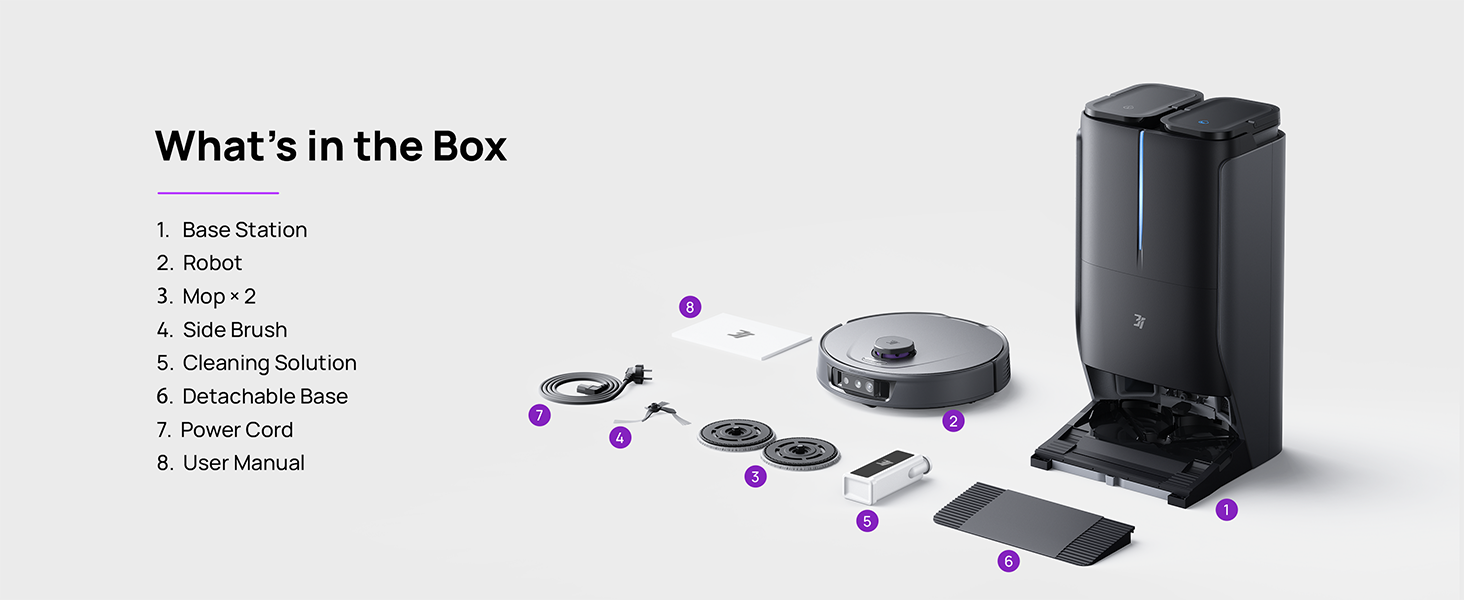
Figure 3.1: Contents of the 3i P10 Ultra package.
3.2 Robot Vacuum Features
- UltraReach Mop: The auto-extending mop system cleans edges and corners thoroughly. Dual mops spin at 220 RPM for effective stain removal.
- 18,000 Pa Suction: Provides powerful suction for deep cleaning on various floor types, including carpets and hard floors. Features smart carpet detection to boost suction and lift mops.
- All-in-One Automated Station: Offers automatic hot-water mop washing, hot air drying, solution adding, and hands-free dust collection for up to 70 days.
- پرمختللی نیویګیشن: Utilizes LiDAR for 3D mapping, dual 3D structured light, and an AI camera for obstacle avoidance, threshold crossing, and collision resistance.
- AI-Powered DirtScan: Identifies over 100 household objects and messes, adapting cleaning methods for optimal results, even in low light conditions.
- Hair Management: Equipped with anti-tangle brushes and a TangleCut blade to prevent hair from wrapping around components.
- Smart Route Planning: Learns home layouts for efficient cleaning routes. Supports scheduled cleaning, no-go zones, and app control. Compatible with Alexa and Google Assistant.
- د وای فای اتصال: Supports both 2.4G and 5G Wi-Fi networks.

شکل 3.2: پورته view of the 3i P10 Ultra Robot Vacuum.

Figure 3.3: The 3i P10 Ultra Base Station.
4. ترتیب کول
4.1 پاکول او ځای پرځای کول
- په احتیاط سره د بسته بندۍ څخه ټولې برخې لرې کړئ.
- Choose a suitable location for the base station. Ensure it is placed against a wall, on a hard, level surface, with at least 0.5 meters (1.6 feet) of clear space on both sides and 1.5 meters (4.9 feet) in front. Avoid areas with direct sunlight or strong Wi-Fi interference.
- د بریښنا تار د بیس سټیشن سره وصل کړئ او د بریښنا آوټ لیټ سره یې ولګوئ.
۳.۳ د روبوټ چمتووالی
- Install the side brushes by pressing them into their slots until they click.
- Attach the mop pads to the mop holders on the robot.
- Place the robot onto the base station to charge. Ensure the charging contacts align. The robot will announce its charging status.
۵.۳ د اپلیکیشن نصب او پیوستون
- Download the 3i app from your mobile device's app store (iOS or Android).
- Open the app and follow the on-screen instructions to create an account and add your 3i P10 Ultra robot.
- Ensure your phone is connected to a 2.4GHz or 5GHz Wi-Fi network during the pairing process.
5. عملیاتي لارښوونې
۵.۱ لومړنۍ پاکول او نقشه کول
For the first use, allow the robot to complete a full cleaning cycle to create a map of your home. This map is crucial for advanced features.

Figure 5.1: Precision 3D Mapping in the 3i App.
۶.۱ د پاکولو دوره پیل کول
- د روبوټ له لارې: د پاکولو د پیل یا بندولو لپاره په روبوټ کې د بریښنا تڼۍ یو ځل فشار ورکړئ.
- د اپلیکیشن له لارې: Open the 3i app, select the desired cleaning mode (Vacuum, Mop, Vac & Mop, AI Auto, Custom), and tap 'Start'.
- د غږ کنټرول له لارې: Use compatible voice assistants (Alexa, Google Assistant) with commands like "Hey Google, start vacuuming."

Figure 5.2: Using voice control to operate the 3i P10 Ultra.
5.3 د اپلیکیشن ځانګړتیاوې
The 3i app provides extensive control and customization options:
- د پاکولو ترتیبات: Schedule cleaning, select rooms, set no-go zones, customize carpet cleaning.
- د نقشې ترتیبات: View 3D maps, quick mapping, multi-floor maps, edit rooms and furniture.
- Station Settings: Customize dust collection, mop washing, auto-drying, and TangleCut.
- نور ترتیبات: Do Not Disturb mode, Smart Route Planning, Pet Recognition, Child Lock.
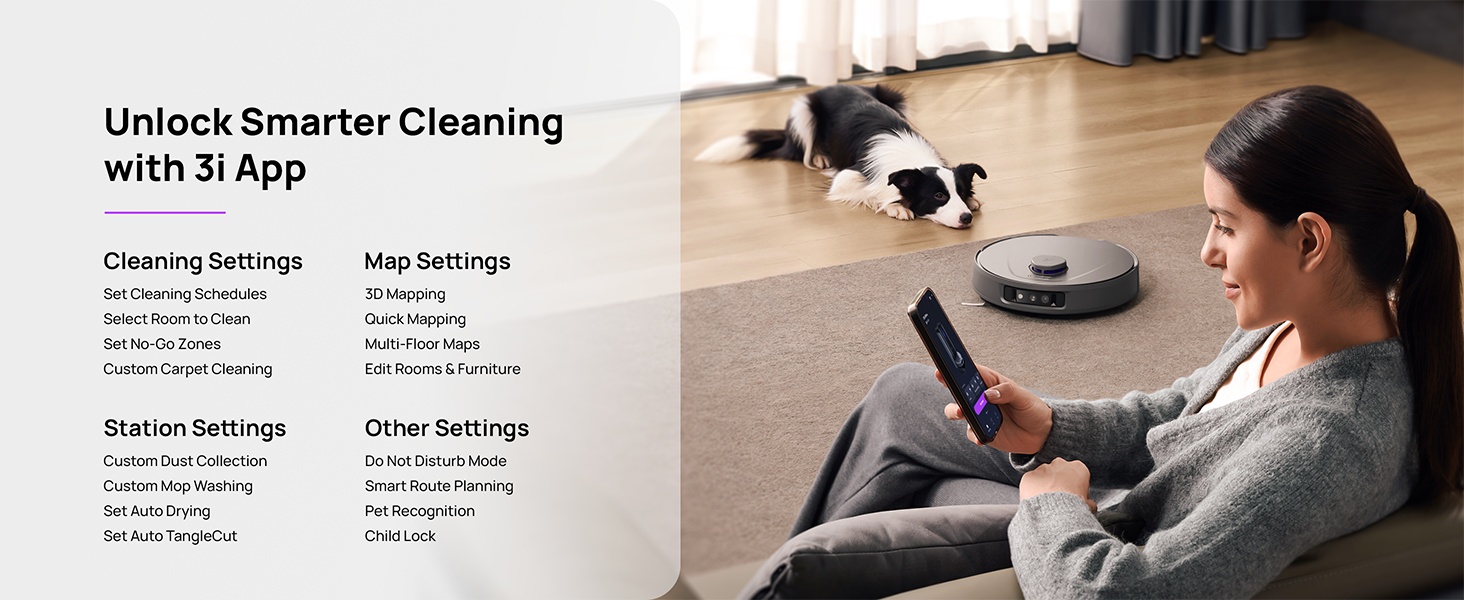
Figure 5.3: The 3i App interface for smart cleaning.
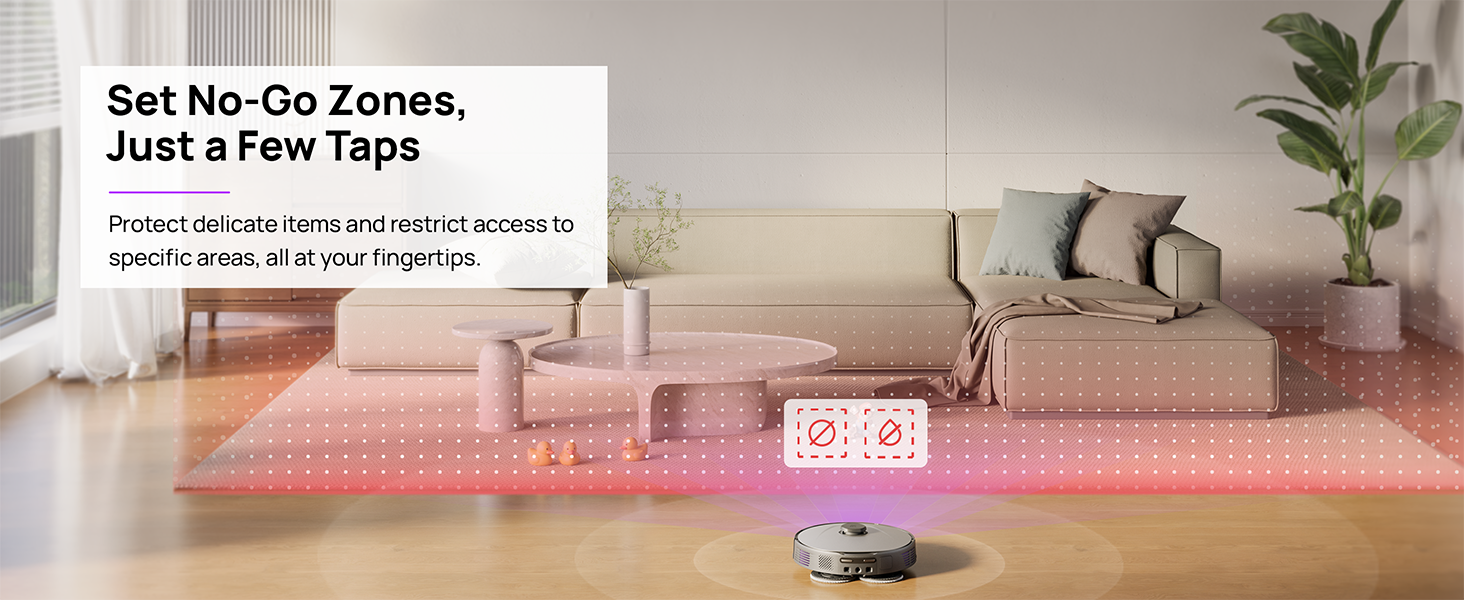
Figure 5.4: Setting No-Go Zones in the 3i App.
6. ساتنه
Regular maintenance ensures optimal performance and extends the lifespan of your 3i P10 Ultra.
۵.۱ د بیس سټیشن ساتنه
- د کثافاتو د ډبې خالي کول: The base station automatically empties the robot's dustbin into a 3L bag. Replace the dust bag approximately every 70 days, or as indicated by the app.
- د مایعاتو مینځل او وچول: The base station automatically washes mop pads with 140°F / 60°C hot water and dries them with hot air (131°F / 55°C) after each cleaning cycle. Ensure the clean and dirty water tanks are properly installed.
- Water Tank Refilling: The extra-large 4L clean water tank automatically refills the robot. Refill the clean water tank as needed. The base station also collects dirty water into a separate wastewater tank. Empty the wastewater tank regularly.
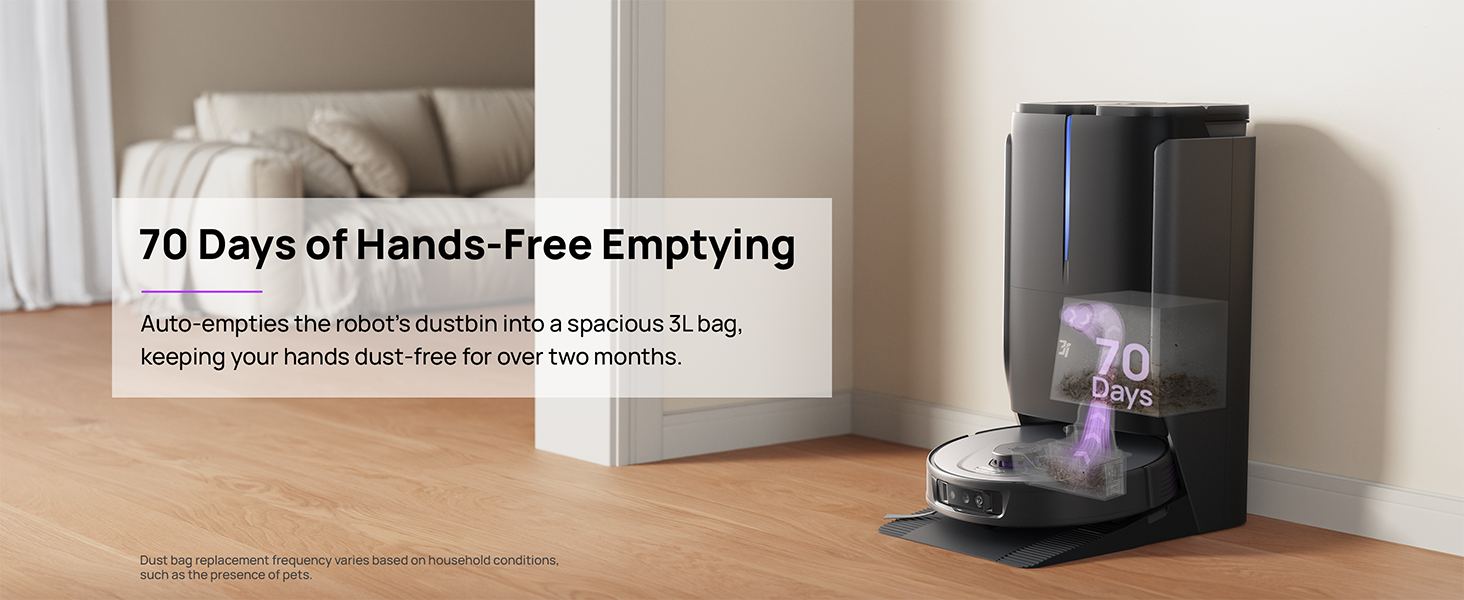
Figure 6.1: Automatic dustbin emptying at the base station.
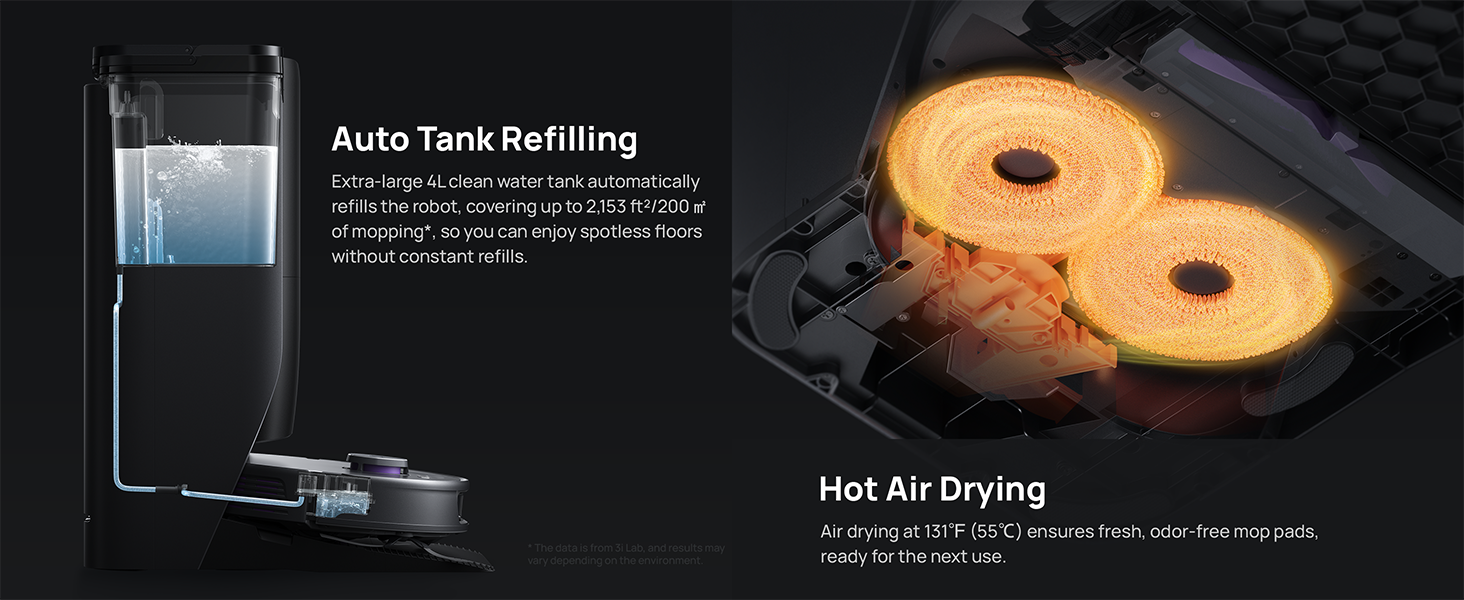
Figure 6.2: Auto tank refilling and hot air drying process.
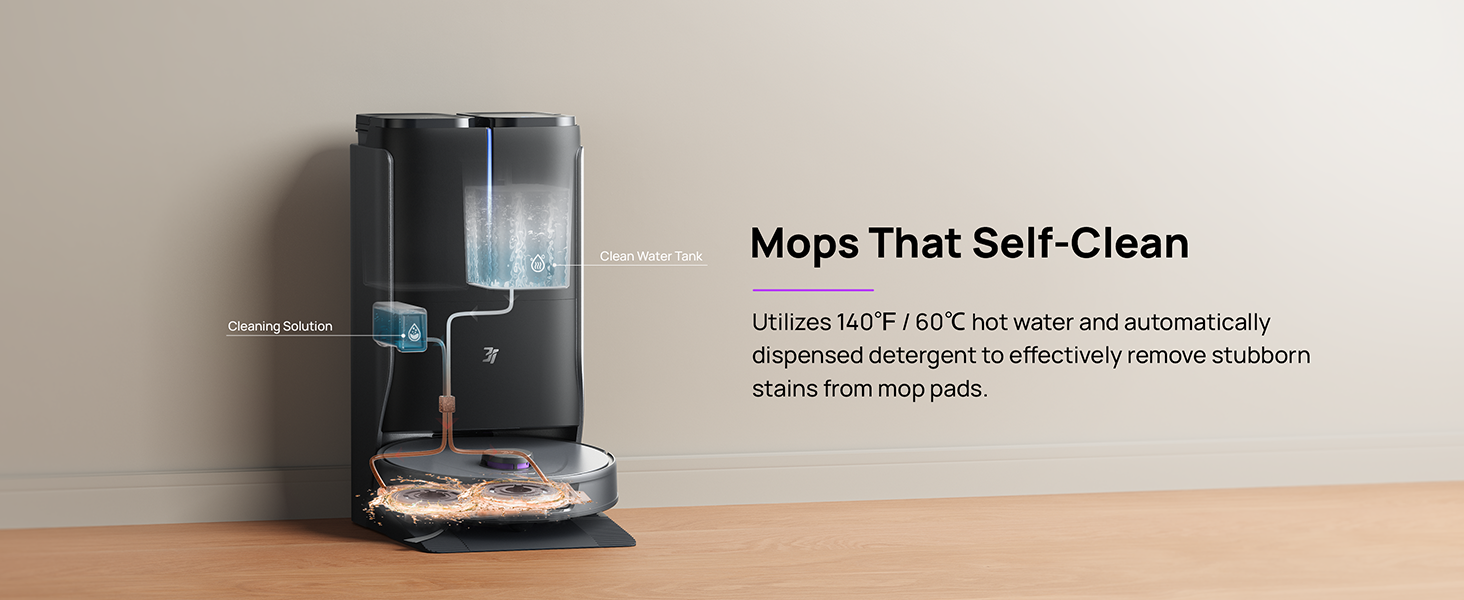
Figure 6.3: Mop self-cleaning function.
6.2 Robot Component Maintenance
- اصلي برش: Regularly check the main brush for tangled hair or debris. Use the cleaning tool provided to remove any obstructions. The TangleCut blade helps prevent excessive tangling.
- د غاړې برشونه: Inspect side brushes for wear or damage. Clean them periodically and replace if necessary.
- د پاکولو پیډونه: Although self-cleaned, inspect mop pads for excessive wear or stubborn stains. Replace them when their cleaning effectiveness diminishes.
- فلټر: The filter is washable. Remove and rinse it under running water. Allow it to air dry completely before reinstalling.
- سینسرونه: Wipe all sensors (LDS, anti-drop, wall-following, charging contacts) with a clean, dry cloth to ensure proper function.
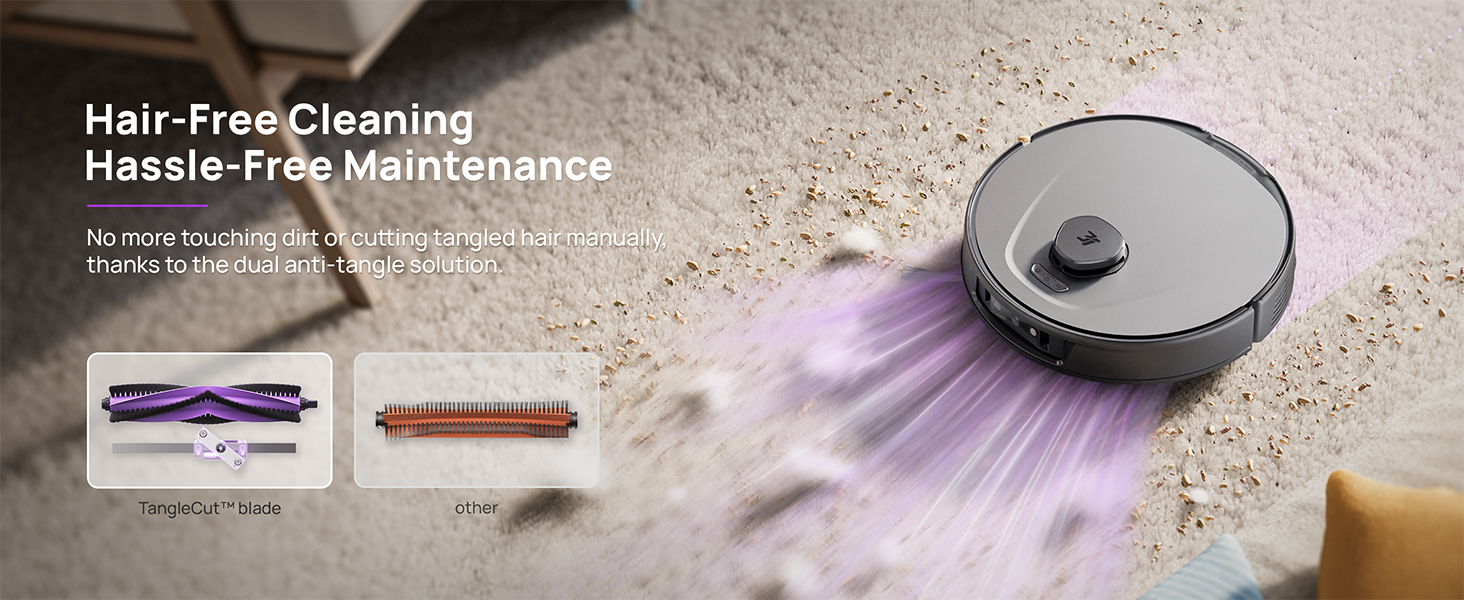
Figure 6.4: Hair-free cleaning with anti-tangle design.
7. ستونزه حل کول
If you encounter issues with your 3i P10 Ultra, refer to the following common problems and solutions:
| ستونزه | احتمالي لامل | د حل لاره |
|---|---|---|
| روبوټ نه چلیږي. | د بیټرۍ ټیټه کچه؛ د بریښنا تڼۍ په سمه توګه نه ده فشار شوې. | Place robot on charging dock; Press and hold power button for 3 seconds. |
| روبوټ د چارج کولو ډاک نشي موندلی. | Dock is obstructed or too far; Poor Wi-Fi signal. | Ensure dock is in an open area; Check Wi-Fi connection. |
| د پاکولو فعالیت کمزوری دی. | د کثافاتو ډبې ډکې دي؛ برشونه ګډوډ دي؛ فلټرونه بند دي؛ د پاکولو پیډونه چټل دي. | Empty dustbin; Clean brushes; Clean/replace filter; Clean/replace mop pads. |
| روبوټ ډېر ځله بندېږي. | په فرش کې خنډونه؛ سینسرونه چټل دي. | Clear floor of obstacles; Clean all sensors. |
| د اپلیکیشن د پیوستون ستونزې. | د وای فای غلط پټنوم؛ د روټر ستونزې؛ روبوټ آفلاین. | Verify Wi-Fi password; Restart router; Restart robot; Re-pair device in app. |
For further assistance, please refer to the 3i app's help section or contact customer support.
8. مشخصات
| فیچر | تفصیل |
|---|---|
| برانډ | 3i |
| د ماډل نوم | د 3i P10 الټرا روبوټ ویکیوم |
| د محصول ابعاد (روباټ) | ۷۱"لیتر x ۲۳.۶"واټه x ۲۴.۴"هوا |
| Product Dimensions (Station) | ۷۱"لیتر x ۲۳.۶"واټه x ۲۴.۴"هوا |
| د توکي وزن | ۲.۴۵ پونډه |
| د بیټرۍ ژوند | 180 دقيقو |
| د فلټر ډول | د وینځلو وړ |
| د سطحې سپارښتنه | Carpet, Marble, Wood, Tile |
| سکشن ځواک | 18,000 Pa |
| د نیویګیشن سیسټم | LDS LiDAR, Dual 3D Structured Light, AI Camera |
| د وائی فای ملاتړ | 2.4G او 5G |

Figure 8.1: Dimensions of the 3i P10 Ultra Robot and Base Station.
9. تضمین او ملاتړ
For warranty information, please refer to the warranty card included with your product or visit the official 3i website. For technical support, troubleshooting beyond this manual, or to inquire about replacement parts, please contact 3i customer service through the contact information provided on their official website or within the 3i app.