
1. محصول ختم شوview
The Camtro M6 is a battery-powered wireless outdoor security camera designed for reliable surveillance. It features 1080p video resolution, color night vision, two-way audio, and smart AI motion detection to enhance your home security. This manual provides detailed instructions for setup, operation, and maintenance.

Figure 1.1: Camtro M6 Outdoor Security Camera with key features highlighted.

شکل 1.2: پایview of Camtro M6 camera features.
2. د بسته محتويات
مهرباني وکړئ د لاندې توکو لپاره په بسته کې وګورئ:
- Camtro M6 Outdoor Security Camera
- د غرونو سکرو کټ
- د لارښود لارښود (دا سند)
3. ترتیب کول
3.1 ابتدايي چارج کول
Before first use, fully charge the camera using a standard 5V USB charger (not included). The charging indicator light will turn solid when charging and off when fully charged. A full charge typically takes several hours.
۴.۲ د اپلیکیشن نصب او د حساب جوړول
- Download the official Camtro app from your smartphone's app store (iOS or Android).
- اپلیکیشن خلاص کړئ او د نوي کارونکي حساب جوړولو لپاره په سکرین کې لارښوونې تعقیب کړئ.
۵.۲ د وسیلو جوړه کول او د وای فای اتصال
- Ensure your smartphone is connected to a 2.4GHz Wi-Fi network. The Camtro M6 camera only supports 2.4GHz Wi-Fi.
- In the Camtro app, tap 'Add Device' or the '+' icon.
- Select the Camtro M6 camera model from the list.
- Follow the app's instructions to put the camera into pairing mode (usually by pressing a reset button).
- Scan the QR code displayed on your phone with the camera lens, or follow alternative pairing methods provided by the app.
- یوځل چې وصل شو، خپل کیمره نوم کړئ او د تنظیم کولو پروسه بشپړه کړئ.
3.4 د کیمرې پورته کول
The Camtro M6 camera is designed for wall mounting. Choose a location that provides the desired viewد اننګ زاویه کې ده او ستاسو د 2.4GHz وای فای شبکې په حد کې ده.
- Mark the desired drill holes on the wall using the mounting bracket as a template.
- د پیلوټ سوري وکرئ او که اړتیا وي نو دیوال لنگرونه دننه کړئ.
- د چمتو شوي پیچونو په کارولو سره د نصب کولو بریکٹ دیوال ته خوندي کړئ.
- کیمره د نصب کولو بریکٹ سره وصل کړئ او د اړتیا سره سم زاویه تنظیم کړئ.
۳. د کیمرې چلول
4.1 ژوندی View
Open the Camtro app and select your camera to access the live video feed. You can monitor your property in real-time from anywhere with an internet connection.
۴.۴ دوه اړخیزه آډیو
کیمره د دوه اړخیزو اړیکو لپاره یو جوړ شوی مایکروفون او سپیکر لري.
- په ژوندۍ بڼه view, tap the microphone icon in the app.
- Speak into your smartphone to transmit audio through the camera's speaker.
- د کیمرې د مایکروفون له لارې د اوریدو لپاره د مایکروفون آیکون خوشې کړئ.

Figure 4.1: Using the two-way audio feature to communicate.

Figure 4.2: Two-way talk functionality for interactive communication.
۴.۲ سمارټ AI حرکت کشف
The Camtro M6 camera utilizes AI to distinguish between human movement and other objects, reducing false alerts.
- د اپلیکیشن تنظیماتو کې د حرکت کشف فعال کړئ.
- Adjust sensitivity levels to optimize detection for your environment.
- Receive instant notifications on your smartphone when human motion is detected.

Figure 4.3: AI Human Detection distinguishing between a person and an object.

Figure 4.4: AI Human Detection accurately identifying human activity.
۴.۳ د شپې رنګین لید
The camera provides clear color video even in low-light conditions, offering enhanced detail compared to traditional black and white night vision.
- Color night vision activates automatically in low light.
- Ensure the camera's night vision settings are enabled in the app.
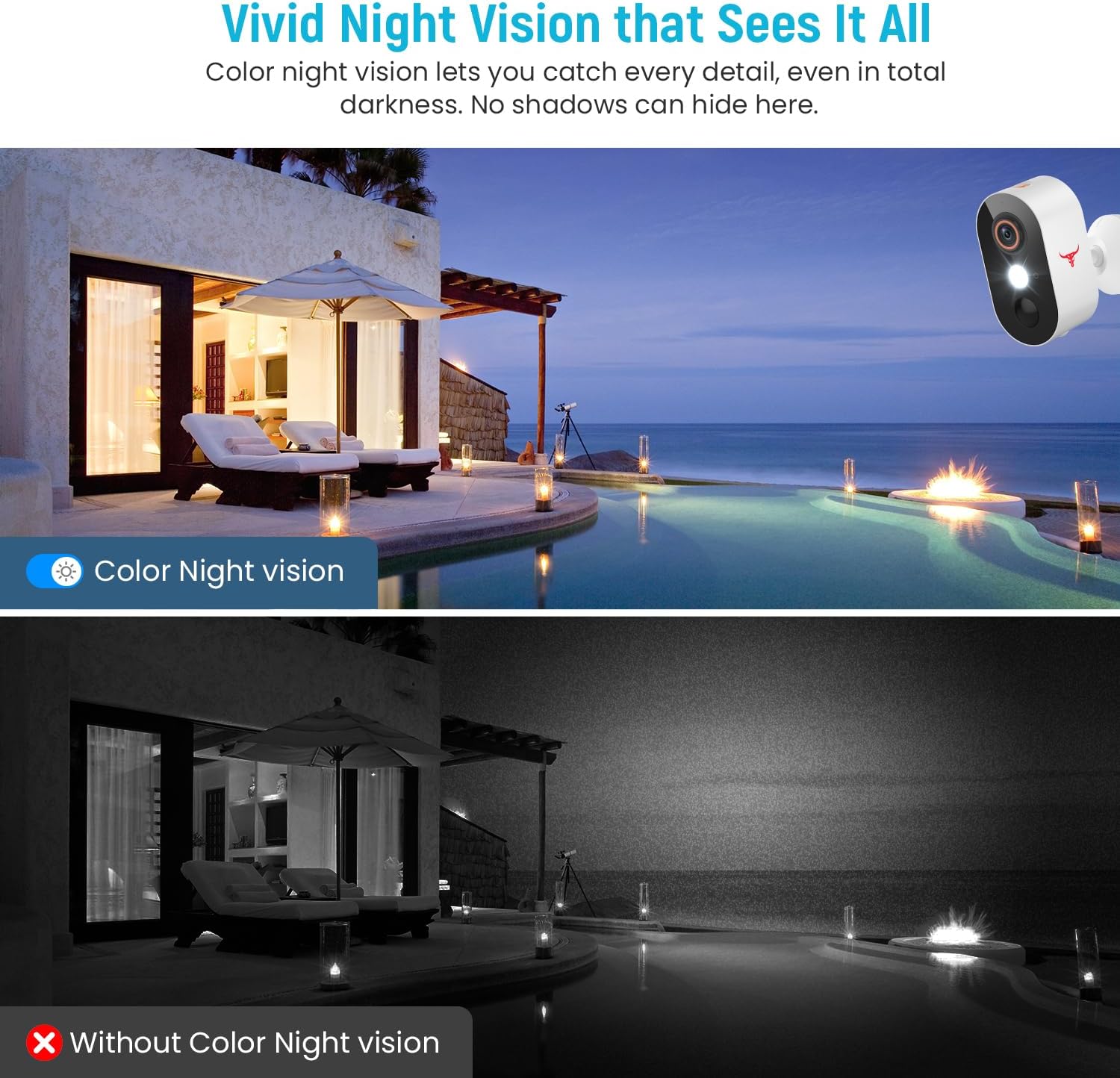
Figure 4.5: Comparison of Color Night Vision versus standard night vision.

Figure 4.6: Visual demonstration of Color Night Vision capability.
۷.۳ د کلاوډ ذخیره
The Camtro M6 supports cloud storage for recording and reviewing ویډیو footage. Cloud storage is sold separately and requires a subscription.
- Access recorded videos and playback history through the Camtro app.
- Manage your cloud storage subscription within the app or through the Camtro webسایټ

Figure 4.7: Cloud Storage functionality for video recording and access.

Figure 4.8: Cloud storage capturing and storing important events.
5. ساتنه
5.1 د بیټرۍ چارج کول
The Camtro M6 is battery-powered. When the battery level is low, you will receive a notification via the app. Remove the camera from its mount and charge it using a standard 5V USB charger. Battery life varies based on usage and environmental factors.
۵.۱ د کیمرې پاکول
To ensure optimal performance, periodically clean the camera lens and housing. Use a soft, damp cloth to wipe away dust and dirt. Avoid using harsh chemicals or abrasive materials that could damage the lens or finish.
۶.۳ د هوا مقاومت
The Camtro M6 camera is designed for outdoor use and is resistant to various weather conditions, operating effectively in temperatures from 14°F to 140°F (-10°C to 60°C).

Figure 5.1: Camtro M6 camera demonstrating weather resistance.
6. ستونزه حل کول
- کیمره له وای فای سره نه نښلي: ډاډ ترلاسه کړئ چې ستاسو د وای فای شبکه 2.4GHz ده. د کیمرې په موقعیت کې د وای فای سیګنال ځواک وګورئ. خپل روټر او کیمره بیا پیل کړئ، بیا هڅه وکړئ چې بیا جوړه کړئ.
- د حرکت په اړه د غلطو خبرتیاوو خپرول: Adjust the motion detection sensitivity settings in the app. Ensure AI Human Detection is enabled to filter out non-human movements.
- د ویډیو خراب کیفیت: Check your Wi-Fi connection speed. Ensure the camera lens is clean and free from obstructions.
- بیټرۍ په چټکۍ سره له مینځه وړل: د لوړ فعالیت ساحې یا په مکرر ډول ژوندۍ خپرونې view access can reduce battery life. Ensure the camera is fully charged. Consider reducing motion detection sensitivity if alerts are excessive.
- د دوه اړخیزه غږ ستونزې: Ensure your phone's microphone and speaker are functioning correctly. Check the app's audio settings and your phone's volume.
7. مشخصات
| فیچر | مشخصات |
|---|---|
| د ماډل نوم | M6 (1080p Wi-Fi Security Camera) |
| د کور دننه / بهر کارول | بهر |
| د ویډیو نیول حل | 1080p |
| د ارتباط ټیکنالوژي | Wireless (2.4GHz Wi-Fi only) |
| د بریښنا سرچینه | Battery Powered (2 Nonstandard Battery batteries included) |
| ځانګړی ځانګړنه | Motion Sensor, Color Night Vision, 2-Way Audio, AI Human Detection |
| مطابقت لرونکې وسیلې | سمارټ فون (انډرایډ، iOS) |
| د نصب کولو ډول | دیوال غر |
| د محصول ابعاد (L x W x H) | 2.8 x 1.7 x 3.4 انچه |
| د توکي وزن | 6.6 اونس |
| د عملیاتي حرارت درجه | 14°F تر 140°F (-10°C ته 60°C) |
| جوړونکی | Shenzhen Puge Electronics Co., Ltd |
8. تضمین او ملاتړ
Camtro products are designed for reliability and performance. For warranty information, technical support, or service inquiries, please refer to the warranty card included with your product or visit the official Camtro website. You can also contact customer support through the Camtro app.