
پیژندنه
Thank you for choosing the RisoPhy PC419 RGB Gaming Keyboard. This manual provides essential information for setting up, operating, maintaining, and troubleshooting your new keyboard. Please read it carefully to ensure optimal performance and longevity of your device.
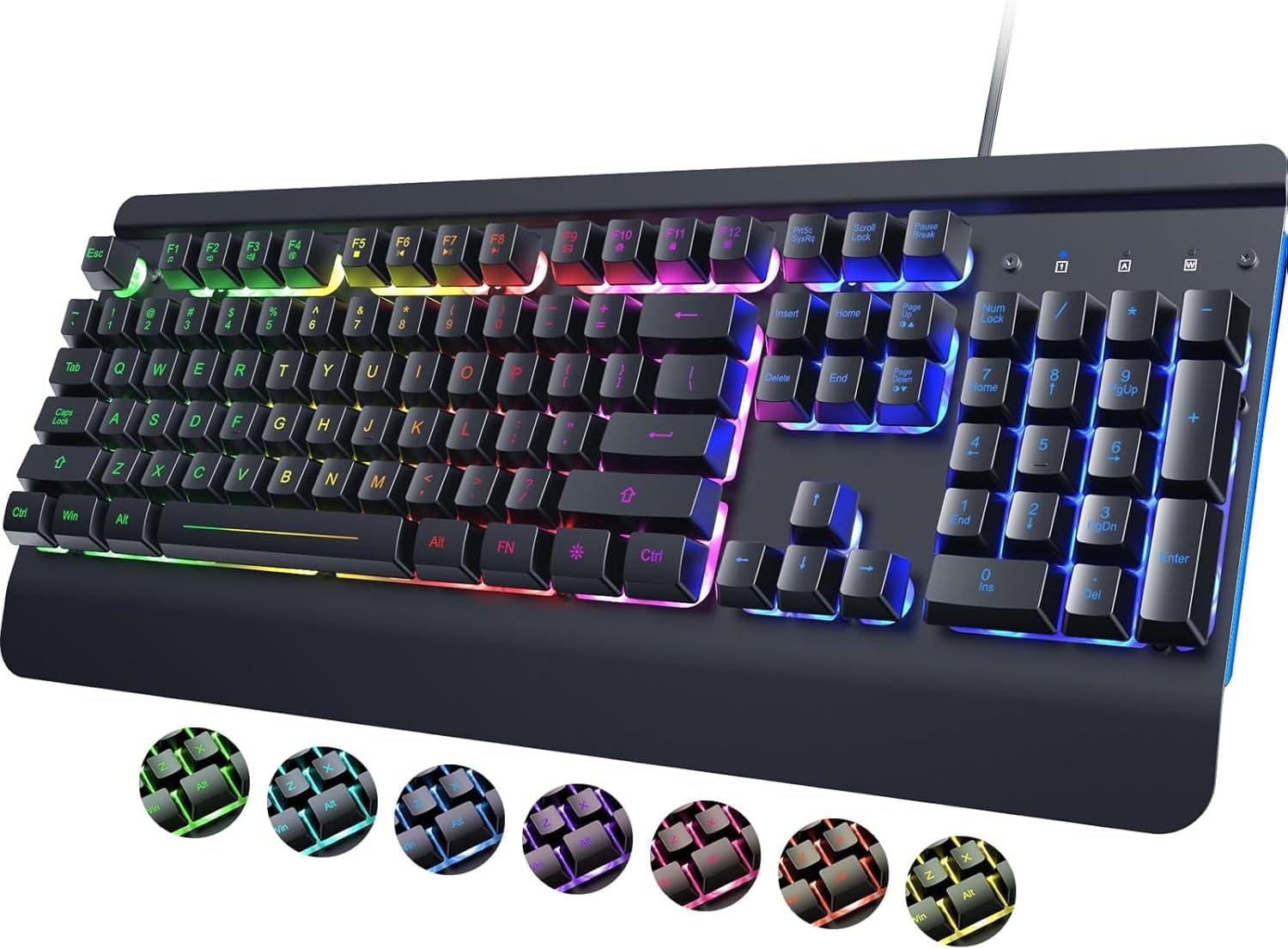
Image: The RisoPhy PC419 RGB Gaming Keyboard, showcasing its full layout and vibrant backlighting.
د تنظیم کولو لارښوونې
د کیبورډ سره نښلول
- Locate an available USB-A port on your computer (PC, Laptop, Mac).
- Plug the USB cable from the RisoPhy PC419 keyboard into the USB-A port.
- The keyboard is designed for Plug & Play functionality. No additional drivers are required for basic operation. Your operating system should automatically detect and configure the device.
The RisoPhy PC419 is compatible with a wide range of operating systems, including Windows 95/98/XP/2000/ME/VISTA/7/8/9/10, and Mac OS.

Image: Illustration of the keyboard connected to various devices, highlighting its broad compatibility.
عملیاتي لارښوونې
د بیک لائټ تنظیم کول
The PC419 keyboard features 7 vibrant backlight colors and 6 dynamic lighting modes. You can customize the lighting effects to suit your preferences.

Image: The keyboard displaying its adjustable RGB backlighting, emphasizing true RGB colors.
Backlight Control Functions:
- FN + INSERT/DEL: Switch between different backlight modes (e.g., rainbow, breathing, ripple, solid colors).
- FN + کور: Switch between the 7 available single backlight colors.
- FN + PGUP: Activate custom backlight settings (specific customization details may vary by mode).
- FN + END: Turn the backlight on or off.
- FN + ↑ (پورته غشی): د شاته رڼا روښانتیا زیاته کړئ.
- FN + ↓ (ښکته غشی): د شاته رڼا روښانتیا کمه کړئ.
- FN + ← (کیڼ غشی): Decrease backlight speed (for dynamic modes).
- FN + → (ښي غشی): Increase backlight speed (for dynamic modes).

Image: Close-up of the keyboard highlighting the FN key and associated keys for dynamic RGB backlight control.

Image: Visual representation of different backlight modes including Steady, Breathing, Monochrome Cycle, and Chasing lights.
ملټي میډیا او فعالیت کیلي
The keyboard includes 12 multi-functional keys, accessible via the FN key, to provide quick access to various system functions and media controls.

Image: The keyboard with F1-F12 keys illuminated, indicating their multi-functional capabilities.
د وین-لاک فعالیت
To prevent accidental interruptions during gaming or intensive tasks, you can lock the Windows key.
- مطبوعاتي FN + WIN to toggle the Windows key lock on or off.

Image: A visual representation of the FN and WIN keys, indicating their combination for the Win-Lock function.
Ergonomic Design and Typing Experience
The PC419 features an ergonomic design with a wrist rest and adjustable stand to promote a natural wrist position and reduce strain during extended use. The volcano-shaped keycap structure and quiet switches contribute to a comfortable and silent typing experience.

Image: A user's hands positioned comfortably on the keyboard's wrist rest, illustrating the ergonomic 7-degree tilt angle.

Image: The keyboard in use, with an icon indicating silent operation, emphasizing its quiet crater-keys and switches.
Durable Keycaps
The keycaps are laser-etched with an anti-corrosion coating, ensuring characters remain clear and resistant to fading over time.

انځور: نږدې انځور view of the keyboard's laser-engraved keycaps, highlighting their durability and resistance to fading.
ساتنه
د تودوخې مقاومت لرونکي ډیزاین
The PC419 keyboard features a spill-resistant design with 4 drain holes and a durable aluminum alloy frame. In case of minor spills, liquid can drain through these holes, protecting internal components.

Image: The keyboard with water droplets, illustrating its spill-resistant design and visible drain holes.
د پاکولو لارښوونې
- د پاکولو دمخه کیبورډ له خپل کمپیوټر څخه جلا کړئ.
- د نرم، لینټ پاک ټوکر څخه لږ څه کار واخلئampد کیبورډ سطحه د اوبو یا نرم پاکولو محلول سره پاک کړئ.
- د کیلي ګانو ترمنځ د دوړو او کثافاتو لپاره، فشار شوي هوا وکاروئ.
- Avoid using harsh chemicals, abrasive cleaners, or excessive moisture, as these can damage the keyboard's finish or internal components.
- ډاډ ترلاسه کړئ چې کیبورډ په بشپړه توګه وچ دی مخکې له دې چې خپل کمپیوټر سره وصل کړئ.
د ستونزو حل کول
عام مسایل او حل لارې
- کیبورډ ځواب نه ورکوي:
– Ensure the USB cable is securely plugged into both the keyboard and the computer.
– Try plugging the keyboard into a different USB port.
- خپل کمپیوټر بیا پیل کړئ. - Backlight Not Working or Turning Off:
– Ensure the backlight is turned on using FN + END.
– Adjust brightness using ایف این + ↑ / ↓.
– Note: The backlight may automatically turn off after a period of inactivity to conserve power. This is a design feature and not a malfunction. - هغه کیلي چې راجستر نه کیږي:
– Check for any debris or obstructions under the affected keycaps.
– Ensure the keyboard is clean and free from spills.
– Test the keyboard on another computer to rule out a system-specific issue. - Windows Key is Disabled:
- فشار ورکړئ FN + WIN to toggle the Win-Lock function.
مشخصات
| فیچر | تفصیل |
|---|---|
| د محصول ابعاد | 17.2 x 7.3 x 1.97 انچه (43.7 x 18.5 x 5 سانتي متره) |
| د توکي وزن | ۶ پونډه (۳ کیلو ګرامه) |
| جوړونکی | RisoPhy |
| د توکي ماډل شمیره | PC419 |
| د ارتباط ټیکنالوژي | USB-A (وایر شوی) |
| د کیبورډ توضیحات | جھلی |
| ځانګړی ځانګړنه | Ergonomic, Spill-Resistant, Backlit |
| د کیبورډ شاته رڼا کول | RGB (7 single colors, multiple dynamic modes) |
| مطابقت لرونکې وسیلې | PC, Laptop, Mac |
| د ژوند موده | 50 million+ keystrokes |
تضمین او ملاتړ
For any questions, technical assistance, or warranty inquiries, please contact RisoPhy customer service. We are committed to providing a satisfactory response.
د پیرودونکي خدمت سره څنګه اړیکه ونیسئ:
- Via Product Page: Click on the seller's name on the product page and send a message.
- Via Your Order: Go to your order history, click on the store name associated with your purchase, and send a message.

Image: A graphic indicating customer support contact methods.