
1. پیژندنه
This manual provides detailed instructions for the assembly, operation, maintenance, and troubleshooting of your FLEXISPOT EB2 electric height-adjustable desk frame. Please read this manual thoroughly before installation and use to ensure proper function and safety.
The FLEXISPOT EB2 desk frame features dual motors for smooth and quiet height adjustments, a wide height adjustment range, and a smart control panel with memory functions. It is designed to support various desktop sizes, offering flexibility for your workspace.
2. د خوندیتوب معلومات
- تل د مجلس لارښوونې په دقت سره تعقیب کړئ.
- Ensure the desk frame is securely mounted to the tabletop to prevent tipping.
- Do not exceed the maximum weight recommendation of 100 kg (dynamic load) or 125 kg (static load) to maintain stability and safety.
- د کار پرمهال ماشومان او څاروي له میز څخه لرې وساتئ.
- ډاډ ترلاسه کړئ چې د لوړوالي د تنظیم کولو پرمهال د میز په لاره کې هیڅ خنډ شتون نلري.
- Do not open the motor housing or attempt to repair the unit yourself. Contact customer support for assistance.
- د پاکولو یا هر ډول ساتنې ترسره کولو دمخه بریښنا قطع کړئ.
3. د بسته محتويات
د اسمبلۍ پیل کولو دمخه ډاډ ترلاسه کړئ چې ټولې برخې شتون لري. په کڅوړه کې معمولا شامل دي:
- Desk Legs (2) with integrated motors
- Crossbar/Frame (adjustable width)
- Control Panel with digital display
- د بریښنا اډاپټر او کیبل
- All necessary screws, bolts, and tools for assembly
- Cable management accessories (e.g., clips, hooks)
4. تنظیم او مجلس
Assembly is required for this product. Please follow the step-by-step instructions provided in the separate assembly guide included with your purchase. Ensure you have adequate space and assistance if needed.
د غونډې مهمې ملاحظات:
- د ډیسټاپ مطابقت: The frame is designed for tabletops with a width of 120 cm to 180 cm and a depth of 60 cm to 80 cm. The frame width is adjustable from 107 cm to 160 cm.
- خوندي تړل: Ensure all screws are tightened securely, especially those connecting the desktop to the frame.
- د کیبل مدیریت: Utilize the provided cable management solutions to keep wires tidy and prevent interference with desk movement.
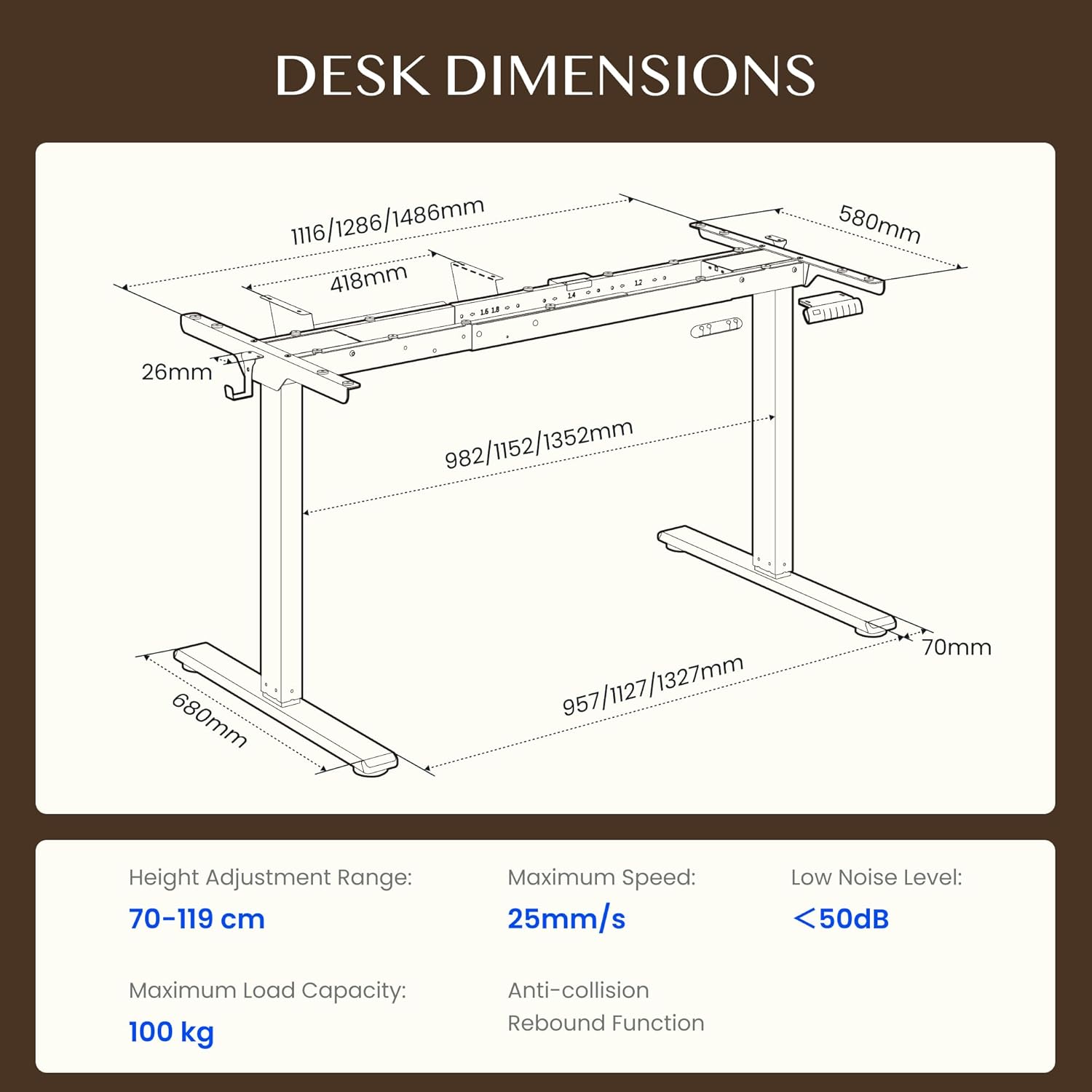
Figure 4.1: Detailed dimensions of the FLEXISPOT EB2 desk frame, showing adjustable width and height ranges, and overall structural measurements.

Figure 4.2: Illustration demonstrating the adaptable desktop size range for the FLEXISPOT EB2 frame, indicating minimum and maximum dimensions for compatible tabletops.
5. عملیاتي لارښوونې
5.1 فعالول
Connect the power cable to the desk frame and then to a standard electrical outlet. The digital display on the control panel should illuminate.
۵.۲ د لوړوالي تنظیم کول
د کارولو Up او ښکته arrow buttons on the control panel to manually adjust the desk height. The height range is from 70 cm to 119 cm.

Figure 5.1: Visual representation of the desk's height adjustment range, illustrating the minimum and maximum heights achievable with the FLEXISPOT EB2 frame.
۳ د حافظې پریسیټونه
The control panel features 4 memory preset buttons (1, 2, 3, 4) to save and recall your preferred sitting and standing heights.
- د پورته/ښکته تڼیو په کارولو سره میز د خپلې خوښې لوړوالي سره سم تنظیم کړئ.
- Press and hold one of the memory buttons (1, 2, 3, or 4) until the display flashes or beeps, indicating the height has been saved.
- د خوندي شوي لوړوالي د یادولو لپاره، په ساده ډول د اړونده حافظې تڼۍ فشار ورکړئ. میز به په اتوماتيک ډول دې موقعیت ته لاړ شي.

5.2 شکل: تړل view of the smart control panel, highlighting the Up/Down buttons, 4 memory presets, and LED display for effortless height adjustment.
5.4 Sit/Stand Reminder
The control panel may include a sit/stand reminder button. Consult your specific control panel's instructions for activation and customization of reminder intervals.
۳.۲ د ټکر ضد سیسټم
The desk frame is equipped with an anti-collision system. If the desk encounters an obstruction during height adjustment, it will automatically stop and reverse slightly to prevent damage.

Figure 5.3: Diagram illustrating the powerful dual motor system of the FLEXISPOT EB2, emphasizing stability, quiet operation, and efficiency.

شکل 5.4: مثالamples of simple desk helpers, including under-desk cable management, side hooks, and adhesive cable clips, designed to keep your workspace organized.
6. ساتنه
- پاکول: Wipe the desk frame with a dry cloth. Avoid using abrasive cleaners or harsh chemicals that could damage the finish.
- معاینه: ټول پیچونه او اړیکې په دوره یي ډول وګورئ ترڅو ډاډ ترلاسه شي چې دوی کلک پاتې دي. که اړتیا وي نو بیا یې ټینګ کړئ.
- د کیبل مدیریت: Ensure cables are not pinched or tangled, which could impede desk movement or cause damage.
7. ستونزه حل کول
If you encounter issues with your FLEXISPOT EB2 desk frame, refer to the following common troubleshooting steps:
- میز نه حرکت کوي: Check if the power cable is securely connected to both the desk and the wall outlet. Ensure the outlet is functional.
- Uneven movement or strange noises: Ensure the desk is not overloaded. Check for any obstructions under or around the desk. Verify that all assembly screws are tight.
- د تېروتنې کوډونه په ښودلو کې: Refer to the specific error code in your detailed assembly guide or contact customer support for assistance.
- د سیسټم بیا تنظیم کول: Some issues can be resolved by performing a system reset. Consult your assembly guide for specific reset procedures, which often involve holding down certain buttons.
If the problem persists after attempting these steps, please contact FLEXISPOT customer support.
8. مشخصات
| فیچر | مشخصات |
|---|---|
| برانډ | FLEXISPOT |
| د ماډل شمیره | EB2B-EU |
| د لوړوالی تنظیم کولو سلسله | 70 cm to 119 cm (27.56" to 46.85") |
| Frame Width (Adjustable) | 107 cm to 160 cm (42.13" to 62.99") |
| Recommended Tabletop Width | 120 cm to 180 cm (47.24" to 70.87") |
| Recommended Tabletop Depth | 60 cm to 80 cm (23.62" to 31.50") |
| د اعظمي بار ظرفیت | 100 kg (220 lbs) dynamic, 125 kg (275 lbs) static |
| د موټرو ډول | دوه ګونی موټرونه |
| د تنظیم سرعت | 2.5 cm/s (1 inch/s) |
| د شور کچه | <50 dB |
| د سټینډ بای بریښنا مصرف | <0.5 W |
| د تضمین اداره | 7-button digital display with 4 memory presets |
| مواد | د الماس فولاد |
| د توکي وزن | 28 کیلوګرامه (61.7 پونډه) |
| ځانګړي ځانګړتیاوې | Anti-collision system, Sit/Stand reminder |
9. تضمین
The FLEXISPOT EB2 desk frame comes with a limited warranty. Please refer to the warranty card included with your product or visit the official FLEXISPOT webد پوښښ او مودې په اړه د مفصلو شرایطو او شرایطو لپاره سایټ.
10. د پیرودونکي ملاتړ
For technical assistance, warranty claims, or any questions regarding your FLEXISPOT EB2 desk frame, please contact FLEXISPOT customer support through their official webسایټ یا ستاسو د محصول په بسته بندۍ کې چمتو شوي د اړیکو معلومات.
Please have your model number (EB2B) and purchase information ready when contacting support.