
پیژندنه
This manual provides essential information for setting up, operating, maintaining, and troubleshooting your Acer AL15-33P laptop. Please read this guide thoroughly to ensure proper use and to maximize the lifespan of your device.
چمتو کول
1. ان باکسینګ او ابتدايي معاینه
Carefully remove the laptop and all accessories from the packaging. Check for any visible damage. The package should include the laptop, power adapter, and this user manual.

مخکی view of the Acer AL15-33P laptop with the screen displaying the Windows desktop.
2. د نښلولو بریښنا
- Connect the AC adapter cable to the power adapter.
- Plug the DC output connector of the power adapter into the power input port on the side of your laptop.
- د AC بریښنا تار په بریښنایی هټۍ کې واچوئ.
بیټرۍ به په اتوماتيک ډول چارج شي. سپارښتنه کیږي چې د لومړني کارونې دمخه بیټرۍ په بشپړه توګه چارج کړئ.
۳. لومړنی بوټ او د وینډوز تنظیم کول
- د لپ ټاپ پوښ خلاص کړئ.
- Press the power button, typically located on the keyboard deck or side, to turn on the laptop.
- Follow the on-screen instructions to complete the Windows 11 setup process. This includes selecting your region, language, accepting terms, and setting up a user account.
ستاسو د لپ ټاپ چلول
۶.۲. د کیبورډ او ټچ پیډ کارول
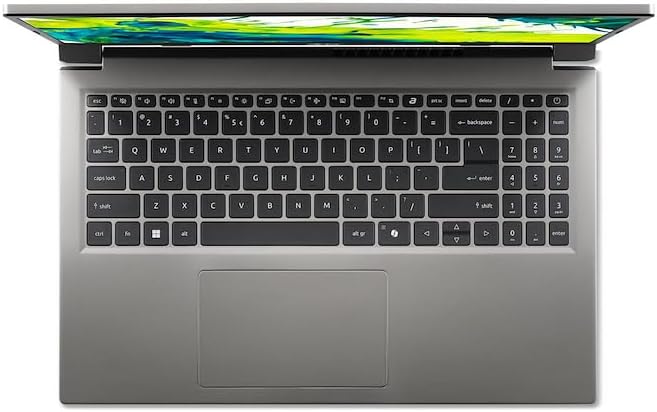
پورته- ښکته view د لپ ټاپ کیبورډ او ټچ پیډ.
- کیبورډ: The laptop features a full-size keyboard. Use the function (Fn) key in combination with F-keys for special functions like adjusting brightness, volume, or enabling/disabling Wi-Fi.
- ټچ پیډ: مدغم شوی ټچ پیډ د څو ټچ اشارو ملاتړ کوي. د کلیک کولو لپاره ټایپ کړئ، د سکرول کولو لپاره دوه ګوتې وکاروئ، او د زوم کولو لپاره پنچ کړئ.
2. د پردیو نښلول
Your Acer AL15-33P laptop is equipped with various ports for connecting external devices.

Right side of the laptop showing ports including USB and audio jack.

Left side of the laptop showing ports including power, USB-C, HDMI, and USB-A.
- USB پورټونه: د USB وسایل لکه بهرني هارډ ډرایو، موږکان، یا کیبورډونه وصل کړئ.
- د HDMI پورټ: Connect an external monitor or TV for a larger display.
- آډیو جیک: د هیډفونونو یا بهرني ویناوو سره وصل شئ.
- د USB-C پورټ: For data transfer and potentially display output or charging, depending on the specific model configuration.
3. بې سیم ارتباط
- وای فای: To connect to a wireless network, click the Wi-Fi icon in the taskbar, select your network, and enter the password if required.
- بلوتوث: To pair Bluetooth devices, go to Windows Settings > Bluetooth & devices, and turn on Bluetooth.
4. د بریښنا مدیریت
- د خوب حالت: د لپ ټاپ پوښ وتړئ یا د سټارټ مینو څخه 'خوب' غوره کړئ ترڅو لیپ ټاپ په ټیټ بریښنا حالت کې واچوئ.
- بندول: To turn off the laptop completely, go to the Start menu, click the Power icon, and select 'Shut down'.
- بیا پیل کول: To restart the laptop, go to the Start menu, click the Power icon, and select 'Restart'.
ساتنه
۱. د لپ ټاپ پاکول
- د نرم، لینټ پاک ټوکر څخه لږ څه کار واخلئampد ښودنې پاکولو لپاره د اوبو یا سکرین کلینر سره مینځل.
- د کیبورډ او چیسس لپاره، نرم ټوکر وکاروئ. د سختو کیمیاوي موادو یا کثافاتو موادو څخه ډډه وکړئ.
- Periodically use compressed air to clear dust from the cooling vents to prevent overheating.
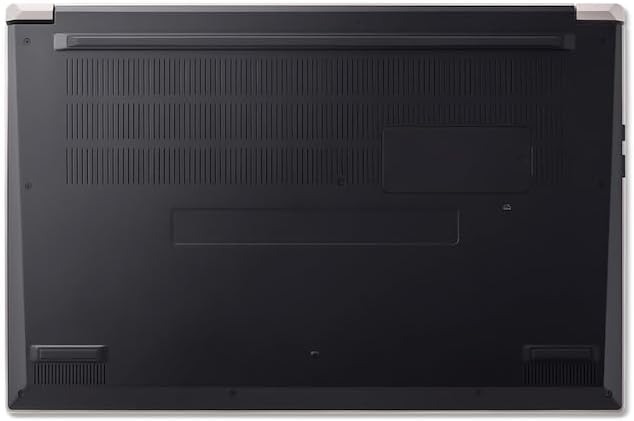
لاندې view of the laptop, highlighting the ventilation grilles.
2. د بیټرۍ پاملرنه
- د بیټرۍ په مکرر ډول د بشپړ چارج کولو څخه ډډه وکړئ.
- که چیرې لیپ ټاپ د اوږدې مودې لپاره ذخیره کوئ، ډاډ ترلاسه کړئ چې بیټرۍ نږدې 50-70٪ چارج شوې ده.
- Operate the laptop in a moderate temperature environment.
3. د سافټویر تازه معلومات
Regularly update your operating system and drivers to ensure optimal performance and security. Windows Update can be accessed via Settings > Windows Update.
4. د ذخیرې مدیریت
په دوره توګه بیاview او غیر ضروري حذف کړئ files to free up storage space. Utilize cloud storage or external drives for backups of important data.
د ستونزو حل کول
This section addresses common issues you might encounter with your Acer AL15-33P laptop.
| ستونزه | احتمالي حل |
|---|---|
| لیپ ټاپ نه چالانېږي. | Ensure the power adapter is securely connected and the outlet is working. Try a different outlet. If the battery is completely drained, it may take a few minutes to show signs of life after plugging in. |
| ښودنه خالي یا توره ده. | Check if the laptop is powered on. Try pressing Fn + F6 (or the corresponding display toggle key) to cycle through display modes. Connect an external monitor to check if the issue is with the laptop's screen. |
| د وای فای اتصال ستونزې. | Ensure Wi-Fi is enabled (Fn + F3 or check Windows settings). Restart your router and modem. Check if other devices can connect to the Wi-Fi network. Update Wi-Fi drivers. |
| لیپ ټاپ ورو روان دی. | Close unnecessary applications. Check Task Manager for processes consuming high CPU or memory. Run a disk cleanup. Ensure Windows and drivers are up to date. |
مشخصات
The following are key specifications for the Acer AL15-33P model. Note that specific configurations may vary.
- ماډل: Acer AL15-33P
- پروسیسر: Intel Core i3-N355
- رام: 8GB
- ذخیره کول: 512GB SSD
- ښکاره کول: 15.6 انچه
- عملیاتي سیسټم: وینډوز ۱۱
- نښه: Acer
تضمین او ملاتړ
Your Acer AL15-33P laptop comes with a standard manufacturer's warranty. Please refer to the warranty card included with your product for specific terms and conditions, including the warranty period and coverage details.
د تخنیکي ملاتړ، د ډرایور ډاونلوډونو، یا د خدماتو پوښتنو لپاره، مهرباني وکړئ د ایسر رسمي ملاتړ ته مراجعه وکړئ. website or contact Acer customer service directly. Have your laptop's serial number ready when contacting support.
د Acer ملاتړ Webسایټ: www.acer.com/support