
1. پیژندنه
This manual provides comprehensive instructions for the setup, operation, maintenance, and troubleshooting of your TECURS 75% Mechanical Keyboard. Please read this manual thoroughly before using the product to ensure optimal performance and longevity.
The TECURS 75% Mechanical Keyboard is designed for both gaming and office use, featuring a compact 81-key layout, Gasket Mount construction for enhanced typing feel, hot-swappable switches, and versatile tri-mode connectivity (2.4G wireless, Bluetooth 5.0, and wired USB-C).
2. د بسته محتويات
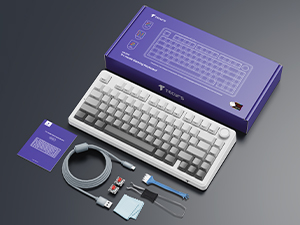
ډاډ ترلاسه کړئ چې ټول توکي په کڅوړه کې شتون لري:
- TECURS 75% Mechanical Keyboard
- USB-C کیبل
- 2.4GHz بې سیم ترلاسه کونکی
- سویچ پلر
- کیکیپ پلر
- Extra Switches (2 units)
- د کارن لارښود
3. محصول ختم شوview
3.1 کلیدي ځانګړتیاوې
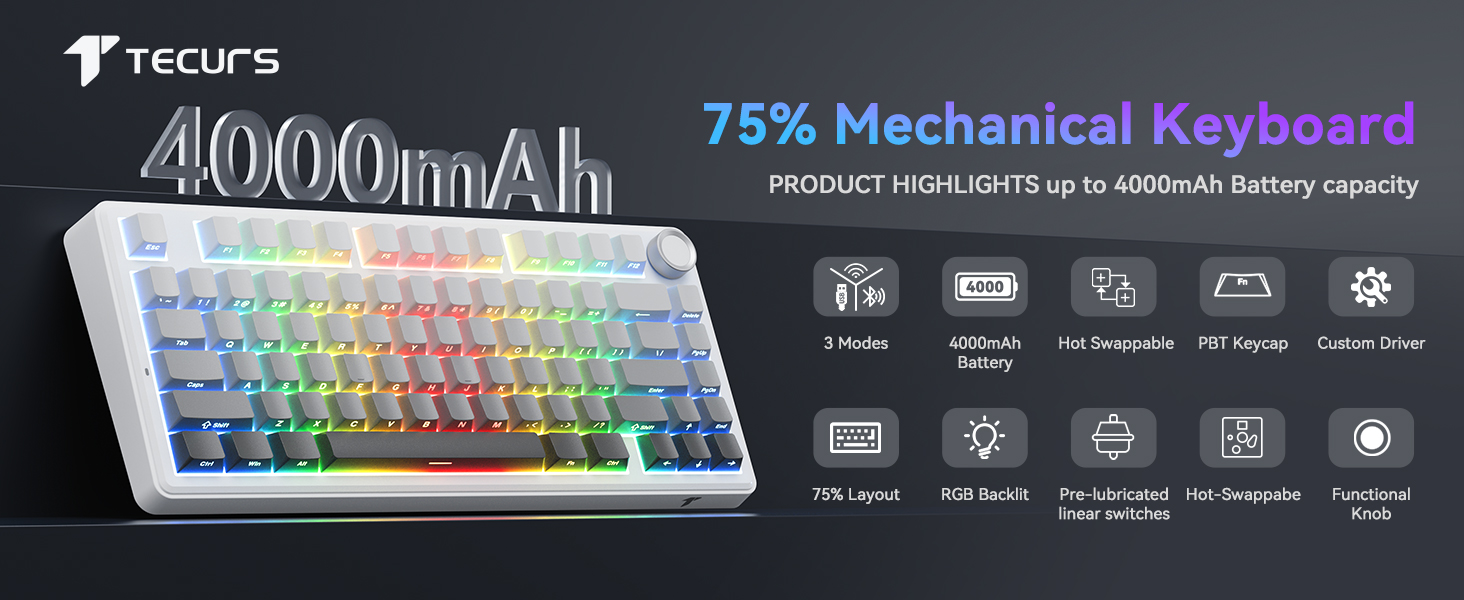
- د ګازکیټ د غره ډیزاین: Incorporates 5-layer dampening for reduced noise and a consistent typing feel.
- د ګرمو بدلولو وړ PCB: Compatible with 3-pin and 5-pin mechanical switches, allowing for easy switch customization without soldering.
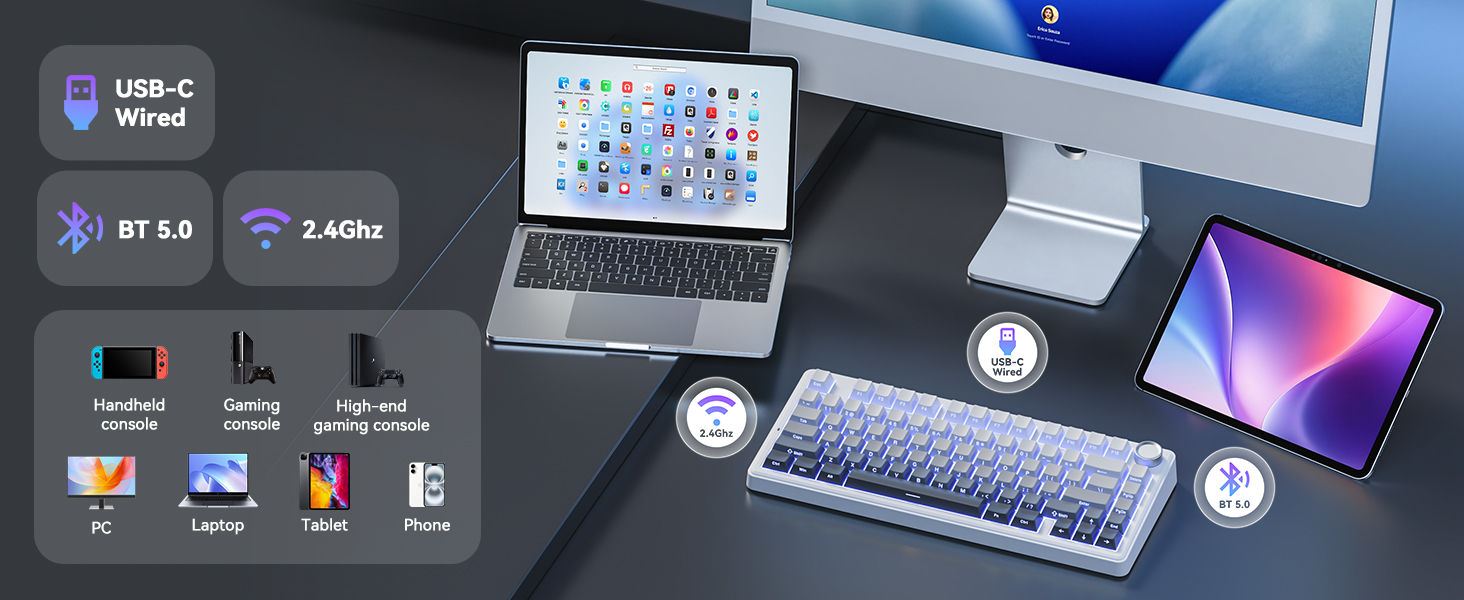
- درې اړخیزه اړیکه: Supports 2.4GHz wireless, Bluetooth 5.0, and wired USB-C connections for broad compatibility.
- د RGB شاته رڼا: Customizable RGB lighting with various effects and brightness levels.
- څو اړخیزه نوب: Controls volume in office mode and RGB brightness/effects in gaming mode.
- د پروګرام وړ کلیدي: Macro recording and key remapping available via software (Windows only, wired mode).
- 4000mAh بیټرۍ: د بېسیم اوږد استعمال چمتو کوي.
- د غیبت ضد: Ensures accurate registration of multiple simultaneous key presses.
- Side-Printed PBT Keycaps: Durable keycaps with legends printed on the side for longevity and shine-through visibility.

3.2 Keyboard Layout and Indicators
- 2.4G Mode Indicator: Lights up when in 2.4GHz wireless mode.
- Android Mode Indicator: Lights up when connected to an Android device.
- Windows Mode Indicator: Lights up when connected to a Windows device.
- MacOS Mode Indicator: Lights up when connected to a macOS device.
- د کیپس لاک شاخص: Indicates Caps Lock status.
- د ګټلو لاک شاخص: Indicates Windows key lock status.
- د چارج کولو حالت شاخص: د بیټرۍ چارج کولو حالت ښیې.
4. ترتیب کول
۳.۱ د کیبورډ چارج کول
Before first use, fully charge the keyboard. Connect the provided USB-C cable to the keyboard's USB-C port and the other end to a USB power source (e.g., computer, wall adapter). The charging indicator will show the charging status.
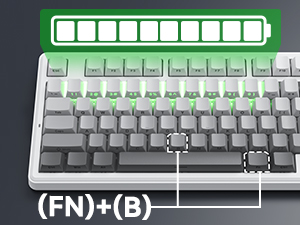
د بیټرۍ کچه چک کولو لپاره، فشار ورکړئ Fn+B. The corresponding number row keys will light up to indicate the battery percentage (e.g., keys 1-0 for 10%-100%).
۴.۲ د کیبورډ نښلول
The keyboard supports three connection modes: 2.4GHz Wireless, Bluetooth 5.0, and Wired USB-C. Use the switch located on the back of the keyboard to select your desired mode.
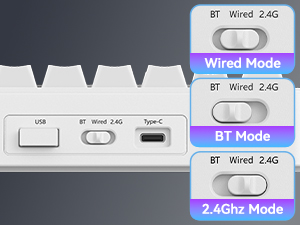
۱.۲.۲ وایرډ موډ (USB-C)
- Set the mode switch to "Wired".
- Connect the USB-C cable to the keyboard and your computer's USB port.
- کیبورډ به په اتوماتيک ډول ستاسو سیسټم لخوا وپیژندل شي.
۳.۱.۲ ۲.۴GHz بېسیم حالت
- د موډ سویچ "2.4G" ته تنظیم کړئ.
- Insert the 2.4GHz USB receiver into an available USB port on your device.
- The keyboard will automatically connect. The 2.4G indicator light on the keyboard will illuminate.
4.2.3 بلوتوث حالت
- د حالت سویچ "BT" ته تنظیم کړئ.
- فشار ورکړئ او ونیسئ fn+1, fn+2، یا fn+3 for 3-5 seconds to enter pairing mode. The corresponding key (1, 2, or 3) will flash rapidly.
- په خپل وسیله (کمپیوټر، لیپ ټاپ، ټابلیټ، سمارټ فون) کې، بلوتوث فعال کړئ او د نویو وسایلو لټون وکړئ.
- Select "TECURS Keyboard" from the list of available devices.
- Once paired, the indicator light for the selected Bluetooth channel will stop flashing and remain solid.
- د جوړو بلوتوث وسیلو ترمنځ د بدلولو لپاره، فشار ورکړئ fn+1, fn+2، یا fn+3.

4.3 System Compatibility Switching
The keyboard supports Windows, macOS, and Android operating systems. To switch between system layouts:
- مطبوعاتي Fn + W for Windows mode.
- مطبوعاتي fn + A for Android mode.
- مطبوعاتي Fn + S for macOS mode.
The corresponding indicator light (Windows, Android, or MacOS) will illuminate.
5. عملیاتي لارښوونې
۵.۲ د RGB شاته رڼا کنټرول
کیبورډ د RGB بیک لایټینګ ځانګړتیا لري. د رڼا اغیزو تنظیمولو لپاره لاندې کلیدي ترکیبونه وکاروئ:
- فېن + \ |: Toggle Light Mode (cycle through various lighting effects).
- Fn + Tab: Toggle Light Color (change static backlight color).
- Fn + ↑: Increase Lighting Brightness.
- Fn + ↓: Decrease Lighting Brightness.
- Fn + ←: Decrease Lighting Speed.
- Fn + →: Increase Lighting Speed.

۵.۲ څو کاري غوټۍ
The knob on the top right of the keyboard has dual functionality, depending on the active mode:
| موډ | عمل | فعالیت |
|---|---|---|
| د دفتر حالت | د ساعت په لور وګرځوئ | حجم پورته |
| د ساعت مقابل لوري ته وګرځوئ | حجم ښکته | |
| مطبوعاتي | آډیو خاموش/غیر خاموشه کړئ | |
| د لوبې کولو حالت | د ساعت په لور وګرځوئ | Increase RGB Brightness (CAPS blinks at max) |
| د ساعت مقابل لوري ته وګرځوئ | Decrease RGB Brightness (CAPS blinks at min) | |
| مطبوعاتي | Cycle 17 Lighting Effects |

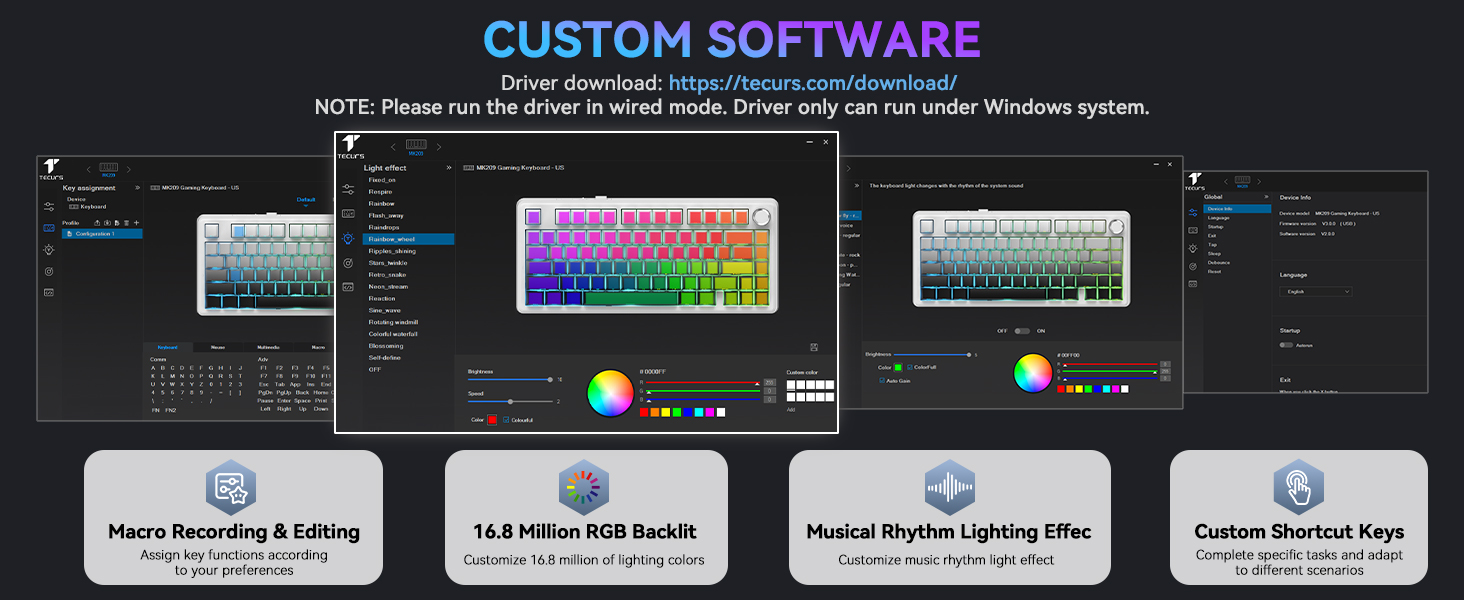
5.3 Programmable Keys and Custom Software
The keyboard supports macro recording and key remapping through dedicated software. This functionality is available only when the keyboard is in wired mode and connected to a Windows operating system.
Download the custom software from the official TECURS webسایټ: https://www.tecurs.com/download/
سافټویر تاسو ته اجازه درکوي:
- Assign key functions.
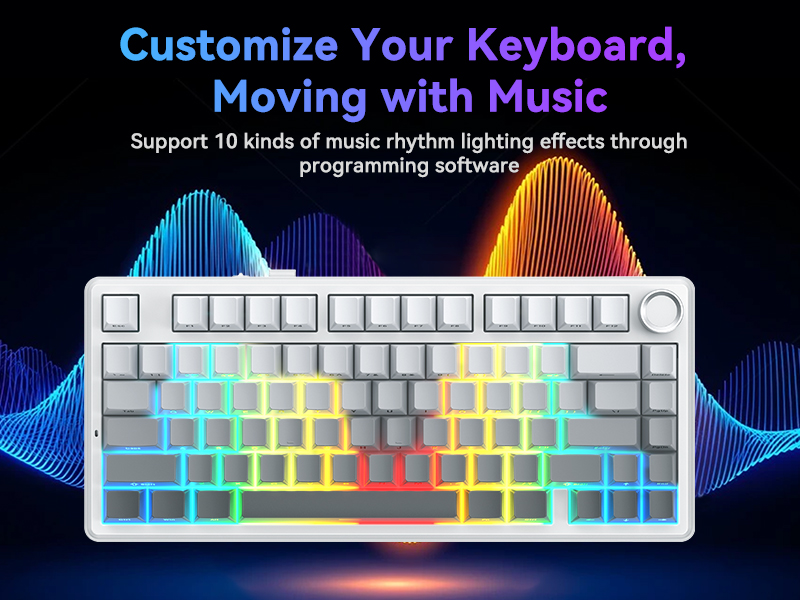
- Customize RGB backlighting with 16.8 million colors.
- Set musical rhythm lighting effects.
- Create custom shortcut keys.
6. ساتنه
6.1 پاکول
- د پاکولو دمخه کیبورډ د ټولو بریښنا سرچینو او وسیلو څخه جلا کړئ.
- د نرم، لینټ پاک ټوکر څخه لږ څه کار واخلئampد کیبورډ سطحه د اوبو یا نرم پاکولو محلول سره پاک کړئ.
- For cleaning between keycaps, use a can of compressed air to remove dust and debris.
- د سختو کیمیاوي موادو، خړوبونکو پاکوونکو یا محلولونو کارولو څخه ډډه وکړئ، ځکه چې دا کولی شي د کیبورډ پای او کی کیپ لیجنډونه زیانمن کړي.
۴.۲ د ګرمو بدلولو سویچونه
The keyboard features a hot-swappable PCB, allowing you to change switches without soldering. Use the provided switch puller for this process.
- Gently use the switch puller to grip the top and bottom clips of the switch you wish to remove.
- Pull the switch straight up with even pressure until it detaches from the PCB.
- د نوي سویچ پنونه د PCB سوریو سره سم کړئ. ډاډ ترلاسه کړئ چې پنونه مستقیم دي.
- Press the new switch firmly into place until it clicks. Do not force it if there is resistance; check pin alignment.
The keyboard supports both 3-pin and 5-pin mechanical switches.


7. ستونزه حل کول
| ستونزه | احتمالي لامل | د حل لاره |
|---|---|---|
| کیبورډ په بېسیم حالت کې ځواب نه ورکوي. | Low battery, incorrect mode selected, receiver not connected, pairing issue. |
|
| کیلي نه راجستر کیږي یا دوه ځله ټایپ کیږي. | د کیلي کیپ/سوئچ لاندې دوړې/کثافات، خراب سویچ. |
|
| د RGB څراغ کار نه کوي یا بند پاتې دی. | د سافټویر خرابوالی، ناسم ترتیبات. |
|
| Custom software not detecting keyboard. | Not in wired mode, not on Windows OS. |
|
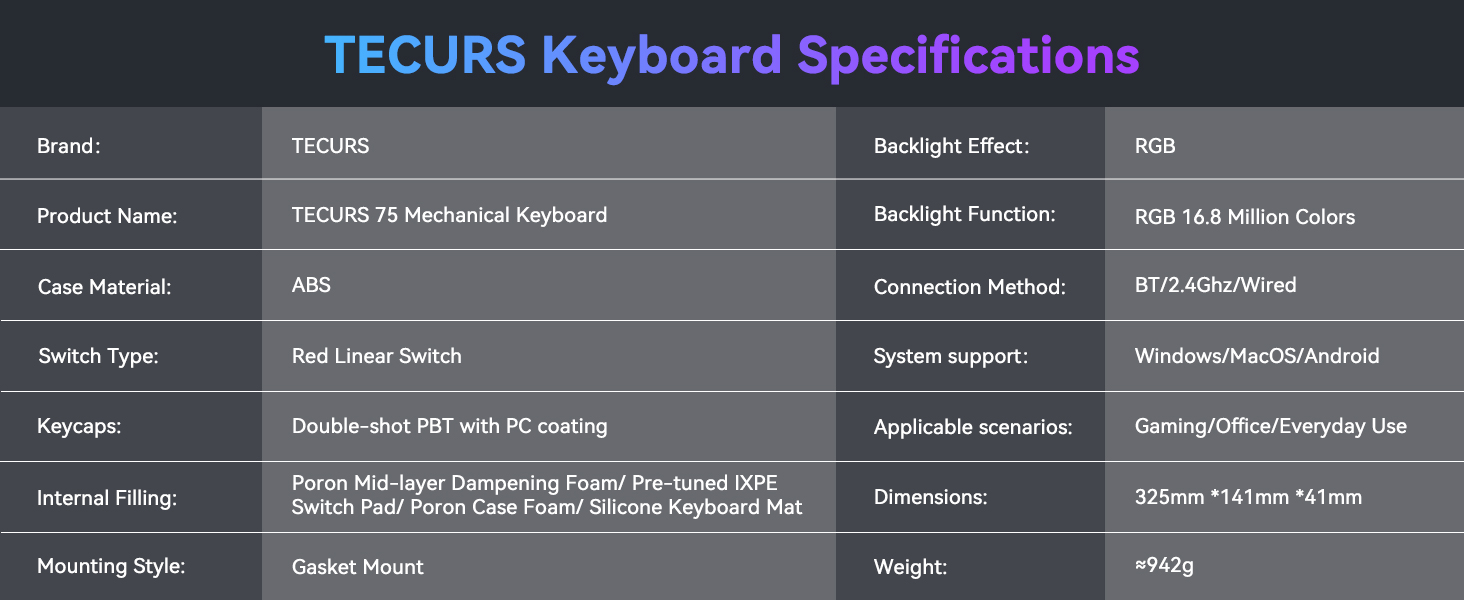
8. مشخصات
| فیچر | تفصیل |
|---|---|
| برانډ | TECURS |
| د محصول نوم | TECURS 75 Mechanical Keyboard |
| ماډل | B0FC62VJRB |
| د قضیې مواد | ABS |
| د سویچ ډول | Red Linear Switch (Pre-lubed) |
| کیکیپس | Double-shot PBT with PC coating (Side-printed) |
| داخلي ډکول | Poron Mid-layer Dampening Foam, Pre-tuned IXPE Switch Pad, Poron Case Foam, Silicone Keyboard Mat |
| د نصب کولو سټایل | د ګازکیټ غر |
| د شاتنۍ رڼا اغیزه | RGB |
| د بیک لائټ فنکشن | RGB 16.8 ملیون رنګونه |
| د پیوستون طریقه | بلوتوث ۵.۰، ۲.۴GHz بېسیم، USB-C وایرډ |
| د سیسټم ملاتړ | Windows, MacOS, Android |
| مطابقت لرونکې وسیلې | لیپ ټاپ، کمپیوټر، د لوبو کنسول، ټابلیټ، سمارټ فون |
| وړاندیز شوي استعمالونه | لوبې، دفتر |
| ځانګړي ځانګړتیاوې | Backlit, Hot-Swappable, Mechanical, Programmable Keys |
| رنګ | ګریډینټ خړ |
| د محصول ابعاد | ۷.۹"L x ۱.۷"W x ۱۷.۳"H (۲۰۰ ملي متره x ۴۴ ملي متره x ۴۴۰ ملي متره) |
| د توکي وزن | 2.77 pounds (~942g) |
| بیټرۍ | 1 Lithium Ion battery (included), 4000mAh capacity |
9. تضمین او ملاتړ
For warranty information and technical support, please refer to the official TECURS website or contact their customer service directly. Details regarding product registration, warranty claims, and support resources can typically be found on the manufacturer's webسایټ
Manufacturer: TECURS
د نورو مرستو لپاره، لیدنه وکړئ TECURS Store on Amazon.