
پیژندنه
Welcome to the DIERYA M1 Wireless Gaming Mouse user manual. This guide provides detailed instructions for setting up, operating, and maintaining your new mouse. Please read this manual thoroughly to ensure proper use and to maximize your gaming and productivity experience.
د بسته محتويات
ډاډ ترلاسه کړئ چې ټول توکي ستاسو په کڅوړه کې شتون لري:
- M1 بې سیم ماوس
- Nylon USB-A to C Cable
- د کارن لارښود
محصول پای ته ورسیدview
The DIERYA M1 mouse features a lightweight, ergonomic design with multiple programmable buttons and versatile connectivity options.

د انځور تفصیل: یو سر view of the black DIERYA M1 wireless gaming mouse, showcasing its honeycomb shell design and RGB lighting. A small USB receiver is positioned to the right of the mouse.
د موږک اجزا

د انځور تفصیل: An overhead and underside view of the DIERYA M1 mouse with various components labeled. These include the Left Button, Right Button, Mouse Wheel (Middle Button), DPI Adjustment Button (6 Adjustable DPI Levels), Forward Button, Back Button, Type-C Interface, Power & Light Switch, and 2.4G Receiver Storage Compartment. The mouse features a honeycomb shell design.
- کیڼ تڼۍ: معیاري کیڼ کلیک فعالیت.
- ښي تڼۍ: د ښي کلیک کولو معیاري فعالیت.
- Mouse Wheel (Middle Button): Scroll and middle-click function.
- د DPI تنظیم کولو تڼۍ: د مخکې ټاکل شوي DPI کچو له لارې تیریږي.
- د وړاندې کولو تڼۍ: مخ په وړاندې ځي web براوزرونه یا غوښتنلیکونه.
- د شا تڼۍ: شاته نیویګیټ کوي web براوزرونه یا غوښتنلیکونه.
- د ډول C ج. د تار لرونکي اتصال او چارج کولو لپاره.
- Power & Light Switch: Controls power and RGB lighting.
- 2.4G Receiver Storage Compartment: Located on the underside for storing the USB dongle.
چمتو کول
The DIERYA M1 mouse offers three connectivity modes: 2.4GHz Wireless, Bluetooth 5.2, and USB-C Wired.

د انځور تفصیل: An illustration demonstrating the three connectivity modes of the M1 mouse: Bluetooth 5.2 pairing with a smartphone, 2.4GHz Wireless with a USB dongle connected to a laptop, and USB-C Wired connection to a laptop. Polling rates for each mode are indicated.
۳.۲. ۲.۴GHz بېسیم اتصال
- Locate the 2.4G USB receiver in the storage compartment on the underside of the mouse.
- د USB ریسیور په خپل کمپیوټر کې موجود USB-A پورټ کې ولګوئ.
- Turn on the mouse using the Power & Light Switch.
- The mouse will automatically connect to the receiver. The polling rate in this mode is 1000Hz.
۳. د بلوتوث ۵.۳ اتصال
- Turn on the mouse using the Power & Light Switch.
- Press and hold the dedicated connectivity mode button (refer to the product's specific button combination if not a dedicated button) to switch to Bluetooth mode. The LED indicator will show the active connection.
- On your device (PC, Mac, Laptop, iPad), go to Bluetooth settings and search for "DIERYA M1".
- Select the mouse to pair. The polling rate in Bluetooth mode is 125Hz.
- The mouse supports dual-device pairing in Bluetooth mode. Refer to the software for managing multiple Bluetooth connections.
۳. د USB-C وائرډ اتصال
- Connect the provided USB-A to C cable to the Type-C interface on the front of the mouse.
- د USB-A کیبل پای په خپل کمپیوټر کې موجود USB پورټ کې ولګوئ.
- The mouse will function immediately as a wired mouse. This mode also charges the mouse. The polling rate in wired mode is 1000Hz.
عملیاتي لارښوونې
د DPI تعدیل
The mouse features a dedicated DPI adjustment button to cycle through six preset DPI levels: 400, 800, 1600, 3200, 4800, and 6400. The scroll wheel LED and RGB lighting strip provide instant color-coded feedback for the current DPI setting.
د انځور تفصیل: An image illustrating the DPI range from 200 to 24,000 and the corresponding scroll wheel LED colors for preset DPI levels (400, 800, 1600, 3200, 4800, 6400). The image also shows a software interface for advanced DPI customization.
د RGB رڼا
The DIERYA M1 mouse features 16.8 million color RGB lighting with 13 vibrant effects, including Breath, Static, Flow, and Starlight. These can be customized via the dedicated driver software.
د پروګرام وړ تڼۍ
All six buttons on the DIERYA M1 mouse are fully programmable. Use the dedicated driver software to assign macros, remap functions, and customize button actions.
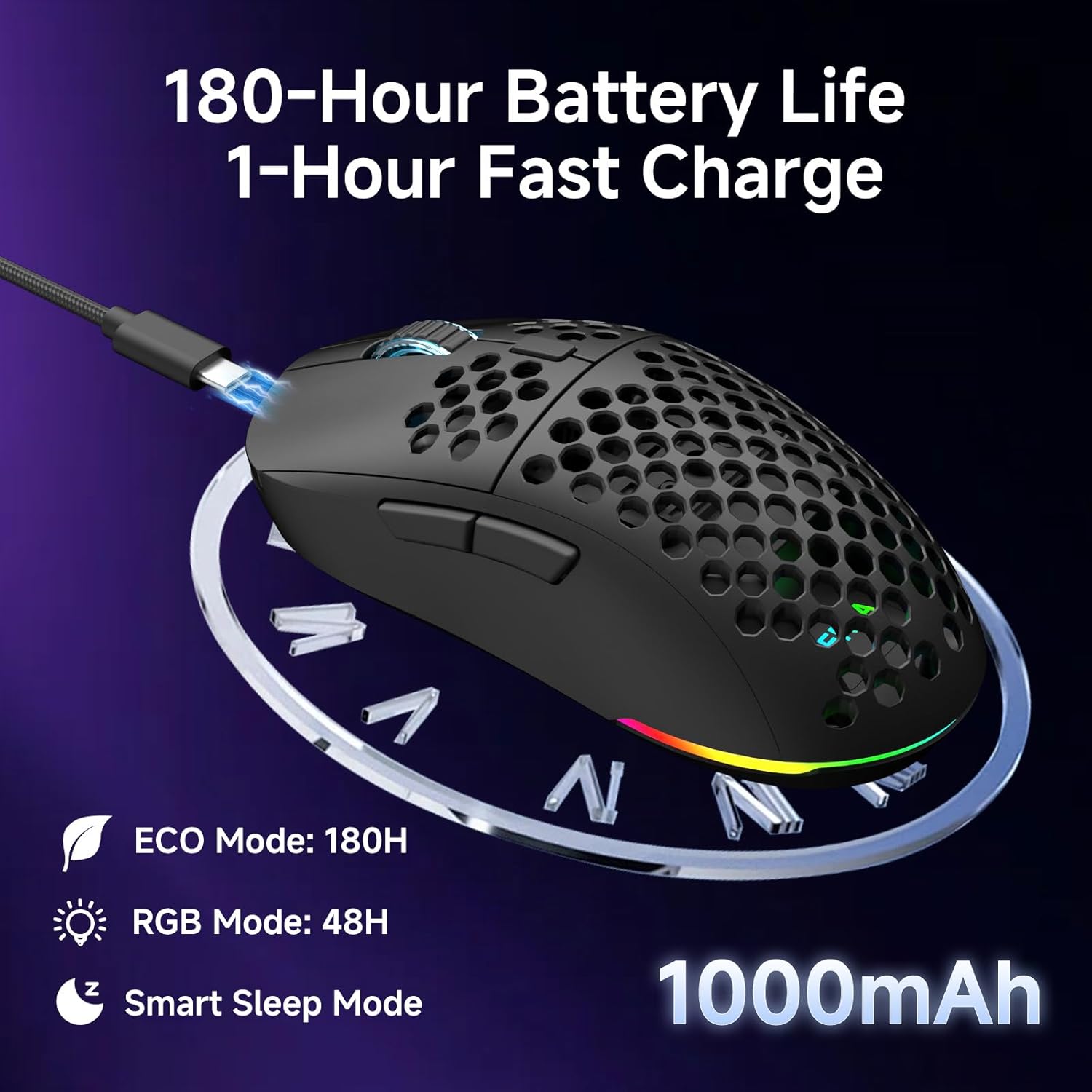
د بیټرۍ مدیریت
موږک د ۴۰۰mAh چارج وړ بیټرۍ سره سمبال دی.
- د بیټرۍ ژوند: Up to 180 hours in ECO mode, or 48 hours with full RGB lighting.
- چارج کول: Fast USB-C charging allows a full charge in approximately 1 hour.
- Smart Sleep Modes: The mouse enters intelligent sleep modes after 1 and 5 minutes of inactivity to conserve power. These timers can be customized via software.

د انځور تفصیل: An image showing the DIERYA M1 mouse connected via USB-C for charging, highlighting its 1000mAh battery, 180-hour ECO mode battery life, 48-hour RGB mode battery life, and smart sleep mode feature.
د سافټویر او ډرایور نصب کول
د اصلاح کولو سافټویر
To unlock the full potential of your DIERYA M1 mouse, including DPI customization (up to 24,000 DPI), report rate adjustment (125-1000Hz), button remapping, macro creation, RGB lighting effects, and sleep timer settings, download and install the dedicated driver software.
The software allows you to define every detail and save up to 4 device profiles.
Visit the official DIERYA website for the latest software download: www.dierya.com/support (بېلګهample لینک، اصلي لینک ممکن توپیر ولري).

د انځور تفصیل: A screenshot of the DIERYA M1 mouse driver software interface, showing options for key assignment, DIY macros, customizable RGB lighting, DPI adjustment, report rate adjustment, and profile بار کول
ساتنه
پاکول او پاملرنه
- Regularly clean the mouse with a soft, dry cloth.
- د سختې خاورې لپاره، لږ څهampټوکر د اوبو یا نرم پاکولو محلول سره ومینځئ. د سختو کیمیاوي موادو څخه ډډه وکړئ.
- موږک په اوبو یا کوم مایع کې مه ډوبوئ.
- Keep the PTFE feet clean to ensure smooth gliding.
ذخیره کول
- When not in use, store the 2.4G USB receiver in its dedicated compartment on the underside of the mouse.
- موږک په یخ او وچ ځای کې د مستقیم لمر وړانګو او سختې تودوخې څخه لرې وساتئ.
د ستونزو حل کول
عام مسایل او حل لارې
- موږک ځواب نه ورکوي:
- ډاډ ترلاسه کړئ چې موږک فعال دی.
- د بیټرۍ کچه وګورئ او که اړتیا وي نو چارج یې کړئ.
- For 2.4GHz wireless, ensure the USB receiver is securely plugged in.
- For Bluetooth, ensure the mouse is paired and selected in your device's Bluetooth settings.
- Try connecting via USB-C wired mode to confirm functionality.
- خپل کمپیوټر بیا پیل کړئ.
- ځنډ یا بې نظمه حرکت:
- Ensure the mouse is within range of the receiver (for 2.4GHz) or your device (for Bluetooth).
- د نورو بې سیم وسیلو څخه د مداخلې لپاره وګورئ.
- د موږک په لاندې برخه کې نظري سینسر پاک کړئ.
- Ensure the mouse is used on a suitable surface (not highly reflective or transparent).
- Update mouse drivers via the software.
- DPI نه بدلیږي:
- Press the DPI adjustment button firmly.
- Ensure the mouse software is installed and running correctly if custom DPI settings are configured.
- د RGB رڼا کار نه کوي:
- Check the Power & Light Switch position.
- ډاډ ترلاسه کړئ چې بیټرۍ کافي چارج لري.
- Adjust lighting settings through the driver software.
مشخصات
تخنیکي توضیحات
| فیچر | تفصیل |
|---|---|
| ماډل | M1 |
| ارتباط | ۲.۴GHz بېسیم، بلوتوث ۵.۰، USB-C وایرډ |
| د DPI حد | ۱۰۰ - ۱۶۰۰۰ ډي پي آی |
| د رای ورکولو کچه | 125-1000Hz |
| د تعقیب سرعت | 300IPS |
| سرعت | 35G |
| د بیټرۍ ظرفیت | 1000mAh |
| د بیټرۍ ژوند | Up to 180 hours (ECO mode), 48 hours (RGB on) |
| د چارج کولو وخت | نږدې 1 ساعت |
| وزن | 90 ګرامه |
| ابعاد | 125 x 63 x 41 mm |
| سویچونه | Huano Micro Switches (20 million clicks) |
| پښې | PTFE |
| د RGB رڼا | 16.8 Million Colors, 13 Effects |
| د پروګرام وړ تڼۍ | 6 |
| مطابقت | PC, Mac, Laptop, iPad, Chromebook |
تضمین او ملاتړ
د محصول تضمین
DIERYA products typically come with a limited warranty. Please refer to the warranty card included in your package or visit the official DIERYA webد تضمین د مفصلو شرایطو او شرایطو لپاره سایټ. د تضمین ادعاوو لپاره د پیرود ثبوت وساتئ.
د پیرودونکي ملاتړ
If you encounter any issues or have questions regarding your DIERYA M1 Wireless Gaming Mouse, please contact DIERYA customer support.
- Webسایټ: www.dierya.com/support (بېلګهample لینک، اصلي لینک ممکن توپیر ولري)
- بریښنالیک: د محصول بسته بندۍ ته مراجعه وکړئ یا webد ملاتړ بریښنالیک پتې لپاره سایټ.
When contacting support, please provide your product model (M1) and a detailed description of the issue.