
پیژندنه
د پیرودلو لپاره مننهasing the Dierya DK68 Wireless Mechanical Gaming Keyboard. This manual provides detailed instructions on how to set up, operate, and maintain your keyboard. Please read this manual thoroughly before use to ensure optimal performance and longevity of your device.

Image: The Dierya DK68 wireless mechanical gaming keyboard, showcasing د دې کمپیکټ 60٪ ترتیب او RGB بیک لایټینګ.
کلیدي ځانګړتیاوې
- د ۶۰٪ کمپیکټ ترتیب: 68-key design for space efficiency, with all functions accessible via FN key combinations. Ideal for portability and maximizing desk space.
- Tri-Mode Seamless Connectivity: Supports USB-C wired, Bluetooth, and 2.4GHz wireless receiver connections. Easily switch between up to 3 devices (PC, Mac, smartphone/tablet).
- Customizable 16.8 Million Color RGB Backlight: Features 21 dynamic lighting effects. Adjust effects and colors using FN key combinations.
- Long-Lasting Battery & Standby: Equipped with a 3000mAh battery, providing approximately 8 hours of continuous use with backlight on, or up to 90 hours with backlight off. Standby time up to 360 hours (approx. 15 days).
- دوامدار میخانیکي سویچونه: Utilizes Dierya's proprietary mechanical switches with a 60 million keystroke lifespan. Red switches (linear, silent) are suitable for gaming and office work.
- د N-Key رول اوور (NKRO): Ensures all key presses are registered accurately, even during simultaneous inputs, for competitive gaming.
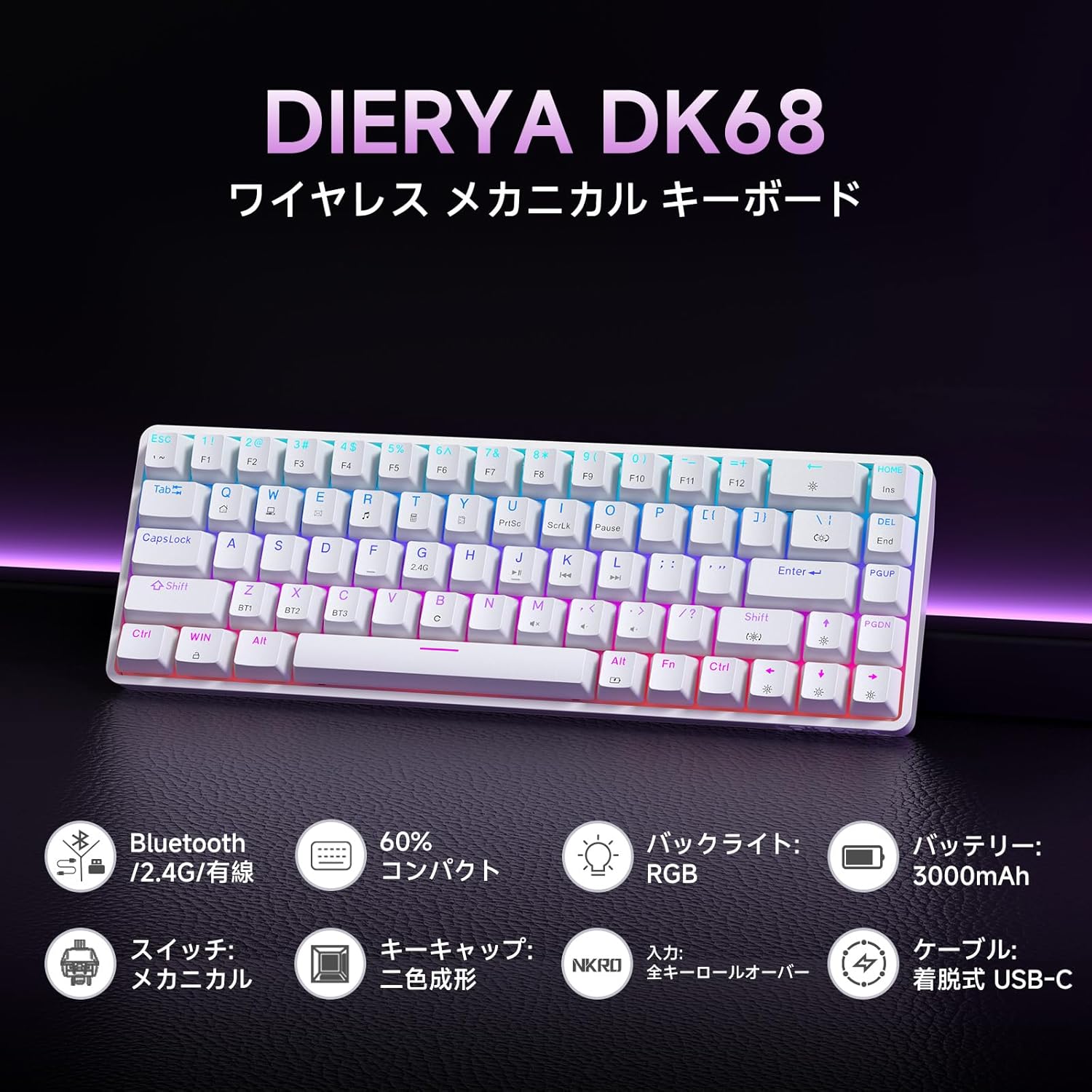
انځور: یو اوورview of the Dierya DK68 keyboard's main features, including Bluetooth/2.4G/Wired connectivity, 60% compact design, RGB backlight, 3000mAh battery, mechanical switches, double-shot keycaps, N-Key Rollover, and a detachable USB-C cable.
چمتو کول
1. د کیبورډ چارج کول
Before first use, fully charge the keyboard using the provided USB-C cable. Connect the cable to the keyboard's USB-C port and to a power source (e.g., computer USB port, USB wall adapter).
- The charging indicator light will show charging status.
- بشپړ چارج معمولا څو ساعته وخت نیسي.
2. د کیبورډ سره نښلول
The DK68 supports three connection modes: USB-C wired, 2.4GHz wireless, and Bluetooth.
د USB-C وائرډ اتصال
- ورکړل شوی USB-C کیبل د کیبورډ USB-C پورټ سره وصل کړئ.
- د کیبل بل پای ستاسو په کمپیوټر کې موجود USB پورټ سره وصل کړئ.
- کیبورډ به په اتوماتيک ډول وپیژندل شي او د کارولو لپاره چمتو شي.
2.4GHz بې سیم پیوستون
- Locate the 2.4GHz USB receiver (usually stored in a compartment on the keyboard or packaging).
- د USB ریسیور په خپل کمپیوټر کې موجود USB پورټ کې ولګوئ.
- Turn on the keyboard. The keyboard should automatically connect to the receiver.
- If connection is not established, press FN + R to switch to 2.4GHz mode.
بلوتوث پیوستون
The keyboard can store up to three Bluetooth device pairings.
- کیبورډ چالان کړئ.
- فشار ورکړئ او ونیسئ FN + Z, FN + X، یا FN + C for 3-5 seconds to enter pairing mode for BT1, BT2, or BT3 respectively. The indicator light will flash rapidly.
- On your device (PC, Mac, smartphone, tablet), enable Bluetooth and search for new devices.
- Select "Dierya DK68" from the list of available devices.
- یوځل چې جوړه شي ، د شاخص ر lightا به چمکۍ ودروي او قوي پاتې شي.
- د جوړو بلوتوث وسیلو ترمنځ د بدلولو لپاره، فشار ورکړئ FN + Z, FN + X، یا FN + C په لنډه توګه

Image: Diagram illustrating the three connection modes: USB-C wired, Bluetooth, and 2.4GHz wireless, along with compatibility icons for Windows, Mac, iOS, Android, Xbox, PC, Laptop, and Tablet.
عملیاتي لارښوونې
۳.۶. د FN کلیدي ترکیبونه
Due to the compact 60% layout, many functions are accessed using the FN کیلي د نورو کیلي ګانو سره په ترکیب کې.
| ترکیب | فعالیت |
|---|---|
| FN + 1-0 (top row) | F1-F10 |
| FN + - = | F11، F12 |
| FN+Backspace | Toggle Backlight ON/OFF |
| FN + Shift | د شاتنۍ رڼا رنګ بدل کړئ |
| ایف این + | | د بیک لائټ حالت بدل کړئ |
| FN + پورته تیر | د شاتنۍ رڼا روښانتیا زیاته کړئ |
| FN + ښکته تیر | د شاتنۍ رڼا روښانتیا کمه کړئ |
| FN + کیڼ غشی | د شاتنۍ رڼا سرعت کم کړئ |
| FN + ښي غشی | د شاتنۍ رڼا سرعت زیات کړئ |
| FN + Z/X/C | Switch Bluetooth Device (BT1/BT2/BT3) |
| FN + R | Switch to 2.4GHz Wireless Mode |
| FN + T | Switch to USB-C Wired Mode |
| FN + WIN | د وینډوز کیلي لاک / انلاک کړئ |

Image: A visual guide to customizing the RGB backlight on the Dierya DK68 keyboard using FN key combinations for turning the light on/off, changing colors, modes, brightness, and speed.
۳. د RGB بیک لایټ اصلاح کول
The keyboard features over 20 dynamic RGB lighting effects. Use the FN key combinations listed above to personalize your lighting experience.
- مطبوعاتي FN+Backspace د بیک لایټ فعال یا بندولو لپاره.
- مطبوعاتي FN + Shift to cycle through different backlight colors.
- مطبوعاتي ایف این + | to switch between various lighting effects.
- کارول FN + پورته/ښکته غشی to adjust brightness and FN + کیڼ/ښي غشی to adjust effect speed.
3. د بریښنا خوندي کولو حالت
To conserve battery life, the keyboard will automatically enter sleep mode after approximately 3 minutes of inactivity. Press any key to wake it up.
ساتنه
- پاکول: Use a soft, dry cloth to wipe the keyboard surface. For deeper cleaning, you may use a can of compressed air to remove dust and debris from between the keycaps. Avoid using harsh chemicals or abrasive materials.
- ذخیره کول: کیبورډ په یخ او وچ ځای کې د مستقیم لمر وړانګو او سختې تودوخې څخه لرې وساتئ.
- د بیټرۍ پاملرنه: د بیټرۍ د ژوند اوږدولو لپاره، د بیټرۍ په مکرر ډول د بشپړ چارج کولو څخه ډډه وکړئ. کیبورډ په منظم ډول چارج کړئ، په ځانګړي توګه که چیرې دا د اوږدې مودې لپاره زیرمه شي.
- د کیلي کیپ لرې کول: If you need to remove keycaps for cleaning or switch replacement, use a keycap puller to avoid damage. Pull straight up with gentle force.
د ستونزو حل کول
- کیبورډ ځواب نه ورکوي:
- ډاډ ترلاسه کړئ چې کیبورډ فعال دی.
- د بیټرۍ کچه وګورئ او که اړتیا وي نو چارج یې کړئ.
- Verify the correct connection mode (USB-C, 2.4GHz, or Bluetooth) is selected.
- For 2.4GHz, ensure the receiver is properly plugged in.
- For Bluetooth, re-pair the device if connection is lost.
- د بېسیم ستونزو د له منځه وړلو لپاره د USB-C کیبل له لارې د نښلولو هڅه وکړئ.
- هغه کیلي چې راجستر نه کیږي یا دوه ځله ټایپ کیږي:
- Clean under the keycaps to remove any debris.
- ډاډ ترلاسه کړئ چې سویچونه په سمه توګه ځای پر ځای شوي دي.
- د RGB بیک لایټ کار نه کوي:
- Ensure the backlight is turned on (FN + Backspace).
- Check battery level; low battery might disable backlighting.
- د بلوتوث اتصال بې ثباته:
- Ensure the keyboard is within range of the device.
- د نورو بېسیم وسیلو مداخله کمه کړئ.
- هڅه وکړئ چې کیبورډ له خپل وسیله سره بیا جوړه کړئ.
مشخصات
| فیچر | تفصیل |
|---|---|
| برانډ | ډیری |
| د ماډل شمیره | DK68 |
| ترتیب | ۶۰٪ (۶۱ کیلي) |
| ارتباط | ۲.۴GHz بېسیم، بلوتوث، USB-C تار |
| د سویچ ډول | Mechanical Red Switches (Linear, Silent) |
| د عمل ځواک | 45gf (±15gf) |
| د عمل سفر | 2.0mm (±0.6mm) |
| د کیلي سټروک عمر | نږدې 60 ملیون |
| شاته څراغ | RGB (16.8 million colors, 21+ effects) |
| د بیټرۍ ظرفیت | 3000mAh لیتیم بیټرۍ |
| Battery Life (Backlight ON) | نږدې 8 ساعته |
| Battery Life (Backlight OFF) | نږدې 90 ساعته |
| ولاړ وخت | نږدې 360 ساعته (15 ورځې) |
| مطابقت | Windows, Mac, iOS, Android, Xbox, PC, Laptop, Tablet |
| ابعاد (L x W x H) | 372 x 115 x 51 mm |
| وزن | 830 ګرامه |
| کیکیپس | Double-shot (OFS height) |
| د غشی ضد | بشپړ N-Key رول اوور (NKRO) |

Image: A diagram showing the compact 60% layout of the Dierya DK68 keyboard with its dimensions: 372mm length, 115mm width, and 51mm height, highlighting its 68-key configuration.

انځور: نږدې انځور view of the Dierya DK68's mechanical red switches, detailing their linear and silent operation, 45gf actuation force, 2.0mm travel, and pre-lubricated design for smooth keystrokes.

Image: An exploded diagram of the Dierya DK68 keyboard, showing its internal layers including ABS keycaps, mechanical switches, positioning plate, EVA mat, PCB, high-density sound-absorbing foam, and bottom case, highlighting its robust construction.
تضمین او ملاتړ
DIERYA products are designed for durability and performance. For warranty information or technical support, please refer to the official DIERYA webسایټ ته مراجعه وکړئ یا مستقیم د دوی د پیرودونکو خدماتو سره اړیکه ونیسئ. د تضمین ادعاوو لپاره د پیرود ثبوت په توګه د پیرود رسید وساتئ.