
1. پیژندنه
Thank you for choosing the Dierya x TMKB M1 Wireless Gaming Mouse. This manual provides detailed instructions on how to set up, operate, and maintain your new gaming mouse. The M1 mouse offers versatile connectivity, high-precision tracking, and customizable features to enhance your gaming and productivity experience.
2. محصول ختم شوview
2.1 اجزا او کنټرول
Familiarize yourself with the various buttons and features of your Dierya M1 mouse:
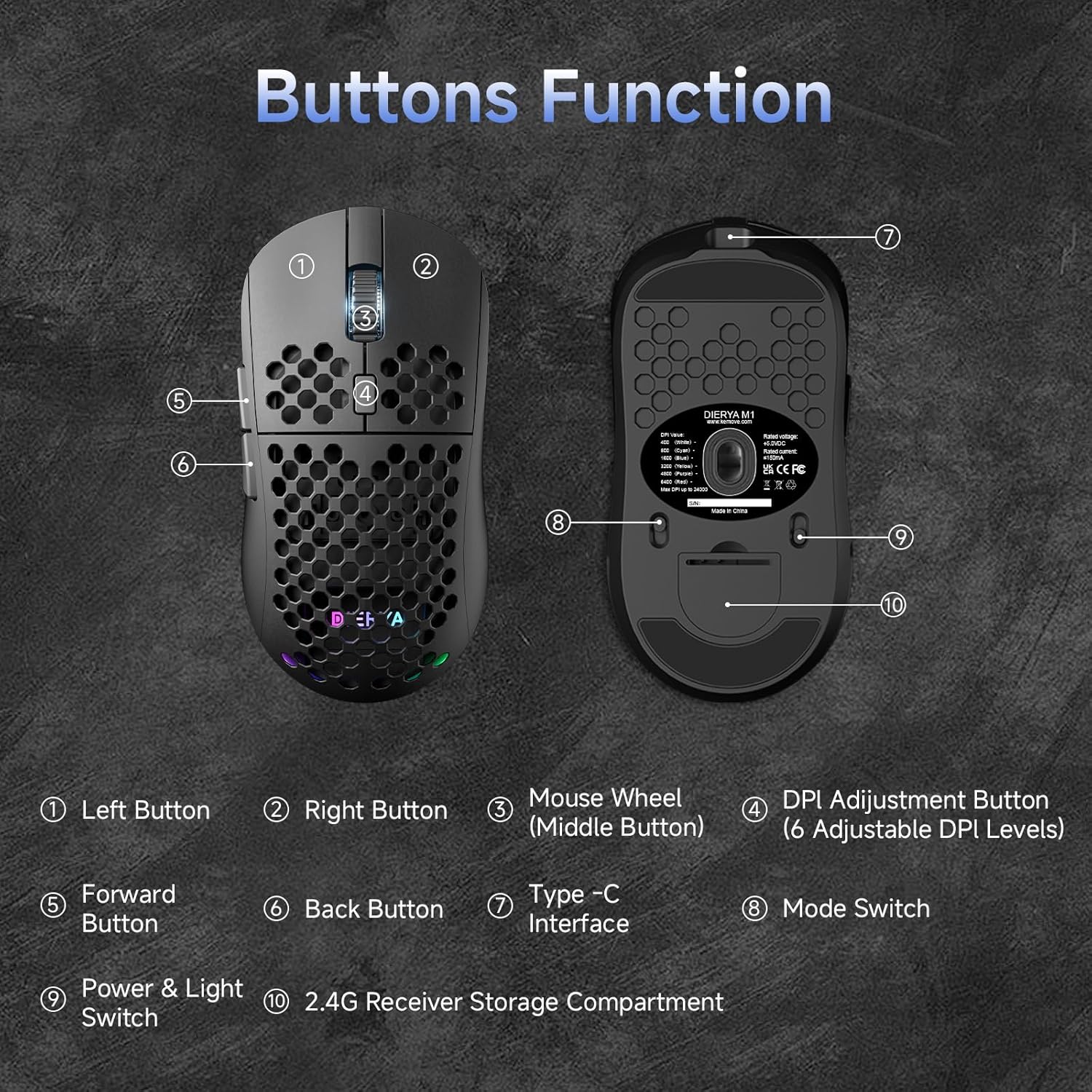
This diagram illustrates the various components of the Dierya M1 wireless gaming mouse. It highlights the کیڼ تڼۍ (1), ښي تڼۍ (2), Mouse Wheel (Middle Button) (3), DPI Adjustment Button (4) with 6 adjustable DPI levels, Forward Button (5), Back Button (6), Type-C Interface (7) for charging and wired connection, د حالت بدلول (8) for selecting connection type, Power & Light Switch (9)، او د 2.4G Receiver Storage Compartment (10) په لاندې برخه کې موقعیت لري.
2.2 کلیدي ځانګړتیاوې
- ۶۲۰۰ DPI آپټیکل سینسر: Adjustable DPI range from 200 to 24,000, with 6 preset levels (400-6400 DPI).
- درې اړخیزه اړیکه: Supports ultra-fast 2.4GHz wireless, energy-efficient Bluetooth 5.2, and stable USB-C wired connections.
- د بیټرۍ اوږد ژوند: 1000mAh battery provides up to 180 hours in ECO mode or 48 hours with RGB lighting, with 1-hour fast charging.
- سپک او ارګونومیک ډیزاین: Weighs only 90g with a honeycomb shell for breathability and a symmetrical design (125x63x41 mm).
- د پروګرام وړ بټنونه: 6 customizable buttons via the M1 Driver software (Windows only).
- متحرک RGB رڼا: 13 integrated RGB lighting effects with 16.8 million customizable colors.
- لوړ فعالیت: 125-1000 Hz polling rate, 300 IPS tracking speed, and 35G acceleration.
- دوامدار سویچونه: Equipped with Huano switches rated for 20 million clicks and 100% PTFE feet for smooth gliding.
3. ترتیب کول
۳.۱ د موږک چارج کول
Before first use, it is recommended to fully charge the mouse. Connect the provided USB-C cable to the Type-C Interface (7) on the mouse and the other end to a USB power source (e.g., computer USB port, USB wall adapter).
- The mouse charges in approximately 1 hour.
- The scroll wheel LED will indicate charging status (e.g., red for charging, green for fully charged).
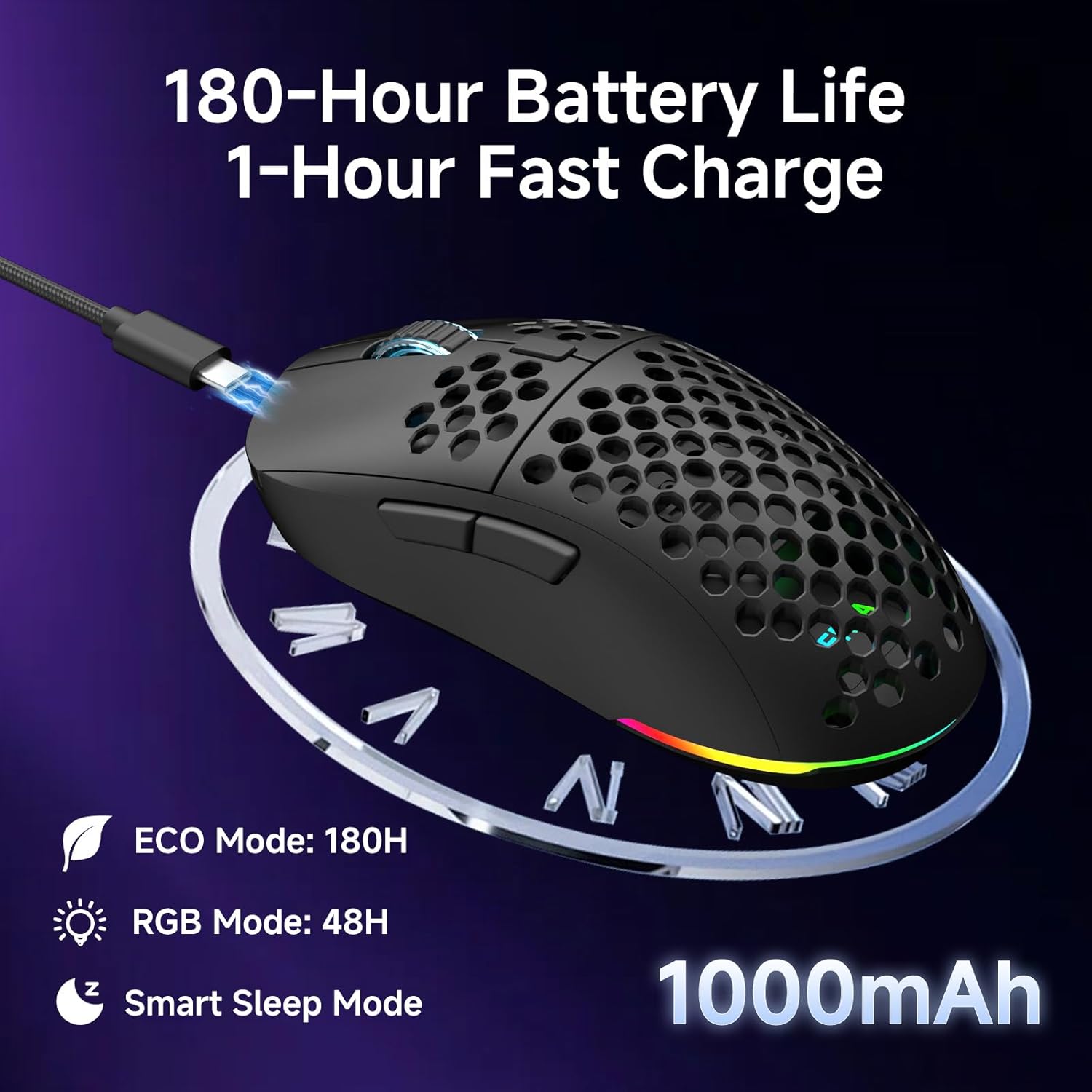
The Dierya M1 mouse features a 1000mAh battery, providing up to 180 hours of use in ECO mode or 48 hours with RGB lighting enabled. It supports fast charging, reaching full capacity in approximately 1 hour via the included USB-C cable. The mouse also includes a smart sleep mode to conserve power during inactivity.
۳.۲ د موږک سره نښلول
The Dierya M1 mouse offers three connection modes: 2.4GHz Wireless, Bluetooth 5.2, and USB-C Wired.

The Dierya M1 mouse supports three flexible connection modes: Bluetooth 5.2 for energy-efficient pairing with up to two devices, 2.4GHz Wireless via a USB dongle for ultra-fast response, and a stable USB-C Wired connection for charging and direct use. Each mode offers a different polling rate, with 2.4GHz and wired modes providing 1000Hz, and Bluetooth offering 125Hz.
۳.۲.۱ ۲.۴GHz بېسیم اتصال
- Locate the 2.4G receiver in the storage compartment (10) on the underside of the mouse.
- د 2.4G ریسیور په خپل کمپیوټر کې موجود USB پورټ کې ولګوئ.
- Set the Mode Switch (8) on the underside of the mouse to the '2.4G' position.
- The mouse should connect automatically. The polling rate for this mode is 1000 Hz.
۲.۲.۲ د بلوتوث ۵.۰ اتصال
- Set the Mode Switch (8) on the underside of the mouse to the 'BT' position.
- په خپل کمپیوټر یا وسیله کې، د بلوتوټ ترتیبات خلاص کړئ او د نویو وسایلو لټون وکړئ.
- Select 'Dierya M1' from the list of available devices to pair.
- The mouse supports Bluetooth 5.2 and has a polling rate of 125 Hz in this mode.
۴.۲.۳ د USB-C وائرډ اتصال
- Connect the USB-C cable to the Type-C Interface (7) on the mouse.
- د USB-C کیبل بل پای ستاسو په کمپیوټر کې موجود USB پورټ سره وصل کړئ.
- The mouse will automatically switch to wired mode and begin charging. The polling rate for this mode is 1000 Hz.
4. عملیاتي لارښوونې
4.1 د DPI تعدیل
The Dierya M1 mouse features a dedicated DPI Adjustment Button (4) to cycle through preset DPI levels. The scroll wheel LED color indicates the current DPI setting.
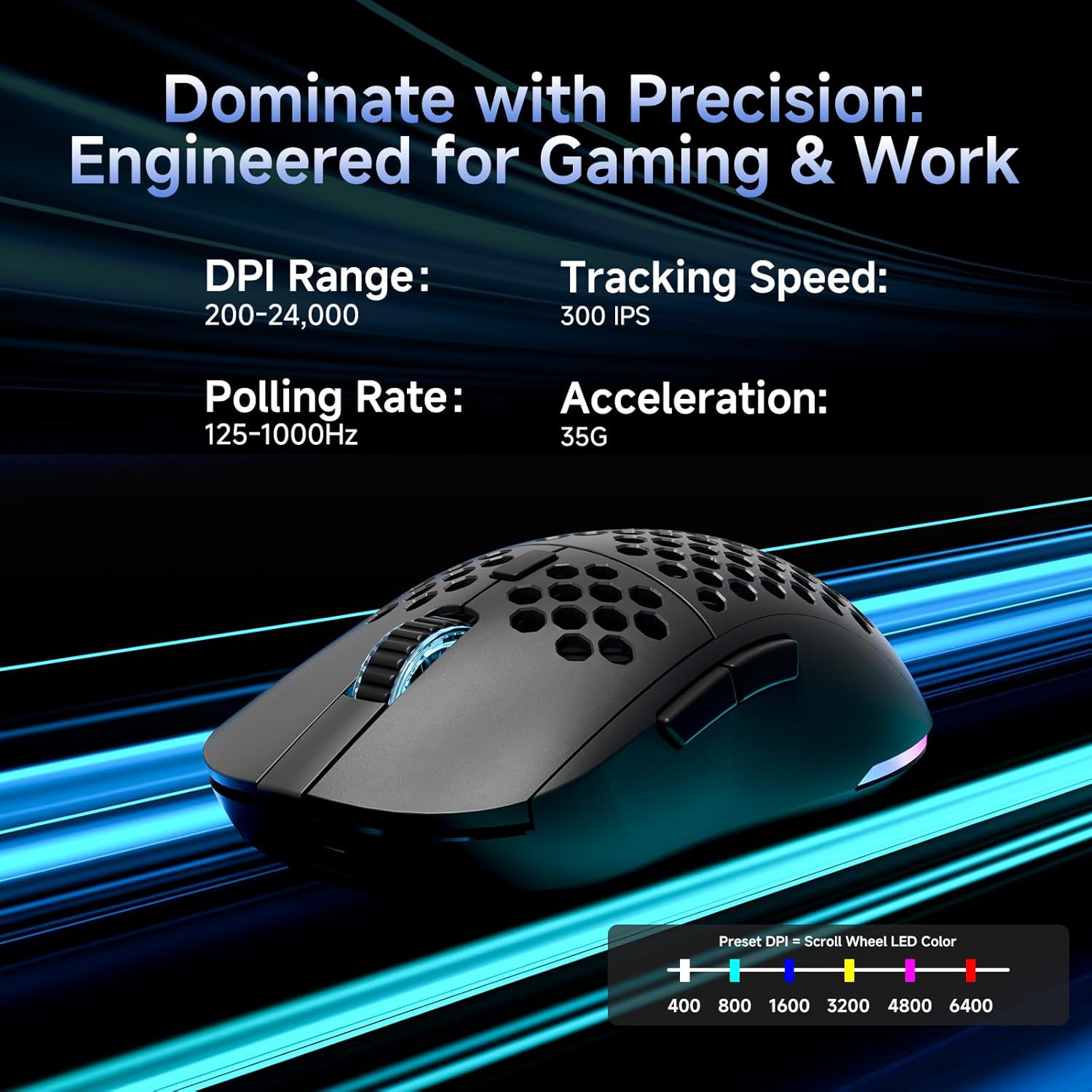
This image details the performance specifications of the Dierya M1 mouse, including a DPI range of 200-24,000, a tracking speed of 300 IPS, a polling rate of 125-1000Hz, and 35G acceleration. It also shows the preset DPI levels (400, 800, 1600, 3200, 4800, 6400) and the color indicators on the scroll wheel for each setting.
- Press the DPI Adjustment Button (4) to cycle through the 6 default DPI settings: 400, 800, 1600, 3200, 4800, and 6400 DPI.
- Each DPI level is indicated by a specific color on the scroll wheel LED.
- For custom DPI settings and a wider range (200-24,000 DPI), use the M1 Driver software.
۵.۴ د RGB رڼا کنټرول
The Dierya M1 mouse features dynamic RGB lighting. You can control the lighting effects and colors using the M1 Driver software.
- The mouse has 13 built-in RGB lighting effects.
- Use the M1 Driver software to customize colors (16.8 million options), brightness, and speed of the lighting effects.
- The Power & Light Switch (9) on the underside can be used to turn the lighting on or off.
4.3 Programmable Buttons and Software
The M1 mouse has 6 programmable buttons that can be customized using the dedicated M1 Driver software.

The Dierya M1 driver software, currently available for Windows, allows users to customize various aspects of the mouse. This includes reassigning the 6 programmable buttons, creating macros, adjusting DPI settings, modifying the polling rate, and personalizing the 13 dynamic RGB lighting effects with 16.8 million colors.
- د سافټویر مطابقت: The M1 Driver software is currently only available for Windows operating systems.
- کلیدي دنده: Reassign functions to any of the 6 programmable buttons (Left, Right, Middle, DPI, Forward, Back).
- د میکرو جوړول: Create and assign complex macros to streamline in-game actions or productivity tasks.
- DPI & Polling Rate: Fine-tune DPI settings beyond the presets and adjust the polling rate.
- د RGB اصلاح کول: Personalize lighting effects, colors, and patterns.
- پروfile مدیریت: مختلف پرو خوندي او بار کړئfileد مختلفو لوبو یا غوښتنلیکونو لپاره.
4.4 د بریښنا خوندي کولو طریقې
The M1 mouse is designed with automatic power-saving features to extend battery life:
- The mouse will enter an automatic power-saving mode after 1-5 minutes of inactivity.
- This inactivity time can be adjusted via the M1 Driver software.
- د موږک د راویښولو لپاره، په ساده ډول یې حرکت ورکړئ یا په هره تڼۍ کلیک وکړئ.
5. ساتنه
Proper maintenance ensures the longevity and optimal performance of your Dierya M1 mouse.
- پاکول: د موږک سطحه د پاکولو لپاره نرم، وچ ټوکر وکاروئ. د سختې خاورې لپاره، یو څه damp ټوکر کارول کیدی شي، مګر ډاډ ترلاسه کړئ چې رطوبت موږک ته ننوځي. د سختو کیمیاوي موادو یا د کثافاتو پاکوونکو څخه ډډه وکړئ.
- د سینسر ساتنه: د موږک په لاندې برخه کې نظري سینسر پاک او د دوړو یا کثافاتو څخه پاک وساتئ ترڅو دقیق تعقیب ډاډمن شي.
- د بیټرۍ پاملرنه: Avoid fully discharging the battery frequently. For long-term storage, charge the mouse to about 50% and store it in a cool, dry place.
- ذخیره کول: کله چې په کارولو کې نه وي، موږک په پاک او وچ چاپیریال کې د سختې تودوخې څخه لرې وساتئ.
6. ستونزه حل کول
If you encounter issues with your Dierya M1 mouse, refer to the following common troubleshooting steps:
| ستونزه | احتمالي لامل | د حل لاره |
|---|---|---|
| موږک ځواب نه ورکوي (2.4GHz) | Low battery, receiver unplugged, incorrect mode, interference. | Charge the mouse. Ensure 2.4G receiver is securely plugged in. Set Mode Switch to '2.4G'. Try a different USB port. Reduce distance to receiver. |
| موږک ځواب نه ورکوي (بلوتوث) | Low battery, incorrect mode, not paired, Bluetooth off on device. | Charge the mouse. Set Mode Switch to 'BT'. Ensure Bluetooth is enabled on your device. Re-pair the mouse in Bluetooth settings. |
| موږک ځواب نه ورکوي (وایر شوی) | Cable not connected, faulty cable/port. | Ensure USB-C cable is securely connected to both mouse and computer. Try a different USB port or cable. |
| ناسم تعقیب | Dirty sensor, unsuitable surface, incorrect DPI. | Clean the optical sensor. Use a mouse pad or a clean, non-reflective surface. Adjust DPI settings. |
| د RGB څراغ کار نه کوي | Lighting switched off, low battery, software issue. | Check Power & Light Switch (9). Charge the mouse. Check settings in M1 Driver software. |
| تڼۍ د پروګرام وړ نه دي | M1 Driver not installed/running, not on Windows. | Ensure M1 Driver software is installed and running (Windows only). Check software settings. |
7. مشخصات
| د ماډل نوم | M1 |
| برانډ | Dierya |
| د ارتباط ټیکنالوژي | ۲.۴GHz بېسیم، بلوتوث ۵.۰، USB-C وایرډ |
| د حرکت کشف ټیکنالوژي | نظري |
| د DPI حد | 200 - 24,000 DPI (6 preset levels: 400, 800, 1600, 3200, 4800, 6400) |
| د رای ورکولو کچه | 125-1000 Hz |
| د تعقیب سرعت | 300IPS |
| سرعت | 35G |
| د تڼیو شمیر | ۴ (پروګرام وړ) |
| د بیټرۍ ظرفیت | 1000 mAh لیتیم آیون |
| د بیټرۍ ژوند | Up to 180 hours (ECO mode), 48 hours (RGB mode) |
| د چارج کولو وخت | نږدې 1 ساعت |
| وزن | 90 ګرامه |
| ابعاد | 125 x 63 x 41 mm |
| د سویچ ډول | Huano (20 million clicks) |
| د پښو مواد | 100٪ PTFE |
| د عملیاتي سیسټم مطابقت | وینډوز، میکوس، لینکس، کروم OS |
| Driver Software Compatibility | یوازې وینډوز |
8. تضمین او ملاتړ
8.1 د تولید کونکي تضمین
The Dierya M1 Wireless Gaming Mouse comes with a د تولید کونکي 1 کلن تضمین. دا تضمین د عادي استعمال لاندې موادو او کاریګرۍ نیمګړتیاوې پوښي. مهرباني وکړئ د تضمین ادعاوو لپاره د پیرود ثبوت وساتئ.
8.2 د پیرودونکي ملاتړ
For further assistance, technical support, or warranty inquiries, please refer to the official Dierya website or contact your retailer. Ensure you have your product model (M1) and proof of purchase ready when seeking support.