
پیژندنه
This user manual provides comprehensive instructions for the Chieftec AS-02B-TG-OP Midi Tower PC Case. It covers essential information regarding product features, installation procedures, operational guidelines, maintenance tips, and technical specifications. Please read this manual thoroughly before installing or operating your PC case to ensure proper functionality and longevity.
محصول پای ته ورسیدview
The Chieftec AS-02B-TG-OP is a Midi Tower PC case designed for optimal cooling and a modern aesthetic. It features a sleek brushed front panel, a tempered glass side panel, and a pre-installed 120mm PWM fan for efficient heat dissipation.
کلیدي ځانګړتیاوې:
- Sleek brushed front panel design.
- Tempered glass side panel for component visibility.
- Optimized interior layout for efficient cooling.
- Pre-installed 120mm PWM fan at the rear.
- Support for various motherboard form factors (ATX, micro ATX, Mini-ITX).
- Multiple expansion bays for storage devices.
- Front I/O panel with USB 2.0, USB Type-C, and audio ports.
د اجزاوو پیژندنه:

شکل 1: مخکی کیڼ اړخ ته view of the Chieftec AS-02B-TG-OP PC case, showcasing the brushed front panel and the tempered glass side panel.

شکل 2: مستقیم مخ view of the Chieftec AS-02B-TG-OP PC case, highlighting the brushed finish of the front panel.

شکل 3: Front-right angle view of the Chieftec AS-02B-TG-OP PC case, showing the subtle design elements.
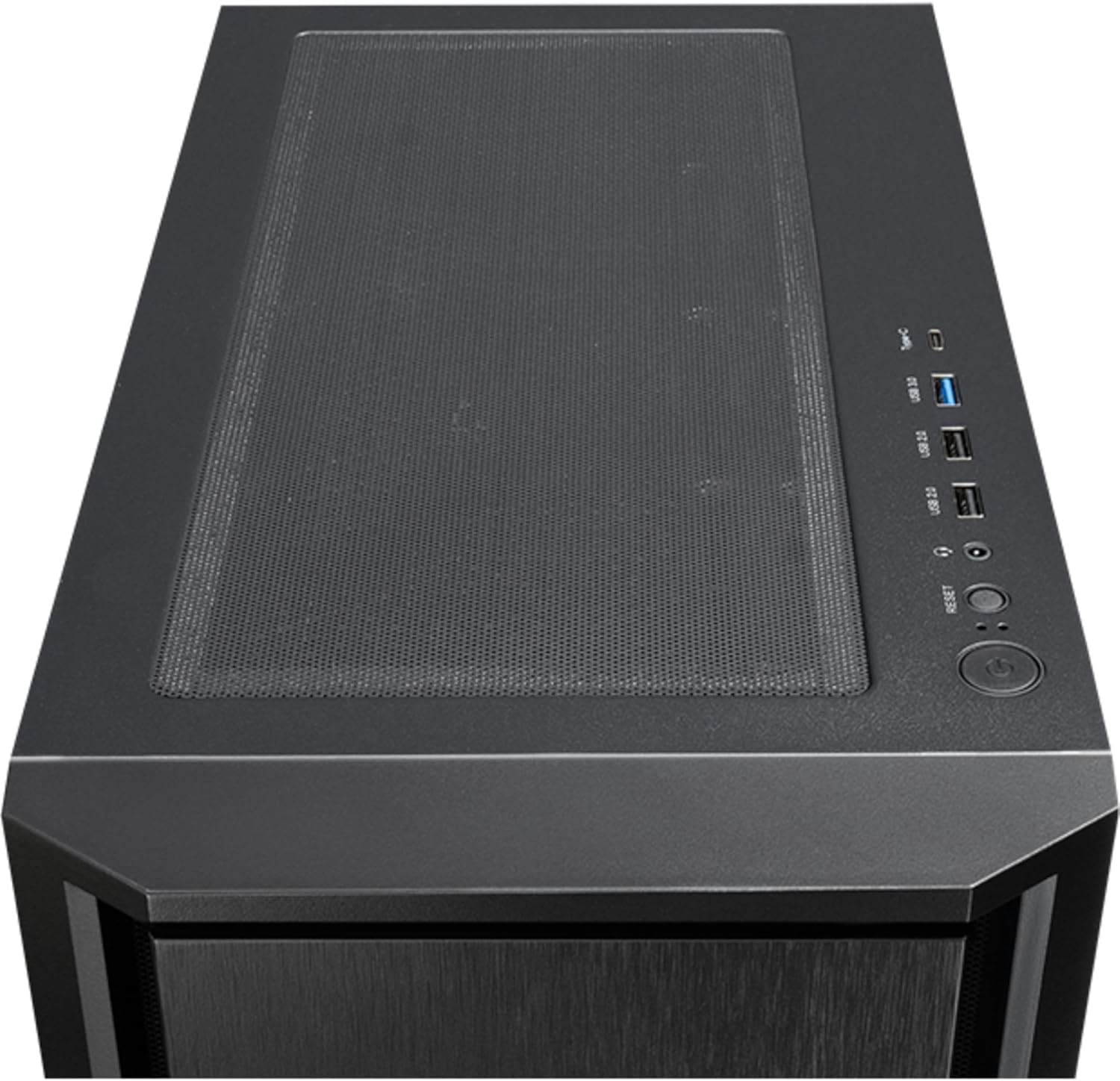
شکل 4: پورته view of the Chieftec AS-02B-TG-OP PC case, showing the top ventilation and the front I/O panel with USB ports and audio jacks.

شکل 5: شاته view of the Chieftec AS-02B-TG-OP PC case, detailing the expansion slots, rear fan mount, and PSU opening.

شکل 6: لاندې view of the Chieftec AS-02B-TG-OP PC case, showing the case feet and bottom dust filter area.
تنظیم او نصب کول
This section guides you through the process of installing components into your Chieftec AS-02B-TG-OP PC case.
۱. د قضیې چمتو کول:
- قضیه په یوه مستحکم او فلیټ سطحه کې کیږدئ.
- Carefully remove the tempered glass side panel by unscrewing the thumb screws at the rear.
- د کیبل مدیریت ساحې ته د لاسرسي لپاره د مخالف اړخ پینل لرې کړئ.
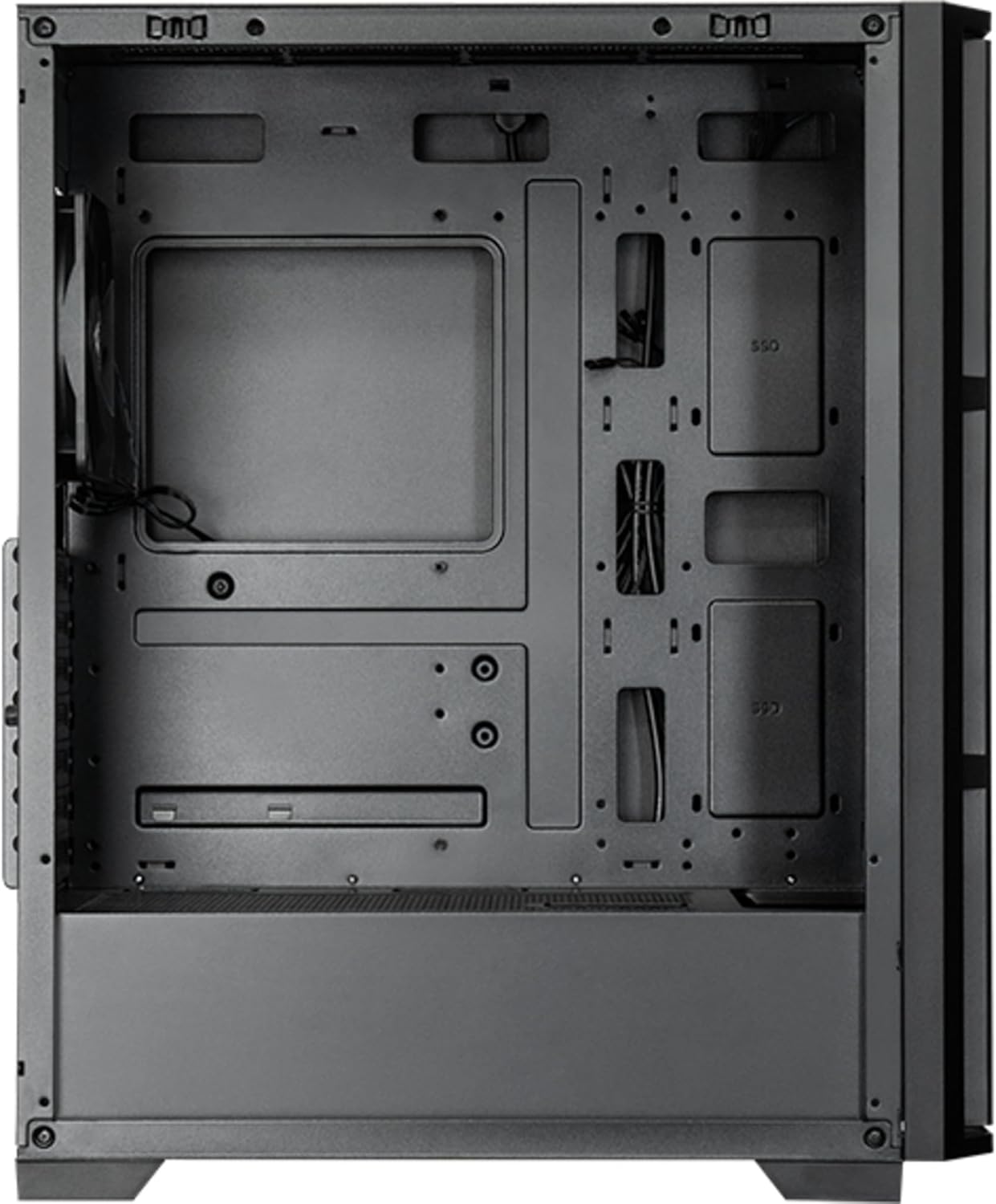
شکل 7: داخلي view of the main compartment, showing the motherboard tray and fan mounting points.
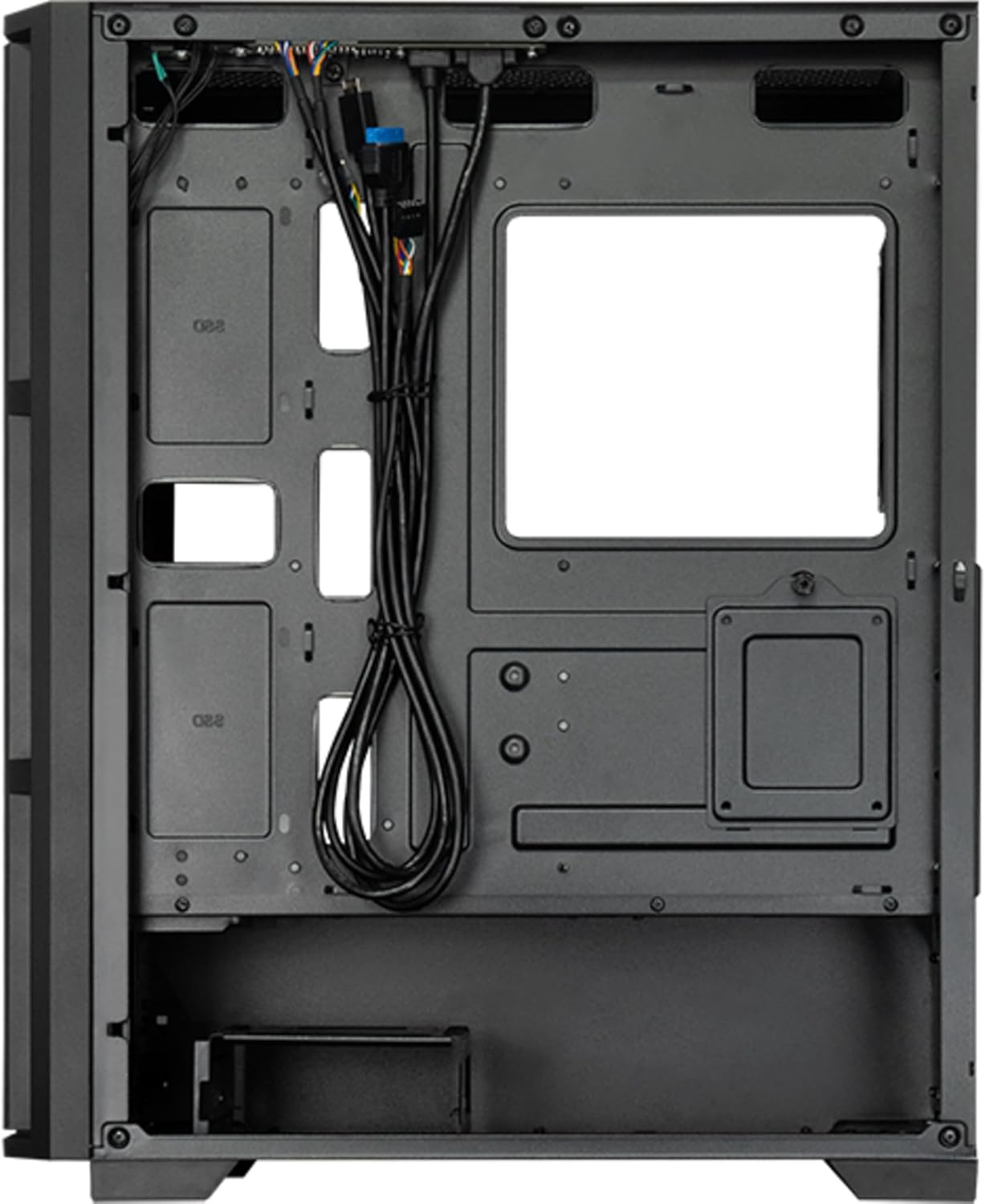
شکل 8: داخلي view from the backside, illustrating the cable management routes and drive mounting locations.
2. د مور بورډ نصب کول:
- د I/O شیلډ د قضیې په شا خلاصیدو کې نصب کړئ.
- Align your ATX, micro ATX, or Mini-ITX motherboard with the standoffs inside the case.
- د ورکړل شویو پیچونو په کارولو سره مور بورډ خوندي کړئ.
۳. د بریښنا رسولو واحد (PSU) نصب کول:
- The PSU is not included. Install your ATX power supply into the dedicated compartment at the bottom rear of the case.
- د قضیې له شا څخه د پیچونو سره PSU خوندي کړئ.
4. Storage Drive Installation:
- Install 3.5" HDDs into the drive cages located at the bottom.
- Install 2.5" SSDs/HDDs into the dedicated mounting points behind the motherboard tray.
- ټول ډرایوونه د مناسبو پیچونو سره خوندي کړئ.
5. Graphics Card and Expansion Cards:
- د قضیې په شا کې اړین پراخیدونکي سلاټ پوښونه لرې کړئ.
- خپل ګرافیک کارت یا نور توسیع کارتونه د مدر بورډ په PCIe سلاټونو کې دننه کړئ.
- کارتونه د پیچونو سره خوندي کړئ.
6. د کیبل مدیریت:
- ټول بریښنا او ډیټا کیبلونه د مدر بورډ ټری شاته د کټ آوټونو او ټای ډاون نقطو له لارې وګرځوئ.
- Connect the front panel I/O cables (USB, audio, power switch, reset switch, LED indicators) to the corresponding headers on your motherboard.
- Ensure cables do not obstruct airflow.
۳. د فین او یخولو سیسټم نصب کول:
- The case includes one pre-installed 120mm PWM fan at the rear.
- Additional fans can be installed at the front (up to 3x 120mm/140mm) and top (up to 2x 120mm/140mm).
- Radiators up to 360mm can be installed at the front and up to 280mm at the top.
- Connect fan power cables to the motherboard fan headers.
عملیاتي لارښوونې
Once all components are installed and secured, and the side panels are reattached, your PC is ready for operation.
فعالول:
- Connect the power cable from your power supply to a wall outlet.
- Press the power button located on the top I/O panel of the case.
- The system should boot up, and any installed lighting will illuminate.
Front I/O Panel Usage:
- د USB 2.0 بندرونه (x2): For connecting peripherals such as keyboards, mice, and USB drives.
- د USB ډول-سي پورټ (x1): د عصري USB-C وسیلو د نښلولو لپاره.
- Audio Jacks (Headphone/Microphone): د هیډفونونو، سپیکرو، یا مایکروفونونو د نښلولو لپاره.
- د بیا تنظیم تڼۍ: To restart the computer.
ساتنه
منظم ساتنه د غوره فعالیت ډاډمن کولو کې مرسته کوي او ستاسو د کمپیوټر اجزاو عمر اوږدوي.
پاکول:
- بهر: یو نرم استعمال کړئ، دamp د بهرنۍ سطحې د پاکولو لپاره ټوکر. د کثافاتو پاکوونکو څخه ډډه وکړئ.
- د دوړو فلټرونه: The case features dust filters (e.g., on the top and bottom). Regularly remove and clean these filters with compressed air or by rinsing with water (ensure they are completely dry before reinstallation).
- داخلي: Periodically use compressed air to remove dust buildup from fans, heatsinks, and other internal components. Ensure the system is powered off and unplugged before cleaning the interior.
د هوا جریان:
- Ensure adequate space around the case for proper airflow.
- د وینټیلیشن خلاصیدو مخه ونیسئ.
د ستونزو حل کول
دا برخه هغه عامې ستونزې په ګوته کوي چې تاسو ورسره مخ کیدی شئ.
ځواک نشته:
- وګورئ چې آیا د بریښنا کیبل په خوندي ډول د PSU او دیوال آوټ لیټ دواړو سره وصل دی.
- Ensure the power switch on the PSU itself is in the "ON" position.
- تایید کړئ چې د مخکینۍ پینل بریښنا سویچ کیبل په سمه توګه د مور بورډ سرلیک سره وصل دی.
مينه وال چې نه ګرځېږي:
- Check if fan power cables are securely connected to the motherboard fan headers or a fan controller.
- Ensure fan speed settings in BIOS/UEFI or operating system are not set to zero RPM.
د مخکینۍ پینل USB/آډیو کار نه کوي:
- Verify that the USB and audio cables from the front panel are correctly connected to the corresponding headers on the motherboard.
- Check motherboard drivers for USB and audio functionality.
مشخصات
| فیچر | تفصیل |
|---|---|
| د ماډل نوم | د AS-02B-TG-OP لپاره تفتیش وسپارئ، موږ به په 24 ساعتونو کې له تاسو سره اړیکه ونیسو. |
| برانډ | چیف ټیک |
| د فارم فکتور | میډی ټاور |
| د محصول رنګ | تور |
| د ملاتړ شوي مور بورډ فورم فکتورونه | ATX, micro ATX, Mini-ITX |
| ابعاد (W x D x H) | ۱۶۷ ملي متره x ۱۱۶ ملي متره x ۸.۱۸ ملي متره (۶.۶" x ۴.۶" x ۰.۳۲") |
| د توکي وزن | 5.3 کیلوګرام (نږدې 11.68 پونډه) |
| 3.5" Expansion Bays | 2 |
| 2.5" Expansion Bays | 2 |
| 5.25" Expansion Bays | 0 |
| د توسعې سلاټونه | 7 |
| د غاړې کړکۍ | هو (تودوخه شیشه) |
| روښنايي | Yes (Multi-color) |
| د اعظمي CPU کولر لوړوالی | 16.5 سانتي متره |
| سامنے I / O بندرونه | 2x USB 2.0, 1x USB Type-C, Audio In/Out |
| مخکې نصب شوي فین | 1x 120mm PWM (Rear) |
| Supported Front Fans (Max) | ۴x ۱۲۰ ملي متره یا ۳x ۱۴۰ ملي متره |
| Supported Top Fans (Max) | ۴x ۱۲۰ ملي متره یا ۳x ۱۴۰ ملي متره |
| Supported Front Radiators | 120mm، 140mm، 240mm، 280mm، 360mm |
| Supported Top Radiators | 120mm، 140mm، 240mm، 280mm |
| د بریښنا رسولو کې شامل دي | نه |
د تضمین معلومات
The Chieftec AS-02B-TG-OP PC case comes with a د جوړونکي دوه کلن تضمین from the date of purchase. This warranty covers defects in materials and workmanship under normal use. It does not cover damage caused by misuse, accident, modification, unauthorized repair, or improper installation.
مهرباني وکړئ د تضمین ادعاګانو لپاره د پیرود ثبوت وساتئ.
ملاتړ
For technical assistance, troubleshooting beyond this manual, or warranty inquiries, please contact Chieftec customer support.
- Webسایټ: Refer to the official Chieftec webد ملاتړ سرچینو او اړیکو معلوماتو لپاره سایټ.
- برېښنالیک/تلیفون: Specific contact details can typically be found on the product packaging or the official Chieftec support page.
When contacting support, please have your product model (AS-02B-TG-OP) and proof of purchase readily available.