
1. پیژندنه
This manual provides essential information for setting up, operating, maintaining, and troubleshooting your Lenovo Laptop Computer 2026 Edition, Model IdeaPad Slim 3. Please read this manual thoroughly before using your device to ensure proper function and longevity.
2. د بسته محتويات
ډاډ ترلاسه کړئ چې ټول توکي ستاسو په کڅوړه کې شتون لري:
- Lenovo Laptop Computer 2026 Edition (IdeaPad Slim 3)
- د بریښنا اډاپټر
- د SD کارت لوستونکی
- د چټک پیل لارښود (که شامل وي)
- Warranty Information Card (if included)
3. محصول ختم شوview
Familiarize yourself with the components and features of your Lenovo IdeaPad Slim 3 laptop.
3.1 کلیدي ځانګړتیاوې

This image displays the Lenovo IdeaPad Slim 3 laptop and highlights its primary features. It includes an Intel Core i7-13620H processor, a 15.3-inch WUXGA IPS display (1920x1200 resolution), and an HD camera with a privacy shutter. The laptop is 0.70 inches thin and weighs 3.51 lbs. It comes with 24GB DDR5 RAM, upgradable to 40GB, and a 512GB SSD, upgradable to 4TB. Audio is provided by dual 2W speakers. The device supports Rapid Charge Boost and features a Metal A Cover for durability, meeting Military Grade standards.
۴.۲ ښودنه او کیبورډ

This image focuses on the laptop's display and keyboard. The 15.3-inch WUXGA IPS display offers a 1920x1200 resolution, 300 nits brightness, anti-glare properties, and a 16:10 aspect ratio. It boasts up to a 90% active area ratio and is an Eyesafe Display, TÜV Rheinland Certified for low blue light. The keyboard is non-backlit and includes a numeric keypad.
3.3 Power and Audio
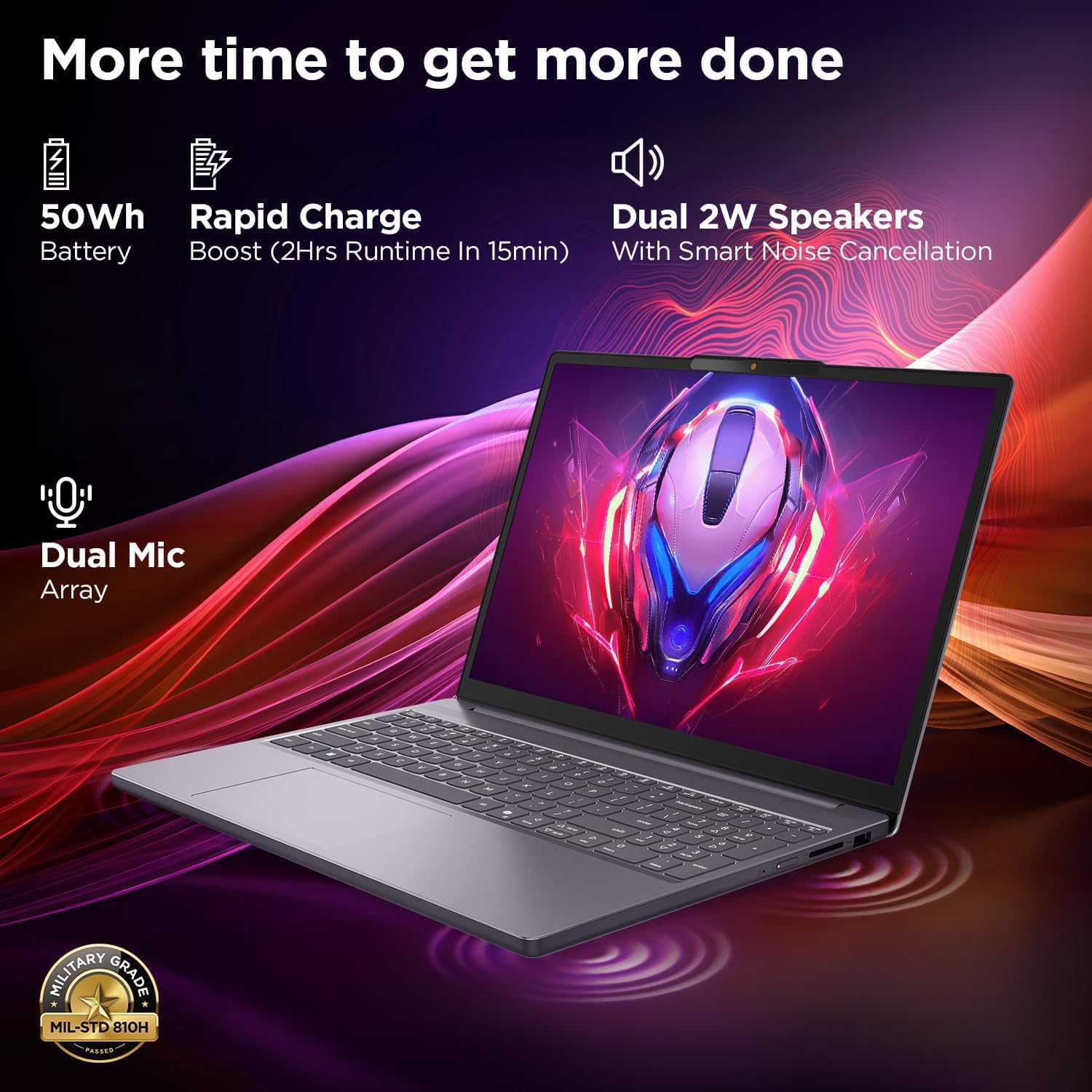
This image highlights the laptop's power and audio capabilities. It features a 50Wh battery with Rapid Charge Boost, providing 2 hours of runtime from a 15-minute charge. Dual 2W speakers with Smart Noise Cancellation and a Dual Mic Array enhance audio quality. The laptop also meets Military Grade MIL-STD 810H durability standards.
۳.۲ بندرونه او نښلونه

This image illustrates the various ports available on the Lenovo IdeaPad Slim 3. These include a power button, an SD card reader, a power connector, two USB-A ports (5Gbps), an HDMI port, and a USB-C port (5Gbps) with USB Power Delivery 3.0 and DisplayPort 1.2 support for data transfer and external displays. A headphone/microphone combo jack (3.5mm) is also present.
3.5 Keyboard and Touchpad Layout
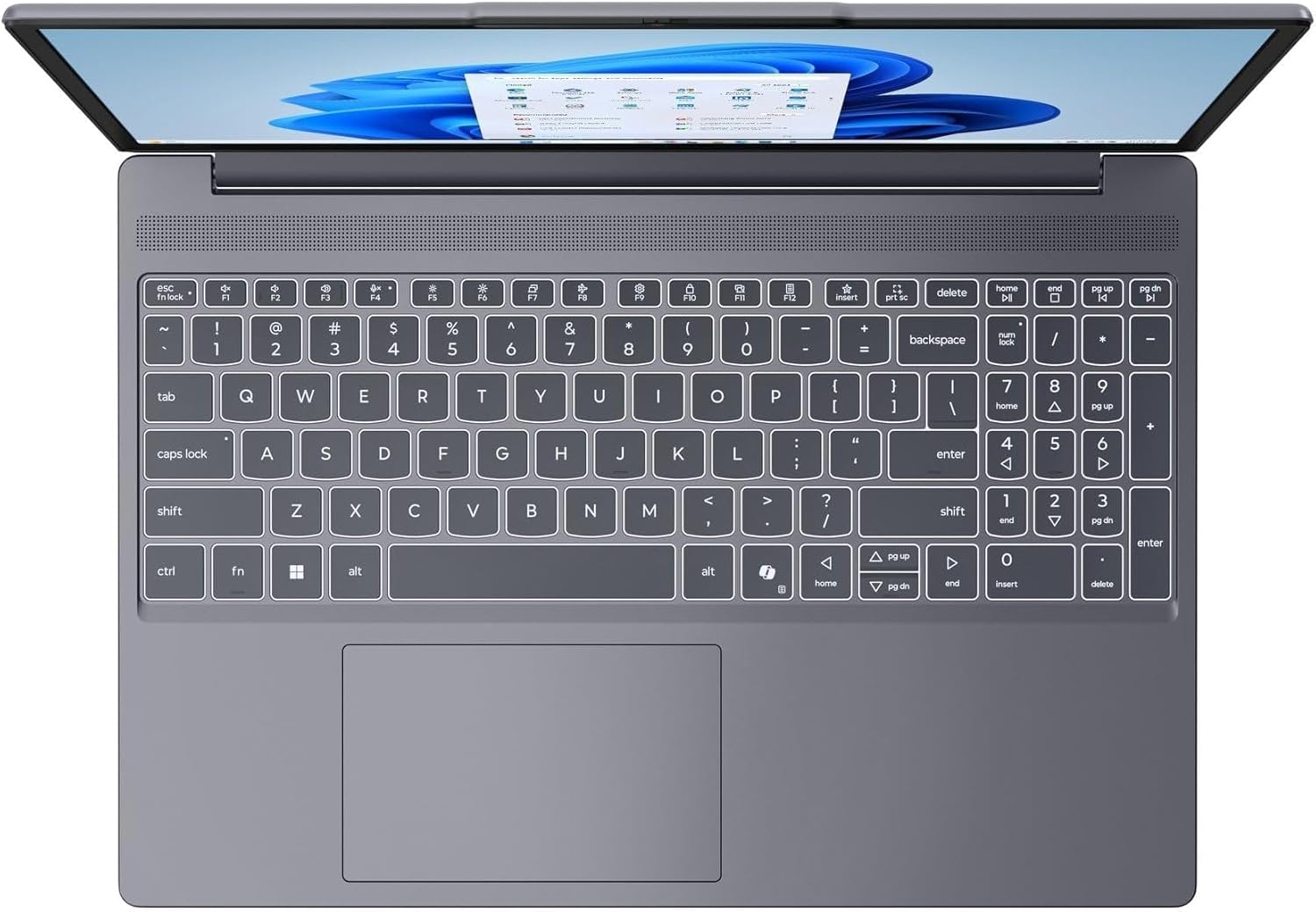
دا انځور له پورته څخه ښکته وړاندې کوي view of the laptop's full-size keyboard with a numeric keypad and the integrated touchpad. It shows the standard QWERTY layout along with function keys and dedicated navigation keys.
3.6 Laptop Exterior (Closed)
This image shows the top cover of the Lenovo IdeaPad Slim 3 laptop when closed, featuring the Lenovo brand logo centrally placed on the grey metallic surface.
3.7 Laptop Bottom View

This image displays the bottom panel of the Lenovo IdeaPad Slim 3 laptop, showing the ventilation grilles for cooling and rubber feet for stability.
4. ترتیب کول
۳.۲ لومړنی بریښنا فعالول او چارج کول
- د بریښنا اډاپټر سره وصل کړئ: د بریښنا اډاپټر د لپ ټاپ د بریښنا نښلونکي سره وصل کړئ او بیا د دیوال آوټ لیټ سره وصل کړئ.
- بیټرۍ چارج کړئ: لیپ ټاپ ته اجازه ورکړئ چې د لومړني کارونې دمخه لږترلږه 30 دقیقې چارج شي، یا تر هغه چې د بیټرۍ شاخص کافي چارج وښيي.
- پاور آن: Open the laptop lid and press the power button located on the side or keyboard deck.
- د وینډوز تنظیم کول: د وینډوز 11 کور تنظیم بشپړولو لپاره په سکرین کې لارښوونې تعقیب کړئ، پشمول د ژبې، سیمې، شبکې اتصال، او د کارونکي حساب جوړول.
4.2 د شبکې سره نښلول
- وای فای: During Windows setup or later, click the Wi-Fi icon in the taskbar, select your network, enter the password, and click Connect.
- Ethernet (if applicable via adapter): Connect an Ethernet cable from your router/modem to a compatible USB-C adapter (not included) and then to the laptop's USB-C port.
5. عملیاتي لارښوونې
۴.۲ د کیبورډ او ټچ پیډ کارول
- کیبورډ: The laptop features a full-size keyboard with a numeric keypad. Use the Fn key in combination with function keys (F1-F12) for special functions like adjusting brightness, volume, or enabling/disabling Wi-Fi.
- ټچ پیډ: The integrated touchpad supports multi-touch gestures for navigation, scrolling, and zooming. Refer to Windows settings for customizing touchpad gestures.
۲.۳ د بهرنیو وسایلو نښلول
- د USB وسایل: Connect USB peripherals (mouse, keyboard, external drives) to the available USB-A or USB-C ports.
- HDMI/ډیسپلی پورټ: Use the HDMI port or USB-C (with DP 1.2 support) to connect an external monitor or projector.
- بلوتوث وسایل: Enable Bluetooth in Windows settings to pair wireless headphones, speakers, or other Bluetooth accessories.
- SD کارت: Insert an SD card into the dedicated SD card reader slot for data transfer.
5.3 د بریښنا مدیریت
- د خوب حالت: د لپ ټاپ د خوب حالت ته د اړولو لپاره پوښ وتړئ یا د بریښنا تڼۍ په لنډ ډول فشار ورکړئ.
- بندول: Click the Start button, then Power, and select "Shut down" to turn off the laptop completely.
- بیا پیل کول: Click the Start button, then Power, and select "Restart" to reboot the laptop.
6. ساتنه
۶.۱ د لپ ټاپ پاکول
- سکرین: د نرم، لینټ پاک ټوکر څخه په روښانه توګه کار واخلئampپه اوبو یا د سکرین پاکونکي سره مینځل شوی. په مستقیم ډول په سکرین باندې مایع مه سپری کوئ.
- کیبورډ او چیسس: د نرم او وچ ټوکر څخه کار واخلئ. د سختې خاورې لپاره، یو څه damp د نرم صابون محلول سره ټوکر کارول کیدی شي، ډاډ ترلاسه شي چې هیڅ مایع سوریو ته ننوځي.
- وینټیلیشن: د هوا د تودولو ګریلونه په دوره یي ډول د فشار شوي هوا سره پاک کړئ ترڅو د دوړو د راټولیدو مخه ونیول شي، کوم چې کولی شي د یخولو فعالیت اغیزمن کړي.
6.2 د بیټرۍ پاملرنه
- د سخت تودوخې څخه ډډه وکړئ.
- بیټرۍ په مکرر ډول په بشپړه توګه مه خارجوئ.
- که چیرې لیپ ټاپ د اوږدې مودې لپاره ذخیره کوئ، نو بیټرۍ یې شاوخوا 50-60٪ پورې چارج کړئ.
6.3 د سافټویر تازه معلومات
- په منظم ډول د وینډوز تازه معلوماتو لپاره د دې له لارې وګورئ ترتیبات> د وینډوز تازه معلومات.
- د لینوو رسمي ملاتړ ته مراجعه وکړئ website for driver and firmware updates specific to your IdeaPad Slim 3 model.
7. ستونزه حل کول
| ستونزه | احتمالي حل |
|---|---|
| لیپ ټاپ نه چالانېږي. | Ensure the power adapter is securely connected and the outlet is functional. Try a different outlet. If the battery is completely drained, allow it to charge for a while before attempting to power on. |
| ښودنه خالي یا توره ده. | Check if the laptop is powered on. Adjust screen brightness using function keys. Connect an external monitor to check if the issue is with the laptop's internal display. |
| د وای فای اتصال ستونزې. | Ensure Wi-Fi is enabled in Windows settings. Restart your router/modem. Check for updated Wi-Fi drivers on the Lenovo support webسایټ |
| ورو فعالیت. | Close unnecessary applications. Check Task Manager for resource-intensive processes. Ensure Windows and drivers are up to date. Run a disk cleanup. |
| کیبورډ یا ټچ پیډ غیر ځواب ورکوونکی دی. | Restart the laptop. Check for driver updates. Ensure no physical obstructions are present. |
8. مشخصات
| فیچر | تفصیل |
|---|---|
| برانډ | Lenovo |
| د ماډل نوم | د آیډیا پیډ سلیم 3 |
| د سکرین اندازه | 15.3 Inches WUXGA IPS |
| قرارداد | 1920 x 1200 پکسله |
| پروسیسر | 13th Gen Intel Core i7-13620H (2.4 GHz, up to 4.9 GHz) |
| RAM | 24GB DDR5 RAM (Upgradable to 40GB) |
| ذخیره کول | 1TB NVMe M.2 SSD (Upgradable to 4TB) |
| عملیاتي سیسټم | د وینډوز 11 کور |
| ګرافیک | یوځای شوی |
| بې سیم ارتباط | وای فای ۶ (۸۰۲.۱۱ اکس) |
| بلوتوث | بلوتوث 5.2 |
| بندرونه | 2x USB-A (5Gbps), 1x USB-C (5Gbps, PD 3.0, DP 1.2), 1x HDMI, 1x Headphone/Mic Combo, 1x SD Card Reader, Power Connector |
| Webکمره | HD Camera with Privacy Shutter |
| آډیو | Dual 2W Speakers with Smart Noise Cancellation, Dual Mic Array |
| بیټرۍ | 50Wh, Rapid Charge Boost |
| ابعاد (L x W x Th) | ۸۳.۸" x ۵۵.۷" x ۴۴.۱" |
| وزن | 3.51 پونډه |
| ځانګړي ځانګړتیاوې | Privacy Shutter, Power Delivery, Military Grade Durability (MIL-STD 810H) |
9. د تضمین معلومات
Your Lenovo Laptop Computer 2026 Edition (IdeaPad Slim 3) comes with a محدود تضمین. The specific terms and duration of your warranty may vary by region and purchase date. For detailed warranty information, including coverage, terms, and conditions, please refer to the warranty card included with your product or visit the official Lenovo support webسایټ:
https://support.lenovo.com/warranty
سپارښتنه کیږي چې خپل محصول په لینووو کې ثبت کړئ website to facilitate warranty claims and receive important updates.
10. ملاتړ
For further assistance, technical support, or to download the latest drivers and manuals, please visit the official Lenovo Support webسایټ:
You may also contact Lenovo customer service directly. Contact information can typically be found on the support webستاسو د ځانګړې سیمې لپاره سایټ.