
1. پیژندنه
Thank you for choosing the roborock Q10 S5 Robot Vacuum and Mop Cleaner. This manual provides essential information for setting up, operating, and maintaining your device to ensure optimal performance and longevity. Please read this manual thoroughly before using the product and keep it for future reference.
2. د خوندیتوب معلومات
To reduce the risk of injury, electric shock, fire, or damage, please observe the following safety precautions:
- دا وسیله د 8 کالو او پورته ماشومانو لخوا کارول کیدی شي او هغه کسان چې فزیکي، حسي یا ذهني وړتیاوې یې کمې وي یا د تجربې او پوهې نشتوالی لري که چیرې دوی ته په خوندي ډول د وسیلې کارولو په اړه نظارت یا لارښوونې ورکړل شوي وي او د خطرونو په اړه پوهیږي. .
- ماشومان باید څارنه وشي ترڅو ډاډ ترلاسه شي چې دوی د وسایلو سره لوبې نه کوي.
- پاکول او د کارونکي ساتنه باید د ماشومانو لخوا پرته له نظارت څخه ترسره نشي.
- Do not use the robot in areas with open flames or fragile objects.
- ډاډ ترلاسه کړئ چې د چارج کولو ډاک د دیوال په وړاندې په یوه هواره سطحه کې ځای پر ځای شوی دی.
- یوازې د وسیلې سره چمتو شوي اصلي بریښنا اډاپټر وکاروئ.
- Do not expose the robot to direct sunlight or moisture.
- Before cleaning, remove power cords, small objects, and fragile items from the floor.
3. محصول ختم شوview
Familiarize yourself with the components of your roborock Q10 S5 robot vacuum.
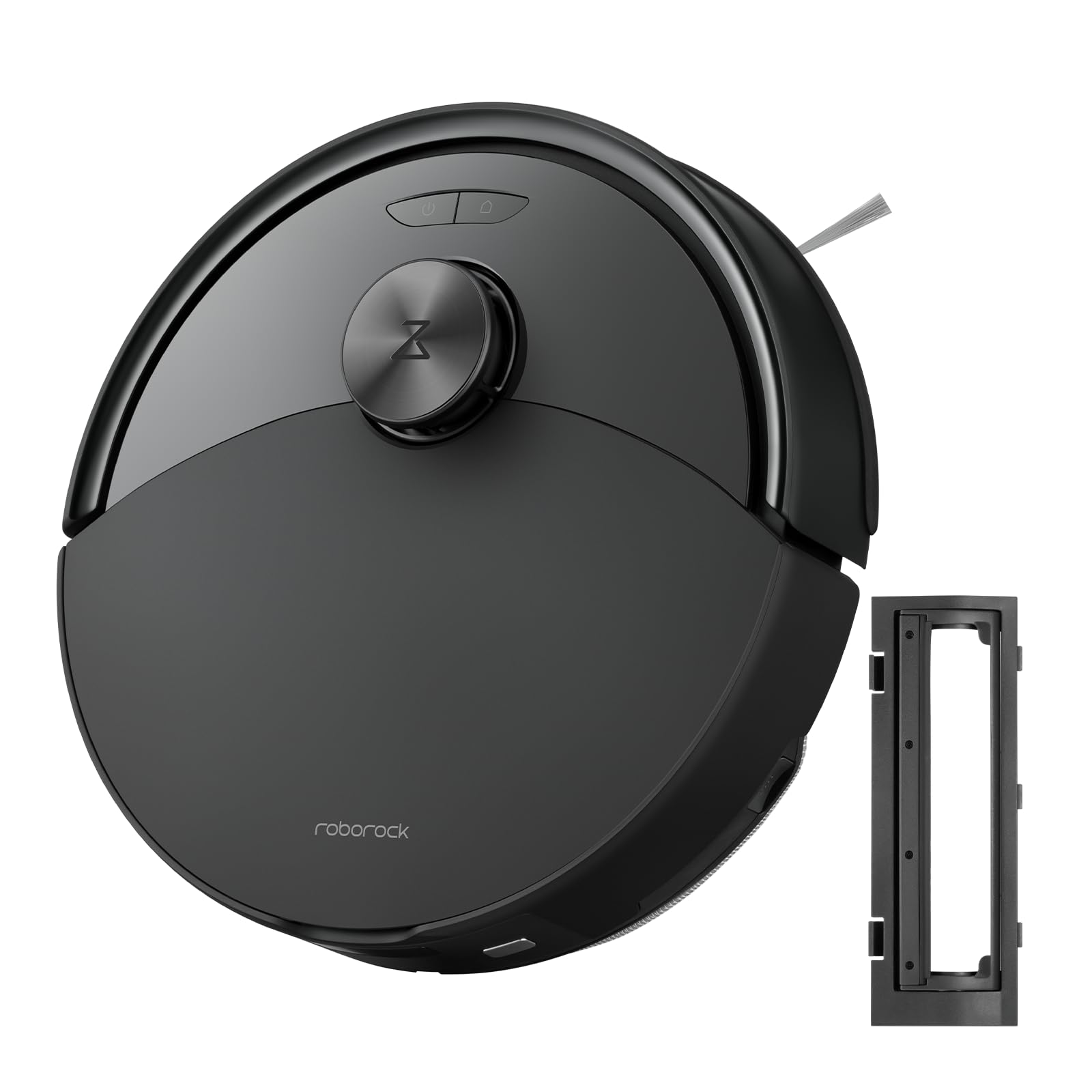
شکل 1: The roborock Q10 S5 Robot Vacuum and Mop Cleaner. This image shows the top view of the robot, highlighting its sleek black design and main control buttons.
د روبوټ اجزا:
- پورتنۍ پوښ: Lifts to reveal the dustbin and Wi-Fi indicator.
- د بریښنا/پاک تڼۍ: Press to start/pause cleaning, hold to turn on/off.
- Dock/Spot Clean Button: Press to send the robot back to the dock, hold for spot cleaning.
- LDS Sensor: For navigation and mapping.
- بمپر: خنډونه کشفوي.
- د غاړې برش: له څنډو او کونجونو څخه کثافات پاکوي.
- اصلي برش: Collects dirt and debris from floors. Features a floating design for better contact.
- هر اړخیز څرخ: For movement.
- د اړیکو چارج کول: د چارج کولو ډاک سره وصل کیږي.
- د کلف سینسرونه: روبوټ د زینو څخه د غورځېدو مخه نیسي.
- Water Tank & Mop Pad: For mopping functionality.
د چارج کولو ډاک:
- Dock Location Beacon: Helps the robot locate the dock.
- د اړیکو چارج کول: Transfers power to the robot.
- Power Cable Port: د بریښنا اډاپټر سره نښلوي.
4. ترتیب کول
- روبوټ خلاص کړئ: Carefully remove the robot and all accessories from the packaging. Remove any protective films or shipping materials.
- Install the Side Brush: Press the side brush onto its post until it clicks into place.
- Place the Charging Dock:
- Place the charging dock on a hard, level surface against a wall.
- Ensure there is at least 0.5 meters (1.6 feet) of clear space on both sides and 1.5 meters (4.9 feet) in front of the dock.
- Connect the power cable to the charging dock and plug it into a wall outlet.
- لومړنی لګښت: Place the robot on the charging dock. The robot will automatically turn on and begin charging. For first-time use, fully charge the robot before operation (approximately 4-6 hours). The power indicator light will breathe white during charging and turn solid white when fully charged.
- اپلیکیشن ډاونلوډ کړئ: لټون "Roborock" in the App Store or Google Play Store, or scan the QR code on the packaging to download and install the app.
- وائی فای سره وصل کړئ:
- Open the Roborock app and follow the on-screen instructions to add your device.
- ډاډ ترلاسه کړئ چې ستاسو تلیفون د 2.4 GHz Wi-Fi شبکې سره وصل دی.
- فشار ورکړئ او ونیسئ ډاک او ځواک buttons simultaneously for 3 seconds until you hear the "Resetting Wi-Fi" voice alert.
- Follow the app's instructions to complete the connection.
5. عملیاتي لارښوونې
د پاکوالي پیل کول:
- د روبوټ څخه: فشار ورکړئ ځواک button once. The robot will start cleaning.
- له اپلیکیشن څخه: Open the Roborock app and tap the "Clean" button.
Pausing/Resuming/Stopping:
- وقفه: په روبوټ کې هره تڼۍ کېکاږئ یا په اپلیکیشن کې "وقفه" کلیک وکړئ.
- بیا پیلول: فشار ورکړئ ځواک button or tap "Resume" in the app.
- درېدل: To stop a cleaning cycle, press the ډاک button to send the robot back to the charging dock, or tap "Stop" in the app.
د مینځلو دنده:
- د اوبو ټانک ډک کړئ: Open the water tank cover, fill with clean water, and close securely.
- د موپ پیډ سره وصل کړئ: Wet the mop pad and wring it out. Slide it into the mop pad slot until it is securely attached.
- Start Mopping: The robot will automatically detect the mop module and switch to mopping mode. You can adjust water flow levels in the app.
د اپلیکیشن ځانګړتیاوې:
- د نقشې مدیریت: Create and save maps, set no-go zones, virtual walls, and invisible barriers.
- د خونې انتخابي پاکول: Choose specific rooms to clean.
- د پاکولو مهالویش: د مختلفو وختونو او ورځو لپاره د پاکولو مهالویشونه تنظیم کړئ.
- Custom Cleaning Modes: د سکشن ځواک او د اوبو د جریان کچه تنظیم کړئ.
- ریموټ کنټرول: د روبوټ حرکت په لاسي ډول کنټرول کړئ.
6. ساتنه
Regular maintenance ensures your roborock Q10 S5 operates efficiently. Always turn off the robot and unplug the charging dock before performing any maintenance.
Dustbin and Filter (Weekly):
- Lift the top cover of the robot.
- کثافات لرې کړئ.
- د کثافاتو د ډبې پوښ خلاص کړئ او محتويات یې په کثافاتو کې خالي کړئ.
- Remove the filter. Tap it gently to remove dust. The filter can be rinsed with water; ensure it is completely dry before reinstallation (allow 24 hours).
- Rinse the dustbin with water if necessary and allow it to dry completely.
- Reinstall the dry filter and dustbin.
Main Brush (Weekly):
- روبوټ وګرځوئ.
- Press the tabs to remove the main brush cover.
- اصلي برش پورته کړئ.
- Use the cleaning tool (if provided) or scissors to cut and remove any hair or debris tangled around the brush.
- Reinstall the main brush and cover, ensuring it clicks into place.
Side Brush (Monthly):
- د غاړې برش خلاص کړئ.
- هر ډول ویښتان یا کثافات لرې کړئ.
- Reattach and tighten the screw.
Sensors and Charging Contacts (Monthly):
- ټول سینسرونه (کلف سینسرونه، دیوال سینسر، د LDS سینسر کړکۍ) او د روبوټ او ډاک دواړو چارج کولو تماسونه د نرم، وچ ټوکر سره پاک کړئ.
Mop Pad (After Each Use):
- د اوبو ټانک څخه موپ پیډ لرې کړئ.
- Rinse thoroughly with water and allow it to air dry completely before next use.
7. ستونزه حل کول
If you encounter issues with your robot, please refer to the following table before contacting support.
| ستونزه | احتمالي لامل | د حل لاره |
|---|---|---|
| روبوټ نه چلیږي. | بیټرۍ ټیټه ده یا چارج شوې نه ده. | Place the robot on the charging dock and ensure it is charging. |
| روبوټ نشي کولی د وائی فای سره وصل شي. | Incorrect Wi-Fi password, 5GHz network, or poor signal. | Ensure correct 2.4GHz Wi-Fi, reset Wi-Fi on robot, move closer to router. |
| روبوټ ډېر ځله بندېږي. | خنډونه، پیچلي کیبلونه، یا ناپاک سینسرونه. | Clear floor, clean sensors, use no-go zones in app. |
| د پاکولو ضعیف فعالیت. | Full dustbin, dirty filter, tangled brushes. | Empty dustbin, clean/replace filter, clean main/side brushes. |
| روبوټ غیر معمولي غږ کوي. | Debris in main brush, side brush, or wheels. | Inspect and clean all brushes and wheels for obstructions. |
If the problem persists, please refer to the Roborock app for more detailed error messages or contact customer support.
8. مشخصات
| فیچر | تفصیل |
|---|---|
| ماډل | Q10 S5 |
| ابعاد | نږدې ۵۳.۲ x ۳۳.۹ x ۵.۶ ملي متره (۲.۰۹ x ۱.۳۳ x ۰.۲۲ انچه) |
| وزن | نږدې 3.7 کیلو ګرامه (8.16 پونډه) |
| بیټرۍ | Lithium-Ion (Capacity not specified, typical for robot vacuums) |
| درجه بندي ځواک | Approx. 60W (Typical for robot vacuums) |
| د کثافاتو ظرفیت | Approx. 470 ml (Typical for robot vacuums) |
| د اوبو د ټانک ظرفیت | Approx. 300 ml (Typical for robot vacuums) |
| سکشن ځواک | Up to 10,000 Pa (HyperForce Suction Power from feature bullets) |
| د وائی فای ارتباط | 2.4 GHz |
یادونه: مشخصات پرته له خبرتیا بدلیږي.
9. تضمین او ملاتړ
roborock products are manufactured to the highest quality standards. For detailed warranty information, please refer to the warranty card included in your product packaging or visit the official roborock website. For technical support, troubleshooting assistance, or to purchase replacement parts, please contact roborock customer service through the app or their official webسایټ
رسمي Webسایټ: www.roborock.com