
1. پیژندنه
This manual provides essential information for setting up, operating, maintaining, and troubleshooting your Lenovo Slim 7 14ILL10 2025 Laptop. Please read this guide thoroughly to ensure optimal performance and longevity of your device.
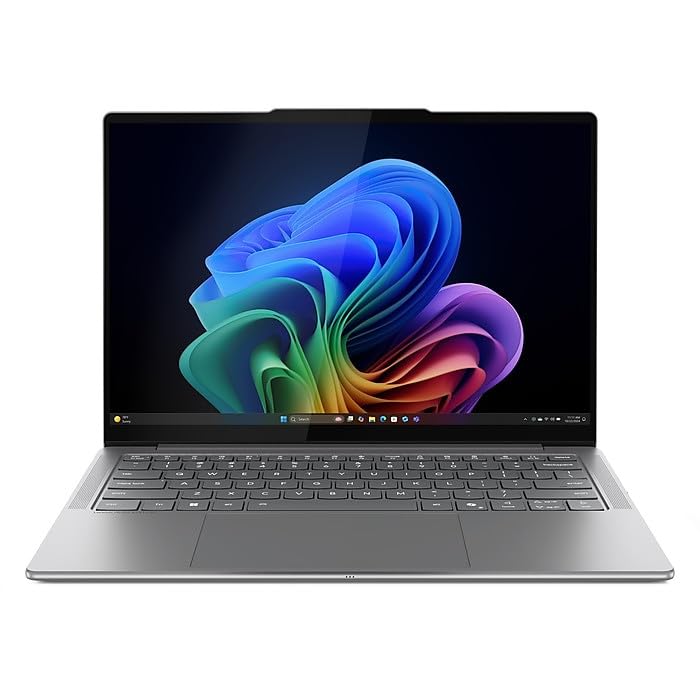
Figure 1.1: Lenovo Slim 7 14ILL10 2025 Laptop, angled view with screen slightly open.
۲. په بکس کې څه دي؟
ډاډ ترلاسه کړئ چې ټول توکي په بسته بندۍ کې شتون لري:
- Lenovo Slim 7 14ILL10 2025 Laptop
- 65W AC اډاپټر
- د ONT ۳۲GB USB ډرایو
3. ترتیب کول
3.1 ابتدايي پاور آن
- لپ ټاپ او ټول لوازم خلاص کړئ.
- Connect the 65W AC adapter to the laptop's USB-C power jack and then to a power outlet.
- د لیپ ټاپ پوښ خلاص کړئ. لیپ ټاپ ممکن په اتوماتيک ډول چالان شي، یا تاسو ممکن د بریښنا تڼۍ فشارولو ته اړتیا ولرئ.
- د وینډوز ۱۱ کور د تنظیم کولو پروسې بشپړولو لپاره په سکرین کې لارښوونې تعقیب کړئ. پدې کې ستاسو د سیمې غوره کول، د وای فای شبکې سره وصل کیدل، او د کارونکي حساب جوړول شامل دي.
3.2 د پردیو سره نښلول
ستاسو لیپ ټاپ د بهرنیو وسیلو د نښلولو لپاره مختلف پورټونه لري:
- د USB تندربولټ 4 / USB4 40Gbps ډول-C (x2): For high-speed data transfer, power delivery, and DisplayPort video output.
- د USB 3.2 Gen 1 ډول-A (x1): د معیاري USB وسیلو لپاره.
- HDMI v2.1 (x1): د بهرنیو ښودنې یا پروجیکټرونو سره د نښلولو لپاره.
- د هیډفون/مایکروفون کامبو جیک (x1): د آډیو ان پټ/آؤټ پټ لپاره.
- د کارت لوستونکی (x1): د حافظې کارتونو لپاره.

Figure 3.1: Left side ports including USB-A and headphone jack.
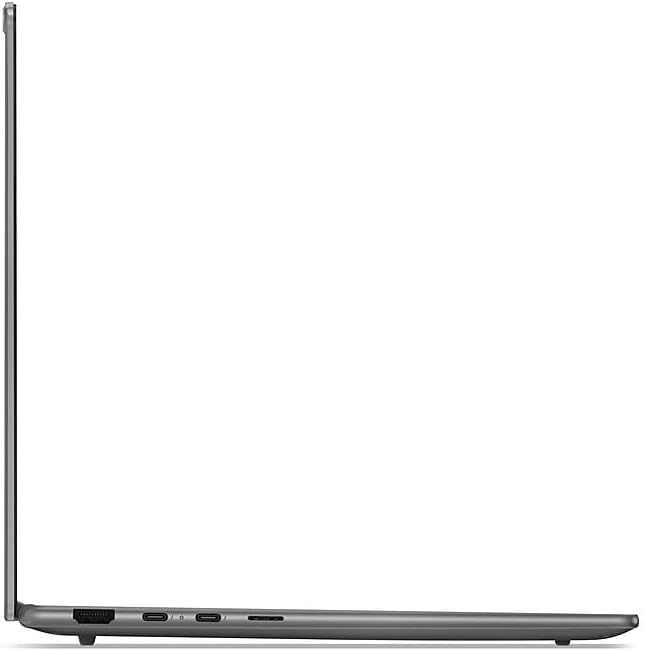
Figure 3.2: Right side ports including Thunderbolt 4 and HDMI.
4. عملیاتي لارښوونې
4.1 Display and Input
- ټچ سکرین: The 14" WUXGA (1920 x 1200) display supports touch input. Use gestures similar to a smartphone or tablet.
- شاته کیبورډ: Adjust keyboard backlight brightness using the function keys (Fn + Spacebar, typically).
- ټچ پیډ: د کرسر کنټرول او څو ټچ اشارو لپاره مدغم ټچ پیډ وکاروئ.
4.2 نښلول
- وای فای: Connect to wireless networks using Intel Wi-Fi 7 BE201. Access Wi-Fi settings via the Windows taskbar.
- بلوتوث: Pair Bluetooth devices such as headphones or mice using Bluetooth 5.3. Manage Bluetooth settings in Windows.
۳.۴ کیمره او آډیو
- 5.0MP + IR Camera: Located at the top of the display, featuring an E-Shutter for privacy.
- آډیو: The laptop is equipped with 4 stereo speakers (2W x2 woofers, 2W x2 tweeters) optimized with Dolby Atmos and Smart Ampلايف
4.4 د بیټرۍ مدیریت
The laptop features a 4-cell 70Wh battery, providing up to 8 hours of non-gaming battery life. To maximize battery lifespan:
- د بیټرۍ په مکرر ډول د بشپړ چارج کولو څخه ډډه وکړئ.
- Store the laptop in a cool, dry place.
- د بیټرۍ کارولو غوره کولو لپاره په وینډوز کې د بریښنا تنظیمات تنظیم کړئ.
5. ساتنه
5.1 پاکول
- د نرم، لینټ پاک ټوکر څخه لږ څه کار واخلئampد ښودنې پاکولو لپاره د اوبو یا سکرین کلینر سره مینځل.
- د کیبورډ او چیسس لپاره، نرم ټوکر وکاروئ. د سختو کیمیاوي موادو څخه ډډه وکړئ.
- د هوا د مناسب جریان ډاډ ترلاسه کولو لپاره په منظم ډول د وینټونو څخه دوړې پاکې کړئ.
5.2 د سافټویر تازه معلومات
Keep your operating system and drivers updated to ensure security and optimal performance. Windows Update will manage most system updates. Check the Lenovo support webستاسو د ماډل لپاره د ځانګړو ډرایور تازه معلوماتو لپاره سایټ.
6. ستونزه حل کول
This section addresses common issues. For more complex problems, refer to the Lenovo support webسایټ
۵.۱ د برېښنا ستونزې
- لیپ ټاپ نه چالانېږي: ډاډ ترلاسه کړئ چې د AC اډاپټر په خوندي ډول وصل دی او د بریښنا آوټ لیټ فعال دی. د 10-15 ثانیو لپاره د بریښنا تڼۍ ونیسئ.
- بیټرۍ چارج نه کوي: د AC اډاپټر اتصال تایید کړئ. اډاپټر یا چارج کولو پورټ ته د کوم ښکاره زیان لپاره وګورئ.
6.2 د ښودلو مسلې
- نه ښودنه: د HDMI له لارې یو بهرنی مانیټر وصل کړئ ترڅو وګورئ چې ایا ستونزه د لیپ ټاپ داخلي ښودنې سره ده.
- ځلیدونکی سکرین: خپل ګرافیک چلوونکي تازه کړئ.
۵.۳ د اتصال مسلې
- وای فای نه وصل کیږي: Restart your router and laptop. Ensure Wi-Fi is enabled in Windows settings.
- د بلوتوث وسیله نه جوړه کیږي: Ensure the device is in pairing mode and within range. Restart Bluetooth on your laptop.
7. مشخصات
| فیچر | مشخصات |
|---|---|
| برانډ | Lenovo |
| د ماډل شمیره | 83MC0009US-CTO |
| پروسیسر | Intel Ultra 7 256V 8-Core (Up to 4.8 GHz) |
| ګرافیک | Intel Arc Graphics 140V |
| ښودل | 14" WUXGA (1920 x 1200) Touchscreen, 600 nits, 100% DCI-P3, 60Hz |
| حافظه | ۱۶ جي بي LPDDR5 ۶۴۰۰ ميګاهرتز SDRAM |
| ذخیره کول | ۱ ټې بي NVMe M.2 SSD |
| عملیاتي سیسټم | د وینډوز 11 کور |
| بې سیم ارتباط | انټل وای فای ۷ BE201 (2x2)، بلوتوث ۵.۴ |
| بندرونه | 2x USB Thunderbolt 4, 1x USB 3.2 Gen 1 Type-A, 1x HDMI v2.1, 1x Headphone/Microphone Combo Jack, 1x Card Reader |
| کیمره | 5.0MP + IR Camera with E Shutter |
| آډیو | 4 stereo speakers (2W x2 woofers, 2W x2 tweeters), Dolby Atmos |
| بیټرۍ | 4 Cell 70Wh |
| ابعاد (L x W x H) | 12.28 x 8.63 x 0.55 انچه |
| وزن | 2.82 پونډه |
| رنګ | لونا خړ |
8. تضمین او ملاتړ
Your Lenovo Slim 7 14ILL10 2025 Laptop comes with an On Site warranty. For detailed warranty terms, service requests, and technical support, please visit the official Lenovo support webسایټ:
You will need your laptop's model number (83MC0009US-CTO) and serial number (typically found on a sticker on the bottom of the laptop) when contacting support.