
1. پیژندنه
Thank you for choosing the TOMPROAD L10 Portable Bluetooth Speaker. This manual will guide you through the features, setup, and operation of your new speaker. Please read it carefully to ensure optimal performance and longevity of your device.
۲. په بکس کې څه دي؟
- 1 x L10 Bluetooth Speaker
- 1 x د ایکس کیبل
- 1 x USB چارج کیبل
- 1 x Dust-free wiping cloth
- 1 x د کارونکي لارښود

Image: All items included in the TOMPROAD L10 Portable Bluetooth Speaker package.
3. د محصول ب Featuresې
- ځواکمن غږ: Equipped with a dual-driver system (1x1'' Tweeter + 1x3'' Woofer) delivering 40W (60W Peak) rich audio with deep bass, enhanced by built-in DSP Technology.
- بېسیم او تار لرونکی اتصال: Features advanced Bluetooth 5.3 for stable wireless transmission up to 100ft. Also supports wired connections via AUX cable for non-Bluetooth devices.
- Multi-function Playback: Supports TWS (True Wireless Stereo), AUX input, U-disk music playback, and TF card music playback.
- د بیټرۍ اوږد ژوند: Built-in 5000mAh rechargeable battery provides 4-12 hours of playtime depending on volume.
- وړ وړ ډیزاین: Features a hand-held pull belt for easy transport, ideal for various indoor and outdoor activities.
- Intuitive Controls & Display: User-friendly physical buttons and a precise volume knob, with a clear digital display showing playback mode and battery level.
- د TWS فعالیت: Pair two L10 speakers for 80W (120W Peak) powerful loud surround stereo sound.

Image: Internal audio components of the L10 speaker, illustrating the dual-driver system and DSP technology.

Image: Battery life and charging time details for the L10 speaker.

Image: The lightweight and portable design of the L10 speaker.
۵. کنټرولونه او بندرونه
The TOMPROAD L10 speaker features an intuitive control panel and various ports for versatile connectivity.

انځور: تفصیلي view د سپیکر د کنټرول پینل څخه.
د کنټرول پینل دندې:
- بریښنا فعال/بند: Turn the audio system on or off.
- Bass Volume Control Knob: د باس کچه تنظیم کړئ.
- Treble Volume Control Knob: درې اړخیزه کچه تنظیم کړئ.
- Monitor Headphone Volume Control Knob: Adjust headphone volume.
- لنډ مطبوعات: پخوانۍ لار ته ځي.
- اوږد پریس: Fast-rewinds.
- لنډ مطبوعات: راتلونکي ټریک ته ځي.
- اوږد پریس: په چټکۍ سره پرمخ وړل.
- د حالت تڼۍ: Switches between Bluetooth/USB/TF Card/AUX modes.
- د پلی کولو/پاز بټن: Short press to play or pause. Long press to pair TWS.
شاته بندرونه:
- USB پورټ: For U-disk music playback.
- د TF کارت سلاټ: For TF card music playback.
- DC IN (USB-C): د سپیکر لپاره د چارج کولو پورټ.
- په اکس کې: 3.5mm audio jack for connecting external non-Bluetooth devices.
- د سر غوږ جیک: د شخصي اوریدلو لپاره.
ویډیو: په تفصیل سرهview of the TOMPROAD L10 Portable Bluetooth Speaker, demonstrating its features, controls, and connectivity options.
۴. د تنظیم لارښوونې
5.1. د سپیکر چارج کول
- Connect the provided USB charge cable to the DC IN (USB-C) port on the back of the speaker.
- د USB کیبل بل پای د یو مناسب USB بریښنا اډاپټر (شامل نه دی) یا د کمپیوټر USB پورټ سره وصل کړئ.
- The battery indicator on the display will show charging status. A full charge typically takes about 3-4 hours.
5.2. بریښنا کول/بندول
- To power on, press and hold the Power ON/OFF button on the top panel until the display lights up.
- To power off, press and hold the Power ON/OFF button again.
5.3. د بلوتوث جوړه کول
- ډاډ ترلاسه کړئ چې سپیکر فعال دی او په بلوتوث حالت کې دی. ښودنه به "نیلي" او فلش وښيي، چې دا په ګوته کوي چې دا د جوړې کولو لپاره چمتو دی.
- په خپل ګرځنده وسیله (سمارټ فون، ټابلیټ، لپ ټاپ) کې، بلوتوث فعال کړئ.
- لټون available Bluetooth devices and select "L10" from the list.
- Once connected, the speaker will emit a confirmation sound, and "BLUE" on the display will stop flashing.
6. عملیاتي لارښوونې
۱. د موسیقۍ بنسټیز غږول
- After successful pairing, you can play music from your connected device.
- Use the Play/Pause button on the speaker or your device to control playback.
- Adjust the master volume using the large knob on the front of the speaker.
- Use the Bass and Treble control knobs on the top panel to fine-tune the sound.
- Use the track navigation buttons (short press) for previous/next track.
۴. TWS (ریښتینی بې سیم سټیریو) جوړه کول
To achieve a broader and richer soundstage, you can pair two L10 speakers together.
- Ensure both L10 speakers are powered on and in Bluetooth mode, but not yet connected to any device.
- On one of the speakers (this will be your primary speaker), long press the Play/Pause button. It will enter TWS pairing mode.
- دواړه سپیکرې به په اتوماتيک ډول یو بل سره وصل شي. د تایید غږ به د TWS بریالي جوړه په ګوته کړي.
- اوس، خپل ګرځنده وسیله د بلوتوث له لارې لومړني سپیکر سره وصل کړئ لکه څنګه چې په 5.3 برخه کې تشریح شوي.
- Enjoy synchronized stereo sound from both speakers.

Image: Two L10 speakers set up for TWS pairing, providing surround sound.
6.3. AUX/USB/TF Card Modes
To switch between different input sources, press the Mode button on the top panel.
- د اکس موډ: Connect an external audio device using the 3.5mm AUX cable to the AUX IN port. The speaker will automatically switch to AUX mode or you can select it using the Mode button.
- د USB حالت: Insert a U-disk with music files into the USB port. The speaker will automatically switch to USB mode or you can select it using the Mode button.
- د TF کارت حالت: د موسیقۍ سره یو TF کارت دننه کړئ files into the TF Card slot. The speaker will automatically switch to TF Card mode or you can select it using the Mode button.
7. ساتنه
- سپیکر د اوبو، رطوبت او سختې تودوخې څخه لرې وساتئ.
- Clean the speaker with the provided dust-free wiping cloth or a soft, dry cloth. Do not use abrasive cleaners or solvents.
- د سپیکر له غورځولو یا د قوي ټکانونو سره مخ کیدو څخه ډډه وکړئ.
- کله چې د اوږدې مودې لپاره نه کارول کیږي، سپیکر په یخ او وچ ځای کې وساتئ او د بیټرۍ روغتیا ساتلو لپاره یې په دوره یي ډول چارج کړئ.
8. ستونزه حل کول
| ستونزه | احتمالي حل |
|---|---|
| سپیکر نه چالانېږي. | ډاډ ترلاسه کړئ چې بیټرۍ چارج شوې ده. سپیکر د USB-C کیبل په کارولو سره د بریښنا سرچینې سره وصل کړئ. |
| د بلوتوث له لارې جوړه نشي کیدی. | Ensure the speaker is in Bluetooth pairing mode (display shows flashing "BLUE"). Make sure your device's Bluetooth is enabled and within range (up to 100ft). Forget previous pairings on your device and try again. |
| غږ نشته یا ټیټ غږ. | Check the volume levels on both the speaker and your connected device. Ensure the correct input mode (Bluetooth, AUX, USB, TF) is selected. |
| د TWS جوړه ناکامه شوه. | Ensure both speakers are not connected to any other Bluetooth device. Place them close to each other and try the TWS pairing process again. |
| Music playback from USB/TF card not working. | Ensure the USB drive or TF card is inserted correctly and contains compatible audio files. Select the correct mode using the Mode button. |
9. مشخصات
| فیچر | تفصیل |
|---|---|
| د ماډل نوم | Bluetooth Speaker L10 |
| د سپیکر ډول | د پورټ ایبل بلوتوټ سپیکر |
| د نصب کولو ډول | د پورټ وړ |
| مواد | اکریلونایتریل بوټاډین سټیرین (ABS) |
| د سپیکر اعظمي تولید ځواک | 60 واټ (چټک) |
| د Subwoofer قطر | ۷۸۷ انچه |
| د Tweeter قطر | ۷۸۷ انچه |
| بلوتوث نسخه | 5.3 |
| د بلوتوټ رینج | 100 پښه |
| د بیټرۍ ظرفیت | 5000 ملیونهamp ساعتونه |
| د چارج کولو وخت | 4 ساعته |
| د لوبې وخت | 4-12 hours (depends on playing volume) |
| د ارتباط ټیکنالوژي | مرستندویه، بلوتوث، USB |
| د آډیو وتلې حالت | سټیریو |
| د سیګنال څخه تر شور پورې نسبت | 80 dB |
| د محصول ابعاد | ۱۶"د x ۲۶"وچ x ۴۷"ح |
| د توکي وزن | ۲.۴۵ پونډه |
| د اوبو د مقاومت کچه | د اوبو مقاومت نلري |
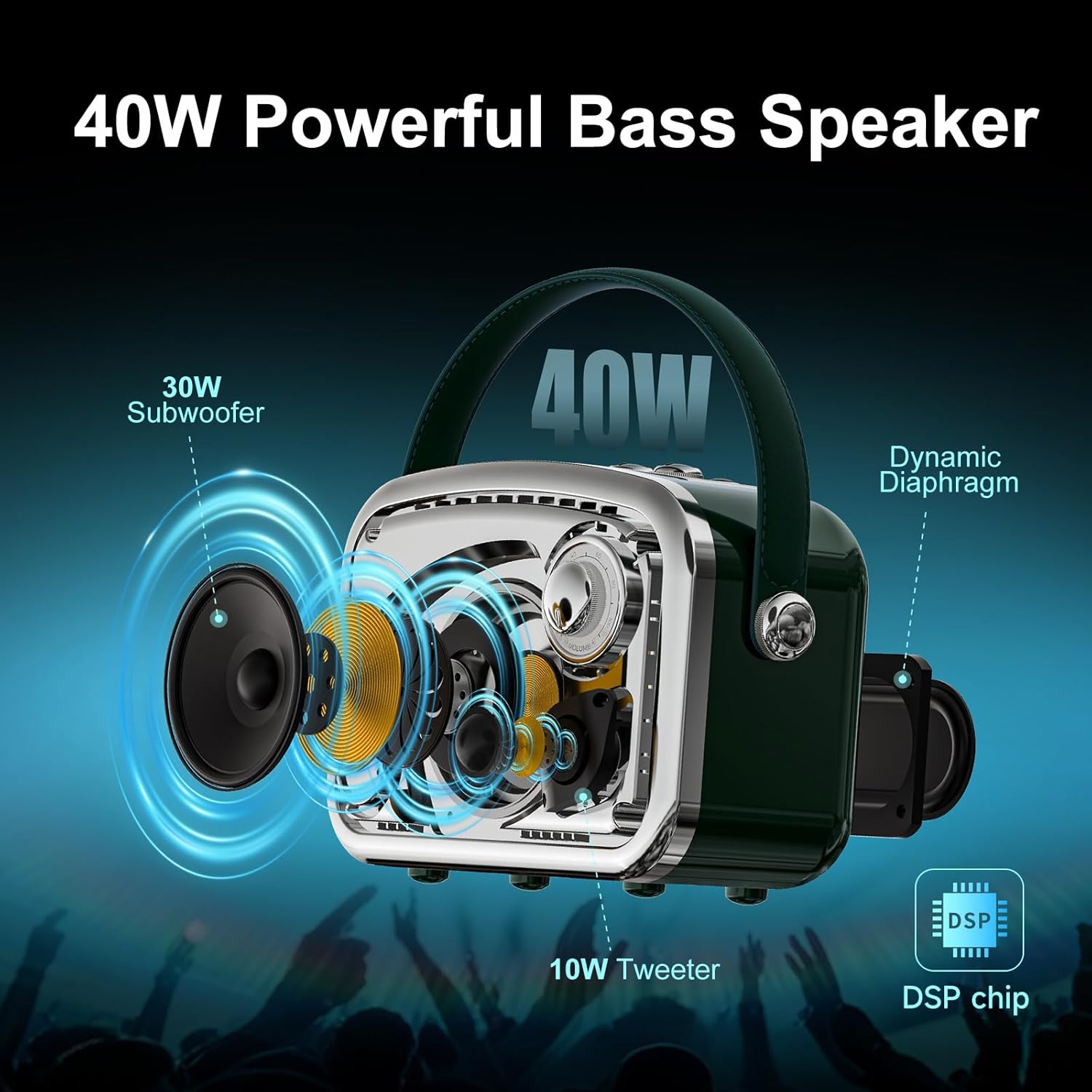
Image: Physical dimensions of the L10 speaker.
10. تضمین او ملاتړ
The TOMPROAD L10 Portable Bluetooth Speaker comes with a Limited Manufacturer Warranty. For any questions or assistance, please contact customer service. We aim to reply within 7-24 hours to provide you with the best support.