
MOZOTER SP9i
د MOZOTER SP9i بې سیم ایربډز کارونکي لارښود
Model: SP9i
پیژندنه
Thank you for choosing the MOZOTER SP9i Wireless Earbuds. These earbuds are designed to provide a comfortable and stable audio experience with advanced Bluetooth 5.3 technology, deep bass sound, and extended playtime. This manual will guide you through the setup, operation, and maintenance of your new earbuds to ensure optimal performance.
په بکس کې څه دي
- MOZOTER SP9i Wireless Earbuds (Left and Right)
- د چارج کولو قضیه
- د USB-C چارج کیبل
- د غوږونو ټپونه (S، M، L اندازه)
- د کارن لارښود
محصول پای ته ورسیدview
The MOZOTER SP9i earbuds feature an over-ear hook design for secure fit and comfort. Each earbud is equipped with intuitive touch controls for easy management of audio and calls. The compact charging case provides additional battery life and convenient storage.

Image: The MOZOTER SP9i Wireless Earbuds resting in their open charging case, showcasing the over-ear hook design and the charging contacts.
انځور: یو مفصل view of an earbud highlighting the integrated Bluetooth 5.3 technology for stable and efficient wireless connectivity.
چمتو کول
۴.۱. د غوږۍ او کیس چارج کول
Before first use, fully charge the earbuds and the charging case. Connect the provided USB-C cable to the charging port on the case and a power source. The indicator lights on the case will show the charging status.
- د چارج کولو وخت: د بشپړ چارج لپاره نږدې 1.5 ساعته.
- د ایربډ لوبې وخت: په یوه چارج کې تر 12 ساعتونو پورې.
- د قضیې سره د لوبې کولو ټول وخت: تر 60 ساعتونو پورې.

Image: The charging case with earbuds inside, illustrating the 60-hour total playtime, 12-hour single charge, and 48-hour case capacity, along with the USB-C charging port.
۲. ستاسو د وسیلې سره جوړه کول
- ډاډ ترلاسه کړئ چې د چارج کولو قضیه بریښنا لري او د غوږ بډونه دننه دي.
- د چارج کولو کیس خلاص کړئ. د غوږ بډونه به په اتوماتيک ډول فعال شي او د جوړې کولو حالت ته به ننوځي.
- په خپل وسیله (سمارټ فون، ټابلیټ، لپ ټاپ) کې، بلوتوث فعال کړئ.
- لټون شته بلوتوث وسایل او غوره کړئ "SP9i"له لیست څخه.
- یوځل چې وصل شو، تاسو به د تایید غږ واورئ، او د غوږونو د شاخص څراغونه به بند شي یا ورو ورو فلش شي.
که چیرې په وسیله کې بلوتوټ فعال وي، نو د غوږ بډونه به په اتوماتيک ډول د وروستي جوړه شوي وسیلې سره وصل شي کله چې له قضیې څخه لرې شي.

Image: An illustration showing the MOZOTER SP9i earbuds in their open case, with a smartphone screen displaying a successful Bluetooth connection to "SP9i".
د اغوستلو لارښوونه
For optimal sound quality and comfort, it is important to wear the earbuds correctly and choose the appropriate eartip size.
۳. د غوږونو غوره کول
The earbuds come with small (S), medium (M), and large (L) eartips. Experiment with different sizes to find the pair that provides the best seal and comfort for your ears. A good seal enhances bass response and passive noise cancellation.
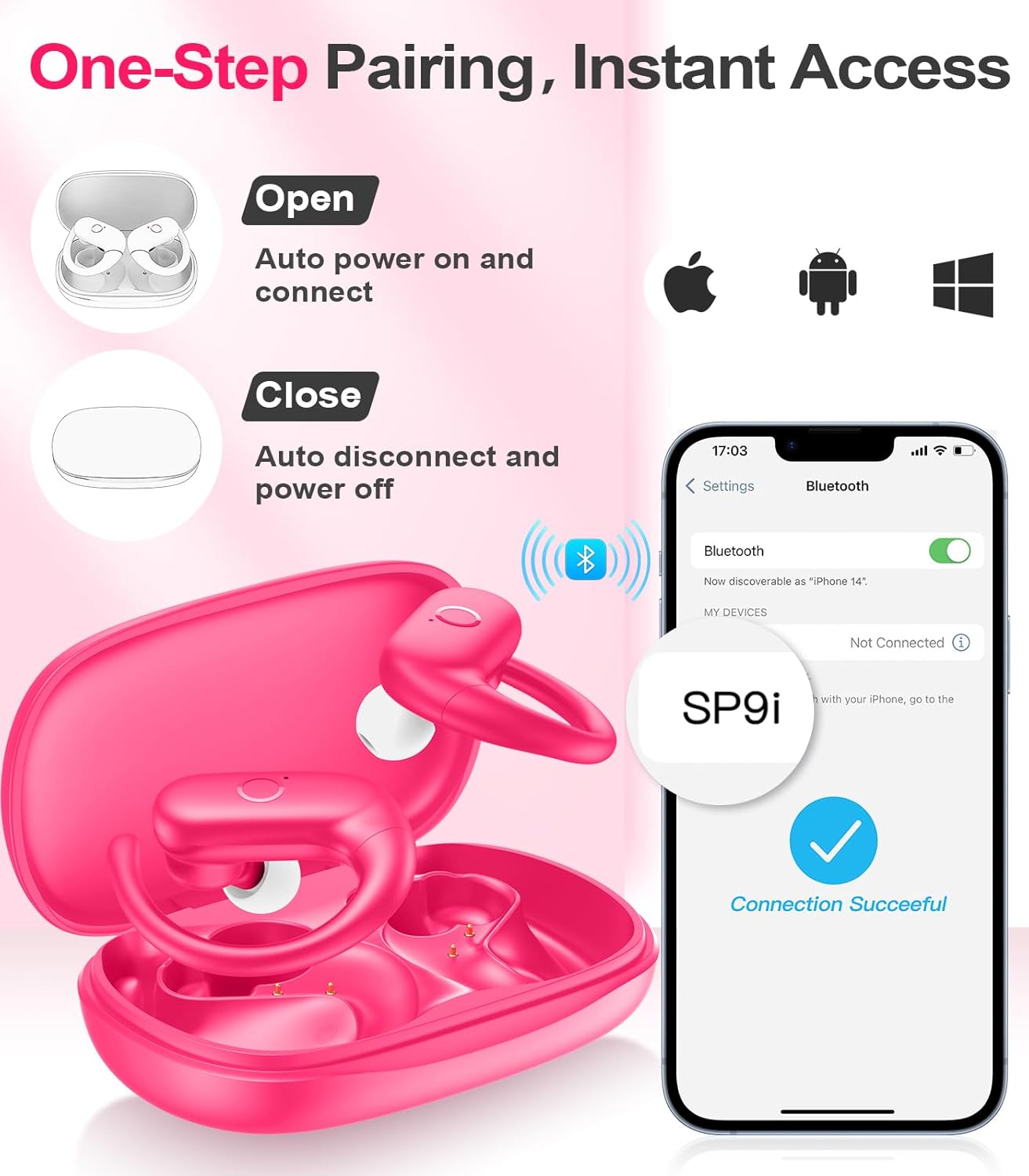
Image: A woman wearing an earbud, with an inset showing the three available eartip sizes (S, M, L) for a customized and comfortable fit.
۲. د خوندي فټ ترلاسه کول
- لومړی ګام: د غوږ چنګک په خپل غوږ کې کیږدئ.
- لومړی ګام: په نرمۍ سره د غوږ کانال ته غوږ بډ دننه کړئ.
- لومړی ګام: Rotate the earbud slightly to find a comfortable and secure angle. The flexible ear hooks ensure a stable fit, ideal for sports and active use.

Image: A three-step diagram illustrating the correct method to wear the MOZOTER SP9i earbuds, ensuring a secure and comfortable fit with the ear hook.

Image: A woman wearing the MOZOTER SP9i earbuds, demonstrating the ergonomic design that rests comfortably and securely on the ear.
عملیاتي لارښوونې
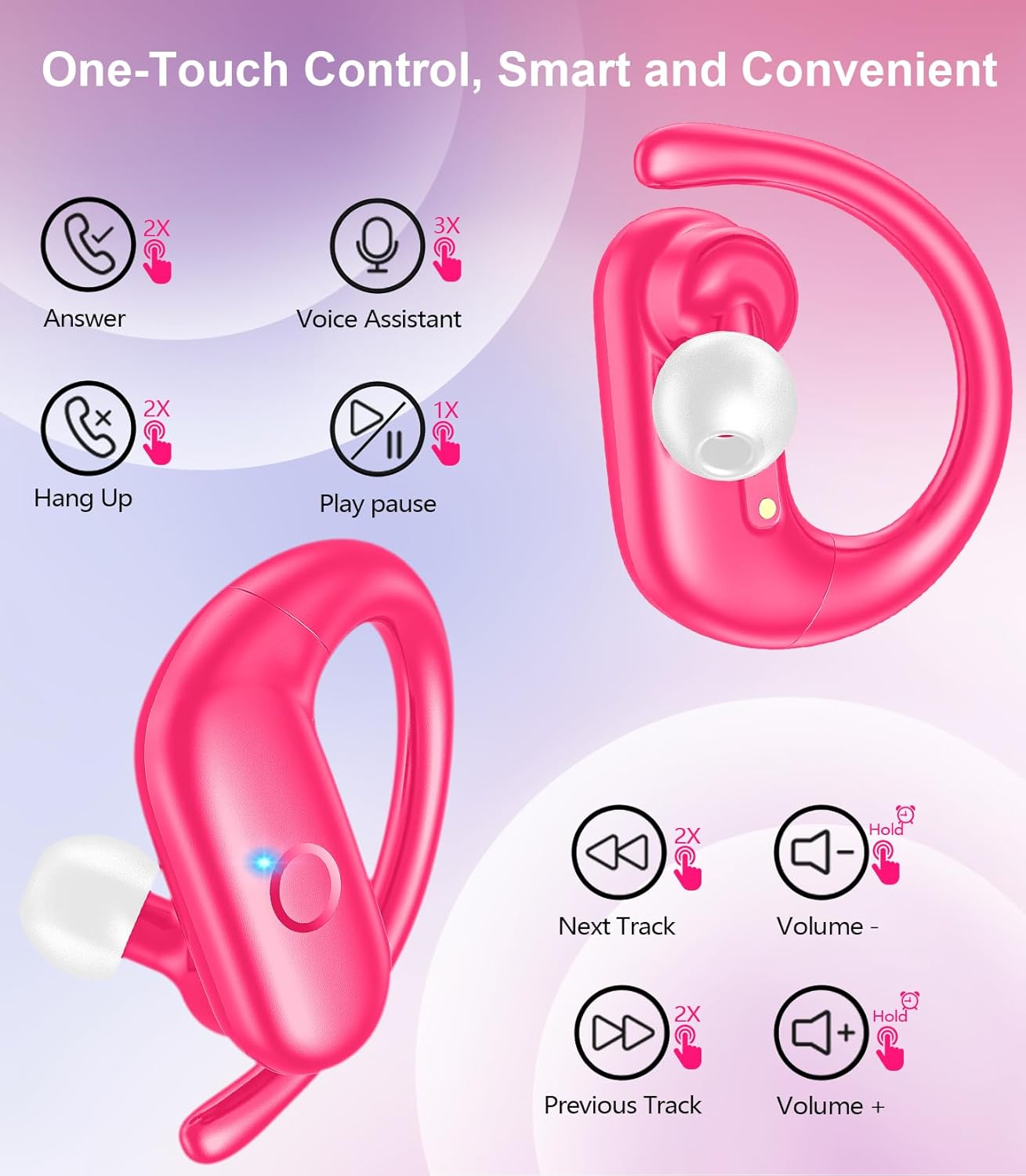
The MOZOTER SP9i earbuds feature intuitive touch controls on each earbud. The following table outlines the functions:
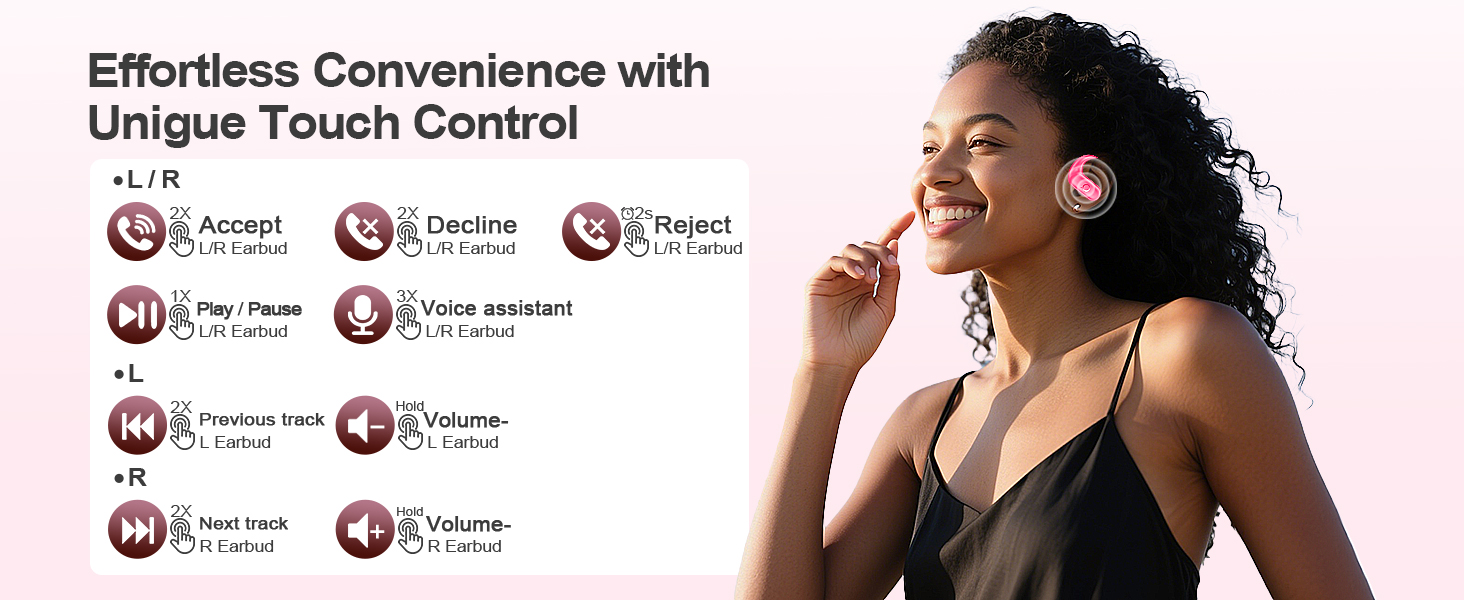
Image: A visual guide detailing the various touch control gestures for the MOZOTER SP9i earbuds, including call management, music playback, and volume adjustments.
| عمل | اشاره (L/R ایربډ) |
|---|---|
| زنګ ووهئ | Double-tap (2X) |
| زنګ ووهئ | Double-tap (2X) |
| زنګ رد کړئ | Triple-tap (3X) |
| میوزیک پلی کړئ / بند کړئ | Single-tap (1X) |
| د غږ معاون فعال کړئ | Triple-tap (3X) |
| بله لار | Double-tap (2X) on سمه ده ایربډ |
| مخکینی ټریک | Double-tap (2X) on کیڼ ایربډ |
| حجم پورته | ودریږه سمه ده ایربډ |
| حجم ښکته | ودریږه کیڼ ایربډ |
ساتنه
مناسب ساتنه ستاسو د غوږونو اوږد عمر او فعالیت تضمینوي.
- پاکول: Regularly clean the eartips and the charging contacts on both the earbuds and the case with a soft, dry, lint-free cloth. Avoid using harsh chemicals or abrasive materials.
- ذخیره کول: کله چې په کارولو کې نه وي، د غوږ بډونه د چارج کولو په قضیه کې وساتئ ترڅو دوی د دوړو او زیان څخه خوندي کړي.
- د اوبو ښکاره کول: While designed for sports, avoid submerging the earbuds in water. Wipe off sweat or moisture immediately after use.
د ستونزو حل کول
If you encounter any issues with your MOZOTER SP9i earbuds, please refer to the following common solutions:
- د غوږونو نه جوړېږي: Ensure both earbuds are charged and removed from the case. Turn off and on your device's Bluetooth. If issues persist, try resetting the earbuds (refer to manufacturer's webکه په لارښود کې نه وي، د ځانګړو بیا تنظیم لارښوونو لپاره سایټ وګورئ).
- یوازې یو غوږۍ کار کوي: Place both earbuds back into the charging case, close the lid, wait a few seconds, then open the lid and remove them. This often resynchronizes them.
- د غږ خراب کیفیت: Ensure the eartips provide a good seal in your ear. Clean any debris from the earbud speakers. Check your device's volume and audio settings.
- د چارج کولو مسلې: Ensure the charging cable is securely connected to both the case and the power source. Clean the charging contacts on the earbuds and inside the case.
- د غوږونو غورځېدل: Experiment with different eartip sizes and adjust the ear hooks for a more secure fit as described in the Wearing Instructions section.
مشخصات
| فیچر | تفصیل |
|---|---|
| د ماډل نوم | SP9i |
| د ارتباط ټیکنالوژي | بېسیم (بلوتوث ۵.۳) |
| د شور کنټرول | غیر فعاله شور لغوه کول |
| خنډ | 4 اوم |
| د ایربود وزن | په هر غوږ کې تقریبا ۵ ګرامه |
| د ایربډ پلی کولو وخت | تر 12 ساعتونو پورې |
| د لوبې ټول وخت (د قضیې سره) | تر 60 ساعتونو پورې |
| د چارج کولو بندر | USB-C |
| شاملې برخې | Earbuds, Charging Case, Eartips, User Manual |
تضمین او ملاتړ
MOZOTER products are designed and manufactured to the highest quality standards. For warranty information and customer support, please refer to the documentation included with your purchase or visit the official MOZOTER website. If you require further assistance, please contact our customer service team.