
1. پیژندنه
This manual provides essential information for the setup, operation, and maintenance of your Lenovo ThinkStation P2 Gen 2 30JQ002TUS Workstation. The ThinkStation P2 Gen 2 is engineered to deliver high performance, versatility, and reliability for demanding professional workflows. Its modular design facilitates easy upgrades and customization.
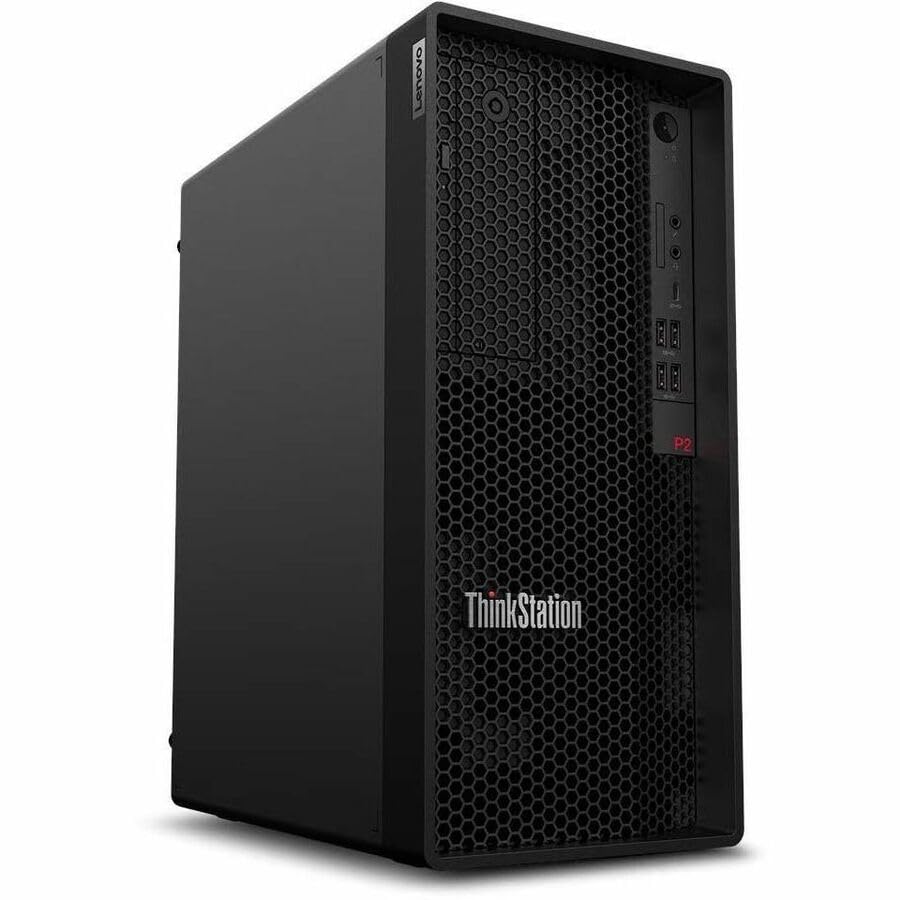
Figure 1: Lenovo ThinkStation P2 Gen 2 Workstation
2. ترتیب کول
2.1 پیک کول
په احتیاط سره د بسته بندۍ څخه ټولې برخې لرې کړئ. ډاډ ترلاسه کړئ چې لاندې توکي شتون لري:
- ThinkStation P2 Tower Gen 2 30JQ002TUS
- کیبورډ
- موږک
- د بریښنا کیبل
2.2 د پردیو سره نښلول
Connect your keyboard, mouse, and monitor to the workstation. Refer to the images below for port locations.

Figure 2: Front Panel. Features USB ports, audio jacks, and optical drive bay (if equipped).
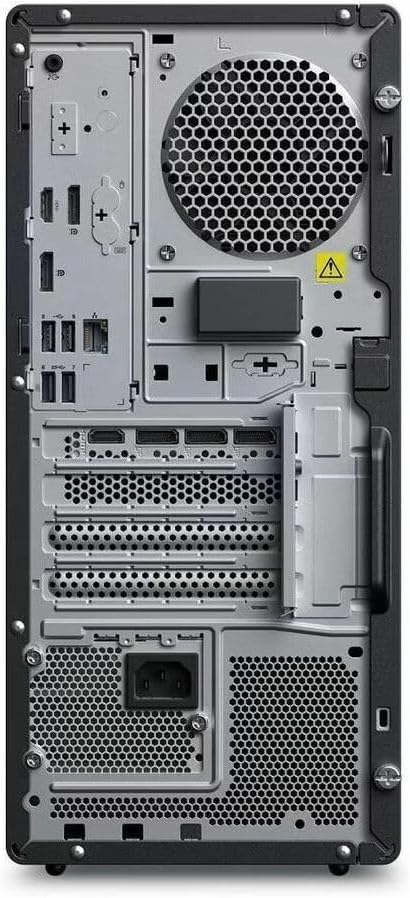
Figure 3: Rear Panel. Includes DisplayPort, HDMI, multiple USB ports (USB 2.0, USB Type C), Ethernet, and power input.
- کیبورډ او موږک: د هر شته USB پورټونو سره وصل شئ.
- څارنه: Connect your display using either the HDMI or DisplayPort outputs.
- شبکه: For wired internet, connect an Ethernet cable to the RJ-45 port. For wireless, ensure Wi-Fi antennas are properly connected (if external) or that the internal Wi-Fi is enabled.
2.3 فعالول
- Connect the power cable to the workstation's power input and then to a power outlet.
- Press the power button located on the front panel of the workstation.
2.4 Initial Operating System Setup
Upon first boot, the Windows 11 Pro operating system will guide you through the initial setup process, including language selection, network configuration, and user account creation.
۳. د کارځای چلول
3.1 د بریښنا مدیریت
- پاور آن: د بریښنا تڼۍ فشار ورکړئ.
- بندول: په وینډوز کې، د پیل> بریښنا> بندولو ته لاړ شئ.
- بیا پیل کول: په وینډوز کې، Start > Power > Restart ته لاړ شئ.
- خوب: In Windows, go to Start > Power > Sleep.
3.2 عملیاتي سیسټم
Your ThinkStation P2 Gen 2 comes pre-installed with Windows 11 Pro, offering advanced features for productivity, security, and management. Familiarize yourself with the Windows interface and its functionalities.
3.3 د فعالیت ځانګړتیاوې
The workstation is equipped with an Intel Core Ultra 5 (Tetradeca-core) processor, 16 GB of DDR5 RAM, and a 512 GB SSD. These components ensure efficient data handling, quick transfers, optimized system responsiveness, and the ability to manage multiple programs simultaneously without performance degradation.
3.4 نښلول
The workstation supports various connectivity options:
- بې سیم: Integrated Wi-Fi for high-speed internet and Bluetooth for connecting wireless peripherals.
- وایر شوی: Ethernet port for stable wired network connections.
- USB پورټونه: Multiple USB 2.0, USB 3.2 Gen 1, and USB Type-C ports for connecting external devices.
- د ویډیو پایلې: DisplayPort and HDMI for connecting multiple monitors.
4. ساتنه
4.1 پاکول
- بهر: یو نرم استعمال کړئ، دamp د بهرنۍ سطحې د پاکولو لپاره ټوکر. د سختو کیمیاوي موادو څخه ډډه وکړئ.
- وینټیلیشن: Regularly check and clean the ventilation grilles to prevent dust buildup, which can impede airflow and cause overheating. Use compressed air to gently clear dust.
4.2 د سافټویر تازه معلومات
Keep your operating system and drivers updated to ensure optimal performance and security. Windows Update will manage OS updates, and Lenovo's official support website provides the latest drivers for your hardware.
۴.۲ د هارډویر لوړول
The ThinkStation P2 Gen 2 features a modular design, allowing for straightforward upgrades. You can expand RAM up to 128 GB (DDR5) and add additional storage drives (SSD/HDD) as needed. Refer to the official Lenovo service manual for detailed instructions on component installation.
5. ستونزه حل کول
۱ برېښنا نشته
- Ensure the power cable is securely connected to both the workstation and the power outlet.
- د بل وسیلې په لګولو سره د بریښنا آوټ لیټ فعال دی تصدیق کړئ.
- د بریښنا رسولو واحد (PSU) فین د فعالیت لپاره وګورئ.
5.2 نه ښکاره کول
- Confirm the monitor is powered on and connected correctly to the workstation's video output (HDMI or DisplayPort).
- Ensure the monitor's input source is set to the correct port.
- Test with a different monitor or video cable if possible.
۶.۳ د سیسټم ورو والی
- هغه غیر ضروري غوښتنلیکونه بند کړئ چې په شاليد کې روان دي.
- د هغو پروسو لپاره چې لوړ CPU یا RAM مصرفوي، د ټاسک مینیجر (Ctrl+Shift+Esc) وګورئ.
- په SSD کې کافي خالي ځای ډاډمن کړئ.
- د مالویر لپاره د سیسټم سکین چل کړئ.
۵.۳ د اتصال مسلې
- وائرډ شبکه: د ایترنیټ کیبل اتصال او د روټر حالت وګورئ.
- وای فای: Verify Wi-Fi is enabled in Windows settings and that you are connected to the correct network. Restart your router if necessary.
- بلوتوث: Ensure Bluetooth is enabled and devices are properly paired.
6. مشخصات
| فیچر | تفصیل |
|---|---|
| برانډ | Lenovo |
| د ماډل نوم | ThinkStation P2 Gen 2 |
| د ماډل شمیره | 30JQ002TUS |
| عملیاتي سیسټم | وینډوز 11 پرو |
| د CPU ماډل | Intel Core Ultra 5 (Tetradeca-core) |
| د CPU سرعت | تر 5.5 GHz پورې |
| د RAM حافظه نصب شوه | 16 GB DDR5 |
| د RAM حافظې اعظمي اندازه | 128 جي بي |
| ذخیره کول | 512 GB SSD |
| د ګرافیک کاپروسیسر | د انټل ګرافیک (مدغم) |
| هډوتري برسیر | Bluetooth, DisplayPort, HDMI, USB, USB 2.0, USB Type C |
| ټول USB پورټونه | 9 |
| د ویډیو تولید انٹرفیس | ډیسپلی پورټ، HDMI |
| د ارتباط ټیکنالوژي | بلوتوث، ایترنیټ، USB، وای فای |
| د بریښنا مصرف | 500 Watts (PSU) |
| د توکي ابعاد (L x W x H) | 12.4 x 6.7 x 14.8 انچه |
7. د تضمین معلومات
The Lenovo ThinkStation P2 Gen 2 30JQ002TUS Workstation comes with a د 3 کلن تولید کونکي تضمین. For detailed terms and conditions, including coverage and service procedures, please refer to the official warranty documentation provided with your product or visit the Lenovo support webسایټ
8. ملاتړ
For further assistance, technical support, driver downloads, or additional documentation, please visit the official Lenovo support website. You can typically find support resources by searching for your specific model number (30JQ002TUS) on their site.
د لینوو ملاتړ Webسایټ: https://support.lenovo.com